


























Key Takeaways
- Codex Micro is a specialised AI-native hardware controller that integrates with ChatGPT Codex, enabling developers to manage multiple autonomous coding agents through programmable mechanical controls, real-time status indicators, and intelligent workflow automation.
- Its advanced hardware architecture, including Agent Keys, Command Keys, the Reasoning Dial, the Planar Joystick, and multi-layer profile management, helps reduce context switching, improve productivity, and streamline AI-assisted software engineering workflows.
- As AI-powered development continues to evolve toward multi-agent orchestration, Codex Micro demonstrates how dedicated hardware can enhance human oversight, optimise engineering efficiency, and shape the future of AI-assisted software development.
Codex Micro is a specialised hardware controller that helps developers manage AI coding agents more efficiently. It combines programmable mechanical controls with native ChatGPT Codex integration to streamline software development workflows, reduce context switching, monitor multiple AI tasks in real time, and improve productivity when building, testing, and maintaining applications.
Artificial intelligence is fundamentally transforming the way software is designed, developed, tested, and maintained. What began as simple code-completion assistants capable of suggesting individual lines of code has rapidly evolved into sophisticated AI systems that can independently analyse repositories, generate production-ready code, debug applications, write documentation, review pull requests, execute automated tests, and even perform complex multi-file refactoring tasks. This shift has ushered in the era of agentic software development, where autonomous AI coding agents work alongside developers to accelerate engineering workflows and improve productivity.
As these AI capabilities continue to mature, the role of software developers is also changing. Instead of spending the majority of their time manually writing every line of code, modern developers increasingly focus on supervising multiple AI agents, validating generated outputs, making architectural decisions, and coordinating parallel engineering tasks. This evolution has introduced new workflow challenges that traditional keyboards, mice, and software interfaces were never designed to solve. Managing several AI conversations simultaneously, monitoring long-running coding tasks, switching between integrated development environments (IDEs), terminals, documentation, version control systems, and AI applications can quickly become overwhelming, leading to increased context switching, reduced concentration, and lower overall efficiency.
Recognising these emerging challenges, OpenAI collaborated with hardware specialist Work Louder to introduce Codex Micro, a purpose-built hardware controller created specifically for AI-assisted software engineering. Rather than functioning as another mechanical keyboard or general-purpose macro pad, Codex Micro has been designed as a dedicated command interface for the ChatGPT Codex platform. It enables developers to interact with autonomous AI coding agents through programmable mechanical controls, live RGB status indicators, configurable workflow shortcuts, tactile navigation controls, and native software integration. The result is a specialised productivity device that bridges the gap between physical hardware and intelligent software, making AI-powered development more intuitive and efficient.
The launch of Codex Micro reflects a broader trend across the technology industry: the convergence of specialised hardware with artificial intelligence. Throughout the history of computing, new technological paradigms have often been accompanied by new forms of human-computer interaction. The graphical user interface popularised the computer mouse, mobile computing introduced touchscreens, and gaming drove the development of advanced controllers and programmable peripherals. Similarly, the emergence of autonomous AI agents is creating demand for hardware specifically designed to manage intelligent software workflows. Codex Micro is among the earliest examples of this new category of AI-native developer hardware.
Unlike conventional macro controllers that simply trigger keyboard shortcuts, Codex Micro integrates directly with the ChatGPT desktop application to provide contextual awareness of active AI coding sessions. Developers can assign AI agents to dedicated hardware keys, monitor their execution status through dynamic lighting, adjust reasoning effort using a physical rotary encoder, navigate workflows with an integrated joystick, and execute frequently used actions using programmable command keys. These capabilities allow developers to spend less time navigating software interfaces and more time making engineering decisions, reviewing AI-generated code, and coordinating complex development projects.
One of the most significant aspects of Codex Micro is its focus on supporting multi-agent software engineering. Modern AI coding platforms are increasingly capable of running multiple autonomous agents simultaneously, each working on different tasks such as debugging, testing, documentation generation, code review, architecture analysis, or feature implementation. While these parallel workflows dramatically increase engineering capacity, they also create new operational challenges related to visibility, prioritisation, and task coordination. Codex Micro addresses these issues by providing a physical command centre that allows developers to monitor multiple AI agents in real time without constantly switching between application windows or browser tabs.
Another distinguishing feature of Codex Micro is its sophisticated multi-layer architecture. The hardware separates AI-native controls from traditional macro functionality, enabling one dedicated layer for ChatGPT Codex while allowing additional programmable layers for integrated development environments, terminal applications, version control systems, creative software, and productivity tools. This flexibility ensures that the device remains valuable throughout the developer’s entire workflow rather than serving as a single-purpose accessory. Whether managing source code repositories, reviewing pull requests, navigating documentation, or supervising autonomous AI agents, developers can customise the hardware to support their preferred working style.
Beyond its technical capabilities, Codex Micro also represents an important strategic milestone for OpenAI’s expanding ecosystem. As artificial intelligence continues moving beyond conversational interfaces into autonomous task execution, the company is exploring new methods of interaction that extend beyond traditional software applications. Codex Micro complements this vision by demonstrating how purpose-built hardware can enhance the usability, accessibility, and efficiency of AI-powered development tools. It also illustrates the growing importance of creating tightly integrated hardware and software experiences that optimise professional workflows rather than relying solely on generic computing devices.
For software engineers, AI developers, DevOps professionals, engineering managers, and technology organisations, understanding Codex Micro is becoming increasingly relevant as AI-assisted development becomes more widespread. Organisations investing in autonomous coding agents require effective methods for managing these intelligent systems, ensuring quality control, maintaining productivity, and enabling seamless collaboration between human engineers and AI. Codex Micro provides an early example of how dedicated hardware can help address these operational requirements while reducing cognitive load and improving overall workflow efficiency.
The economic implications are equally noteworthy. As software engineering teams seek to maximise the return on their AI investments, productivity increasingly depends not only on the capabilities of large language models but also on the interfaces through which developers interact with them. Small reductions in context switching, faster access to common workflows, improved visibility into AI task progress, and more efficient decision-making can collectively produce significant gains across large engineering organisations. By bringing many of these interactions into a tactile, hardware-based interface, Codex Micro offers a practical solution aimed at enhancing both individual and team productivity.
At the same time, it is important to recognise that Codex Micro is not intended to replace traditional software development tools or human expertise. Instead, it complements existing workflows by providing developers with faster, more intuitive methods for interacting with AI coding systems. Human judgement remains essential for defining software requirements, making architectural decisions, ensuring security and compliance, validating generated outputs, and overseeing complex engineering initiatives. Codex Micro simply enhances this collaborative relationship by making interactions with autonomous AI agents more efficient, organised, and responsive.
As the software industry continues embracing AI-native development, hardware innovations like Codex Micro are likely to become increasingly influential. The transition from manually written code to AI-orchestrated engineering represents one of the most significant changes in software development in decades, and it is reshaping not only the tools developers use but also the way they work. Devices specifically designed to supervise, coordinate, and interact with autonomous AI agents may soon become as common in professional engineering environments as mechanical keyboards, multi-monitor workstations, and programmable input devices are today.
This comprehensive guide explores everything readers need to know about Codex Micro, including what it is, how it works, its hardware architecture, firmware integration, programmable controls, multi-layer workflow management, operational dynamics, AI agent interaction model, market positioning, pricing strategy, deployment considerations, and future outlook. Whether you are an experienced software engineer evaluating AI-native productivity tools, an organisation adopting autonomous software development workflows, or simply interested in the future of AI-assisted programming, this article provides an in-depth understanding of why Codex Micro represents an important step in the evolution of modern software engineering and the growing convergence of intelligent software with specialised developer hardware.
Before we venture further into this article, we would like to share who we are and what we do.
About 9cv9
9cv9 is a business tech startup based in Singapore and Asia, with a strong presence all over the world.
With over ten years of startup and business experience, and being highly involved in connecting with thousands of companies and startups, the 9cv9 team has listed some important and crucial software tools in this review.
If you like to get your company listed in our top B2B software reviews, check out our world-class 9cv9 Media and PR service and pricing plans here.
Codex Micro: What It Is and How It Works
- Introduction
- System Architecture, Firmware Integration, and Multi-Layer Management
- Operational Dynamics and Interaction Domains
- Strategic Context, Economic Analysis, and Market Positioning
- Synthesis and Operational Outlook
1. Introduction
As artificial intelligence continues to transform software engineering, developers are increasingly moving beyond traditional chat-based coding assistants toward autonomous AI agents capable of planning, writing, testing, debugging, and reviewing software with minimal human intervention. This shift has introduced a new challenge: efficiently managing multiple AI agents simultaneously without constantly switching between windows, browser tabs, and applications.
To address this emerging workflow, OpenAI collaborated with hardware manufacturer Work Louder to develop the Codex Micro, a purpose-built programmable hardware controller designed specifically for the ChatGPT Codex ecosystem. Rather than functioning as a conventional keyboard or a consumer AI assistant, the Codex Micro serves as a dedicated command interface that allows developers to interact with AI coding agents using tactile controls, programmable shortcuts, real-time visual feedback, and workflow automation.
Officially introduced as a limited-edition device in July 2026, the Codex Micro represents one of the earliest examples of hardware specifically engineered around agentic AI software development. Instead of replacing traditional keyboards and mice, it complements them by providing instant access to frequently used Codex actions while offering continuous visibility into multiple AI agents working simultaneously.
As AI-assisted software engineering continues evolving toward multi-agent development environments, the Codex Micro demonstrates how specialized hardware may become an increasingly important component of professional programming workflows.
What Is Codex Micro?
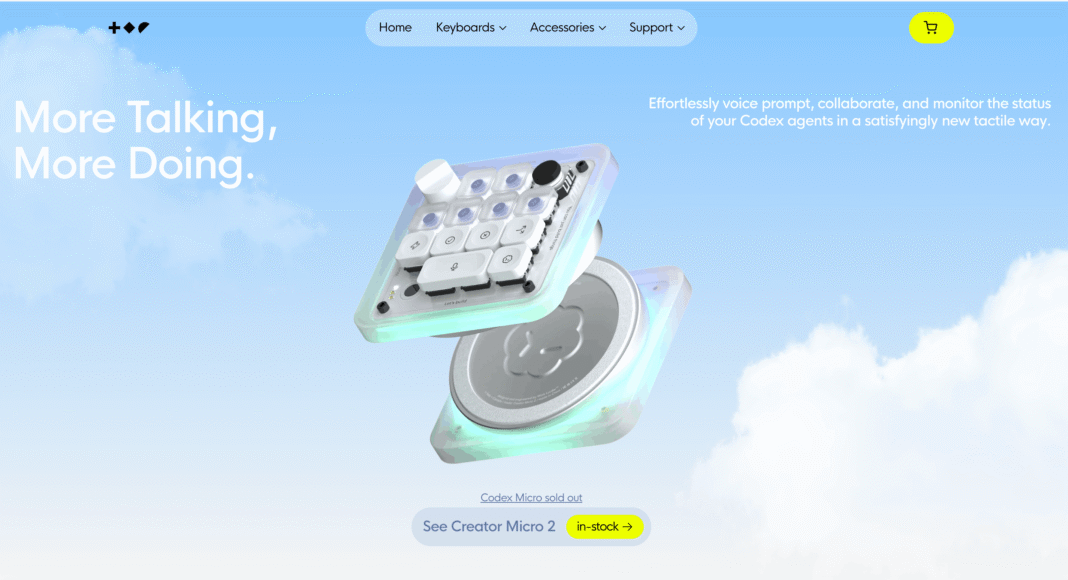
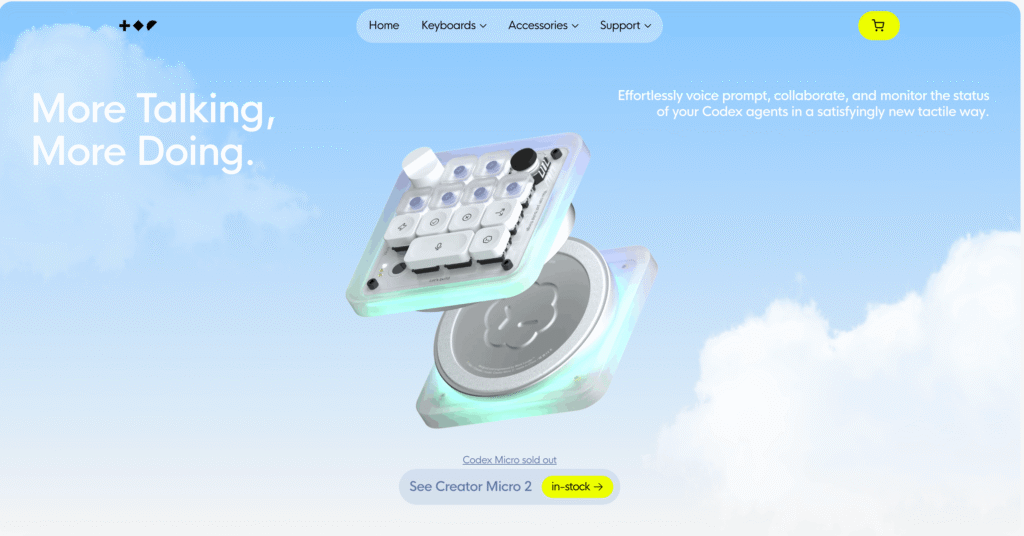
Codex Micro is a compact programmable mechanical macro controller designed to serve as a physical command centre for developers using ChatGPT Codex.
Unlike standard macro pads that simply execute keyboard shortcuts, Codex Micro integrates directly into the Codex development workflow, allowing users to launch AI-powered coding tasks, monitor multiple autonomous agents, adjust reasoning intensity, and control conversations without navigating multiple software interfaces.
The device combines physical inputs—including programmable mechanical switches, an analogue joystick, a rotary dial, and touch controls—with software integrations that communicate directly with the ChatGPT desktop application and Codex platform.
Its primary objective is reducing friction during AI-assisted programming by bringing frequently used commands into immediate physical reach.
Codex Micro at a Glance
| Category | Description |
|---|---|
| Product Type | Programmable AI developer macro controller |
| Primary Purpose | Physical control interface for ChatGPT Codex |
| Collaboration | OpenAI and Work Louder |
| Initial Launch | July 2026 |
| Hardware Classification | Mechanical macro pad |
| Primary Audience | Software developers, AI engineers, DevOps professionals |
| Main Workflow | AI-assisted software development |
| Interface Style | Hardware command centre |
| Connectivity | USB-C and Bluetooth |
| Platform Compatibility | macOS and Windows |
Why Codex Micro Was Developed
Modern software development increasingly involves multiple autonomous AI agents performing different tasks simultaneously.
Instead of asking one chatbot to write code line by line, developers can now assign different agents to review pull requests, debug applications, generate documentation, refactor code, analyse repositories, or execute testing workflows in parallel.
While this dramatically improves productivity, it also introduces several operational challenges.
Common Challenges in Multi-Agent Development
| Traditional Workflow Challenge | Impact on Productivity |
|---|---|
| Multiple browser tabs | Constant context switching |
| Numerous active AI conversations | Difficult tracking of task progress |
| Keyboard shortcut overload | Reduced workflow efficiency |
| Frequent mouse navigation | Interrupted coding flow |
| Hidden agent status | Delayed decision making |
| Multiple windows | Increased cognitive load |
Codex Micro addresses these challenges by moving many common software interactions from the screen to dedicated physical controls.
Instead of searching through menus or changing windows, developers can perform routine actions with a single press, turn, or joystick movement.
How Codex Micro Works
At its core, Codex Micro functions as a programmable hardware interface connected to the ChatGPT desktop application.
Every button, joystick movement, rotary dial adjustment, and touch input can be mapped to specific Codex actions.
Rather than typing repetitive commands, users can trigger predefined workflows almost instantly.
Typical Operational Workflow
| Step | User Action | Codex Response |
|---|---|---|
| 1 | Developer assigns work to AI agents | Multiple agents begin processing tasks |
| 2 | Agent status updates appear on hardware | RGB indicators display progress |
| 3 | User selects an agent | Active conversation changes immediately |
| 4 | Hardware shortcut pressed | Workflow launches automatically |
| 5 | AI completes task | Status lights update in real time |
| 6 | Developer reviews output | Accepts, rejects, or modifies results |
This hardware-assisted interaction significantly reduces repetitive interface navigation.
Hardware Design Philosophy
Codex Micro follows a minimalist industrial design focused on productivity rather than aesthetics alone.
The hardware is based on Work Louder’s Creator Micro platform with extensive customisation for the Codex ecosystem.
Major design goals include:
• Rapid tactile interaction
• Minimal desktop footprint
• High durability
• Continuous workflow visibility
• Programmable flexibility
• Seamless integration with AI coding workflows
Hardware Architecture Overview
| Hardware Component | Purpose |
|---|---|
| Mechanical switches | Execute mapped commands |
| Rotary encoder | Adjust reasoning level and settings |
| Analogue joystick | Navigate workflows and launch actions |
| Touch sensor | Switch control layers and functions |
| RGB lighting | Display live AI agent status |
| USB-C interface | Wired communication and charging |
| Bluetooth | Wireless operation |
Mechanical Switch System
The Codex Micro includes thirteen low-profile programmable mechanical switches engineered for frequent professional use.
Each switch can be assigned to different Codex commands depending on the developer’s preferred workflow.
Examples include:
• Start new AI task
• Accept generated code
• Reject changes
• Open terminal
• Launch debugging
• Trigger pull request review
• Push-to-talk
• Create documentation
• Run testing
• Refactor source code
Developers can remap these controls to suit their own workflows through the supported software configuration tools.
Joystick-Based Workflow Navigation
One of the device’s distinctive features is its integrated two-axis analogue joystick.
Unlike traditional directional keys, the joystick enables fast directional gestures that can initiate predefined AI workflows.
Illustrative Workflow Mapping
| Joystick Direction | Example Action |
|---|---|
| Up | Review pull request |
| Down | Debug application |
| Left | Refactor project |
| Right | Generate documentation |
| Diagonal | Launch custom workflow |
This design allows developers to initiate complex actions with simple directional movements.
Rotary Encoder and Dynamic AI Control
Another distinguishing feature is the rotary encoder.
Instead of functioning purely as a volume control, the rotary dial enables developers to adjust the reasoning level of Codex agents directly from the hardware.
Reasoning Control Matrix
| Lower Setting | Higher Setting |
|---|---|
| Faster responses | Deeper reasoning |
| Lower compute usage | Higher compute allocation |
| Simpler programming tasks | Complex engineering problems |
| Quick code edits | Architectural planning |
| Lightweight assistance | Advanced analysis |
This capability enables developers to balance response speed against analytical depth without navigating software settings.
Live RGB Agent Status System
Perhaps the most innovative aspect of Codex Micro is its live RGB feedback system.
Rather than displaying decorative lighting effects, the illuminated keys communicate the operational state of active AI agents.
Illustrative Agent Status Matrix
| RGB Status | Meaning |
|---|---|
| White | Idle |
| Blue | Processing |
| Green | Task completed |
| Red | Error encountered |
| Waiting colour | Awaiting user input |
This continuous visual feedback enables developers to understand the progress of multiple AI tasks without switching back to the desktop interface.
Customisable Keycap System
The Codex Micro includes a dedicated keycap collection designed specifically for software development.
Rather than generic keyboard legends, many keycaps represent common developer actions, AI workflows, repository operations, and coding shortcuts.
Developers can rearrange these keycaps according to personal preferences and workflow organisation.
Connectivity and Platform Support
The Codex Micro supports both wired and wireless operation.
Connectivity Overview
| Feature | Capability |
|---|---|
| USB-C | Wired operation and charging |
| Bluetooth | Wireless connectivity |
| Desktop Integration | ChatGPT desktop application |
| Supported Operating Systems | macOS and Windows |
| Configuration Software | Work Louder Input |
This flexibility enables developers to use the device in both fixed workstation environments and portable setups.
How Codex Micro Fits into AI Software Development
The Codex Micro represents more than another programmable keyboard accessory.
Instead, it reflects a broader industry transition toward hardware designed specifically for AI-native workflows.
Traditional Development Model
Developer
↓
Keyboard
↓
IDE
↓
Compiler
↓
Application
AI-Assisted Development Model
Developer
↓
Codex Micro
↓
ChatGPT Codex
↓
Multiple AI Agents
↓
Parallel Development Tasks
↓
Developer Review
This evolving workflow places AI agents between the developer and the software project, with Codex Micro acting as the physical control layer for managing those agents.
Advantages of Codex Micro
| Benefit | Explanation |
|---|---|
| Faster workflow execution | Reduces repetitive interface navigation |
| Improved multitasking | Monitor several AI agents simultaneously |
| Reduced cognitive switching | Physical controls minimise window changes |
| Higher efficiency | Frequently used actions become one-touch commands |
| Better workflow visibility | Live agent monitoring through RGB lighting |
| Greater customisation | Fully programmable shortcuts |
Potential Limitations
Despite its innovative design, Codex Micro is intended for a specialised audience.
Potential Considerations
| Consideration | Impact |
|---|---|
| Designed primarily for Codex | Limited usefulness outside supported workflows |
| Learning curve | Users must configure shortcuts effectively |
| Premium hardware pricing | May exceed the needs of casual developers |
| Workflow dependence | Greatest value comes from frequent AI-assisted development |
| Limited availability | Initially released as a limited-run product |
Who Should Consider Codex Micro?
Codex Micro is particularly well suited for professionals who interact extensively with AI coding systems.
Potential Users
| User Group | Likely Benefit |
|---|---|
| Software engineers | High |
| Full-stack developers | High |
| DevOps engineers | High |
| AI researchers | High |
| Technical architects | Moderate to High |
| Engineering managers | Moderate |
| Hobby programmers | Moderate |
| Casual users | Low |
Future Outlook
The Codex Micro illustrates an important evolution in human-computer interaction for software engineering. As AI coding assistants mature into autonomous multi-agent systems capable of handling increasingly sophisticated engineering tasks, developers will require more efficient methods of supervising, coordinating, and directing these digital collaborators.
Rather than replacing conventional keyboards or development environments, specialised devices such as the Codex Micro introduce a dedicated hardware layer optimised for AI-first workflows. Features including programmable shortcuts, real-time agent monitoring, tactile workflow controls, and dynamic reasoning adjustment suggest how future developer workstations may integrate physical interfaces with intelligent software agents.
As agentic development becomes more widely adopted, hardware designed specifically for AI orchestration may become as familiar to professional developers as mechanical keyboards, multi-monitor setups, and programmable input devices are today. The Codex Micro represents an early step in this transition, demonstrating how purpose-built hardware can streamline collaboration between human engineers and autonomous AI systems while improving visibility, responsiveness, and overall development efficiency.
2. System Architecture, Firmware Integration, and Multi-Layer Management
The Codex Micro is engineered as a dedicated hardware control surface that bridges physical interaction and AI-powered software engineering. Unlike conventional programmable macro pads that primarily emulate keyboard shortcuts, the Codex Micro combines embedded firmware, native ChatGPT Codex integration, configurable hardware profiles, and intelligent application-aware switching to create a workflow specifically optimized for AI-assisted software development.
Its architecture separates AI-native controls from traditional macro functionality, allowing developers to seamlessly transition between managing autonomous coding agents and operating conventional development tools. This layered design enables the hardware to function simultaneously as an AI command console and as a professional productivity controller for software engineering environments.
Overall System Architecture
The Codex Micro follows a hybrid hardware-software architecture in which embedded firmware communicates directly with the ChatGPT desktop application while also supporting programmable macro functionality through companion configuration software.
Unlike many programmable macro keyboards that translate button presses into standard Human Interface Device (HID) keyboard shortcuts, the Codex Micro incorporates native software awareness within the ChatGPT desktop ecosystem. This enables real-time synchronization between hardware inputs and AI agent activity, allowing the device to display live task status, manage reasoning controls, and execute agent-specific commands without relying solely on operating system keyboard emulation.
Codex Micro System Architecture Overview
| System Layer | Primary Responsibility | Key Functions |
|---|---|---|
| Hardware Layer | Physical interaction | Mechanical switches, joystick, rotary encoder, touch sensor |
| Embedded Firmware Layer | Device control | Input processing, RGB management, Bluetooth, USB communication |
| Connectivity Layer | Device communication | USB-C wired connection and Bluetooth wireless communication |
| Native Codex Integration Layer | AI workflow management | Agent control, reasoning adjustment, prompt dispatch, status synchronization |
| Macro Management Layer | Productivity automation | Keyboard shortcuts, application profiles, programmable macros |
| Operating System Layer | Device permissions | HID communication, input monitoring, device recognition |
| Developer Applications | Software workflows | IDEs, terminals, creative applications, version control tools |
Multi-Layer Control Architecture
One of the defining characteristics of the Codex Micro is its six-layer operational architecture.
Instead of treating every programmable key equally, the hardware divides its functionality into two distinct operational categories:
• AI-native controls
• Universal programmable macro controls
This separation allows AI-specific functionality to remain tightly integrated with ChatGPT Codex while preserving flexibility for other desktop applications.
Codex Micro Layer Structure
| Layer | Management Platform | Primary Purpose |
|---|---|---|
| Layer 1 | ChatGPT Desktop | Native Codex controls |
| Layer 2 | Work Louder Input | Custom application macros |
| Layer 3 | Work Louder Input | Development environment shortcuts |
| Layer 4 | Work Louder Input | Creative software controls |
| Layer 5 | Work Louder Input | Terminal and command workflows |
| Layer 6 | Work Louder Input | User-defined productivity profile |
This layered architecture enables developers to dedicate one operational environment exclusively to AI interaction while allocating the remaining layers to traditional productivity software.
Native Codex Engine (Layer 1)
Layer 1 functions as the dedicated AI interaction layer.
Rather than serving as a generic macro profile, this layer communicates directly with the ChatGPT desktop application and provides access to native Codex functionality.
Illustrative Native Functions
| Native Feature | Operational Purpose |
|---|---|
| Agent selection | Switch between active AI agents |
| Live RGB synchronization | Display real-time task progress |
| Prompt dispatch | Launch predefined AI workflows |
| Reasoning adjustment | Increase or decrease reasoning depth |
| Workflow control | Accept, reject, retry, or interrupt tasks |
| Conversation management | Navigate active AI sessions |
Because these controls operate through direct software integration rather than simple keyboard shortcuts, they can provide richer contextual interactions than traditional programmable keypads.
Universal Macro Layers
Layers 2 through 6 operate independently from the AI-specific control layer.
These programmable profiles function similarly to professional macro controllers, allowing users to create application-specific shortcuts for virtually any desktop software.
Examples include:
• Integrated Development Environments (IDEs)
• Terminal applications
• Git clients
• Design software
• Video editing platforms
• Productivity applications
• Database management tools
Each layer may contain entirely different key mappings, joystick behaviours, rotary assignments, and lighting profiles depending on the active software.
Example Layer Assignments
| Layer | Example Application |
|---|---|
| Layer 2 | Visual Studio Code |
| Layer 3 | JetBrains IDE |
| Layer 4 | Terminal and Git |
| Layer 5 | Figma or Adobe Creative Cloud |
| Layer 6 | Personal productivity shortcuts |
Firmware Integration
The Codex Micro’s embedded firmware serves as the intermediary between physical hardware components and software running on the host computer.
Its responsibilities extend far beyond scanning keyboard switches.
Firmware Responsibilities
| Firmware Module | Function |
|---|---|
| Input scanning | Detect button presses and joystick movement |
| RGB controller | Synchronize lighting states |
| Communication stack | USB-C and Bluetooth communication |
| Power management | Battery operation and sleep control |
| Layer management | Switch active profiles |
| Configuration storage | Save custom mappings |
| Device authentication | Identify hardware to supported software |
The firmware continuously processes physical input events while maintaining communication with both the operating system and the ChatGPT desktop application.
This architecture enables near real-time interaction between hardware controls and AI workflows.
Native Desktop Integration
One of the most significant architectural differences between the Codex Micro and conventional macro controllers is its native integration with the ChatGPT desktop application.
When the device is connected, the desktop application can recognise the supported hardware and expose dedicated configuration options for Codex-specific functionality. This integration allows the hardware to work directly with AI coding workflows rather than relying only on operating-system-level keyboard shortcuts.
Traditional Macro Pad vs Codex Micro
| Feature | Traditional Macro Pad | Codex Micro |
|---|---|---|
| Keyboard shortcut emulation | Yes | Yes |
| Native AI integration | No | Yes |
| Agent status feedback | No | Yes |
| AI reasoning control | No | Yes |
| Live workflow synchronization | No | Yes |
| AI conversation awareness | No | Yes |
Context-Aware Layer Switching
The Codex Micro supports intelligent profile management through application-aware context detection.
Rather than requiring developers to manually switch profiles each time they change applications, supported configuration software can automatically activate different hardware layers based on the foreground application.
Illustrative Context Switching Workflow
Developer opens IDE
↓
Development Layer activates
↓
Developer switches to terminal
↓
Terminal Layer activates
↓
Developer opens ChatGPT Codex
↓
Native Codex Layer activates
↓
Developer returns to IDE
↓
IDE Layer automatically restores
This workflow reduces interruptions while maintaining optimized controls for each software environment.
Application Detection Matrix
| Active Application | Automatically Selected Layer |
|---|---|
| ChatGPT Codex | Layer 1 |
| Visual Studio Code | Layer 2 |
| Terminal | Layer 3 |
| Git Client | Layer 4 |
| Creative Software | Layer 5 |
| User Productivity Software | Layer 6 |
Power Management Architecture
Despite functioning as an always-available productivity device, the Codex Micro incorporates intelligent power management to maximise battery life during wireless operation.
Power State Overview
| Device State | Behaviour |
|---|---|
| Active | Full lighting and input response |
| Idle | Reduced lighting activity |
| Sleep | Low-power mode |
| Wake | Restores immediately after user interaction or supported status changes |
| Charging | USB-C charging while operational |
The embedded firmware manages these transitions automatically while preserving the active configuration profile.
Connectivity Architecture
The Codex Micro supports both wired and wireless communication.
Connectivity Features
| Feature | Description |
|---|---|
| USB-C | Wired communication and charging |
| Bluetooth | Wireless operation |
| Multiple Bluetooth profiles | Support for switching between paired devices |
| Automatic reconnection | Restores previous connection when available |
| Wired priority | USB-C operation when connected |
This dual-mode architecture allows developers to transition easily between desktop workstations and portable environments.
Device Communication Flow
Hardware Input
↓
Embedded Firmware
↓
USB-C or Bluetooth Communication
↓
Operating System Driver
↓
ChatGPT Desktop Application
↓
Codex Agent Engine
↓
AI Response
↓
RGB Status Feedback
↓
Hardware Display
This bidirectional communication enables both command transmission and real-time visual feedback.
Operating System Integration
The Codex Micro interacts closely with operating system input services.
Depending on the platform, developers may need to grant permissions that allow supported software to receive global input events when running in the background. These permissions enable hardware shortcuts to function consistently while users continue working in development tools or other desktop applications.
Platform Compatibility
| Platform | Support |
|---|---|
| macOS | Supported |
| Windows | Supported |
| USB-C | Supported |
| Bluetooth | Supported |
| Native ChatGPT Desktop Integration | Supported |
Potential Software Compatibility Considerations
Because the Codex Micro operates as a sophisticated input device with both native integration and programmable macro capabilities, compatibility may depend on the broader desktop environment.
Applications that perform extensive low-level keyboard interception or device remapping could potentially influence how hardware events are processed. Examples may include advanced keyboard remapping utilities, automation software, or peripheral management platforms. Where multiple utilities attempt to intercept identical hardware events, users may occasionally need to adjust software priorities or configuration settings to achieve optimal behaviour. Community discussions have also highlighted occasional interaction issues on some Windows configurations, although these reports are anecdotal and not official product documentation.
System Architecture Summary
| Architectural Component | Primary Role |
|---|---|
| Embedded firmware | Controls hardware operation |
| Native ChatGPT integration | AI workflow management |
| Six-layer profile system | Separates AI and productivity workflows |
| Context-aware switching | Automatic profile selection |
| USB-C and Bluetooth engine | Device communication |
| RGB synchronization | Real-time AI status indication |
| Operating system integration | Input event processing |
| Macro engine | Custom productivity automation |
Conclusion
The Codex Micro represents a significant advancement beyond traditional programmable macro pads by combining embedded firmware, native ChatGPT Codex integration, and a sophisticated multi-layer control architecture into a unified developer workflow solution. Its layered design allows AI-specific functions to coexist with conventional productivity shortcuts, enabling developers to manage autonomous coding agents while maintaining seamless access to development environments, terminal applications, and creative software.
Through intelligent profile management, real-time status synchronization, programmable firmware, and flexible connectivity, the Codex Micro illustrates how specialised hardware is evolving to support the growing demands of AI-assisted software engineering. As agentic development environments become increasingly common, architectures that tightly integrate physical controls with intelligent software systems are likely to play an expanding role in improving developer productivity, reducing workflow friction, and enhancing human oversight of autonomous AI agents.
3. Operational Dynamics and Interaction Domains
The Codex Micro is designed around a simple objective: reducing the time between an autonomous AI agent completing work and a developer making the next engineering decision. Rather than relying exclusively on software menus, mouse navigation, and keyboard shortcuts, the device introduces a dedicated physical interaction layer that enables developers to supervise, control, and coordinate multiple AI coding agents with minimal interruption.
Its operational design is organised into four primary interaction domains, each serving a distinct role within the AI-assisted development workflow:
• Agent Keys
• Command Keys
• Reasoning Dial
• Planar Joystick
Together, these controls form an integrated command centre that allows developers to monitor agent activity, execute common workflows, adjust AI reasoning depth, and respond quickly to completed or interrupted tasks. This approach reflects the growing shift toward agentic software development, where human engineers increasingly supervise multiple autonomous AI agents rather than manually performing every programming task themselves.
Codex Micro Interaction Architecture
| Interaction Domain | Primary Function | Typical User Activity |
|---|---|---|
| Agent Keys | Monitor and manage AI agents | Switch between active coding agents |
| Command Keys | Execute frequent actions | Approve, reject, send, or create new tasks |
| Reasoning Dial | Adjust AI reasoning depth | Increase or decrease computational effort |
| Planar Joystick | Launch workflow shortcuts | Trigger debugging, code review, refactoring, and navigation |
Operational Workflow Philosophy
Unlike conventional macro pads that primarily automate repetitive keyboard shortcuts, the Codex Micro is built around event-driven interaction.
Rather than continuously issuing commands, developers primarily respond to changes in AI agent status.
Typical Operational Cycle
Developer assigns work
↓
AI agent begins processing
↓
Agent status updates on hardware
↓
Developer notices status change
↓
Developer reviews result
↓
Developer approves, modifies, or launches next workflow
↓
AI continues execution
This event-based workflow significantly reduces unnecessary screen monitoring while allowing developers to remain focused on engineering decisions rather than interface management.
Agent Keys
One of the most recognisable elements of the Codex Micro is the row of six illuminated Agent Keys positioned across the upper portion of the device.
Rather than representing fixed shortcuts, these keys correspond to active Codex agent sessions.
Each key continuously reflects the operational state of its assigned AI agent through dedicated RGB lighting, enabling developers to determine task progress without switching windows or inspecting multiple conversations.
Agent Key Responsibilities
| Function | Purpose |
|---|---|
| Agent selection | Switch between active AI threads |
| Live monitoring | Display current execution state |
| Rapid navigation | Instantly focus an agent |
| Workflow awareness | Highlight tasks needing attention |
| Session management | Open or organise AI conversations |
Live Agent Status Indicators
The RGB lighting system functions as an always-visible operational dashboard for AI activity.
Illustrative Agent Status Matrix
| LED Colour | Operational State | Developer Interpretation |
|---|---|---|
| White | Idle | Agent is available and awaiting work |
| Blue | Processing | Agent is actively reasoning or executing |
| Green | Completed | Work has finished and awaits review |
| Amber | User attention required | Human approval or additional information needed |
| Red | Error | Execution problem or workflow interruption |
| Off | Unassigned | No active agent associated with the key |
This immediate visual feedback allows developers supervising multiple AI agents to identify which tasks require attention without opening each conversation individually.
Agent Key Interaction Model
The Agent Keys support several interaction behaviours that streamline navigation across multiple AI conversations.
Illustrative Interaction Matrix
| User Interaction | Result |
|---|---|
| Single press | Focus selected AI agent |
| Double press | Bring the selected conversation into the foreground |
| Active key | Displays continuous activity indication |
| Unassigned key | Creates a new AI conversation |
This interaction model minimises the number of mouse movements and software window changes required during large-scale AI-assisted development.
Agent Assignment Strategies
Developers may organise Agent Keys using several assignment strategies depending on how they prefer to manage concurrent AI workloads.
Example Assignment Approaches
| Assignment Strategy | Description | Best Use Case |
|---|---|---|
| Recent activity | Most recently updated conversations | General daily coding |
| Pinned agents | Fixed long-running AI sessions | Ongoing development projects |
| Priority queue | Agents needing review first | High-volume AI supervision |
| Manual mapping | Permanent assignment to specialised workflows | Dedicated testing or documentation agents |
This flexibility enables developers to build hardware workflows that align with their preferred project organisation.
Reasoning Dial
The rotary encoder located on the upper-right corner of the Codex Micro serves as one of its most distinctive controls.
Rather than adjusting volume or scrolling through menus, the dial primarily manages AI reasoning behaviour.
Reasoning refers to the amount of computational effort an AI model devotes to analysing a problem before producing a response. Higher reasoning settings generally allocate more internal processing to complex engineering tasks, while lower settings favour speed for simpler operations.
Reasoning Dial Capabilities
| Function | Purpose |
|---|---|
| Increase reasoning | Allocate more computational effort |
| Reduce reasoning | Prioritise faster responses |
| Menu navigation | Move through supported interface controls |
| Confirm selection | Activate highlighted option |
| Settings access | Open device configuration |
Reasoning Adjustment Matrix
| Lower Reasoning | Higher Reasoning |
|---|---|
| Quick edits | Complex architecture reviews |
| Faster responses | Deeper analytical processing |
| Simple bug fixes | Multi-step refactoring |
| Small code changes | Large engineering decisions |
| Lightweight prompts | Sophisticated planning |
This dynamic control enables developers to adapt AI behaviour according to the complexity of the current task without repeatedly opening software configuration menus.
Planar Joystick
The integrated two-axis joystick provides rapid access to frequently used engineering workflows.
Rather than functioning as a gaming controller, the joystick operates as a directional workflow launcher.
Each movement can activate a predefined Codex skill or developer shortcut.
Illustrative Workflow Mapping
| Direction | Example Workflow |
|---|---|
| Up | Architecture planning or code refactoring |
| Down | Pull request review |
| Left | Debugging or navigation |
| Right | Launch custom workflow |
The joystick reduces the number of software interactions required for commonly repeated development activities.
High-Frequency Engineering Workflows
Examples of workflows commonly associated with joystick actions include:
• Code refactoring
• Pull request review
• Debugging
• Error analysis
• Repository inspection
• Documentation generation
• Architecture evaluation
• Test execution
Because these actions are programmable, developers can customise the joystick according to individual workflows.
Command Keys
The lower portion of the Codex Micro contains six programmable Command Keys.
Whereas the Agent Keys primarily manage AI conversations, the Command Keys perform direct actions within those conversations.
Typical Responsibilities
| Command Category | Purpose |
|---|---|
| Approval | Accept AI-generated work |
| Rejection | Reject proposed changes |
| Conversation management | Create new conversations |
| Prompt submission | Send completed prompts |
| Voice interaction | Activate speech input |
| User-defined macros | Launch custom shortcuts |
Factory mappings typically prioritise the actions developers perform most frequently during AI-assisted coding, while remaining fully configurable through supported software.
Illustrative Command Layout
| Key Position | Example Action |
|---|---|
| Key 1 | Fast mode |
| Key 2 | Approve |
| Key 3 | Reject |
| Key 4 | New conversation |
| Key 5 | Push-to-talk |
| Key 6 | Send prompt |
Customisation System
One of the strengths of the Codex Micro is its extensive customisation capability.
Developers can replace default actions with workflows that better suit their development environments.
Examples include:
• Git commit
• Open terminal
• Launch debugger
• Run automated testing
• Open documentation
• Execute deployment scripts
• Start code review
• Trigger repository synchronisation
The accompanying software also supports interchangeable keycaps, making it easier for users to maintain visual consistency when remapping frequently used functions.
Voice Interaction Workflow
Although the Codex Micro does not include an integrated microphone, it serves as a physical controller for voice interactions by triggering the host computer’s audio input.
Illustrative Voice Workflow
Voice button pressed
↓
Host microphone activated
↓
Developer speaks
↓
Speech captured
↓
Speech-to-text processing
↓
Transcribed prompt appears
↓
Developer reviews text
↓
Send command executed
↓
AI agent begins processing
This workflow allows developers to combine physical controls with voice input while relying on the host computer’s existing audio hardware.
Voice Interaction Stages
| Stage | Description |
|---|---|
| Recording | Audio capture begins |
| Processing | Speech converted into text |
| Review | User verifies transcription |
| Submission | Prompt sent to selected AI agent |
| Execution | AI begins reasoning and task processing |
Benefits of the Four-Domain Interaction Model
The separation of controls into specialised interaction domains improves both usability and workflow efficiency.
Interaction Domain Benefits
| Interaction Domain | Primary Productivity Benefit |
|---|---|
| Agent Keys | Continuous awareness of AI activity |
| Command Keys | Faster approval and execution |
| Reasoning Dial | Immediate adjustment of AI behaviour |
| Planar Joystick | Rapid access to complex workflows |
Overall Operational Benefits
| Benefit | Developer Impact |
|---|---|
| Reduced context switching | Less movement between windows |
| Faster supervision | Immediate awareness of AI progress |
| Improved multitasking | Easier management of multiple agents |
| Better workflow consistency | Frequently used actions remain accessible |
| Increased responsiveness | Shorter delay between task completion and review |
| Enhanced ergonomics | More tactile interaction during long development sessions |
Conclusion
The operational design of the Codex Micro reflects the changing nature of AI-assisted software engineering, where developers increasingly supervise multiple autonomous coding agents instead of interacting with a single conversational interface. By organising its controls into four specialised interaction domains—Agent Keys, Command Keys, the Reasoning Dial, and the Planar Joystick—the device provides a structured, tactile approach to managing AI workflows with greater speed and precision.
Features such as real-time RGB status indicators, programmable workflow shortcuts, adjustable reasoning controls, and dedicated command inputs reduce interface friction while improving situational awareness across concurrent AI tasks. Rather than functioning as a conventional macro pad, the Codex Micro acts as a hardware orchestration layer that complements the ChatGPT Codex platform, helping developers monitor progress, respond to AI-generated outputs, and maintain productivity in increasingly sophisticated agent-driven development environments.
4. Strategic Context, Economic Analysis, and Market Positioning
The launch of the Codex Micro represents more than the introduction of a specialised developer accessory. It signals an emerging shift in how software developers interact with increasingly autonomous artificial intelligence systems. As AI coding assistants evolve into agentic platforms capable of independently planning, writing, testing, debugging, and reviewing software, new forms of human-computer interaction are becoming necessary to manage these more sophisticated workflows.
Rather than positioning the Codex Micro as a mainstream consumer electronic device, OpenAI and Work Louder introduced it as a professional productivity tool designed specifically for developers using ChatGPT Codex. Its purpose is not to replace traditional programming tools, but to reduce workflow friction by providing physical controls for monitoring and coordinating multiple AI coding agents simultaneously.
The Broader Industry Context
The Codex Micro arrives during a period of rapid transformation in AI-assisted software engineering.
Early AI coding assistants primarily functioned as autocomplete tools that generated individual code snippets in response to developer prompts. Modern AI coding platforms increasingly operate as autonomous agents capable of handling multi-step engineering tasks with limited human intervention.
This evolution changes the developer’s role from manually producing every line of code to supervising, validating, and coordinating multiple AI-generated workflows.
Evolution of AI Software Development
| Development Era | Primary AI Capability | Developer Role |
|---|---|---|
| Traditional Programming | No AI assistance | Manual software development |
| Code Completion Era | Inline code suggestions | Primary code author with AI assistance |
| Conversational AI Era | Prompt-based coding assistance | Collaborative programmer |
| Agentic AI Era | Autonomous software engineering agents | Supervisor and decision-maker |
| Multi-Agent Development | Parallel autonomous engineering workflows | AI workflow orchestrator |
This transition creates new workflow requirements that traditional keyboards, mice, and graphical interfaces were not originally designed to support.
Market Positioning
Rather than competing with mainstream consumer keyboards or gaming peripherals, the Codex Micro occupies a niche segment within professional developer hardware.
Its value proposition is centred on AI-native workflow management instead of conventional productivity enhancements.
Codex Micro Market Position
| Market Category | Positioning |
|---|---|
| Consumer Keyboard | No |
| Gaming Peripheral | No |
| Standard Macro Pad | Partially |
| Professional Developer Hardware | Yes |
| AI Workflow Controller | Yes |
| Agent Management Console | Yes |
This positioning distinguishes the Codex Micro from general-purpose programmable devices by focusing on direct integration with AI-assisted development workflows rather than universal desktop automation.
Pricing Strategy
The Codex Micro launched with a suggested retail price of US$230.
Although its hardware platform is derived from Work Louder’s Creator Micro 2, the Codex edition incorporates custom industrial design elements, dedicated firmware integration, AI-specific controls, specialised keycaps, and native ChatGPT Codex functionality.
Pricing Comparison
| Product | Retail Price (USD) | Primary Integration |
|---|---|---|
| Work Louder Creator Micro 2 | $174 | General macro programming |
| Codex Micro | $230 | Native ChatGPT Codex integration |
| Price Difference | $56 | AI workflow integration and customisation |
The price difference reflects not only hardware customisation but also the software ecosystem and specialised workflow integration developed specifically for Codex users.
Value Components Behind the Premium
The additional cost primarily reflects several integrated features beyond the base hardware platform.
Illustrative Value Breakdown
| Added Component | Productivity Benefit |
|---|---|
| Native ChatGPT integration | Immediate AI workflow access |
| AI-aware firmware | Direct communication with Codex |
| Custom keycap collection | Visual workflow identification |
| Agent status RGB system | Real-time monitoring |
| Reasoning dial integration | Hardware control of AI behaviour |
| AI-specific software support | Simplified configuration |
Unlike generic macro pads that rely on manually configured shortcuts, the Codex Micro is designed to work as an integrated component of the Codex ecosystem.
Economic Value Analysis
The economic justification for the Codex Micro depends largely on the developer’s workflow.
For occasional users of AI coding assistants, many of its capabilities can be approximated using conventional programmable macro pads and software automation tools.
However, developers who supervise multiple AI agents throughout the working day may derive value from reduced interface friction, faster workflow transitions, and continuous task visibility.
Illustrative Cost-Benefit Matrix
| Developer Profile | Potential Value |
|---|---|
| Casual programmer | Limited |
| Student developer | Moderate |
| Professional software engineer | High |
| AI engineer | High |
| DevOps specialist | High |
| Engineering manager | Moderate to High |
| Enterprise development team | High |
The return on investment is therefore closely linked to workflow intensity rather than the hardware specifications alone.
Comparison with General-Purpose Macro Controllers
General-purpose programmable controllers already provide keyboard shortcuts, application launching, and workflow automation.
The Codex Micro differentiates itself through AI-native integration.
Feature Comparison
| Capability | Standard Macro Pad | Codex Micro |
|---|---|---|
| Keyboard shortcuts | Yes | Yes |
| Application launching | Yes | Yes |
| Custom macros | Yes | Yes |
| Native Codex integration | No | Yes |
| Live AI agent monitoring | No | Yes |
| Hardware reasoning control | No | Yes |
| AI workflow awareness | No | Yes |
| Real-time agent switching | Limited | Yes |
For users deeply invested in ChatGPT Codex, these software-level integrations represent the primary differentiator rather than the underlying hardware itself.
Strategic Importance for OpenAI
From a strategic perspective, the Codex Micro serves several purposes beyond direct hardware sales.
Strategic Objectives
| Objective | Business Significance |
|---|---|
| Strengthen Codex ecosystem | Encourage deeper platform adoption |
| Improve developer productivity | Increase daily engagement |
| Explore AI-native hardware | Test specialised interaction models |
| Expand ecosystem | Complement software offerings |
| Validate workflow concepts | Gather feedback on physical AI controls |
The device functions as a focused ecosystem product that reinforces OpenAI’s broader investment in AI-assisted software development rather than attempting to compete directly in the mass-market hardware sector.
Relationship to OpenAI’s Broader Hardware Strategy
The Codex Micro is separate from OpenAI’s larger consumer hardware initiatives.
Industry reports indicate that OpenAI continues to pursue broader AI hardware ambitions following its acquisition of io, the hardware startup co-founded by Jony Ive. Those efforts target consumer-oriented AI devices, whereas the Codex Micro was developed independently with Work Louder as a specialised accessory for professional developers. Reports have also noted legal disputes surrounding the separate consumer hardware programme, but these issues are distinct from the Codex Micro collaboration.
Hardware Strategy Comparison
| Initiative | Primary Audience | Strategic Goal |
|---|---|---|
| Codex Micro | Software developers | AI workflow optimisation |
| Consumer AI hardware programme | General consumers | Everyday AI interaction |
| ChatGPT desktop platform | Knowledge workers | Software ecosystem expansion |
| Codex platform | Professional developers | Agentic software engineering |
This distinction demonstrates that the Codex Micro is intended as a specialised productivity device rather than a prototype for future consumer products.
Human-Computer Interaction Perspective
Perhaps the most significant aspect of the Codex Micro is its focus on human-computer interaction.
As AI systems become increasingly autonomous, the primary challenge shifts from generating code to effectively supervising multiple independent software agents.
Traditional Interaction Model
Developer
↓
Keyboard and Mouse
↓
IDE
↓
Application
Agentic Interaction Model
Developer
↓
Codex Micro
↓
ChatGPT Codex
↓
Multiple AI Agents
↓
Parallel Engineering Tasks
↓
Developer Review
This architectural change places greater emphasis on oversight, prioritisation, and decision-making than on manual code entry.
Addressing Cognitive Challenges
The Codex Micro is designed to reduce several forms of cognitive overhead associated with supervising multiple AI agents.
Workflow Challenge Matrix
| Challenge | Traditional Workflow | Codex Micro Approach |
|---|---|---|
| Context switching | Frequent window changes | Physical agent selection |
| Task monitoring | Continuous visual scanning | Peripheral RGB indicators |
| Workflow navigation | Mouse and keyboard shortcuts | Dedicated tactile controls |
| Reasoning adjustment | Software menus | Physical rotary dial |
| Agent management | Multiple conversations | Hardware-based switching |
By moving frequently used controls into a dedicated hardware interface, the device aims to reduce interruptions during complex software engineering tasks.
Competitive Landscape
Although the Codex Micro occupies a relatively unique niche, it competes indirectly with several categories of productivity hardware.
Competitive Positioning
| Product Category | Strength | Codex Micro Advantage |
|---|---|---|
| Generic macro pads | Lower cost | Native AI integration |
| Stream controllers | Extensive automation | AI workflow awareness |
| Mechanical keyboards | Typing performance | Dedicated AI controls |
| DIY programmable controllers | High flexibility | Turnkey Codex integration |
Many developers can replicate portions of the functionality using programmable hardware and custom automation software. However, the Codex Micro reduces configuration complexity by providing a purpose-built solution tightly integrated with the Codex ecosystem.
Potential Limitations
As with any specialised hardware, the Codex Micro is best suited to a specific category of users.
Potential Considerations
| Consideration | Implication |
|---|---|
| Premium pricing | Greater value for frequent Codex users |
| Ecosystem dependence | Best experience within the ChatGPT Codex platform |
| Niche audience | Limited appeal outside professional software development |
| Alternative solutions | Generic macro pads may satisfy simpler requirements |
| Limited production | Availability may be constrained |
These considerations suggest that purchasing decisions should be based primarily on workflow needs rather than hardware specifications alone.
Future Market Outlook
The Codex Micro may represent the beginning of a broader category of AI-native professional hardware.
As autonomous AI systems continue to expand into software engineering, design, research, and enterprise operations, physical interfaces dedicated to AI orchestration could become increasingly common.
Potential Industry Evolution
| Current State | Future Direction |
|---|---|
| Software-only AI interaction | Hybrid hardware and software workflows |
| Single AI assistant | Multi-agent orchestration |
| Keyboard and mouse control | Dedicated AI command surfaces |
| Manual workflow supervision | Hardware-assisted agent management |
| Traditional desktop interfaces | AI-native productivity environments |
Whether the Codex Micro itself becomes a mainstream developer tool remains uncertain. However, its introduction illustrates a growing recognition that managing fleets of autonomous AI agents may require new forms of interaction beyond traditional desktop computing. By combining specialised hardware with native software integration, OpenAI and Work Louder have introduced an early example of how professional developer workflows could evolve as AI agents become an increasingly central part of modern software engineering.
5. Synthesis and Operational Outlook
The Codex Micro represents an important milestone in the evolution of AI-assisted software engineering. Rather than introducing another general-purpose programmable keypad, OpenAI and Work Louder have developed a specialised hardware interface designed specifically for managing autonomous AI coding agents within the ChatGPT Codex ecosystem.
Its design philosophy reflects a broader transformation in software development, where developers are increasingly shifting from writing every line of code manually to orchestrating multiple AI agents that can independently analyse repositories, generate code, review pull requests, debug applications, produce documentation, and perform other long-running engineering tasks. In this new environment, productivity depends not only on the intelligence of AI models but also on how efficiently humans can supervise, coordinate, and interact with them.
The Codex Micro addresses this challenge by combining programmable mechanical hardware with native software integration, enabling developers to manage AI workflows through tactile controls, real-time status indicators, and dedicated interaction mechanisms that minimise workflow interruptions.
Codex Micro at a Strategic Glance
| Category | Summary |
|---|---|
| Product Type | AI-native programmable hardware controller |
| Primary Purpose | Physical management of autonomous AI coding agents |
| Core Audience | Professional software developers and engineering teams |
| Integration | Native ChatGPT Codex desktop application |
| Workflow Focus | Multi-agent orchestration |
| Interaction Style | Physical controls combined with software intelligence |
| Market Position | Professional AI development accessory |
The Evolution of Developer Workflows
The software development landscape is evolving rapidly.
Historically, programming workflows centred around keyboards, integrated development environments (IDEs), and manual coding. AI initially supplemented this process by providing inline code completion and conversational assistance.
Today, modern AI systems increasingly operate as autonomous agents capable of independently executing substantial engineering tasks.
Developer Workflow Evolution
| Development Phase | Primary Human Role | AI Capability |
|---|---|---|
| Manual programming | Code author | None |
| AI-assisted coding | Collaborative programmer | Code completion |
| Conversational AI | Prompt engineer | Interactive coding assistance |
| Agentic development | Workflow supervisor | Autonomous engineering tasks |
| Multi-agent orchestration | AI operations manager | Parallel autonomous software development |
This transition fundamentally changes how developers allocate their attention. Rather than continuously writing code, engineers increasingly focus on assigning work, validating outputs, resolving exceptions, and coordinating multiple concurrent AI processes.
Operational Value Proposition
The Codex Micro is designed to reduce friction throughout this supervisory workflow.
Instead of repeatedly navigating software interfaces, developers gain immediate access to AI workflows through dedicated hardware controls.
Core Productivity Objectives
| Objective | Operational Benefit |
|---|---|
| Reduce context switching | Fewer window and tab changes |
| Improve workflow visibility | Continuous AI status monitoring |
| Accelerate approvals | One-touch task management |
| Simplify reasoning adjustment | Physical control of AI compute depth |
| Streamline navigation | Faster movement between AI agents |
| Enhance ergonomics | Reduced dependence on mouse interaction |
These objectives support a more fluid relationship between developers and autonomous AI agents.
Workflow Alignment
The Codex Micro delivers its greatest value in environments where developers regularly coordinate multiple AI agents working simultaneously.
Teams that primarily use AI for occasional code suggestions may experience fewer productivity gains than organisations that integrate Codex deeply into their engineering workflows.
Expected Value by Workflow Type
| Development Workflow | Expected Benefit |
|---|---|
| Single AI conversation | Moderate |
| Multiple parallel AI agents | High |
| Large software repositories | High |
| Continuous code review | High |
| Automated testing pipelines | High |
| Enterprise engineering teams | High |
As agent usage increases, the hardware’s dedicated controls become increasingly valuable by reducing the overhead associated with supervising numerous concurrent AI tasks.
Deployment Considerations
Before integrating the Codex Micro into production development environments, organisations should ensure that their desktop configuration supports its intended operation.
Illustrative Deployment Checklist
| Deployment Area | Recommendation |
|---|---|
| Desktop application | Install the latest supported ChatGPT desktop application |
| Operating system support | Verify compatibility with supported macOS or Windows versions |
| Input permissions | Enable required accessibility or input monitoring permissions where applicable |
| USB or Bluetooth | Confirm stable device connectivity |
| Firmware | Maintain current firmware where updates are available |
| User configuration | Customise hardware mappings for team workflows |
Proper configuration ensures that hardware interactions function consistently across development environments.
Multi-Application Flexibility
Although primarily designed for ChatGPT Codex, the Codex Micro also functions as a versatile programmable controller for broader software engineering workflows.
Its multiple programmable layers enable developers to extend functionality across numerous professional applications.
Illustrative Multi-Application Usage
| Software Category | Example Workflows |
|---|---|
| Integrated Development Environments | Build, run, debug, refactor |
| Terminal applications | Execute scripts and commands |
| Version control tools | Repository management |
| Documentation platforms | Content creation and review |
| Design software | Shortcut automation |
| Productivity applications | Workflow customisation |
This flexibility allows developers to maintain a consistent physical workflow across their broader development ecosystem rather than limiting usage exclusively to AI interactions.
Operational Readiness Matrix
| Deployment Factor | Importance | Expected Outcome |
|---|---|---|
| Native Codex integration | High | Seamless AI workflow management |
| Custom layer configuration | High | Efficient application switching |
| Team workflow standardisation | Medium | Consistent productivity gains |
| User training | Medium | Faster adoption |
| Hardware customisation | Medium | Improved ergonomics |
| Long-term workflow optimisation | High | Greater operational efficiency |
Human-Centred AI Interaction
One of the most significant aspects of the Codex Micro is its emphasis on human-centred AI interaction.
Rather than attempting to automate every aspect of software engineering, the device recognises that developers remain responsible for judgement, validation, architectural decisions, security reviews, and final approvals.
Accordingly, the hardware is designed to support decision-making rather than replace it.
Human and AI Responsibilities
| Human Responsibility | AI Responsibility |
|---|---|
| Define engineering objectives | Execute delegated tasks |
| Review generated output | Generate code |
| Approve changes | Analyse repositories |
| Resolve architectural decisions | Perform testing |
| Ensure security and compliance | Produce documentation |
| Coordinate multiple workflows | Execute repetitive engineering operations |
This collaborative model positions AI as an increasingly capable engineering partner while preserving human oversight over strategic and high-impact decisions.
Market Outlook
The Codex Micro represents an early example of a new category of professional hardware built specifically for AI-native workflows.
As agentic AI systems continue to mature, future developer workstations may increasingly incorporate dedicated hardware designed for supervising, coordinating, and interacting with autonomous software agents.
Potential Industry Evolution
| Current Environment | Emerging Direction |
|---|---|
| Keyboard and mouse interaction | Dedicated AI command interfaces |
| Software-only AI management | Hybrid hardware and software ecosystems |
| Manual workflow supervision | Hardware-assisted orchestration |
| Single-agent interaction | Multi-agent management |
| Traditional developer tools | AI-native engineering platforms |
This evolution mirrors earlier transitions in software development, where specialised hardware such as programmable keyboards, multi-monitor workstations, and stream controllers became standard productivity tools for specific professional workflows.
Strategic Implications for Engineering Teams
Engineering organisations evaluating the Codex Micro should view it less as an input peripheral and more as an operational interface for AI-driven software development.
Strategic Assessment Matrix
| Evaluation Area | Key Consideration |
|---|---|
| AI adoption maturity | Higher maturity increases potential value |
| Multi-agent workflows | Greater concurrency strengthens return on investment |
| Developer productivity | Reduced workflow interruptions |
| Team scalability | Improved coordination across complex engineering tasks |
| AI governance | Better visibility into autonomous agent activity |
| Future readiness | Alignment with evolving AI-assisted development practices |
Organisations already incorporating autonomous AI agents into daily engineering operations are likely to realise the greatest operational benefits from specialised hardware designed for AI orchestration.
Conclusion
The Codex Micro illustrates how software engineering is entering a new phase in which physical hardware is becoming an active component of AI-assisted development workflows. By combining programmable mechanical controls, native ChatGPT Codex integration, real-time agent monitoring, and flexible multi-layer functionality, the device provides a dedicated interface for supervising increasingly autonomous software engineering tasks.
Its greatest value lies not in replacing traditional programming tools but in reducing the cognitive overhead associated with managing multiple AI agents simultaneously. Features such as tactile workflow controls, live operational feedback, programmable interaction layers, and streamlined navigation enable developers to spend less time navigating interfaces and more time making engineering decisions.
As AI systems continue to evolve from conversational assistants into long-running autonomous collaborators, hardware designed specifically for agent orchestration is likely to become an increasingly important part of professional development environments. The Codex Micro offers an early demonstration of this emerging paradigm, highlighting how tightly integrated hardware and software ecosystems can improve productivity, reduce context switching, and strengthen human oversight in the era of agentic software development.
Conclusion
The introduction of the Codex Micro marks an important development in the rapidly evolving landscape of AI-assisted software engineering. As artificial intelligence continues to reshape how developers design, build, test, debug, and maintain applications, the tools used to interact with these increasingly autonomous systems must also evolve. Rather than functioning as another programmable macro pad or productivity accessory, the Codex Micro has been purpose-built to address the unique challenges of managing AI coding agents within the ChatGPT Codex ecosystem. Its combination of mechanical hardware, native software integration, programmable controls, and real-time visual feedback demonstrates how physical interfaces can complement intelligent software to create more efficient, intuitive, and productive development environments.
Understanding what the Codex Micro is and how it works requires looking beyond its compact form factor. At its core, the device is designed to reduce friction between developers and autonomous AI workflows. Instead of constantly switching between application windows, browser tabs, terminal sessions, and multiple AI conversations, developers can monitor agent activity, launch workflows, adjust reasoning levels, approve generated outputs, and navigate between coding sessions using dedicated tactile controls. This approach shifts much of the interaction away from repetitive software navigation and toward direct, physical engagement with AI-powered development tools.
One of the defining strengths of the Codex Micro lies in its seamless integration with the ChatGPT desktop application. Unlike traditional macro controllers that rely solely on operating system shortcuts or third-party scripting software, the Codex Micro is aware of the AI workflows occurring within Codex itself. This native integration enables features such as live agent status indicators, hardware-based reasoning controls, intelligent workflow switching, and immediate interaction with active AI coding sessions. These capabilities illustrate a growing trend in professional software development, where hardware and software are designed together as a unified productivity ecosystem rather than as independent components.
The device also highlights the increasing importance of multi-agent software engineering. Modern AI models are no longer limited to generating individual code snippets or answering programming questions. They are capable of independently reviewing repositories, analysing architecture, generating documentation, running automated tests, debugging applications, reviewing pull requests, and performing complex refactoring tasks. As organisations adopt these agentic workflows, developers are transitioning from acting solely as programmers to becoming supervisors, coordinators, and decision-makers who oversee multiple autonomous processes simultaneously. The Codex Micro reflects this operational shift by providing a physical command centre optimised for managing concurrent AI activities.
Another significant advantage of the Codex Micro is its ability to reduce cognitive load during development. Context switching has long been recognised as one of the biggest productivity challenges in software engineering. Constantly moving between coding environments, communication platforms, documentation, AI conversations, and development tools can interrupt concentration and slow decision-making. Through features such as programmable Agent Keys, colour-coded RGB status indicators, dedicated Command Keys, a configurable Planar Joystick, and the Reasoning Dial, the Codex Micro enables developers to remain focused on engineering decisions while receiving continuous visual and tactile feedback about AI activity. This human-centred design philosophy emphasises efficiency without sacrificing oversight or control.
The multi-layer architecture further expands the device’s usefulness beyond ChatGPT Codex alone. While Layer 1 provides dedicated AI functionality through native integration, additional programmable layers allow developers to customise the hardware for integrated development environments, terminals, version control systems, design software, and countless other professional applications. This flexibility enables the Codex Micro to function as both an AI orchestration interface and a powerful productivity controller across diverse software engineering workflows. As teams increasingly rely on complex toolchains, this adaptability enhances the long-term value of the hardware.
From a strategic perspective, the Codex Micro also represents an early example of a broader movement toward AI-native hardware. Throughout computing history, new paradigms have often required new forms of interaction. Graphical operating systems introduced the mouse, mobile computing popularised touchscreens, and gaming advanced specialised controllers. Similarly, the rise of autonomous AI agents is creating demand for physical interfaces specifically designed to supervise, coordinate, and interact with intelligent software. The Codex Micro demonstrates that future developer workstations may incorporate dedicated AI control surfaces alongside traditional keyboards, mice, and monitors as standard components of professional programming environments.
Its market positioning reflects this specialised purpose. Rather than targeting casual users or general consumers, the Codex Micro has been developed for professional software engineers, AI developers, DevOps specialists, engineering managers, and organisations that regularly utilise advanced AI-assisted development workflows. Teams managing multiple AI agents, large software repositories, automated testing pipelines, and continuous integration environments are likely to derive the greatest benefit from its capabilities. For these users, the value extends beyond hardware specifications to improvements in workflow efficiency, decision-making speed, and overall productivity.
However, as with any specialised productivity tool, the Codex Micro is not intended to replace fundamental programming knowledge or software engineering expertise. AI agents remain tools that require human guidance, architectural judgement, security oversight, quality assurance, and business understanding. Developers continue to play the critical role of defining objectives, validating outputs, reviewing generated code, ensuring compliance, and making final engineering decisions. The Codex Micro enhances this collaborative relationship by making interactions with AI systems faster, more organised, and more intuitive, rather than attempting to automate the human element entirely.
Looking ahead, the principles demonstrated by the Codex Micro may influence the next generation of professional development hardware. As AI models become more capable of independently executing sophisticated engineering tasks, physical interfaces that provide real-time status monitoring, workflow orchestration, intelligent task management, and low-latency interaction may become increasingly common across software development teams. Future devices may integrate even deeper with AI ecosystems, offering richer contextual awareness, expanded automation capabilities, enhanced collaboration features, and more sophisticated methods for managing large numbers of autonomous agents.
For businesses investing in AI-powered software development, the emergence of specialised hardware such as the Codex Micro also signals a broader shift in how engineering teams may operate over the coming years. Productivity gains will no longer depend solely on faster processors, larger monitors, or improved software tools. Instead, competitive advantages may increasingly come from how effectively organisations integrate intelligent software, collaborative AI agents, and human expertise into unified development workflows. Hardware that facilitates this collaboration will likely become an important component of future engineering infrastructure.
Ultimately, the Codex Micro is more than a programmable keypad. It represents a practical exploration of how physical hardware can evolve alongside artificial intelligence to improve the way developers work. By combining mechanical precision, native software integration, intelligent workflow management, and real-time interaction with autonomous AI agents, it offers a glimpse into the future of software engineering where human creativity and machine intelligence operate in closer partnership than ever before.
As AI-assisted development continues to mature, understanding technologies like the Codex Micro becomes increasingly valuable for developers, engineering leaders, and technology organisations seeking to remain competitive in a rapidly changing industry. Whether viewed as an innovative productivity device, a specialised AI workflow controller, or an early example of AI-native hardware, the Codex Micro highlights an important direction for the future of software engineering—one where intelligent software, dedicated hardware, and human expertise combine to deliver faster development cycles, improved collaboration, and more efficient engineering outcomes.
If you find this article useful, why not share it with your hiring manager and C-level suite friends and also leave a nice comment below?
We, at the 9cv9 Research Team, strive to bring the latest and most meaningful data, guides, and statistics to your doorstep.
To get access to top-quality guides, click over to 9cv9 Blog.
To hire top talents using our modern AI-powered recruitment agency, find out more at 9cv9 Modern AI-Powered Recruitment Agency.
People Also Ask
What is Codex Micro?
Codex Micro is a specialised programmable hardware controller designed for ChatGPT Codex. It helps developers manage AI coding agents using physical controls, real-time status indicators, and workflow shortcuts to improve software development productivity.
Who created Codex Micro?
Codex Micro was developed through a collaboration between OpenAI and Work Louder. It combines Work Louder’s hardware expertise with native integration into the ChatGPT Codex platform for AI-assisted software development.
How does Codex Micro work?
Codex Micro connects to a computer via USB-C or Bluetooth and communicates with the ChatGPT desktop application. Its programmable controls allow users to manage AI agents, launch workflows, monitor task progress, and adjust reasoning settings.
What is the primary purpose of Codex Micro?
Its primary purpose is to help developers supervise multiple AI coding agents efficiently, reduce context switching, and streamline complex software engineering workflows using dedicated hardware controls.
Is Codex Micro a keyboard?
No. Codex Micro is not a full keyboard. It is a compact programmable macro controller designed specifically for managing AI-powered software development workflows alongside a traditional keyboard and mouse.
Can Codex Micro replace a standard keyboard?
No. It is designed to complement rather than replace a keyboard by providing quick access to AI workflows, shortcuts, and agent management features during software development.
What operating systems support Codex Micro?
Codex Micro supports both macOS and Windows. Compatibility depends on using supported desktop software and configuring any required system permissions.
Does Codex Micro work wirelessly?
Yes. Codex Micro supports both USB-C wired connectivity and Bluetooth Low Energy, allowing developers to use it in desktop or portable workstation environments.
What are Agent Keys on Codex Micro?
Agent Keys are programmable buttons that represent active AI coding agents. They display live status information using RGB lighting and allow developers to switch between multiple AI conversations quickly.
What do the RGB status lights mean?
The RGB lights indicate AI agent activity such as idle, processing, completed tasks, required user input, or execution errors, allowing developers to monitor multiple agents at a glance.
What is the Reasoning Dial?
The Reasoning Dial is a rotary encoder that allows developers to adjust AI reasoning effort or navigate supported interface controls, depending on the selected operating mode.
What is the Planar Joystick used for?
The Planar Joystick provides quick access to common development workflows such as debugging, code review, navigation, refactoring, or launching custom programmable actions.
What are Command Keys?
Command Keys execute frequently used actions such as approving AI responses, rejecting suggestions, sending prompts, activating voice input, or launching customised developer shortcuts.
Does Codex Micro support programmable shortcuts?
Yes. Developers can customise buttons, joystick movements, rotary actions, and multiple hardware layers to match their preferred development workflow.
How many programmable layers does Codex Micro have?
Codex Micro supports six programmable layers. One layer is dedicated to ChatGPT Codex integration, while the remaining layers can be customised for other software applications.
Can Codex Micro be used with other applications?
Yes. Besides ChatGPT Codex, it can be configured for IDEs, terminal applications, design software, version control tools, and other productivity applications through supported configuration software.
Does Codex Micro support multiple AI agents?
Yes. It is specifically designed to help developers manage multiple AI coding agents simultaneously, making it suitable for modern multi-agent software development workflows.
What makes Codex Micro different from a regular macro pad?
Unlike traditional macro pads, Codex Micro includes native ChatGPT Codex integration, AI-aware controls, live agent status monitoring, and hardware-based workflow management for autonomous coding agents.
Is Codex Micro suitable for beginner programmers?
While beginners can use it, Codex Micro offers the greatest value to experienced developers and engineering teams who regularly work with AI-assisted coding workflows.
Can engineering teams benefit from Codex Micro?
Yes. Teams managing large software projects and multiple AI coding agents can benefit from faster workflow coordination, improved visibility, and reduced context switching.
Does Codex Micro include voice control?
It supports voice workflow control by activating the host computer’s microphone. It does not contain a built-in microphone but can trigger speech-to-text workflows.
Is Codex Micro portable?
Yes. Its compact design, lightweight construction, and Bluetooth connectivity make it suitable for portable development setups as well as permanent desktop workstations.
How does Codex Micro improve developer productivity?
It reduces repetitive software navigation, provides instant access to AI workflows, improves task visibility, and allows developers to manage multiple coding agents more efficiently.
Does Codex Micro require the ChatGPT desktop application?
Many of its AI-native features depend on integration with the ChatGPT desktop application, while programmable macro functionality can also be used with supported configuration software.
Who should buy Codex Micro?
It is best suited for software developers, AI engineers, DevOps professionals, engineering managers, and technical teams that frequently use ChatGPT Codex for AI-assisted development.
Can Codex Micro be customised?
Yes. Users can remap controls, configure multiple layers, assign macros, customise lighting behaviour, and replace keycaps to match their preferred workflow.
What are the advantages of using Codex Micro?
Its key advantages include faster workflow navigation, real-time AI monitoring, reduced context switching, programmable controls, native AI integration, and improved developer efficiency.
Are there any limitations to Codex Micro?
Codex Micro is primarily designed for developers using ChatGPT Codex. Casual users or those who rarely use AI coding assistants may not benefit as much from its specialised features.
How does Codex Micro fit into the future of AI development?
It represents an early generation of AI-native hardware designed for supervising autonomous coding agents, demonstrating how physical interfaces may evolve alongside AI-powered software engineering.
Is Codex Micro worth buying?
For developers who regularly manage multiple AI coding agents, Codex Micro can provide meaningful productivity improvements. Its value depends on how extensively AI-assisted software development is integrated into daily workflows.
Sources
WoLoveAI EAIDaily MLQ.ai Reddit Roo OpenAI BigGo Nghiện Nhìn Việt Nam Work Louder ChatGPT Learn hi-Tech.ua Techpresso Tinhte.vn