





























Key Takeaways
- The top document version control software in 2026 integrates AI, automation, and cloud collaboration to improve document governance, workflow efficiency, and enterprise productivity.
- Leading platforms such as SharePoint, Google Workspace, Box, and M-Files provide advanced features like predictive document management, metadata-driven organization, and secure version tracking.
- Choosing the right document version control system requires evaluating AI capabilities, integration ecosystems, security frameworks, and scalability for modern digital workplaces.
In the digital economy of 2026, organizations generate, edit, share, and archive an unprecedented volume of documents every day. From contracts and policy manuals to engineering blueprints, financial reports, and regulatory filings, documents are the backbone of nearly every business process. As companies scale across global teams and digital ecosystems, maintaining control over these documents has become a critical operational priority. This is where document version control software plays a central role.

Document version control systems ensure that teams work on the most accurate and up-to-date files while preserving a complete history of every change made to a document. In a modern workplace where collaboration occurs across multiple departments, devices, and locations, these platforms prevent the confusion that often arises from duplicated files, outdated drafts, and inconsistent document revisions. Without effective version control, organizations risk productivity loss, compliance violations, and costly operational errors.
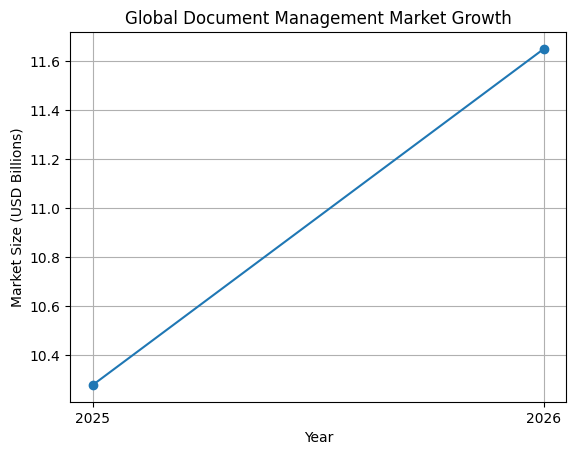
By 2026, document version control software has evolved far beyond simple file tracking tools. Today’s platforms integrate advanced technologies such as artificial intelligence, cloud infrastructure, automated workflow engines, and real-time collaboration frameworks. These innovations allow organizations to not only manage document revisions but also automate document lifecycles, enforce compliance policies, and provide predictive insights that support strategic decision-making.
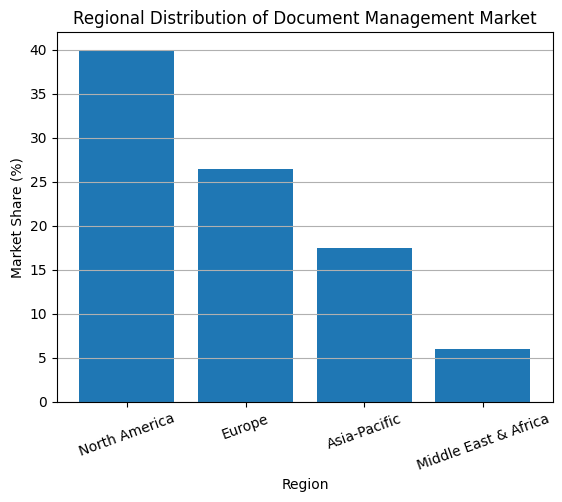
The Growing Importance of Document Version Control in the Digital Workplace
As businesses continue to adopt digital-first strategies, the volume and complexity of enterprise documents have grown significantly. Employees now collaborate across distributed teams, remote environments, and multinational operations. In such environments, documents are constantly updated by multiple contributors, making version accuracy and traceability essential.
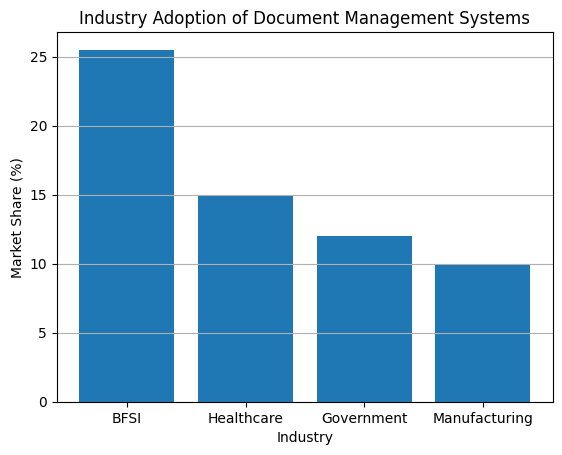
A typical organization may have hundreds of employees working simultaneously on shared documents across projects, departments, and client engagements. Without a centralized version control system, employees often spend excessive time searching for the correct version of a file or manually reconciling conflicting document edits. Studies consistently show that a significant portion of workplace productivity is lost due to inefficient document management practices.
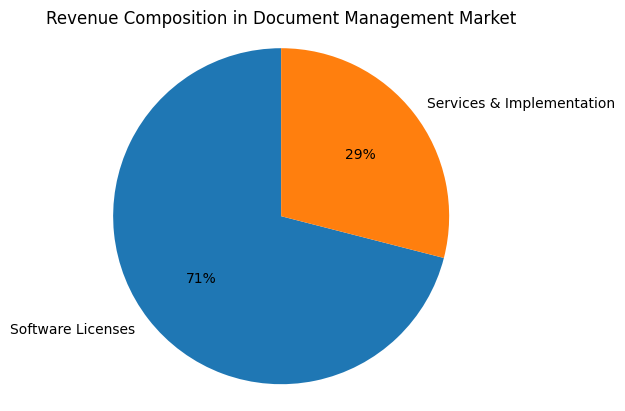
Document version control platforms address this challenge by maintaining structured document repositories that track every modification, provide clear audit trails, and allow users to restore earlier versions when necessary. These capabilities ensure that employees can collaborate confidently without risking data loss or document confusion.
Key Benefits of Document Version Control Software
Modern document version control systems provide several operational advantages that significantly improve business efficiency and governance. Organizations implementing these systems gain access to advanced features designed to streamline collaboration, enhance security, and ensure regulatory compliance.
Core Benefits of Document Version Control Platforms
Benefit
Operational Impact
Centralized document repositories
Provides a single source of truth for organizational information
Automated version tracking
Maintains a clear history of document revisions
Secure collaboration environments
Allows teams to edit and share documents safely
Regulatory compliance support
Ensures adherence to legal and industry standards
Improved workflow automation
Accelerates document approval and review processes
These capabilities are particularly valuable for industries that operate under strict regulatory oversight, where maintaining accurate documentation is essential for compliance and audit readiness.
The Evolution of Document Management Technology
Over the past decade, document management technology has undergone a significant transformation. Early document management systems focused primarily on storing files in digital repositories. While these systems provided basic version tracking capabilities, they lacked the intelligence required to manage large-scale enterprise content environments.
Today’s document version control software platforms integrate artificial intelligence and machine learning technologies that allow them to interpret document content, automate metadata tagging, and improve search accuracy. These systems can analyze document patterns, predict workflow requirements, and recommend actions based on contextual information.
This transformation has turned document management systems into intelligent content platforms capable of orchestrating complex information ecosystems across organizations.
Modern Capabilities of Advanced Document Management Systems
Capability
Description
AI-powered document classification
Automatically organizes files based on content analysis
Natural language search
Allows users to locate documents using conversational queries
Predictive workflow automation
Anticipates document needs and automates processes
Real-time collaboration tools
Enables simultaneous editing across distributed teams
Integrated compliance monitoring
Ensures regulatory requirements are continuously met
These innovations enable organizations to manage digital knowledge more effectively while reducing manual administrative tasks.
Why Businesses Need Document Version Control Software in 2026
The need for advanced document version control solutions has never been greater. Several global trends have accelerated the adoption of these platforms across industries.
First, the shift toward remote and hybrid work environments has created new challenges for document collaboration. Teams are no longer confined to a single office location, and employees must access documents securely from various devices and networks.
Second, the rapid growth of enterprise data has made it increasingly difficult to maintain organized document repositories without automated systems. Organizations now manage millions of digital files, requiring intelligent search capabilities and automated classification tools.
Third, global regulatory frameworks such as financial reporting standards, healthcare regulations, and data protection laws require organizations to maintain detailed records of document revisions and approvals. Document version control systems help organizations meet these requirements by providing comprehensive audit trails and compliance features.
Finally, the rise of artificial intelligence in enterprise software has expanded the capabilities of document management platforms, enabling predictive analytics, automated document generation, and intelligent workflow orchestration.
How the Top Document Version Control Software Platforms Stand Out
The best document version control software platforms in 2026 combine several critical capabilities that distinguish them from traditional file storage solutions. These platforms offer scalable cloud infrastructure, advanced security frameworks, and seamless integration with enterprise software ecosystems.
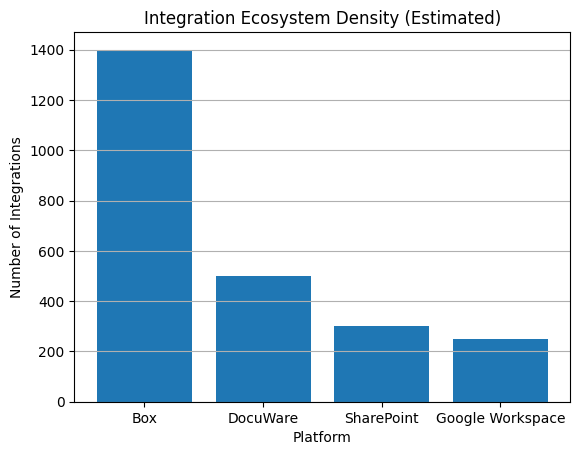
Top platforms also prioritize integration density, allowing organizations to connect document management systems with other critical applications such as customer relationship management tools, financial software, and collaboration platforms. This integration ensures that documents remain accessible and synchronized across the entire digital workplace.
Additionally, leading document management systems incorporate robust security architectures that protect sensitive information from unauthorized access. Features such as encryption, multi-factor authentication, and role-based access controls are now standard components of modern document version control platforms.
What This Guide Covers
This comprehensive guide explores the top 10 document version control software platforms in the world in 2026. Each solution has been selected based on its technological capabilities, market adoption, enterprise integrations, and ability to support modern digital workflows.
The platforms included in this list represent a wide range of approaches to document management, from AI-powered collaboration tools and metadata-driven document systems to compliance-focused enterprise content management platforms.
Readers will gain insights into the strengths of each platform, the industries they serve best, and the key features that make them leaders in the document management ecosystem.
By understanding the capabilities of these top solutions, businesses can make informed decisions when selecting document version control software that aligns with their operational needs and long-term digital transformation strategies.
As organizations continue to navigate an increasingly data-driven world, the ability to manage documents effectively will remain a critical factor in maintaining productivity, ensuring compliance, and preserving institutional knowledge. The top document version control software platforms of 2026 represent the next generation of intelligent content management systems designed to meet these challenges.
Top 10 Document Version Control Software in 2026
- Microsoft SharePoint
- Google Workspace
- Box
- M-Files
- Laserfiche
- DocuWare
- OpenText
- Hyland Software
- MasterControl
- Revver
1. Microsoft SharePoint
Microsoft SharePoint continues to play a foundational role in enterprise document management infrastructures. As part of the broader Microsoft 365 platform, SharePoint acts as the central repository for corporate documentation, supporting structured document libraries, advanced metadata tagging, automated workflows, and integrated version tracking.
SharePoint’s influence is largely driven by its tight integration with the Microsoft ecosystem, including Microsoft Teams, OneDrive, Outlook, Power Automate, and Microsoft Defender. This ecosystem approach allows organizations to maintain a unified information governance architecture across communication tools, collaboration platforms, and document storage systems.
By 2026, the introduction of SharePoint Syntex and Copilot capabilities has significantly enhanced the platform’s ability to manage document lifecycles automatically. Syntex uses machine learning and generative AI to identify document types, extract key information, classify files, and apply compliance labels. Copilot, meanwhile, provides contextual document summaries, automated content insights, and intelligent document generation features.
These advancements position SharePoint not simply as a storage solution, but as a cognitive document management platform capable of interpreting and organizing enterprise knowledge at scale.
Global Adoption and Market Penetration
Microsoft SharePoint’s global adoption remains unmatched within enterprise collaboration platforms. Its integration with Microsoft 365 has allowed the platform to expand across organizations of all sizes, from small businesses to multinational corporations and government agencies.
As of fiscal year 2026, the Microsoft 365 ecosystem has surpassed 450 million paid commercial seats worldwide. This vast user base has made SharePoint one of the most widely deployed document governance systems globally.
The following table summarizes key adoption and performance indicators reported for Microsoft 365 and associated AI-driven services.
Enterprise Adoption Metrics for Microsoft 365 and SharePoint (2026)
| Metric Category | Value (2026) | Year-over-Year Growth |
|---|---|---|
| Microsoft 365 Commercial Cloud Revenue | $34.1 Billion | 17% |
| Paid Commercial Seats | 450 Million | 6% |
| Microsoft 365 Copilot Paid Seats | 15 Million | 160% |
| Organizations Using SharePoint for Governance | Over 300,000 Enterprises | Estimated |
| Average Document Volume per Enterprise | 5 – 50 Million Documents | Increasing |
These metrics highlight a critical trend in the enterprise software market. While the growth of user seats remains steady, the most significant revenue expansion is now driven by AI-based productivity enhancements and intelligent document management capabilities.
Strategic Pricing Evolution in 2026
In July 2026, Microsoft introduced a structural pricing update across multiple Microsoft 365 commercial plans. This update reflects a broader industry trend toward embedding security, compliance, and AI automation features directly into core subscription tiers.
Microsoft’s pricing strategy aligns with its “secure-by-default” framework, which integrates advanced security layers, endpoint protection, and document governance tools directly into subscription bundles.
The following table illustrates the price adjustments across major Microsoft 365 enterprise SKUs.
Microsoft 365 Commercial Pricing Changes (Effective July 2026)
| Subscription Plan | 2025 Price (Per User / Month) | 2026 Price (Per User / Month) | Percentage Change |
|---|---|---|---|
| Microsoft 365 Business Basic | $6.00 | $7.00 | 16% |
| Microsoft 365 Business Standard | $12.50 | $14.00 | 12% |
| Microsoft 365 Business Premium | $22.00 | $22.00 | 0% |
| Microsoft 365 E3 (Without Teams) | $27.45 | $30.45 | 11% |
| Microsoft 365 E5 (Without Teams) | $48.45 | $51.45 | 6% |
| Office 365 E3 | $23.00 | $26.00 | 13% |
| Office 365 E5 | $38.00 | $41.00 | 8% |
A particularly notable decision was Microsoft’s choice to maintain the price of the Business Premium plan while increasing the Business Standard tier. This strategic adjustment narrows the value gap between these plans and encourages small and medium-sized businesses to adopt higher-security subscriptions that include advanced device management through Intune and enterprise-grade threat protection through Microsoft Defender for Business.
For nonprofit organizations, Microsoft continues to provide significant discounts, often ranging from 60 percent to 75 percent below standard commercial pricing.
Technical Architecture and Storage Allocation Model
One of the defining technical characteristics of SharePoint’s document version control system is its storage allocation structure. In 2026, the platform provides organizations with a base storage pool combined with per-user expansion capacity.
SharePoint Storage Allocation Model
| Storage Component | Allocation Rule |
|---|---|
| Base Storage per Tenant | 1 TB |
| Additional Storage per Licensed User | 10 GB per user |
| Version History Retention | Unlimited (configurable policies) |
| Document Size Limit | Up to 250 GB per file |
| Archive Integration | Azure Blob and cold storage tiers |
While the base allocation appears sufficient for small organizations, large enterprises frequently exceed these limits due to the accumulation of historical document versions, multimedia content, design assets, and collaborative editing records.
Storage Overage Economics
Exceeding allocated storage triggers additional charges based on consumption levels. The cost structure for extra storage is approximately $0.20 per gigabyte per month.
The financial impact of storage overages can become substantial for large enterprises.
Enterprise SharePoint Storage Overage Costs
| Additional Storage Volume | Monthly Cost Estimate | Annual Cost Estimate |
|---|---|---|
| 10 TB | $2,000 | $24,000 |
| 50 TB | $10,000 | $120,000 |
| 100 TB | $19,500 | $234,000 |
For organizations with 1,000 or more employees, the default storage allocation of roughly 11 TB often proves insufficient. Many enterprises experience annual data growth rates ranging from 15 percent to 30 percent, driven by continuous collaboration and digital transformation initiatives.
Role of AI in Managing Document Version Sprawl
The rapid accumulation of document versions has created a phenomenon known as version sprawl, where thousands of document revisions accumulate across departments and project teams. Without intelligent management tools, these redundant versions significantly increase storage consumption and administrative complexity.
SharePoint Syntex addresses this challenge by applying artificial intelligence to document classification and lifecycle management. The platform automatically analyzes content patterns, identifies obsolete or inactive files, and recommends archival actions.
AI-Driven Storage Optimization Workflow
| Process Stage | AI Capability Implemented | Organizational Benefit |
|---|---|---|
| Document Classification | Automatic tagging and categorization | Faster document retrieval |
| Content Understanding | Extraction of metadata and key document entities | Improved governance and compliance |
| Lifecycle Automation | Identification of inactive or redundant versions | Reduced storage consumption |
| Archival Optimization | Migration to lower-cost storage tiers | Significant cost savings |
| Compliance Monitoring | Automated policy enforcement | Reduced regulatory risk |
By moving inactive documents to lower-cost archival storage tiers within Azure infrastructure, organizations can reduce excess storage costs by up to 75 percent. This approach transforms SharePoint from a static document repository into an intelligent document lifecycle management system.
Strategic Position of SharePoint in the 2026 Document Control Ecosystem
In the broader landscape of document version control software, SharePoint remains a cornerstone platform primarily due to its scale, ecosystem integration, and continuous investment in AI-driven capabilities.
Key competitive strengths include:
Enterprise-grade document governance frameworks
Deep integration with Microsoft productivity applications
Advanced version tracking and auditing capabilities
Automated document classification through AI
Extensive compliance and security infrastructure
As organizations increasingly prioritize secure digital collaboration, intelligent document lifecycle management, and AI-assisted knowledge discovery, platforms like SharePoint continue to shape the future of enterprise document version control.
Within the broader list of the Top 10 Document Version Control Software solutions in 2026, SharePoint stands as one of the most comprehensive platforms, combining collaboration infrastructure, AI automation, and enterprise-grade governance within a single integrated ecosystem.
2. Google Workspace
Google Workspace has established itself as one of the most influential productivity and document collaboration ecosystems in the world. By early 2026, the platform holds approximately 50.34 percent of the global productivity software market, slightly surpassing Microsoft 365, which accounts for around 45.46 percent. This market leadership reflects Google’s long-standing emphasis on cloud-native architecture, seamless real-time collaboration, and simplified infrastructure management.
Google Workspace integrates a broad suite of applications including Google Drive, Docs, Sheets, Slides, Meet, and Gmail. Within this ecosystem, Google Drive functions as the central document repository and version control engine. Unlike traditional document management systems that rely heavily on file locking and sequential editing workflows, Google Drive enables simultaneous multi-user collaboration with automatic version tracking and real-time document synchronization.
By 2026, the integration of Gemini AI across the Workspace ecosystem has significantly enhanced document intelligence, automation, and workflow productivity. These capabilities allow organizations to summarize documents, analyze version history, automate knowledge discovery, and generate contextual insights across large document libraries.
Global Adoption and Market Penetration
Google Workspace continues to experience rapid growth in enterprise and small-to-medium business adoption. The platform’s simplicity, scalability, and minimal infrastructure requirements have made it particularly attractive to organizations seeking cloud-first digital workplace solutions.
The ecosystem currently supports more than 3 billion active monthly users globally. In addition, the number of paying business customers has grown significantly, increasing from approximately 8 million organizations in early 2025 to more than 11 million by 2026.
The following table summarizes key global adoption metrics for Google Workspace.
Google Workspace Global Adoption Metrics (2026)
| Metric Category | Reported Value (2026) | Growth Trend |
|---|---|---|
| Global Productivity Market Share | 50.34% | Leading |
| Microsoft 365 Market Share | 45.46% | Second |
| Total Active Monthly Users | 3 Billion+ | Stable Growth |
| Paying Business Customers | 11 Million Organizations | Strong Growth |
| Gemini AI Enterprise Customers | 2,800+ Companies | Rapid Growth |
| Paid Gemini Enterprise Seats | 8 Million Seats | Expanding |
| Gemini Monthly Active Users | 750 Million Users | High Adoption |
These statistics demonstrate that Google’s competitive advantage lies not only in scale but also in its ability to rapidly integrate AI capabilities across its productivity infrastructure.
User Engagement and AI Adoption
The introduction of Gemini AI has significantly accelerated user engagement within Google Workspace. Gemini functions as an integrated AI assistant embedded directly into applications such as Docs, Sheets, Gmail, and Drive. It enables intelligent document summarization, automated report generation, contextual writing assistance, and collaborative knowledge analysis.
By February 2026, the Gemini AI application had reached approximately 750 million monthly active users. Google has also successfully deployed over 8 million paid Gemini Enterprise licenses across more than 2,800 companies worldwide.
Organizations adopting Gemini Enterprise have reported measurable productivity improvements, with employees saving an average of 105 minutes per week through automated writing assistance, document summarization, and workflow optimization.
AI Productivity Impact within Google Workspace
| AI Capability | Functional Description | Average Productivity Benefit |
|---|---|---|
| Document Summarization | Automatic extraction of key document insights | Reduced reading time |
| Smart Content Generation | AI-assisted drafting and editing | Faster document creation |
| Version History Analysis | Identification of major document changes | Improved collaboration |
| Contextual Knowledge Retrieval | AI search across Workspace files | Faster decision-making |
| Automated Task Generation | Creation of action items from meeting notes | Improved team coordination |
This AI-driven productivity layer has become a central differentiator between modern document version control platforms and earlier generations of document management systems.
Workspace Pricing Structure and Subscription Tiers
Google updated its Workspace pricing structure in January 2025, and these pricing tiers remain the baseline configuration for enterprise and business customers throughout 2026.
Google Workspace plans are designed around pooled storage models and scalable collaboration tools, allowing organizations to increase storage capacity and security features as their operational complexity grows.
Google Workspace Pricing Plans (2026 Baseline)
| Plan Name | Monthly Price (Annual Commitment) | Storage Allocation | Key Collaboration Features |
|---|---|---|---|
| Business Starter | $7.00 – $7.20 per user | 30 GB per user | Custom email, 100-person video meetings |
| Business Standard | $14.00 – $14.40 per user | 2 TB per user | Shared Drives, 150-person meetings |
| Business Plus | $22.00 – $26.40 per user | 5 TB per user | eDiscovery (Vault), 500-person meetings |
| Enterprise | Custom Pricing | 5 TB expandable | Advanced security, S/MIME, DLP, 1000-person meetings |
The tiered pricing structure reflects Google’s strategy of scaling from small businesses to large multinational enterprises while maintaining simplicity in licensing and infrastructure deployment.
Role of Google Drive in Document Version Control
Within the Google Workspace ecosystem, Google Drive serves as the central storage and version management platform. It supports automated version history, collaborative editing, granular permission controls, and secure file sharing across organizations.
One of the defining features of Google Drive is its real-time collaborative editing engine. As of 2025, Google documents support up to 100 concurrent editors within a single document. This capability allows teams to collaborate simultaneously without requiring file downloads, manual merging, or version conflicts.
Key Document Version Control Capabilities in Google Drive
| Capability | Description | Operational Impact |
|---|---|---|
| Automatic Version History | Every change is recorded in real-time | Complete audit trail |
| Multi-User Concurrent Editing | Up to 100 simultaneous editors per document | Faster collaboration |
| Granular Access Permissions | Role-based access for viewing or editing | Improved governance |
| Activity Tracking | Detailed file activity logs | Transparency and accountability |
| File Recovery and Restoration | Recovery of previous document versions | Risk mitigation |
This collaborative architecture has positioned Google Drive as one of the most widely used document management platforms in the world, with approximately 2 billion monthly active users interacting with Drive-based documents.
Hybrid Productivity Environments and Dual-Stack Adoption
An important trend within the enterprise productivity ecosystem is the emergence of dual-stack software environments. Many organizations maintain Microsoft 365 as their official corporate productivity platform while simultaneously allowing departments such as marketing, product development, and design teams to use Google Workspace.
Research indicates that approximately 64 percent of organizations now operate within this dual-platform environment.
Typical Enterprise Dual-Stack Deployment Model
| Department or Function | Preferred Platform | Primary Reason |
|---|---|---|
| Corporate Administration | Microsoft 365 | Compliance and governance |
| Finance and Legal | Microsoft 365 | Advanced security and policy control |
| Marketing Teams | Google Workspace | Faster real-time collaboration |
| Product Development | Google Workspace | Agile document workflows |
| External Collaboration | Google Workspace | Easier document sharing |
This coexistence highlights the complementary strengths of both ecosystems, with Microsoft excelling in enterprise governance and Google dominating in collaborative speed and usability.
Security Architecture and Threat Protection
Google Workspace’s cloud-native architecture provides a centralized security framework that leverages Google’s global infrastructure and AI-powered threat detection systems.
The platform uses machine learning models to identify malicious attachments, phishing attempts, and suspicious account activity before they reach end users. As a result, Google reports that Workspace systems are capable of blocking more than 99.9 percent of spam, malware, and phishing threats.
Security Impact Metrics for Google Workspace Users
| Security Metric | Reported Performance |
|---|---|
| Spam and Malware Blocking Rate | 99.9% |
| Reduction in Security Incidents | 33% over two years |
| Comparable Reduction for Microsoft Users | 22% over two years |
| AI-Based Threat Detection | Integrated globally |
This “secure-by-design” architecture has contributed to growing trust among enterprises adopting Google Workspace as their primary collaboration and document version control platform.
Strategic Role of Google Workspace in the 2026 Document Version Control Landscape
As organizations increasingly rely on digital collaboration and distributed workforces, document version control platforms have evolved into intelligent knowledge management systems. Google Workspace stands at the forefront of this transformation by combining scalable cloud infrastructure, AI-assisted productivity tools, and real-time collaborative editing capabilities.
Within the broader list of the top document version control software platforms in 2026, Google Workspace remains a dominant solution due to its simplicity, collaboration-first architecture, and powerful AI ecosystem. Its integration with Gemini AI further strengthens its position as a next-generation document management platform capable of transforming how organizations create, manage, and analyze enterprise knowledge.
3. Box
Box has evolved significantly over the past decade, transitioning from a basic cloud storage provider into a sophisticated enterprise content management platform known as the Intelligent Content Cloud. By 2026, Box has positioned itself as a specialized enterprise document management ecosystem designed to manage complex content workflows, enforce governance policies, and integrate seamlessly with external enterprise applications.
Unlike productivity-suite-based platforms that bundle storage with office tools, Box focuses on becoming a neutral enterprise content platform that integrates across multiple ecosystems. Organizations often deploy Box as a centralized document repository while enabling employees to interact with those documents through tools such as CRM platforms, communication systems, and workflow automation tools.
The Intelligent Content Cloud architecture enables enterprises to manage documents across their entire lifecycle—from creation and collaboration to governance, compliance, and long-term archival. In addition, Box has invested heavily in artificial intelligence capabilities that allow organizations to analyze document content, automate workflows, and generate insights from large content repositories.
Evolution from Cloud Storage to Intelligent Content Cloud
The transformation of Box into an Intelligent Content Cloud reflects broader changes in enterprise document management. Traditional file storage solutions have gradually evolved into full-scale content lifecycle platforms that incorporate governance, compliance, AI analysis, and process automation.
Box’s strategy centers around three core pillars:
Content intelligence powered by AI
Enterprise-grade governance and compliance tools
Extensive third-party integrations
These pillars allow organizations to treat Box as a central system of record for corporate documentation while still allowing employees to work within their preferred productivity applications.
Core Architecture of the Box Intelligent Content Cloud
| Platform Layer | Core Functionality | Business Value |
|---|---|---|
| Content Storage Layer | Secure cloud-based document repository | Centralized content management |
| Content Intelligence Layer | AI-driven document analysis and Q&A | Knowledge discovery |
| Governance and Compliance Layer | Retention policies, legal hold, compliance monitoring | Regulatory compliance |
| Collaboration Layer | Secure sharing and editing across teams | Productivity and teamwork |
| Integration Layer | APIs and connectors for enterprise software | Ecosystem interoperability |
Through this layered architecture, Box provides organizations with the ability to manage large-scale document ecosystems while maintaining strict control over data access, retention policies, and compliance frameworks.
Financial Performance and Enterprise Adoption
Box has demonstrated steady enterprise adoption as organizations increasingly prioritize secure content management platforms that operate independently from productivity suites.
For the fiscal year ending January 31, 2026, the company reported more than 100,000 paying organizations worldwide. The company’s net revenue retention rate of approximately 104 percent indicates that existing customers continue to expand their usage of Box services year after year.
Another indicator of enterprise commitment is the company’s non-cancellable revenue backlog, which reached approximately 1.06 billion dollars. This backlog represents long-term contractual revenue that has already been committed by enterprise customers.
Operational Metrics for Box Intelligent Content Cloud (2026)
| Operational Metric | Reported Value |
|---|---|
| Paying Organizations | 100,000+ |
| Net Revenue Retention Rate | 104% |
| Non-Cancellable Revenue Backlog | $1.06 Billion |
| Employees | 2,912 |
| Research and Development Investment | $294.5 Million (2025) |
The company’s strong investment in research and development highlights its long-term strategy of expanding AI-driven content intelligence capabilities and strengthening its enterprise security infrastructure.
Box Subscription Plans and Pricing Model
Box offers a tiered pricing structure designed to accommodate organizations with varying levels of security requirements, content governance needs, and AI-driven automation capabilities. Each subscription tier adds additional capabilities related to document governance, compliance monitoring, and AI-assisted content analysis.
Box Pricing Plans for Enterprise Content Management
| Plan Name | List Price (Per User / Month) | Primary Storage and Features |
|---|---|---|
| Business | $15.00 – $20.00 | 100 GB storage, Box Sign for 10 documents per month |
| Business Plus | $25.00 – $33.00 | Enhanced content management and external collaboration |
| Enterprise | $35.00 – $47.00 | Advanced data protection and AI-powered document Q&A |
| Enterprise Plus | $50.00 | Box Shield security, multi-document AI analysis |
These pricing tiers reflect the increasing importance of security, automation, and governance in modern enterprise document management platforms.
Enterprise Purchasing Trends and Contract Negotiations
While Box publishes standard pricing tiers, the actual cost paid by enterprise customers often differs significantly due to negotiated discounts, volume licensing agreements, and long-term contracts.
Market purchasing data indicates that the median annual expenditure for Box services is approximately $36,141 based on analysis of 232 enterprise purchase records.
Enterprise Purchasing Patterns for Box Services
| Purchasing Factor | Typical Range or Value |
|---|---|
| Median Annual Contract Value | $36,141 |
| Volume Discount Threshold | 25 – 50 Users |
| Volume Discount Range | 15% – 30% |
| Multi-Year Contract Length | 2 – 3 Years |
| Multi-Year Pricing Reduction | 10% – 25% |
These purchasing trends highlight the importance of long-term enterprise contracts in the content management software industry.
Advanced Governance and Security Capabilities
One of Box’s strongest competitive advantages lies in its advanced security and governance features. The platform includes several specialized modules designed to meet the strict compliance requirements of industries such as financial services, healthcare, government, and legal sectors.
Key security solutions within the Box ecosystem include Box Shield and Box Governance.
Enterprise Security and Compliance Modules
| Security Module | Core Functionality | Organizational Benefit |
|---|---|---|
| Box Shield | Threat detection and anomaly monitoring | Protection against insider threats |
| Box Governance | Content retention policies and legal hold management | Regulatory compliance |
| Box KeySafe | Customer-managed encryption keys | Enhanced data control |
| Box Zones | Regional data residency management | Compliance with local regulations |
These capabilities make Box particularly attractive to organizations that must adhere to strict data protection and regulatory frameworks.
The Integration Ecosystem as a Strategic Advantage
Perhaps the most defining feature of the Box platform is its extensive integration ecosystem. Unlike many document management platforms that prioritize proprietary ecosystems, Box emphasizes interoperability.
The platform currently supports more than 1,400 third-party integrations, allowing organizations to connect Box with a wide range of enterprise tools, including CRM systems, communication platforms, productivity applications, and workflow automation tools.
Examples of Major Box Integrations
| Integration Category | Example Platforms | Primary Use Case |
|---|---|---|
| Customer Relationship Management | Salesforce | Sales document management |
| Collaboration Platforms | Slack, Microsoft Teams | File sharing within conversations |
| Video Conferencing | Zoom | Meeting document collaboration |
| Productivity Applications | Microsoft Office, Google Docs | Document editing |
| Workflow Automation | Box Relay | Business process automation |
This open integration strategy allows organizations to use Box as the single source of truth for enterprise documents while employees continue to work within familiar applications.
Native Workflow and Digital Signature Capabilities
Box has also expanded its native feature set to reduce the need for third-party workflow and signature solutions.
Two notable tools within the platform are Box Sign and Box Relay.
Workflow and Automation Capabilities
| Feature Name | Primary Function | Business Impact |
|---|---|---|
| Box Sign | Native digital signature platform | Reduced reliance on external e-signature tools |
| Box Relay | Workflow automation for document approvals | Faster process execution |
| AI Document Q&A | Natural language queries across document libraries | Improved knowledge retrieval |
These capabilities allow organizations to streamline document-based business processes while maintaining strict version control and auditability.
Strategic Role of Box in the 2026 Document Version Control Landscape
In the broader ecosystem of document version control platforms, Box occupies a unique position as a neutral enterprise content platform. While productivity-suite providers focus on tightly integrated ecosystems, Box differentiates itself by serving as an independent content layer that integrates across multiple enterprise environments.
This neutrality allows organizations to consolidate document storage, governance, and compliance management within a single platform while maintaining flexibility in the tools employees use for collaboration and productivity.
As organizations increasingly manage complex digital document ecosystems, platforms like Box are becoming essential infrastructure components that ensure secure content governance, seamless integration, and intelligent document lifecycle management. Within the global list of leading document version control software platforms in 2026, Box remains one of the most specialized and enterprise-focused solutions available.
4. M-Files
M-Files has established a distinctive position in the global document version control and enterprise content management landscape by introducing a metadata-driven architecture. Unlike traditional document management systems that rely on folder hierarchies and file paths to organize information, M-Files organizes documents based on metadata attributes such as document type, project, client, status, and compliance classification.
This architectural approach fundamentally changes how organizations manage enterprise content. Instead of navigating complex folder structures, users interact with documents through contextual metadata, dynamic views, and automated classification rules. By 2026, this approach has become increasingly popular among knowledge-intensive organizations that manage large volumes of regulatory documentation, contracts, financial records, and research data.
The platform is widely recognized for addressing a long-standing challenge in enterprise document management known as document chaos, where files become difficult to locate due to inconsistent folder structures, duplicate storage locations, and fragmented document ownership.
Metadata-Driven Document Architecture
The central concept behind M-Files is the idea that documents should be organized by their meaning rather than their location. Traditional systems store files within hierarchical folder structures, forcing users to remember where documents are stored. M-Files replaces this model with a metadata layer that allows documents to exist independently of physical storage locations.
When a document is created or uploaded into the system, it is automatically tagged with metadata such as project name, document type, client identity, regulatory classification, and approval status. This metadata enables the system to dynamically generate views and workflows based on the document’s context.
Comparison of Folder-Based and Metadata-Based Document Systems
| System Model | Organizational Method | User Experience Impact |
|---|---|---|
| Traditional Folder Hierarchy | Documents stored in nested folders | Difficult to locate documents |
| Metadata-Driven Architecture | Documents tagged with metadata attributes | Faster search and retrieval |
| Static File Paths | Fixed document location | Risk of duplication |
| Dynamic Context Views | Documents appear in multiple views | Improved knowledge access |
This architecture allows a single document to appear in multiple contextual views simultaneously without being duplicated, significantly improving information accessibility across organizations.
Edition Structure and Pricing in 2026
M-Files offers two primary platform editions designed to address the needs of different organizational sizes and operational complexity levels. These editions include M-Files Essentials and M-Files Enterprise.
The Essentials edition targets organizations seeking streamlined document management with built-in workflow automation and AI-assisted content handling. The Enterprise edition expands these capabilities with advanced artificial intelligence features, federated authentication systems, and secure external collaboration infrastructure.
M-Files Platform Editions Overview
| Edition Name | Pricing Structure | Primary Capabilities |
|---|---|---|
| M-Files Essentials | Starting at $65 per seat | Metadata-driven document organization, Microsoft 365 integration, automated workflows |
| M-Files Enterprise | Custom pricing based on usage | AI-powered metadata extraction, advanced security, external collaboration tools |
The pricing model for the Enterprise edition is typically determined by several factors, including total content volume, number of users, AI processing requirements, and workflow complexity.
Artificial Intelligence Capabilities through M-Files Aino
A major technological advancement within the M-Files platform is the integration of its proprietary artificial intelligence engine known as M-Files Aino. This AI layer enables organizations to automate document classification, extract structured information from unstructured documents, and generate intelligent insights across enterprise knowledge repositories.
M-Files Aino analyzes document content using natural language processing and machine learning models. It can identify document attributes, extract key business information, and automatically apply metadata tags. These capabilities significantly reduce manual document indexing and improve the accuracy of document retrieval.
Core AI Capabilities of M-Files Aino
| AI Capability | Functional Description | Organizational Benefit |
|---|---|---|
| Metadata Extraction | Automatic identification of document attributes | Reduced manual tagging |
| Document Classification | AI-based categorization of files | Improved organization |
| Contextual Knowledge Discovery | Intelligent search across enterprise documents | Faster information access |
| Automated Workflow Triggers | AI-driven workflow activation | Increased operational efficiency |
| Document Content Analysis | Natural language processing of document text | Enhanced knowledge management |
In standard subscription tiers, the usage of Aino AI is typically limited to approximately 500 AI inquiries per user per month. These inquiries include document analysis requests, metadata extraction operations, and AI-driven search queries.
Workflow Automation and Knowledge Work Optimization
One of the most compelling advantages of the M-Files platform is its ability to automate knowledge-based workflows. Through graphical workflow engines, organizations can create automated processes for document approvals, compliance validation, contract management, and internal review cycles.
Research conducted by Forrester Consulting indicates that organizations implementing M-Files experience substantial improvements in operational efficiency.
Document Workflow Performance Improvements
| Performance Indicator | Reported Improvement |
|---|---|
| Workflow Efficiency | 70% Increase |
| Document Search Speed | 50% Faster |
| Three-Year Return on Investment | 294% ROI |
| Reduction in Manual Indexing | Significant Reduction |
These results highlight the growing importance of intelligent document automation in modern enterprise operations, particularly in industries where document compliance and traceability are critical.
Compliance, Audit Trails, and Governance
M-Files is particularly well suited for organizations operating within highly regulated industries. The platform includes robust governance features designed to support compliance frameworks, document retention policies, and regulatory auditing requirements.
Every document interaction within the system is recorded through detailed audit trails. These records allow organizations to track who accessed a document, when changes were made, and how documents progressed through approval workflows.
Compliance and Governance Capabilities
| Governance Feature | Functional Purpose | Compliance Benefit |
|---|---|---|
| Audit Trail Tracking | Records all document interactions | Regulatory transparency |
| Document Version Control | Maintains historical versions of documents | Legal traceability |
| Automated Retention Policies | Enforces document lifecycle management | Compliance with regulations |
| Access Control Policies | Role-based document permissions | Data protection |
These capabilities make M-Files particularly popular among industries such as accounting firms, financial services providers, wealth management organizations, pharmaceutical companies, and scientific research institutions.
Industry Adoption and User Feedback
The platform has earned strong recognition within enterprise content management markets due to its innovative architecture and automation capabilities. M-Files maintains a user satisfaction rating of approximately 4.3 out of 5 on major enterprise software review platforms.
Users frequently highlight the system’s intelligent metadata tagging, powerful search capabilities, and automated workflow engine as major strengths.
User Experience Highlights
| User Feedback Category | Reported Experience |
|---|---|
| Metadata Tagging System | Highly effective for document organization |
| Search Capabilities | Fast and accurate document retrieval |
| Workflow Automation | Significant productivity improvements |
| Compliance Management | Strong support for regulatory frameworks |
While the platform requires a shift in organizational mindset away from traditional folder-based systems, many enterprises report that the metadata-driven approach significantly improves long-term knowledge management.
Strategic Role of M-Files in the 2026 Document Version Control Landscape
In the broader ecosystem of document version control platforms, M-Files represents a distinct technological philosophy centered around metadata intelligence rather than file location management. This design philosophy aligns well with modern knowledge-based organizations that prioritize contextual information retrieval, automated compliance enforcement, and intelligent workflow orchestration.
As enterprise data volumes continue to expand and regulatory requirements become more complex, metadata-driven document management platforms like M-Files are increasingly viewed as critical infrastructure for organizations seeking to modernize their information governance strategies.
Within the global ranking of the top document version control software platforms in 2026, M-Files stands out as one of the most innovative solutions due to its metadata-first architecture, AI-driven automation capabilities, and strong focus on regulated industry environments.
5. Laserfiche
Laserfiche has established itself as one of the most respected enterprise content management platforms for organizations operating within highly regulated environments. By 2026, the platform has evolved beyond traditional document storage and version control to become a comprehensive process automation and compliance management solution.
Laserfiche focuses heavily on enabling organizations to automate document-centric workflows while maintaining strict regulatory governance. Its architecture combines document version control, records management, business process automation, and artificial intelligence capabilities within a unified content services platform.
A distinguishing characteristic of Laserfiche is its emphasis on no-code automation frameworks. These tools allow business users, rather than software developers, to design and deploy complex document workflows, approval processes, and compliance management systems. As regulatory complexity increases across sectors such as government administration, financial services, healthcare, and higher education, platforms like Laserfiche have become essential infrastructure for organizations seeking to modernize their information governance strategies.
Position of Laserfiche in the Enterprise Content Management Ecosystem
Laserfiche operates within the enterprise content management category but has increasingly positioned itself as a process automation platform built around document intelligence. This shift reflects the growing importance of workflow automation, digital records governance, and compliance management in modern organizations.
The platform combines several functional layers designed to support large-scale document operations.
Laserfiche Content Platform Architecture
| Platform Layer | Core Functionality | Organizational Benefit |
|---|---|---|
| Document Management Layer | Secure storage, version control, and document indexing | Centralized information management |
| Workflow Automation Layer | No-code business process automation tools | Faster operational workflows |
| AI Extraction Layer | Smart Fields for automated data extraction | Reduced manual data entry |
| Compliance and Records Layer | Retention policies, legal holds, and audit trails | Regulatory compliance |
| Integration Layer | API-based integrations with enterprise applications | Cross-system interoperability |
Through this architecture, Laserfiche enables organizations to connect document workflows with business processes such as contract approvals, licensing applications, regulatory reporting, and financial documentation management.
Laserfiche Cloud Pricing Structure in 2026
Laserfiche offers a cloud-based subscription model structured around three primary service tiers. These tiers are designed to support organizations ranging from small departments to large enterprise environments with complex compliance requirements.
The pricing model incorporates both user licensing and system capabilities such as AI-powered document extraction, API call limits, and workflow automation capacity.
Laserfiche Cloud Subscription Plans
| Plan Name | Price Per User Per Month | Minimum User Requirement | AI and Automation Features |
|---|---|---|---|
| Starter | $53.00 | 1 User | Basic storage, Microsoft 365 integration, 50,000 API calls |
| Professional | $73.00 | 5 Users | 50,000 Smart Field AI extractions annually, workflow builder |
| Business | $93.00 | 25 Users | 2.5 million Smart Field extractions annually, advanced records management |
The Professional tier represents the most commonly adopted plan across mid-sized organizations. This tier introduces workflow automation tools and AI-powered document extraction capabilities, making it suitable for departments seeking to automate document-heavy processes.
The Business plan is designed for enterprise-scale deployments that require advanced compliance infrastructure and large-scale automation capabilities.
Enterprise Subscription Commitments
The subscription pricing model for Laserfiche includes minimum commitment thresholds depending on the plan selected.
Enterprise Subscription Commitments by Plan
| Plan Name | Minimum Commitment Structure | Estimated Annual Value |
|---|---|---|
| Starter | Monthly subscription per user | Variable |
| Professional | Minimum annual commitment of $4,380 | Department-level usage |
| Business | Minimum monthly commitment of $27,900 (25 users) | Large enterprise deployments |
These commitment levels reflect the enterprise-oriented nature of the platform, particularly for organizations operating in sectors with strict regulatory requirements.
Artificial Intelligence and Smart Field Extraction
A major innovation within Laserfiche’s platform is its Smart Field technology, which uses artificial intelligence to extract structured data from unstructured documents.
Smart Fields analyze documents such as invoices, forms, contracts, and applications, automatically identifying key information fields such as names, dates, identification numbers, financial amounts, and regulatory classifications.
AI-Powered Document Processing Capabilities
| AI Feature | Functional Description | Business Impact |
|---|---|---|
| Smart Field Extraction | Automated identification of document data fields | Reduced manual data entry |
| Intelligent Document Indexing | AI-driven classification of uploaded documents | Faster document retrieval |
| Workflow Trigger Automation | Automated process initiation based on document content | Improved operational efficiency |
| Content Analysis | Identification of document metadata and attributes | Improved compliance monitoring |
By automating data extraction and classification processes, Laserfiche significantly reduces the administrative overhead associated with manual document indexing and data entry.
No-Code Workflow Automation
One of Laserfiche’s most valuable features is its graphical workflow automation engine. This system allows business users to design complex workflows through visual interfaces without requiring programming expertise.
Typical workflow automation scenarios include document approval chains, employee onboarding documentation, government licensing applications, financial record validation, and regulatory reporting.
Examples of Automated Workflows in Laserfiche
| Workflow Type | Example Use Case | Operational Benefit |
|---|---|---|
| Contract Approval Workflow | Multi-stage contract review and approval | Faster legal processing |
| Government Licensing Applications | Automated permit processing | Reduced administrative delays |
| Financial Document Processing | Automated invoice approval and archiving | Improved accounting efficiency |
| HR Onboarding Documentation | Automated employee documentation workflows | Standardized HR processes |
This no-code approach democratizes process automation, allowing non-technical staff to implement sophisticated document workflows.
Security Infrastructure and Compliance Certifications
Laserfiche is widely recognized for its strong security and compliance capabilities. These capabilities are particularly important for organizations that must comply with strict regulatory frameworks related to financial records, healthcare data, or government documentation.
The platform maintains multiple internationally recognized security certifications.
Laserfiche Security Certifications and Compliance Standards
| Certification Standard | Coverage Area |
|---|---|
| ISO/IEC 27001:2022 | Information security management systems |
| SOC 2 Type 2 Plus | Security, availability, and processing integrity |
| HIPAA Compliance Coverage | Protection of healthcare information |
| SEC Rule 17a-4 Support | Financial record retention requirements |
These certifications demonstrate that the platform meets rigorous industry standards for information security, data integrity, and regulatory compliance.
WORM Storage and Regulatory Record Keeping
A particularly important feature for financial institutions and government agencies is Laserfiche Vault, which supports Write Once, Read Many (WORM) storage.
WORM storage prevents documents from being modified or deleted once they have been stored. This capability is critical for organizations subject to regulatory requirements that mandate tamper-proof record preservation.
Compliance Benefits of WORM Storage
| Feature Capability | Compliance Benefit |
|---|---|
| Immutable Document Storage | Prevents unauthorized alterations |
| Regulatory Record Preservation | Ensures compliance with financial regulations |
| Tamper-Proof Audit Records | Supports legal investigations |
| Long-Term Archival Integrity | Protects institutional records |
This capability allows organizations to comply with strict regulations such as SEC Rule 17a-4, which governs the retention of financial records for broker-dealers and financial institutions.
Industry Reputation and User Satisfaction
Laserfiche has earned strong recognition within the enterprise content management market due to its reliability, security infrastructure, and automation capabilities.
The platform currently maintains a user satisfaction rating of approximately 4.7 out of 5 on major enterprise software review platforms. This rating reflects strong customer approval in areas such as workflow automation, compliance management, and platform reliability.
User Experience Evaluation
| Evaluation Category | User Feedback Summary |
|---|---|
| Workflow Automation | Highly effective and flexible |
| Compliance and Records Mgmt | Strong regulatory support |
| Ease of Use | Accessible for non-technical users |
| System Reliability | High availability and stability |
The platform has also received recognition as a Customer Choice solution within the enterprise content management category.
Strategic Role of Laserfiche in the 2026 Document Version Control Landscape
In the broader ecosystem of document version control and enterprise content management platforms, Laserfiche stands out for its strong focus on compliance-driven workflow automation. While many platforms focus primarily on collaboration and document storage, Laserfiche emphasizes the automation of document-based business processes.
This focus has made it particularly valuable for organizations operating in highly regulated industries where document governance, audit trails, and regulatory reporting are critical operational requirements.
Within the global list of leading document version control software platforms in 2026, Laserfiche remains a prominent solution due to its powerful automation capabilities, strong compliance infrastructure, and advanced AI-powered document processing technologies.
6. DocuWare
DocuWare has emerged as one of the most influential document automation and workflow management platforms within the mid-market enterprise segment. By 2026, the platform has firmly established itself as a cloud-first document management system designed to streamline business processes, automate document handling, and enable intelligent workflow orchestration.
Unlike legacy enterprise content management systems that originally evolved from on-premises architectures, DocuWare has prioritized cloud-native deployment strategies. This cloud-centric approach has allowed the platform to scale rapidly across international markets while reducing infrastructure complexity for organizations adopting digital document management solutions.
The system combines document storage, automated indexing, business workflow automation, and compliance management within a single unified cloud platform. As organizations increasingly transition away from physical documentation and manual processes, DocuWare’s automation capabilities have made it particularly attractive for departments such as finance, human resources, legal operations, and procurement.
Cloud Adoption and Global Customer Growth
DocuWare has experienced significant global adoption over the past several years, particularly among mid-sized enterprises seeking scalable document automation tools without the complexity of traditional enterprise content management deployments.
A major milestone occurred in 2024 when the company reached its 10,000th global cloud customer. This milestone represented a doubling of its cloud customer base within a three-year period, demonstrating strong market momentum for its cloud deployment model.
By 2026, the platform serves more than 20,000 organizations worldwide, with an overwhelming majority of new customers choosing cloud deployments rather than on-premises infrastructure.
DocuWare Customer Adoption Metrics
| Adoption Metric | Reported Value |
|---|---|
| Total Global Customers | 20,000+ Organizations |
| Cloud Customers Milestone (2024) | 10,000 Organizations |
| New Customer Cloud Adoption Rate | Approximately 90% |
| Global User Base | 930,000 Active Users |
| Countries Served | 100 Countries |
| Supported Languages | 24 Languages |
| Partner Network | 800+ Global Partners |
This rapid adoption highlights the growing preference for cloud-native document automation platforms among organizations that want to reduce IT infrastructure overhead while improving document accessibility and process automation.
Market Expansion and Revenue Growth
DocuWare’s financial performance has reflected the broader industry shift toward cloud-based document management solutions. The company reported significant revenue expansion driven primarily by its cloud offerings.
In fiscal year 2024, DocuWare recorded cloud revenue growth of approximately 47 percent year-over-year. This growth demonstrates the increasing demand for SaaS-based document management systems that combine automation capabilities with scalable cloud infrastructure.
The company’s global partner ecosystem also plays a major role in expanding its international reach. With more than 800 certified partners, DocuWare has built an extensive distribution network capable of delivering localized implementations, industry-specific configurations, and ongoing support services.
DocuWare Global Distribution Infrastructure
| Infrastructure Component | Operational Scope |
|---|---|
| Certified Implementation Partners | 800+ Partners Worldwide |
| Supported Languages | 24 Languages |
| Global Markets Served | 100 Countries |
| Deployment Options | Cloud and Hybrid Environments |
This ecosystem enables organizations across diverse industries to deploy DocuWare with localized customization while maintaining a consistent core platform architecture.
Pricing Model and Subscription Structure
DocuWare’s pricing structure generally falls within a mid-range enterprise software pricing model. Most cloud subscriptions range between approximately 25 and 100 dollars per user per month, depending on the scale of deployment, storage requirements, and automation capabilities.
Unlike some document management platforms that rely solely on per-user licensing, DocuWare also offers tenant-based subscription tiers designed for larger organizational deployments.
DocuWare Cloud Pricing Overview
| Pricing Category | Estimated Cost Range |
|---|---|
| Entry-Level Subscription | $25 per user per month |
| Mid-Market Deployments | $50 – $75 per user per month |
| Enterprise Deployments | Up to $100 per user per month |
These subscription tiers typically include core features such as document storage, automated indexing, workflow automation, and integration with common enterprise applications.
Tenant-Based Enterprise Deployment Plans
In addition to individual user licensing models, DocuWare offers larger enterprise packages designed to support departmental or organization-wide deployments.
These packages bundle user licenses with storage allocations and workflow automation capabilities.
DocuWare Enterprise Deployment Packages
| Deployment Package | Included Users | Storage Allocation | Typical Use Case |
|---|---|---|---|
| Cloud 40 | 40 Users | 500 GB Storage | Mid-sized departments |
| Cloud 100 | 100 Users | 1,000 GB Storage | Large enterprise teams |
These bundled deployment tiers allow organizations to scale their document automation infrastructure while maintaining predictable subscription costs.
Intelligent Indexing and Document Recognition
One of DocuWare’s most notable technological capabilities is its Intelligent Indexing service. This AI-powered indexing engine allows the system to automatically classify and extract information from scanned documents and digital files.
The platform’s machine learning algorithms analyze user corrections during document indexing. Over time, the system learns to recognize document structures and field locations, significantly improving its accuracy in extracting structured data from unstructured documents.
AI Document Processing Capabilities
| AI Feature | Functional Description | Operational Benefit |
|---|---|---|
| Intelligent Indexing | AI-based document classification and tagging | Faster document retrieval |
| Automated Data Extraction | Identification of key fields within scanned forms | Reduced manual indexing |
| Machine Learning Feedback Loop | Learns from user corrections | Improved indexing accuracy |
| Invoice Processing Automation | Recognition of vendor invoices and payment data | Streamlined financial workflows |
This capability is particularly valuable for organizations that manage large volumes of scanned invoices, purchase orders, contracts, and regulatory documents.
Workflow Automation and Business Process Integration
Beyond document storage and indexing, DocuWare provides advanced workflow automation capabilities designed to streamline document-based business processes.
Organizations can configure automated workflows that route documents through approval processes, trigger notifications, update records in external systems, and enforce compliance procedures.
Common Automated Business Workflows
| Workflow Category | Typical Use Case |
|---|---|
| Accounts Payable Processing | Automated invoice approvals and payment workflows |
| Human Resources Documentation | Employee onboarding and document archiving |
| Contract Approval Processes | Multi-stage legal review and approval |
| Procurement Documentation | Purchase order management and vendor records |
By automating these document-intensive processes, organizations can significantly reduce administrative workload while improving operational efficiency.
Customer Satisfaction and Net Promoter Score
DocuWare maintains strong customer loyalty within the document automation market. One widely recognized indicator of customer satisfaction is the company’s Net Promoter Score.
As of January 2026, DocuWare reports a Net Promoter Score of 53, which places the platform well above average within the enterprise software industry.
Customer Loyalty and Satisfaction Metrics
| Customer Metric | Reported Value |
|---|---|
| Net Promoter Score (NPS) | 53 |
| Promoter Customer Percentage | 64% |
| Active Global Users | 930,000 |
An NPS score above 50 is typically considered excellent, indicating that a large portion of customers actively recommend the platform to other organizations.
Strategic Role of DocuWare in the 2026 Document Version Control Ecosystem
Within the broader landscape of document version control and enterprise content management platforms, DocuWare has established itself as a leading cloud-first automation solution. Its architecture prioritizes intelligent document processing, automated workflows, and scalable cloud deployment.
This positioning makes the platform particularly well suited for mid-market organizations seeking powerful document automation capabilities without the complexity associated with large enterprise content management systems.
As digital transformation initiatives continue to accelerate across industries, platforms such as DocuWare are playing an increasingly important role in helping organizations modernize their document management infrastructure, reduce manual processes, and improve operational transparency.
Within the global ranking of the top document version control software platforms in 2026, DocuWare stands out as a high-growth solution recognized for its intelligent indexing technology, cloud-native architecture, and strong customer satisfaction levels.
7. OpenText
OpenText continues to occupy a dominant position in the enterprise content management landscape, particularly among large multinational organizations with complex regulatory and operational requirements. By 2026, the company remains one of the most established providers of enterprise document management infrastructure, offering platforms designed to support massive content repositories, advanced compliance frameworks, and deep integrations with mission-critical enterprise software systems.
Unlike many modern document management platforms that focus primarily on collaboration and lightweight automation, OpenText specializes in high-scale enterprise deployments. Its architecture is designed to support complex business environments involving millions or even billions of documents, highly structured data repositories, and strict regulatory oversight.
Two flagship platforms define OpenText’s content services portfolio: Extended ECM and Documentum. These platforms serve different operational roles within enterprise environments, allowing organizations to manage both collaborative business documents and highly structured regulatory archives within a unified governance framework.
Enterprise Content Architecture within OpenText Platforms
OpenText platforms are typically deployed as part of a broader enterprise information architecture that integrates content management, workflow automation, and compliance management across multiple enterprise systems.
The OpenText ecosystem supports deep integration with widely used enterprise platforms including SAP enterprise resource planning systems, Salesforce customer relationship management tools, and Microsoft productivity applications.
OpenText Enterprise Content Architecture
| Platform Layer | Core Functionality | Organizational Value |
|---|---|---|
| Content Repository Layer | Secure storage of enterprise documents and records | Centralized document control |
| Process Integration Layer | Integration with SAP, Salesforce, and Microsoft ecosystems | Seamless workflow automation |
| Governance and Compliance Layer | Retention policies, legal holds, audit trails | Regulatory compliance |
| AI and Content Intelligence Layer | Automated document analysis and risk detection | Improved decision-making |
| Collaboration Layer | Enterprise document sharing and version control | Cross-team productivity |
Through this layered architecture, OpenText enables organizations to manage both structured and unstructured enterprise content across multiple business systems.
Distinction Between Extended ECM and Documentum
Within the OpenText ecosystem, Extended ECM and Documentum serve complementary but distinct operational purposes.
Extended ECM is designed to integrate enterprise content management directly into operational business processes. It connects documents and records with business objects inside applications such as SAP, allowing organizations to embed document workflows within their core operational systems.
Documentum, on the other hand, focuses on managing extremely large and highly structured document repositories. It is widely used in industries where strict regulatory compliance and long-term document retention are essential.
Comparison of OpenText Flagship Platforms
| Platform Name | Primary Focus | Typical Use Case |
|---|---|---|
| Extended ECM | Integration of documents with business systems | SAP process workflows |
| Documentum | Large-scale structured content repositories | Pharmaceutical research documentation |
| Extended ECM for Salesforce | CRM-integrated document management | Sales contract lifecycle management |
| Documentum Compliance Vault | Regulated content storage and archiving | Financial services records |
This dual-platform approach allows OpenText to address both operational document workflows and highly regulated content archives within a single enterprise ecosystem.
Financial Performance and Enterprise ROI
OpenText deployments are often associated with large-scale digital transformation initiatives that aim to modernize document governance across large organizations.
Research conducted by Forrester Consulting indicates that organizations implementing OpenText Content Services Private Cloud platforms can achieve substantial operational improvements over time.
The study estimates that enterprises can realize a potential return on investment of approximately 310 percent through increased workflow efficiency, reduced administrative costs, and improved compliance management.
Enterprise ROI and Operational Efficiency Gains
| Performance Metric | Reported Outcome |
|---|---|
| Potential Three-Year ROI | 310% |
| Process Time Savings by Year Three | Up to 95% |
| Reduction in Manual Document Handling | Significant Decrease |
| Improvement in Regulatory Compliance Speed | Substantial Improvement |
These improvements often result from the automation of document workflows, the elimination of redundant manual processes, and the centralization of document governance systems.
Pricing Structure and Service Tier Updates in 2026
In January 2026, OpenText implemented a list price adjustment across its enterprise software portfolio. The increase averaged approximately four percent and applied to a broad range of products, including Extended ECM, Documentum, and associated cloud services.
The Extended ECM platform is offered through a tiered service model designed to accommodate organizations with varying levels of document governance complexity.
OpenText Extended ECM Subscription Tiers
| Tier Name | Functional Scope | Key Capabilities |
|---|---|---|
| Express (X1) | Foundational enterprise content control | Microsoft 365 integration, automated retention management |
| Premium (X2) | Advanced governance and performance optimization | Encryption at rest, high-performance caching |
| Ultimate (X3) | Fully managed enterprise collaboration and content services | Intelligent document capture and e-signature capabilities |
These tiers allow organizations to gradually scale their content management infrastructure as their governance requirements grow.
Artificial Intelligence and the OpenText Content Aviator
One of the most significant innovations introduced in the 2026 OpenText platform releases is the AI-powered assistant known as OpenText Content Aviator.
Content Aviator integrates artificial intelligence capabilities directly into document workflows, enabling automated analysis, summarization, and risk detection across enterprise documents.
AI Capabilities within OpenText Content Aviator
| AI Capability | Functional Description | Organizational Benefit |
|---|---|---|
| Document Summarization | AI-generated summaries of complex documents | Faster information review |
| Risk Detection | Identification of compliance risks and anomalies | Improved regulatory oversight |
| Workflow Intelligence | AI analysis of workflow bottlenecks | Process optimization |
| Content Context Analysis | Automated understanding of document meaning | Enhanced knowledge discovery |
By embedding AI directly into document lifecycle workflows, OpenText enables organizations to gain deeper insights into their content repositories while reducing the time required to review complex documentation.
Advanced Content Capture and Digital Signatures
The Ultimate tier of Extended ECM introduces additional advanced capabilities designed to streamline enterprise content processing.
Two notable tools included in this tier are Core Capture and Core Signature.
Enterprise Document Automation Tools
| Feature Name | Functional Description | Business Benefit |
|---|---|---|
| Core Capture | Automated document ingestion and classification | Reduced manual document entry |
| Core Signature | Legally binding digital signature workflows | Faster contract execution |
| Content Workflow Engine | Automated routing of documents through processes | Improved operational efficiency |
These tools allow organizations to automate high-volume document processing workflows such as contract approvals, invoice management, and regulatory documentation submission.
Integration with Enterprise Software Ecosystems
One of OpenText’s most important competitive advantages is its deep integration with major enterprise software platforms. These integrations allow organizations to manage documents directly within the applications employees use to perform daily business tasks.
Major Enterprise Integrations Supported by OpenText
| Integration Platform | Integration Purpose |
|---|---|
| SAP Enterprise Systems | Content management for ERP processes |
| Salesforce CRM | Customer document lifecycle management |
| Microsoft 365 | Document collaboration and productivity integration |
| Engineering Systems | Technical documentation management |
These integrations enable OpenText to function as the central content governance layer across large enterprise technology environments.
Strategic Role of OpenText in the 2026 Document Version Control Ecosystem
Within the global ecosystem of document version control and enterprise content management platforms, OpenText represents the most comprehensive solution for organizations operating at massive scale.
While many platforms focus primarily on collaboration and lightweight document storage, OpenText specializes in high-performance enterprise content infrastructures capable of supporting millions of users and extremely large document repositories.
This focus on large-scale enterprise environments has made OpenText particularly valuable for industries such as financial services, pharmaceuticals, energy, government administration, and manufacturing.
Within the broader ranking of the top document version control software platforms in 2026, OpenText remains the dominant heavyweight solution for organizations requiring deep process integration, advanced compliance capabilities, and high-performance document repository management.
8. Hyland Software
Hyland Software has established itself as a major force in the enterprise content management industry through the management of two prominent platforms: OnBase and Alfresco. By 2026, the company has evolved its strategy toward what it describes as a Content Innovation Cloud, combining document management, robotic process automation (RPA), and secure workflow orchestration within a unified digital content ecosystem.
Unlike many content management vendors that operate a single flagship platform, Hyland’s portfolio approach allows it to address two distinct segments of the market. OnBase primarily serves highly regulated industries such as healthcare, financial services, and insurance, where document governance and operational workflows must adhere to strict compliance requirements. Alfresco, on the other hand, appeals to organizations seeking flexible, open-source-based content management architectures capable of deep customization and integration with modern cloud infrastructure.
Through the integration of automation technologies, Hyland aims to transform traditional document repositories into dynamic content platforms capable of supporting enterprise-wide digital transformation initiatives.
Strategic Architecture of the Content Innovation Cloud
Hyland’s Content Innovation Cloud represents the company’s long-term strategy to unify document management, workflow automation, and artificial intelligence within a single enterprise content services platform.
This architecture integrates document repositories, process automation, analytics, and robotic process automation into a cohesive environment designed to improve operational efficiency.
Hyland Content Innovation Cloud Architecture
| Platform Layer | Core Functionality | Organizational Benefit |
|---|---|---|
| Content Repository Layer | Secure storage and version control for enterprise documents | Centralized information management |
| Workflow Automation Layer | Automated routing of documents and process tasks | Operational efficiency |
| Robotic Process Automation Layer | Automation of repetitive business tasks | Reduced manual workload |
| Integration Layer | Connectivity with enterprise applications | Cross-system interoperability |
| Content Analytics Layer | Analysis of enterprise document usage and trends | Data-driven decision making |
This layered approach allows organizations to manage documents not only as static records but as active components within business workflows.
OnBase Platform and Enterprise Adoption
OnBase is one of Hyland’s most established platforms and has built a strong reputation among organizations operating in highly regulated sectors. The platform is widely used to manage large volumes of documents, automate internal workflows, and enforce regulatory compliance policies.
OnBase has historically been deployed in industries where document accuracy, audit trails, and compliance reporting are essential. Healthcare organizations frequently use the system to manage patient documentation, insurance claims processing, and clinical records. Financial institutions use it to manage loan documentation, regulatory filings, and contract management workflows.
Enterprise Adoption Metrics for OnBase
| Metric Category | Reported Data |
|---|---|
| Verified Organizations Using OnBase | 3,580 Companies |
| Estimated Total Deployments | 6,029 Organizations |
| Healthcare Industry Share | 24.5% |
| Computer Software Industry Share | 17.2% |
| Additional Key Sectors | Finance, Insurance, Government |
These adoption figures demonstrate the platform’s strong presence in industries that rely heavily on document governance and regulatory reporting.
Industry Distribution of OnBase Customers
| Industry Sector | Percentage of Customer Base |
|---|---|
| Healthcare | 24.5% |
| Computer Software | 17.2% |
| Financial Services | Significant share |
| Insurance | Moderate share |
| Government Agencies | Growing adoption |
The healthcare sector remains the largest user group for OnBase due to the platform’s strong compliance capabilities and document lifecycle management features.
Operational Benefits of OnBase Implementations
Organizations adopting OnBase often report significant improvements in document accessibility, operational efficiency, and cost reduction. One of the most notable advantages of the platform is its ability to replace large physical document archives with digital repositories.
This shift toward digital documentation has produced measurable benefits for many organizations.
Operational Impact of OnBase Deployments
| Operational Improvement | Business Impact |
|---|---|
| Reduction in Paper-Based Records | Lower physical storage costs |
| Digital Document Access | Faster document retrieval |
| Remote Work Enablement | Improved workforce flexibility |
| Automated Workflow Processing | Reduced administrative workload |
By eliminating the need for physical document storage, many organizations have reduced office space requirements and improved their ability to support distributed work environments.
Challenges and Platform Modernization
Despite its strengths, some organizations have raised concerns about the modernization of the OnBase user interface. As enterprise software increasingly prioritizes modern cloud-native interfaces and user experience design, legacy systems sometimes struggle to keep pace with newer platforms.
In addition, Hyland’s transition toward subscription-based pricing models has created concerns among some existing customers. Analysts estimate that the shift to subscription licensing could potentially price out approximately 25 percent to 35 percent of smaller organizations currently using the platform.
Customer Concerns and Platform Challenges
| Challenge Area | Reported Concern |
|---|---|
| User Interface Modernization | Some users find the interface dated |
| Subscription Pricing Shift | Potential cost increase for smaller organizations |
| Migration Complexity | Transitioning from legacy deployments can require planning |
Despite these challenges, the platform remains widely trusted in sectors where compliance reliability and document governance are more important than interface aesthetics.
Alfresco Platform and Open-Source Flexibility
Hyland’s second major platform, Alfresco, represents a different technological philosophy. Originally developed as an open-source enterprise content management system, Alfresco has gained a reputation as a highly flexible and developer-friendly platform.
Many organizations choose Alfresco because it provides extensive customization capabilities and the ability to modify the platform’s architecture according to specific business needs.
Unlike closed proprietary systems, Alfresco’s open-source foundation allows development teams to build custom extensions, integrate the platform with internal systems, and create specialized content management workflows.
Core Characteristics of the Alfresco Platform
| Platform Feature | Description |
|---|---|
| Open-Source Architecture | Flexible and customizable content management framework |
| Cloud-Native Deployment | Designed for modern cloud environments |
| Developer Extensibility | Supports extensive customization through APIs |
| Microservices Compatibility | Integration with containerized infrastructure |
These characteristics make Alfresco particularly popular among organizations with advanced technical teams that require full control over their document management infrastructure.
Comparison of Hyland Platforms
Although both OnBase and Alfresco fall under the Hyland ecosystem, they serve different organizational needs and technology strategies.
Comparison of OnBase and Alfresco Platforms
| Platform Name | Primary Strength | Target Users |
|---|---|---|
| OnBase | Compliance-focused document management | Healthcare and financial institutions |
| Alfresco | Open-source content platform with developer flexibility | Technology-driven organizations |
| Content Innovation Cloud | Unified automation and content services | Large enterprises seeking integrated workflows |
This dual-platform strategy allows Hyland to address both traditional enterprise customers and organizations pursuing modern cloud-native architectures.
Strategic Role of Hyland Software in the 2026 Document Version Control Landscape
In the broader ecosystem of document version control and enterprise content management platforms, Hyland Software represents a hybrid approach that combines legacy enterprise reliability with modern content innovation capabilities.
OnBase continues to serve as a trusted solution for regulated industries that require strict document governance, auditability, and workflow automation. Alfresco, meanwhile, provides a flexible and developer-oriented content management framework for organizations building highly customized digital platforms.
Through its Content Innovation Cloud strategy, Hyland is attempting to bridge these two worlds by combining automation technologies, AI-driven content intelligence, and scalable cloud infrastructure.
Within the global landscape of the top document version control software platforms in 2026, Hyland Software remains an influential provider due to its strong presence in regulated industries, its open-source innovation through Alfresco, and its continued investment in automation-driven content management technologies.
9. MasterControl
MasterControl has established itself as one of the most specialized document version control and quality management platforms within the life sciences industry. Unlike general enterprise content management systems that support a wide variety of industries, MasterControl focuses specifically on organizations operating under strict regulatory frameworks such as pharmaceutical manufacturing, biotechnology, and medical device production.
The platform is designed to control the entire lifecycle of regulated documentation, ensuring that companies comply with international regulatory requirements including FDA 21 CFR Part 11, ISO quality management standards, and global pharmaceutical compliance frameworks. In these industries, document version control is not simply a productivity feature but a regulatory necessity. Every change to procedures, product documentation, manufacturing records, and quality protocols must be traceable, auditable, and validated.
By 2026, MasterControl has expanded its platform to combine document governance, quality management systems, manufacturing process automation, and regulatory submission support within a single integrated environment.
Strategic Role of Document Control in Life Sciences
In regulated industries such as pharmaceuticals and medical devices, document control systems are essential to maintaining product safety, traceability, and regulatory compliance. Regulatory agencies require companies to maintain detailed records documenting every stage of product development, manufacturing, testing, and distribution.
MasterControl addresses these requirements by providing strict document lifecycle governance, including version tracking, approval workflows, electronic signatures, and automated audit trails.
Life Sciences Document Control Requirements
| Regulatory Requirement | Operational Requirement |
|---|---|
| FDA 21 CFR Part 11 Compliance | Electronic signatures and audit trails |
| ISO Quality Management Standards | Controlled document revision processes |
| Good Manufacturing Practice (GMP) | Traceable manufacturing documentation |
| Regulatory Submission Documentation | Standardized document control systems |
Through automated workflow enforcement and strict version control, MasterControl ensures that organizations maintain regulatory compliance throughout their operational processes.
Enterprise Adoption and Market Growth
MasterControl has experienced strong adoption among life sciences organizations due to the platform’s ability to simplify complex regulatory documentation processes. By providing an integrated environment for document control, quality management, and manufacturing oversight, the platform helps organizations reduce compliance risks and accelerate regulatory approvals.
The company has demonstrated consistent financial growth over recent years. It reported surpassing 100 million dollars in annual recurring revenue during fiscal year 2021, representing approximately 30 percent year-over-year growth at the time.
As of 2026, MasterControl continues to maintain strong momentum, reporting approximately 28 percent year-to-date growth in its platform adoption and service revenues.
Enterprise Adoption and Financial Performance
| Performance Indicator | Reported Value |
|---|---|
| Annual Recurring Revenue Milestone | $100 Million+ |
| Revenue Growth (2021) | 30% Year-over-Year |
| Growth Rate (2026 YTD) | 28% |
| Verified Organizations Using Platform | 689 Companies |
| Major Enterprise Customers | Global pharmaceutical and defense organizations |
The platform’s customer base includes major global corporations that operate under strict regulatory oversight, including companies involved in pharmaceutical manufacturing, defense technology, and medical device development.
Industry Sectors Using MasterControl
| Industry Sector | Primary Use Case |
|---|---|
| Pharmaceutical Manufacturing | Drug development documentation |
| Medical Device Production | Regulatory submission records |
| Biotechnology | Clinical trial documentation |
| Aerospace and Defense | Compliance-driven manufacturing records |
These industries require highly controlled documentation systems capable of maintaining accurate records across multiple stages of product development and production.
Manufacturing Excellence Suite and Digital Documentation
A major innovation within the MasterControl ecosystem is the Manufacturing Excellence Suite. This platform module is designed to digitize manufacturing records and automate documentation processes related to production operations.
One of the most important components of this suite is the implementation of electronic Device History Records (eDHR). Device History Records document every step in the manufacturing process of regulated products, ensuring that each unit produced meets regulatory and quality standards.
Traditional paper-based manufacturing records often create administrative bottlenecks and increase the risk of documentation errors. The digital eDHR approach automates this process, improving traceability and accelerating product release cycles.
Digital Manufacturing Documentation Features
| Feature Name | Functional Description | Business Impact |
|---|---|---|
| Electronic Device History Records (eDHR) | Digital documentation of product manufacturing processes | Faster regulatory compliance |
| Automated Production Records | Real-time recording of manufacturing activities | Reduced documentation errors |
| Quality Management Integration | Linking quality events with manufacturing documentation | Improved product safety |
| Regulatory Submission Support | Automated generation of compliance documentation | Accelerated approvals |
These capabilities allow life sciences companies to significantly reduce administrative overhead associated with compliance documentation while maintaining strict regulatory oversight.
Growth of the Electronic Device History Record Market
The increasing adoption of digital manufacturing documentation has contributed to the rapid growth of the eDHR software market. Organizations are increasingly transitioning from paper-based manufacturing documentation systems to automated digital platforms.
Market analysts estimate that the global electronic Device History Record market will reach approximately 314.3 million dollars by 2026. This expansion reflects a compound annual growth rate of approximately 11.1 percent as more organizations modernize their manufacturing documentation systems.
Projected Growth of the eDHR Market
| Market Indicator | Estimated Value |
|---|---|
| Global eDHR Market Size (2026) | $314.3 Million |
| Estimated CAGR | 11.1% |
| Primary Adoption Drivers | Regulatory compliance and digital manufacturing |
This market growth demonstrates the increasing importance of digital documentation systems within regulated manufacturing industries.
Patented System Validation Technology
One of the most innovative aspects of the MasterControl platform is its patented validation technology. In highly regulated industries, every software system used to manage regulated data must undergo a validation process to ensure it meets regulatory standards.
Traditional system validation processes can take several weeks to complete due to extensive documentation, testing, and compliance verification requirements.
MasterControl has developed automated validation tools that dramatically accelerate this process.
System Validation Efficiency Improvements
| Validation Stage | Traditional Time Requirement | With MasterControl Validation |
|---|---|---|
| Software Configuration Testing | Several days | Automated validation scripts |
| Compliance Documentation Review | Multiple weeks | Automated documentation generation |
| System Approval Process | Extended regulatory review | Accelerated approval cycles |
Through automation and pre-validated system components, organizations can reduce validation timelines from weeks to minutes in some scenarios.
Regulatory Compliance and Audit Readiness
Maintaining regulatory readiness is a critical requirement for life sciences organizations. Regulatory agencies conduct routine inspections to verify that companies maintain accurate documentation, follow approved procedures, and maintain proper quality management controls.
MasterControl provides comprehensive compliance management features designed to support these requirements.
Compliance and Governance Capabilities
| Governance Capability | Compliance Benefit |
|---|---|
| Electronic Signatures | Regulatory approval traceability |
| Audit Trails | Complete record of document changes |
| Controlled Document Versioning | Accurate regulatory documentation |
| Automated Approval Workflows | Standardized compliance processes |
These capabilities ensure that organizations remain continuously prepared for regulatory audits and inspections.
Strategic Role of MasterControl in the 2026 Document Version Control Ecosystem
Within the broader landscape of document version control software platforms, MasterControl occupies a highly specialized niche focused on regulated manufacturing industries. While many platforms prioritize collaboration and general enterprise document management, MasterControl focuses specifically on regulatory compliance, quality management, and manufacturing documentation control.
This specialization has made the platform one of the most trusted solutions among pharmaceutical companies, biotechnology firms, and medical device manufacturers.
As regulatory complexity continues to increase and digital manufacturing systems become more prevalent, platforms such as MasterControl are playing an increasingly important role in ensuring that organizations maintain strict compliance while improving operational efficiency.
Within the global ranking of the top document version control software platforms in 2026, MasterControl stands out as the leading solution dedicated specifically to life sciences and other highly regulated manufacturing environments.
10. Revver
Revver has emerged as a notable mid-market document management and workflow automation platform by repositioning itself around artificial intelligence, automated document routing, and streamlined digital collaboration. Formerly known as eFileCabinet, the company has undergone a strategic transformation, evolving from a simple document storage tool into a comprehensive document workflow platform designed to simplify document lifecycle management for small and mid-sized organizations.
By 2026, Revver focuses on delivering a fast deployment experience, AI-assisted document intelligence, and simplified digital workflow automation. Its platform architecture emphasizes ease of implementation, intuitive user interfaces, and integrated automation features that allow organizations to digitize document-heavy processes without the complexity associated with large enterprise content management systems.
Revver’s positioning in the document version control market reflects a growing demand among small and mid-sized businesses for solutions that provide enterprise-level document automation capabilities without requiring extensive technical resources or long deployment cycles.
Evolution from eFileCabinet to Revver
The transformation from eFileCabinet to Revver marked a shift in strategic focus toward AI-driven document workflows and intelligent document automation. This transition reflects broader industry trends in which document management platforms are integrating artificial intelligence, automation, and workflow orchestration capabilities to improve operational efficiency.
Revver’s modern platform architecture integrates several core components designed to automate the document lifecycle from creation and storage to approval and distribution.
Revver Document Workflow Architecture
| Platform Component | Core Functionality | Organizational Benefit |
|---|---|---|
| Document Repository | Secure storage and version control for documents | Centralized document access |
| AI Metadata Capture | Automated tagging and classification of documents | Faster document retrieval |
| Workflow Automation Engine | Automated routing of documents between stakeholders | Improved operational efficiency |
| Digital Signature Integration | Built-in e-signature capabilities | Accelerated approvals |
| Collaboration Interface | Secure document sharing and task assignment | Enhanced team coordination |
Through this architecture, Revver enables organizations to transform traditional document repositories into automated workflow systems that manage document processes end-to-end.
Market Position in the Mid-Market Segment
Revver has positioned itself as a strong competitor within the mid-market document management segment. Unlike large enterprise platforms that often require months of configuration and deployment, Revver focuses on rapid implementation and faster time-to-value for organizations that need immediate operational improvements.
The platform is frequently recommended for organizations seeking secure document sharing, workflow automation, and digital signature capabilities without the complexity of enterprise-scale content management systems.
Key characteristics of Revver’s market positioning include:
Rapid implementation cycles
AI-assisted document organization
Integrated digital signature capabilities
User-friendly dashboards and interfaces
Simplified workflow automation
These characteristics make the platform particularly attractive to professional services firms, accounting firms, legal practices, real estate organizations, and small-to-mid-sized corporate teams.
Subscription Pricing Structure in 2026
Revver offers a flexible subscription pricing model designed to accommodate organizations with varying operational requirements. The platform uses a mix-and-match licensing structure that allows organizations to select feature sets according to their workflow automation needs.
A key differentiator in Revver’s pricing strategy is the inclusion of Revver AI across all subscription tiers. This AI component assists with metadata extraction, document classification, and automated routing processes.
Revver Subscription Pricing Overview
| Subscription Tier | Average Monthly Price Per User | Discounted Entry Pricing | Primary Feature Focus |
|---|---|---|---|
| Basic | $25.00 | As low as $4.00 | Document storage and secure file sharing |
| Essentials | $67.00 | As low as $39.00 | Task management, PDF editing, and e-signature sending |
| Full | $87.00 | As low as $56.00 | Advanced automation, administrative controls, workflow management |
The tiered pricing model allows organizations to scale their document management capabilities as operational needs evolve.
Artificial Intelligence Integration with Revver AI
Revver AI is integrated into the platform as a foundational component designed to automate document organization and streamline workflow processes. Unlike some enterprise platforms that offer AI as a premium add-on, Revver includes AI functionality across all subscription plans.
Revver AI analyzes document content, extracts key metadata attributes, and automatically routes documents through predefined workflows. This automation significantly reduces the manual effort required to organize and manage document repositories.
AI Capabilities within Revver
| AI Capability | Functional Description | Operational Benefit |
|---|---|---|
| Metadata Extraction | Automatic identification of document attributes | Reduced manual indexing |
| Document Classification | AI-driven categorization of uploaded files | Improved organization |
| Automated Workflow Routing | Intelligent routing of documents to appropriate users | Faster approval processes |
| Natural Language Search | Search documents using conversational queries | Improved information retrieval |
These capabilities allow organizations to automate document management tasks that traditionally required manual oversight.
Digital Signature and Secure Sharing Workflows
A key strength of Revver lies in its integration of document workflows with digital signature processes. Organizations can send documents for signature directly from within the platform while maintaining version control and compliance tracking.
Secure document sharing is also a central component of the platform, allowing organizations to exchange documents with external clients and partners while maintaining strict access controls.
Secure Document Collaboration Features
| Feature Capability | Functional Description | Business Benefit |
|---|---|---|
| Built-in eSignature Tools | Send documents for legally binding signatures | Faster contract approvals |
| Secure Document Sharing | Controlled access for external collaborators | Secure client communication |
| Activity Tracking | Logs of document access and changes | Improved transparency |
| Version History Tracking | Maintenance of document revision history | Compliance and accountability |
These features make the platform particularly effective for organizations that frequently exchange documents with clients, vendors, or regulatory authorities.
Implementation Speed and Deployment Efficiency
One of Revver’s most frequently cited advantages is its rapid deployment model. The company emphasizes an implementation process that is significantly faster than traditional enterprise content management platforms.
Revver reports that its deployment process can be approximately three to six times faster than many enterprise competitors. This efficiency is achieved through a combination of cloud-based infrastructure, simplified configuration tools, and in-house migration specialists who assist organizations with data transfer and system configuration.
Implementation Efficiency Comparison
| Deployment Factor | Traditional Enterprise ECM | Revver Platform |
|---|---|---|
| Typical Deployment Timeline | Several months | Weeks or less |
| Data Migration Support | External consultants often required | In-house migration specialists |
| Configuration Complexity | High technical expertise required | Simplified configuration tools |
| User Training Requirements | Extensive onboarding | Intuitive dashboards |
This faster deployment model enables organizations to begin realizing operational benefits much sooner than with traditional enterprise platforms.
User Experience and Interface Design
Another distinguishing feature of Revver is its focus on user-friendly interface design. The platform emphasizes clean dashboards, simplified navigation, and intuitive search capabilities that allow users to quickly locate documents and manage workflows.
The natural language search functionality allows users to retrieve documents using conversational queries rather than complex metadata filters.
User Interface and Experience Highlights
| Interface Feature | User Benefit |
|---|---|
| Clean Dashboard Layout | Easier document navigation |
| Natural Language Search | Faster document discovery |
| Task-Oriented Workflow Views | Improved productivity |
| Integrated Document Preview | Quick review of files without downloads |
These usability improvements reduce the learning curve for new users and increase adoption rates within organizations.
Strategic Role of Revver in the 2026 Document Version Control Ecosystem
Within the broader ecosystem of document version control and enterprise content management platforms, Revver occupies a strategic position as an agile, AI-driven workflow solution designed for mid-market organizations.
While large enterprise platforms often prioritize deep governance frameworks and large-scale integrations, Revver focuses on rapid deployment, automated workflows, and user-friendly collaboration tools. This approach enables organizations to modernize document processes without the complexity typically associated with enterprise content management systems.
As digital transformation initiatives continue to expand across businesses of all sizes, platforms like Revver are becoming increasingly important for organizations seeking to automate document workflows, improve collaboration, and accelerate operational efficiency.
Within the global ranking of the top document version control software platforms in 2026, Revver stands out as one of the most accessible AI-driven workflow solutions for small and mid-sized enterprises seeking modern document management capabilities with minimal implementation overhead.
The Global State of Document Version Control and Intelligent Content Management in 2026
By 2026, document version control and intelligent content management systems have evolved into foundational infrastructure for modern enterprises. What was once considered a secondary administrative function has transformed into a core operational layer responsible for maintaining organizational knowledge, regulatory compliance, and collaborative productivity. Analysts increasingly describe modern document management systems as the cognitive infrastructure of the enterprise because they capture, govern, and contextualize the massive volumes of data generated by contemporary digital organizations.
The transformation of document management platforms has been accelerated by several global shifts. The rapid expansion of digital workflows, the rise of hybrid and distributed work environments, and the integration of artificial intelligence into enterprise software ecosystems have collectively elevated the importance of version control systems. In addition, global regulatory frameworks now require organizations to maintain precise documentation histories, secure audit trails, and transparent compliance records.
The global document management system market continues to experience strong growth. Market estimates place the total market value between 10.08 billion and 10.48 billion dollars in 2025. By the end of 2026, this figure is expected to increase to between 11.48 billion and 11.81 billion dollars. This expansion reflects a compound annual growth rate ranging from approximately 12.61 percent to 13.9 percent.
Global Document Management System Market Growth
| Market Year | Estimated Market Value (USD) | Growth Trend |
|---|---|---|
| 2025 | $10.08B – $10.48B | Expansion phase |
| 2026 | $11.48B – $11.81B | Accelerating adoption |
This growth trajectory demonstrates the rapid institutional shift toward paperless business processes and AI-integrated content governance frameworks.
Economic Foundations and Key Market Macro-Trends
The document version control market in 2026 is shaped by the convergence of several technological and economic forces. These forces have fundamentally redefined how organizations manage and govern digital information.
The first major force is the maturation of generative artificial intelligence. AI systems are now capable of analyzing document content, extracting metadata, automating workflows, and detecting compliance risks in real time. These capabilities transform document repositories into intelligent knowledge systems.
The second major force is the widespread adoption of zero-trust security architectures. As cyber threats continue to grow, organizations must implement strict access controls, encryption protocols, and audit mechanisms to protect sensitive information stored within document systems.
The third major driver is the growing complexity of global regulatory environments. International trade regulations, data privacy frameworks, and industry compliance standards have dramatically increased the need for structured documentation management.
Key Market Drivers in the Document Management Ecosystem
| Market Driver | Impact on Document Management Systems |
|---|---|
| Generative AI Integration | Automated document analysis and classification |
| Zero-Trust Security Frameworks | Stronger authentication and access control |
| Global Regulatory Compliance | Mandatory document retention and audit trails |
| Hybrid Workforce Models | Increased demand for collaborative document platforms |
| Digital Transformation Initiatives | Accelerated adoption of cloud-based systems |
These trends have expanded the role of document management systems from simple file repositories into sophisticated information governance platforms.
Revenue Composition and Market Segmentation
Within the document management market, revenue distribution is dominated by software licensing and subscription services. Software platforms represent the largest segment of the market, accounting for between approximately 66.12 percent and 76.12 percent of total market revenue.
However, the services segment is expanding more rapidly than software sales. These services include implementation consulting, data migration, AI model tuning, compliance mapping, and integration support.
Market Revenue Distribution by Segment
| Market Segment | Share of Total Revenue | Growth Characteristics |
|---|---|---|
| Software Licenses and Subscriptions | 66.12% – 76.12% | Largest revenue contributor |
| Professional Services | Rapid growth | Implementation and compliance support |
| AI Integration Services | Emerging segment | AI configuration and training |
The services segment is expanding at an estimated compound annual growth rate between 17.21 percent and 18.90 percent, significantly outpacing the overall market.
Rise of the Paperless Enterprise
One of the most influential drivers of document management system adoption is the global transition toward paperless operational environments. Organizations are increasingly eliminating physical document storage in favor of fully digital workflows.
Governments around the world are leading this transition through large-scale digital transformation initiatives. One of the most notable examples is the United Arab Emirates’ national paperless government program.
This initiative aims to eliminate physical paper transactions across government agencies. The program is projected to generate significant cost savings and environmental benefits.
Economic Impact of Paperless Government Initiatives
| Initiative | Estimated Economic Impact |
|---|---|
| UAE Paperless Government Program | $350 million in savings |
| Paper Reduction | 336 million sheets annually |
Such initiatives demonstrate the scale at which public sector organizations are transitioning toward fully digital document ecosystems.
Expansion of the Version Control System Market
Alongside traditional document management systems, the market for version control systems that manage software development workflows has also expanded significantly. These systems track code changes, enable collaborative software development, and maintain historical revision records.
The global version control system market is valued at approximately 760 million dollars in 2026 and is expected to reach roughly 1.44 billion dollars by 2035.
Version Control System Market Projection
| Year | Market Value |
|---|---|
| 2026 | $0.76 Billion |
| 2035 | $1.44 Billion |
The adoption of DevOps practices and Agile software development methodologies has played a major role in driving demand for advanced version control systems.
Regional Market Distribution and Competitive Concentration
The global document management market exhibits significant regional concentration. North America remains the largest regional market, supported by the presence of major technology providers and strong regulatory compliance requirements.
Large technology companies headquartered in North America continue to shape the competitive landscape of document management software through cloud platforms, AI capabilities, and enterprise integrations.
However, the Asia-Pacific region is currently the fastest-growing market due to large-scale digitalization programs across major economies.
Regional Distribution of Document Management System Revenue
| Region | Estimated Market Share (2025–2026) | Projected CAGR | Primary Market Drivers |
|---|---|---|---|
| North America | 37.5% – 43.7% | 16.29% (U.S.) | Digital transformation and regulatory frameworks |
| Europe | 25.0% – 28.0% | 12% – 14% | GDPR compliance and enterprise digitalization |
| Asia-Pacific | ~15% – 20% | 18.2% – 18.4% | Government-led digital initiatives |
| Middle East & Africa | ~5% – 7% | 10% – 12% | Paperless government strategies |
Rapid digital transformation programs in countries such as India, China, Japan, and South Korea have significantly accelerated adoption rates across the Asia-Pacific region.
Cloud Deployment as the Dominant Infrastructure Model
Cloud-based deployment models now dominate the document management ecosystem. Organizations are increasingly migrating away from on-premise infrastructure toward cloud platforms that offer scalability, elasticity, and integrated AI services.
By 2026, cloud-based deployments account for more than 70.34 percent of global document management system revenue.
Document Management Deployment Models
| Deployment Model | Market Share | Key Advantages |
|---|---|---|
| Cloud-Based Systems | 70.34%+ | Scalability and AI integration |
| Hybrid Systems | Moderate share | Gradual migration from legacy infrastructure |
| On-Premise Systems | Declining share | Higher infrastructure costs |
Global tariffs on IT hardware and server infrastructure have also increased the cost of maintaining on-premise systems. These cost pressures have accelerated the shift toward cloud-native platforms that leverage hyperscale data centers.
Sector-Specific Adoption Patterns
Different industry sectors adopt document management systems for distinct operational purposes. The banking and financial services sector currently represents the largest share of the market due to strict compliance requirements.
Financial institutions must maintain extensive documentation to comply with regulatory frameworks such as Know Your Customer (KYC) policies, anti-money-laundering regulations, and Basel III reporting standards.
Healthcare, however, is expected to be the fastest-growing vertical as telehealth services and digital medical records expand globally.
Industry Adoption Patterns for Document Management Systems
| Industry Vertical | Market Share (2025) | Projected CAGR | Primary Use Cases |
|---|---|---|---|
| Banking and Financial Services | 22.6% – 28.5% | 12% – 14% | Regulatory compliance and financial reporting |
| Healthcare | ~15% | 17.69% | Electronic health records and telehealth documentation |
| Government | ~12% | 11% | Digital public records and administrative documentation |
| Manufacturing | ~10% | 10.5% | Quality management and standard operating procedures |
These industry-specific use cases highlight the expanding role of document management systems as compliance and governance platforms.
Customer Retention and SaaS Growth Dynamics
The document management software market is largely structured around subscription-based software-as-a-service business models. Customer retention and recurring revenue expansion play a major role in the long-term profitability of these platforms.
Across the broader B2B SaaS ecosystem, average customer retention rates are approximately 74 percent annually.
Top-performing enterprise software providers achieve significantly higher retention levels through expansion revenue strategies.
SaaS Customer Retention Metrics in Document Management Platforms
| Performance Metric | Industry Average | Top Performing Firms |
|---|---|---|
| Annual Customer Retention | 74% | 85%+ |
| Net Revenue Retention | 100% – 110% | 120%+ |
| Expansion Revenue Contribution | ~30% | 50%+ of ARR |
These expansion strategies include upselling advanced AI capabilities, increased storage capacity, workflow automation modules, and compliance management tools.
Despite strong retention performance, voluntary churn remains a significant risk factor. Approximately 20 percent of customer churn is attributed to inadequate onboarding experiences during the early stages of platform adoption.
Conclusion: The Strategic Importance of Intelligent Content Management
The global document version control and intelligent content management market in 2026 reflects the transformation of enterprise software into cognitive information infrastructures. Document management systems are no longer simply digital filing cabinets but have evolved into intelligent platforms that support compliance, automate workflows, and preserve institutional knowledge.
As organizations continue to navigate increasingly complex regulatory landscapes and massive data growth, the role of intelligent document management systems will continue to expand. Platforms that integrate artificial intelligence, cloud infrastructure, and advanced governance frameworks will define the next generation of enterprise knowledge management systems.
The competitive landscape of this market is therefore shaped not only by software capabilities but also by the ability of platforms to provide scalable intelligence, secure collaboration environments, and long-term compliance support.
The Evolution of Version Control: From Storage to Cognitive Orchestration
Transformation of Version Control in the Intelligent Enterprise
By 2026, the concept of version control has undergone a profound transformation. What was once a relatively simple system for tracking changes to documents has evolved into a sophisticated framework for orchestrating enterprise knowledge. Modern version control platforms no longer operate solely as repositories for document revisions; instead, they function as intelligent orchestration layers that interpret information, guide workflows, and anticipate organizational needs.
This new paradigm reflects the growing complexity of enterprise operations and the massive expansion of digital information. Organizations now generate enormous volumes of documents, records, and collaborative content across distributed teams and digital platforms. In response, modern document management systems incorporate artificial intelligence, automation engines, and predictive analytics to ensure that critical information remains accessible, accurate, and aligned with regulatory requirements.
In this environment, version control platforms act as intelligent coordinators of knowledge. They analyze document relationships, monitor workflow activities, detect potential compliance risks, and provide contextual insights that enable employees to make faster and more informed decisions.
From File Storage to Knowledge Orchestration
Traditional document management systems were designed primarily for storing and retrieving files. Users were responsible for organizing documents within hierarchical folder structures and manually managing document revisions.
In contrast, modern version control systems rely heavily on metadata frameworks, artificial intelligence algorithms, and automated workflow engines to manage information dynamically.
Evolution of Version Control Capabilities
| System Generation | Core Function | Operational Characteristics |
|---|---|---|
| First Generation | File storage and basic revision tracking | Manual file organization and limited collaboration |
| Second Generation | Collaborative document management | Shared editing, version history, permission control |
| Third Generation | Automated workflow integration | Document routing and approval automation |
| Fourth Generation (2026) | Cognitive knowledge orchestration | AI interpretation, predictive workflow management |
This progression demonstrates how version control systems have evolved from passive storage tools into active knowledge management infrastructures capable of supporting complex enterprise operations.
The Productivity Cost of Unmanaged Information
One of the most persistent challenges in knowledge-intensive organizations is the difficulty employees face when searching for information within fragmented document environments. Studies indicate that employees working in unmanaged document ecosystems spend approximately 19 percent of their workweek searching for files or attempting to locate accurate versions of documents.
This inefficiency has significant economic consequences. Lost productivity, duplicated work, and outdated information can disrupt decision-making processes and slow down operational workflows.
Productivity Impact of Inefficient Document Retrieval
| Productivity Indicator | Estimated Impact |
|---|---|
| Time Spent Searching for Documents | Approximately 19% of workweek |
| Operational Delays | Frequent workflow interruptions |
| Knowledge Duplication | Multiple versions of the same document |
| Decision-Making Bottlenecks | Delayed access to accurate information |
Modern document management platforms address these challenges by embedding artificial intelligence systems capable of automatically classifying documents, extracting metadata, and providing context-aware search capabilities.
AI-Driven Context-Aware Retrieval
Artificial intelligence plays a central role in the transformation of document version control systems. AI-powered retrieval engines analyze document content, relationships, and user behavior patterns to deliver highly accurate search results.
Instead of relying solely on keyword searches, modern systems interpret document meaning and contextual relationships. This allows employees to retrieve documents based on intent rather than file names or folder locations.
AI-Enhanced Document Retrieval Capabilities
| AI Capability | Functional Description | Organizational Benefit |
|---|---|---|
| Automated Metadata Tagging | AI-generated document classifications | Improved search accuracy |
| Context-Aware Search | Retrieval based on document meaning and usage context | Faster information discovery |
| Intelligent Document Summaries | AI-generated document insights | Reduced review time |
| Predictive Document Recommendations | Suggested documents based on workflow context | Improved productivity |
These capabilities significantly reduce the time employees spend searching for documents while improving the reliability of retrieved information.
Transition from Plan-and-Execute to Sense-and-Respond Models
The evolution of version control systems also reflects a broader transformation in organizational management models. Traditional enterprise systems were built around a “Plan-and-Execute” approach, where processes were carefully designed in advance and executed according to predefined workflows.
However, modern digital environments require organizations to operate with greater flexibility and responsiveness. This has led to the emergence of “Sense-and-Respond” operational models in which systems continuously monitor data streams and adjust workflows dynamically.
Operational Model Comparison
| Operational Model | Characteristics | Enterprise Impact |
|---|---|---|
| Plan-and-Execute | Static workflows and predefined procedures | Limited adaptability |
| Sense-and-Respond | Real-time data analysis and automated workflow adjustment | Increased operational agility |
Version control platforms play a critical role in enabling these adaptive workflows. By continuously analyzing document activity and workflow patterns, these systems can detect anomalies, flag potential risks, and automatically trigger corrective actions.
Application in Supply Chain and Manufacturing Environments
The importance of advanced document version control is particularly evident in supply chain management and manufacturing operations. These sectors depend heavily on accurate documentation to coordinate production processes, logistics operations, and regulatory compliance.
Even minor discrepancies in documentation can have serious operational consequences. For example, a missed update in a product specification document or a shipping manifest can disrupt production schedules, delay deliveries, and trigger costly supply chain disruptions.
Risks Associated with Document Control Failures
| Operational Area | Potential Risk |
|---|---|
| Manufacturing Specifications | Production defects due to outdated documentation |
| Supply Chain Documentation | Shipment delays and logistics errors |
| Quality Assurance Procedures | Regulatory compliance violations |
| Inventory Management Records | Stockouts or overstocking |
To mitigate these risks, modern document management systems incorporate real-time monitoring and automated validation mechanisms. These systems ensure that employees always work with the most current version of a document while maintaining a complete historical audit trail.
Real-Time Visibility and Predictive Risk Detection
Leading document version control platforms in 2026 increasingly focus on providing real-time visibility into document workflows and operational processes. This visibility allows organizations to monitor document usage, identify potential bottlenecks, and proactively address risks before they escalate into operational disruptions.
Predictive analytics capabilities enable systems to analyze historical document usage patterns and detect anomalies that may indicate potential workflow failures.
Predictive Risk Detection Capabilities
| System Capability | Functional Outcome |
|---|---|
| Real-Time Document Monitoring | Immediate detection of workflow disruptions |
| Predictive Analytics | Early identification of compliance or operational risks |
| Automated Alerts | Notification of critical document updates |
| Workflow Optimization | Continuous improvement of operational processes |
These capabilities enable organizations to maintain greater control over complex document ecosystems while reducing operational risks associated with outdated or incomplete information.
Strategic Role of Cognitive Version Control Systems
The transformation of document version control into cognitive orchestration platforms represents one of the most significant developments in enterprise information management. As organizations continue to generate vast amounts of digital information, the ability to interpret, organize, and act on that information becomes increasingly important.
Modern document management systems now serve as the foundation for enterprise knowledge governance, enabling organizations to manage content lifecycles, automate regulatory compliance, and coordinate complex operational workflows.
Within the broader competitive landscape of document management software in 2026, the most successful platforms are those capable of combining artificial intelligence, workflow automation, and predictive analytics into unified content management ecosystems.
These cognitive version control systems are rapidly becoming essential infrastructure for organizations seeking to operate efficiently within increasingly complex digital environments.
Technical Benchmarks and Comparative Performance in Document Version Control Systems (2026)
Scaling Technical Requirements in the Era of High-Volume Digital Content
By 2026, the technical requirements for document version control systems have expanded significantly due to the increasing size and complexity of enterprise data. Modern organizations generate and manage large-scale digital assets that go far beyond traditional office documents. Industries such as healthcare, architecture, engineering, and construction increasingly rely on large and highly structured files that demand advanced storage capabilities and intelligent version control infrastructure.
For example, healthcare institutions regularly store medical imaging files in the DICOM format, which can reach several gigabytes per file when dealing with high-resolution diagnostic imaging. Similarly, construction and engineering firms manage Building Information Modeling (BIM) files containing detailed architectural models and structural simulations. These files require robust document management systems capable of supporting massive file sizes, maintaining precise revision histories, and enabling collaborative editing across distributed teams.
As a result, document version control platforms have significantly expanded their technical capabilities to accommodate large file handling, AI-powered search mechanisms, and scalable document repositories.
Comparative Technical Limits of Leading Document Version Control Platforms (2026)
The following table outlines the core technical limits and capabilities of several leading document management platforms operating in 2026.
Comparative Technical Capabilities of Major Document Management Platforms
| Platform | Maximum File Size | Primary Search Logic | Typical Use Case |
|---|---|---|---|
| Microsoft SharePoint | 250 GB | Keyword indexing with Syntex AI interpretation | Organizations using Microsoft 365 ecosystems |
| Google Drive | 5 TB (upload limit) | Full-text search combined with Gemini AI | Real-time collaboration environments |
| Box Enterprise | 150 GB | Metadata-based search combined with AI analytics | Secure external collaboration and content governance |
| Laserfiche | 100 MB default limit (administrator configurable) | Optical character recognition with AI document capture | Government and education document management |
| M-Files | 1 GB per document | Metadata-driven document organization | Compliance-heavy small and mid-sized enterprises |
These technical benchmarks illustrate how modern document platforms prioritize different capabilities depending on their primary target markets. Collaboration-oriented platforms such as Google Drive prioritize large file handling and real-time editing capabilities, while governance-focused systems like M-Files emphasize metadata-driven document classification and regulatory compliance.
Search Architecture and Document Discovery
A key technical differentiator among document management platforms is their search architecture. As organizations store millions of documents within centralized repositories, efficient document retrieval becomes essential for maintaining productivity and operational efficiency.
Modern platforms employ a variety of search methodologies ranging from traditional keyword indexing to advanced AI-powered semantic analysis.
Search Technologies Used in Document Management Platforms
| Search Methodology | Technical Approach | Platform Examples |
|---|---|---|
| Keyword-Based Indexing | Searches document text for exact phrase matches | Microsoft SharePoint |
| Full-Text Semantic Search | Interprets document meaning using natural language models | Google Drive |
| Metadata-Driven Retrieval | Uses structured metadata fields for precise document filtering | M-Files |
| AI-Based Document Capture | Extracts searchable content using OCR and machine learning | Laserfiche |
| Hybrid AI Search | Combines metadata indexing with AI content analysis | Box Enterprise |
The shift toward AI-powered search systems has dramatically improved the accuracy of document retrieval while reducing the time employees spend searching for information within large repositories.
Integration Density as a Key Platform Selection Metric
In addition to technical storage limits and search capabilities, integration density has become one of the most important evaluation metrics for document management platforms in 2026. Integration density refers to the number of third-party software systems that a document management platform can connect with seamlessly.
As organizations increasingly operate complex digital ecosystems involving enterprise resource planning systems, customer relationship management tools, financial platforms, and collaboration software, the ability of a document platform to integrate with these systems is critical.
Document Management Platform Integration Ecosystems
| Platform | Approximate Number of Integrations | Typical Integration Focus |
|---|---|---|
| Box | 1,400+ integrations | Enterprise collaboration, CRM, productivity tools |
| DocuWare | Approximately 500 integrations | ERP systems and accounting platforms |
| Microsoft SharePoint | Extensive ecosystem within Microsoft stack | Microsoft productivity applications |
| Google Workspace | Native integrations within Google ecosystem | Cloud collaboration tools |
| Laserfiche | Targeted enterprise integrations | Government and education systems |
Among the leading platforms, Box stands out for maintaining one of the most extensive integration ecosystems in the industry. This allows organizations to use Box as a centralized document repository while continuing to interact with documents through a wide range of external applications.
Security Architecture and Zero-Trust Frameworks
Security architecture has become a central component of document management platforms due to the increasing prevalence of cyber threats and the sensitive nature of enterprise data. By 2026, zero-trust security frameworks have become the standard architecture across leading document management systems.
Zero-trust security assumes that no device, user, or network connection should be automatically trusted. Every interaction with the system must be verified through authentication and authorization protocols.
Core Security Components in Modern Document Management Systems
| Security Feature | Technical Function | Security Benefit |
|---|---|---|
| Cryptographically Bound Sessions | Sessions tied to specific verified devices | Prevents session hijacking |
| Multi-Factor Authentication | Identity verification through multiple credentials | Strengthens access security |
| AI-Powered Threat Detection | Machine learning models detect malicious activity | Blocks phishing and malware attacks |
| Granular Access Control | Role-based document permission systems | Protects sensitive content |
| Continuous Activity Monitoring | Real-time tracking of document access patterns | Early detection of insider threats |
These security measures allow organizations to protect sensitive documents while maintaining accessibility for authorized users.
Artificial Intelligence in Security and Threat Prevention
Artificial intelligence has also become a critical component of document platform security systems. AI-powered threat detection systems continuously analyze user activity patterns, document access behaviors, and network traffic to identify potential security risks.
Leading document management platforms report that their AI-driven security tools can block more than 99.9 percent of malware, phishing attempts, and suspicious file uploads before they reach end users.
AI Security Capabilities in Document Platforms
| AI Security Function | Operational Role |
|---|---|
| Malware Detection | Identification of malicious files before upload |
| Phishing Prevention | Blocking of suspicious links and attachments |
| Behavioral Analytics | Detection of unusual user activity |
| Document Anomaly Detection | Identification of abnormal document modifications |
These capabilities allow organizations to maintain secure document environments while minimizing operational disruptions caused by cyber threats.
Granular Access Control and Data Governance
Another defining feature of modern document management systems is granular access control. This capability allows organizations to define detailed permission structures governing who can view, edit, or distribute specific documents.
Granular permissions can be configured at multiple levels within document repositories, including folder-level, document-level, and even metadata-field-level access control.
Document Access Control Hierarchies
| Access Level | Description |
|---|---|
| Organizational Access | Permissions granted to entire departments |
| Role-Based Permissions | Access determined by employee roles |
| Document-Level Permissions | Specific files restricted to authorized users |
| Metadata Field Restrictions | Access controlled at the individual data field level |
These governance mechanisms ensure that sensitive information remains accessible only to authorized personnel while maintaining compliance with data privacy regulations.
Strategic Implications for Enterprise Document Management
The technical benchmarks and comparative performance metrics observed in 2026 highlight the increasing complexity of document version control systems. Modern platforms must balance multiple competing priorities including storage scalability, AI-powered search capabilities, security infrastructure, and seamless integration with external enterprise systems.
Organizations selecting document management solutions must therefore evaluate platforms based on several criteria:
Storage and file size capabilities
Search intelligence and document discovery mechanisms
Integration ecosystem compatibility
Security architecture and regulatory compliance support
The most successful document management platforms are those that combine these technical capabilities with user-friendly interfaces and scalable cloud infrastructure.
As enterprise data volumes continue to expand and regulatory environments become more complex, the ability of document version control systems to deliver secure, intelligent, and highly integrated content management solutions will remain a critical determinant of their long-term market success.
Transition from Document Processing to Predictive Intelligence
As the document management industry moves toward 2027, the strategic focus of enterprise platforms is shifting from document processing toward predictive knowledge systems. Traditional document management platforms were designed to store, organize, and retrieve files. However, modern platforms are increasingly expected to anticipate user needs, automate document creation, and guide workflows proactively.
Predictive knowledge systems represent the next evolutionary stage in document version control. These systems rely on advanced machine learning models trained on historical document usage patterns, organizational workflows, and external market data. Instead of waiting for users to request information, the platform actively predicts which documents will be required in upcoming tasks and prepares them in advance.
This transformation marks a shift from reactive document management to proactive knowledge orchestration, where systems analyze operational patterns and assist employees before manual intervention is required.
Evolution of Document Intelligence Platforms
| Technology Phase | Core Capability | Organizational Impact |
|---|---|---|
| Document Storage Systems | Basic file storage and retrieval | Digital archiving |
| Workflow Automation Platforms | Automated document routing and approvals | Process efficiency |
| Intelligent Content Platforms | AI-assisted search and document classification | Knowledge discovery |
| Predictive Knowledge Systems | AI-driven forecasting of document needs | Proactive workflow orchestration |
By 2027, predictive knowledge systems are expected to become a defining capability of leading document management platforms.
Predictive Document Workflows in Enterprise Operations
Predictive document management systems analyze project timelines, operational processes, and document lifecycle events to anticipate future document requirements. These systems continuously monitor organizational workflows and trigger automated actions when certain conditions are met.
For example, when a supplier contract approaches its expiration date, a predictive document system does more than simply send a notification. It analyzes historical contract negotiations, examines current market pricing trends, and begins generating a draft renewal agreement automatically.
Predictive Workflow Example: Contract Renewal Automation
| Workflow Stage | Traditional System Behavior | Predictive Knowledge System Behavior |
|---|---|---|
| Contract Nearing Expiration | Send expiration notification | Automatically prepare renewal draft |
| Market Condition Analysis | Manual review by procurement team | AI analyzes historical contract data |
| Negotiation Preparation | Manual document creation | System generates proposed contract terms |
| Approval Workflow | Initiated manually | Automatically triggered based on timeline |
This level of predictive automation significantly reduces administrative workload while accelerating decision-making processes.
Artificial Intelligence as the Primary Revenue Engine
The increasing importance of artificial intelligence in document management platforms has also reshaped the economic structure of the industry. AI features are rapidly becoming the primary source of revenue growth for enterprise software providers.
Many document management vendors now offer AI-powered modules as premium add-ons to their core subscription platforms. These AI extensions provide capabilities such as document summarization, predictive workflow automation, metadata extraction, and knowledge discovery.
Because AI features are sold as optional upgrades, they generate substantial incremental revenue for software providers.
Enterprise Revenue Impact of AI Adoption
| Metric | Example Scenario |
|---|---|
| Enterprise Size | 50,000 employees |
| AI Add-on Price | $30 per user per month |
| Adoption Rate | 60% of workforce |
| Annual AI Revenue | $10.8 million |
In this example scenario, a large enterprise adopting an AI add-on across 60 percent of its workforce generates more than ten million dollars in additional annual revenue for the platform provider.
This financial incentive explains why leading document management vendors are aggressively investing in artificial intelligence capabilities.
Strategic Priorities of Software Vendors
Given the strong monetization potential of AI-driven functionality, software vendors are increasingly prioritizing AI-based document intelligence over traditional storage capabilities.
Enterprise software development strategies now emphasize:
Predictive analytics for document workflows
AI-powered metadata extraction and classification
Natural language document interaction interfaces
Automated document generation and summarization
Risk detection within document approval processes
Vendor Investment Priorities in Document Platforms
| Strategic Investment Area | Purpose |
|---|---|
| AI Document Understanding | Extract insights from unstructured content |
| Predictive Workflow Engines | Automate future document requirements |
| Knowledge Graph Integration | Map relationships between documents |
| Automated Compliance Monitoring | Detect regulatory risks |
These investments are gradually transforming document management systems into enterprise intelligence platforms.
The Hidden Cost of Tool Sprawl
While document management technology continues to evolve rapidly, organizations face a growing risk known as tool sprawl. Tool sprawl occurs when multiple disconnected software systems are used to manage different aspects of document workflows, resulting in fragmented information environments.
When document systems lack sufficient integration capabilities, employees are forced to switch between multiple tools to locate documents, update records, and manage workflows. This fragmentation leads to lost productivity and increased operational complexity.
Consequences of Tool Sprawl in Document Management
| Organizational Impact | Operational Consequence |
|---|---|
| Multiple disconnected platforms | Inefficient workflows |
| Duplicate document repositories | Version conflicts |
| Fragmented metadata systems | Poor search accuracy |
| Manual document transfers | Increased administrative workload |
Organizations must carefully evaluate software platforms to avoid these inefficiencies.
Importance of Integration Density in Software Selection
One of the most important factors when selecting document management platforms is integration density. Integration density refers to the number of external applications and enterprise systems that a document platform can connect with seamlessly.
A high integration density allows document management platforms to function as centralized information hubs within broader enterprise software ecosystems.
Key Integration Categories in Document Management Systems
| Integration Category | Typical Connected Systems |
|---|---|
| Enterprise Resource Planning | Financial and procurement systems |
| Customer Relationship Management | Sales and client records |
| Collaboration Platforms | Messaging and team communication tools |
| Business Intelligence Systems | Data analytics platforms |
Organizations adopting document management systems in 2026 must prioritize platforms that offer extensive integration ecosystems to avoid long-term operational inefficiencies.
Importance of AI Accuracy and Model Reliability
Another critical factor in selecting document management platforms is the accuracy of artificial intelligence models. As predictive knowledge systems become more prevalent, organizations must ensure that AI systems deliver reliable and accurate recommendations.
AI models trained on incomplete or poorly structured data may generate inaccurate document predictions, leading to operational confusion and compliance risks.
Key AI Performance Evaluation Criteria
| Evaluation Factor | Importance |
|---|---|
| Prediction Accuracy | Determines reliability of automated recommendations |
| Metadata Extraction Precision | Ensures proper document classification |
| Natural Language Understanding | Enables accurate document queries |
| Compliance Risk Detection | Prevents regulatory violations |
Organizations should therefore evaluate not only the availability of AI features but also the underlying accuracy and reliability of the models powering these capabilities.
Strategic Outlook for the Document Management Industry
The emergence of predictive knowledge systems signals a fundamental shift in the role of document management technology. As organizations continue to generate increasingly complex information ecosystems, platforms that can interpret, anticipate, and automate document workflows will become critical components of enterprise infrastructure.
The most successful document management platforms in the coming years will be those capable of combining artificial intelligence, predictive analytics, and extensive integration ecosystems into unified knowledge management systems.
For organizations evaluating document management solutions in 2026, the strategic priorities should include:
Strong AI capabilities with high model accuracy
Extensive integration ecosystems to avoid tool fragmentation
Predictive automation features that streamline document workflows
Scalable cloud infrastructure that supports large data volumes
Platforms that successfully integrate these capabilities will define the next generation of intelligent document management systems and shape the future of enterprise knowledge orchestration.
Conclusion
The global business environment in 2026 has reached a point where document version control software is no longer a supplementary productivity tool but a foundational component of enterprise infrastructure. Organizations now generate and process vast volumes of digital information every day, ranging from contracts and regulatory filings to design files, engineering models, medical records, and financial reports. In this increasingly complex digital landscape, the ability to manage document versions accurately, maintain traceable histories, and coordinate collaboration across distributed teams has become essential for operational stability and regulatory compliance.
The evolution of document management systems into intelligent content platforms reflects a larger transformation occurring across the enterprise software ecosystem. Modern organizations require far more than simple file storage or basic version tracking. Instead, they demand systems capable of orchestrating knowledge, automating workflows, and providing predictive insights that guide business processes. The top document version control software solutions in 2026 embody this transformation by integrating artificial intelligence, automated metadata management, secure collaboration environments, and advanced compliance frameworks.
Understanding the Role of Document Version Control in the Modern Enterprise
Document version control software serves a critical role in ensuring that organizations maintain a single source of truth for their information assets. In environments where hundreds or thousands of employees collaborate on shared documents, the risk of outdated versions, duplicated files, or inconsistent information can quickly disrupt operations. Version control systems address this challenge by maintaining structured document histories, tracking every change made to a file, and allowing users to restore previous versions when necessary.
The significance of these systems extends beyond productivity improvements. In industries such as financial services, healthcare, government administration, and manufacturing, regulatory frameworks require organizations to maintain precise records of document revisions, approvals, and compliance validations. Failure to maintain these records can result in severe financial penalties or legal liabilities. As a result, modern document version control platforms incorporate sophisticated governance mechanisms such as audit trails, electronic signatures, retention policies, and access control systems.
Key Capabilities Defining the Best Document Version Control Software in 2026
The leading document version control software platforms in 2026 share several core capabilities that distinguish them from traditional file management systems. These features allow organizations to manage digital information at scale while maintaining security, compliance, and operational efficiency.
Core Capabilities of Leading Document Version Control Platforms
| Capability | Description | Business Benefit |
|---|---|---|
| Intelligent Version Tracking | Maintains detailed revision histories of documents | Prevents version conflicts |
| AI-Powered Search | Uses machine learning to interpret document content | Faster information retrieval |
| Automated Workflow Management | Routes documents through approval and review processes | Improved operational efficiency |
| Secure Collaboration Tools | Enables controlled sharing and editing across teams | Enhanced teamwork |
| Regulatory Compliance Features | Supports audit trails, retention policies, and legal documentation | Reduced compliance risk |
These capabilities demonstrate how document management systems have evolved into integrated enterprise knowledge platforms.
Overview of the Top Document Version Control Software Platforms in 2026
The ten software platforms highlighted in this analysis represent the most influential document version control solutions operating in the global market in 2026. Each platform serves a unique segment of the enterprise software ecosystem while addressing specific operational requirements.
Some platforms focus on collaboration and productivity integration, while others specialize in regulatory compliance, metadata-driven organization, or large-scale enterprise content management. Together, they illustrate the diversity of approaches used to manage complex document ecosystems.
Top Document Version Control Software Platforms in 2026
| Software Platform | Primary Strength | Typical Users |
|---|---|---|
| Microsoft SharePoint with Syntex and Copilot | Enterprise collaboration and AI automation | Large enterprises using Microsoft ecosystems |
| Google Workspace with Drive and Gemini | Real-time collaboration and cloud-native workflows | Technology companies and distributed teams |
| Box Intelligent Content Cloud | Secure enterprise content sharing | Organizations requiring neutral content platforms |
| M-Files | Metadata-driven document organization | Compliance-focused businesses |
| Laserfiche | Process automation and government compliance | Public sector and educational institutions |
| DocuWare | Cloud-first document automation | Mid-sized enterprises |
| OpenText Extended ECM and Documentum | Large-scale enterprise repositories | Multinational corporations |
| Hyland OnBase and Alfresco | Content innovation and workflow automation | Healthcare and financial services |
| MasterControl | Life sciences document compliance | Pharmaceutical and medical device manufacturers |
| Revver | AI-driven document workflows for mid-market teams | Small and mid-sized businesses |
These platforms represent different approaches to solving the same fundamental challenge: managing digital information in an increasingly complex enterprise environment.
Artificial Intelligence as the Defining Innovation in Document Management
Artificial intelligence has become the defining technological force shaping the next generation of document version control software. AI capabilities are now embedded throughout modern document management platforms, enabling them to interpret document content, extract structured data from unstructured files, and automate routine administrative tasks.
For example, AI-powered metadata extraction can automatically classify documents according to project type, regulatory category, or client relationship. Natural language search allows users to locate information by describing the context of a document rather than relying on exact file names or keywords. Predictive analytics can even anticipate document needs based on historical workflow patterns.
AI Applications in Document Version Control Platforms
| AI Application | Operational Function |
|---|---|
| Automated Document Classification | Organizes documents based on content analysis |
| Intelligent Metadata Tagging | Extracts key information from files |
| Predictive Workflow Automation | Anticipates document needs in upcoming processes |
| Compliance Risk Detection | Identifies potential regulatory violations |
| Document Summarization | Generates concise summaries of complex files |
These capabilities significantly reduce the time employees spend searching for documents while improving the reliability and accuracy of organizational knowledge systems.
The Shift Toward Cloud-Native Document Management Platforms
Another defining trend in the document version control market is the widespread adoption of cloud-based deployment models. Cloud-native platforms now dominate the industry due to their scalability, cost efficiency, and integration with advanced AI infrastructure.
Cloud-based document management systems allow organizations to access files from any location while maintaining secure access controls and centralized governance policies. These platforms also enable seamless integration with other enterprise applications such as customer relationship management systems, financial software, collaboration tools, and analytics platforms.
Advantages of Cloud-Based Document Version Control Systems
| Advantage | Operational Benefit |
|---|---|
| Global Accessibility | Supports remote and distributed workforces |
| Scalable Infrastructure | Accommodates growing data volumes |
| AI Integration | Enables advanced analytics and automation |
| Reduced IT Maintenance | Eliminates on-premise server management |
These advantages have accelerated the shift away from traditional on-premise document repositories toward fully cloud-based information management systems.
Importance of Integration Ecosystems
As organizations increasingly rely on complex digital ecosystems, integration capabilities have become a crucial factor when selecting document version control software. Modern enterprises use dozens or even hundreds of specialized applications to manage different aspects of their operations.
The best document management platforms function as central information hubs that connect these applications together. Through integration APIs and connectors, documents can flow seamlessly between financial systems, collaboration platforms, regulatory compliance tools, and business intelligence environments.
Integration Categories for Document Management Platforms
| Integration Type | Examples |
|---|---|
| Productivity Suites | Microsoft 365, Google Workspace |
| Customer Relationship Management | Salesforce |
| Financial Systems | ERP and accounting platforms |
| Communication Platforms | Slack and collaboration tools |
| Analytics Platforms | Business intelligence systems |
Organizations evaluating document version control solutions should prioritize platforms with strong integration ecosystems to ensure long-term operational efficiency.
Security and Compliance as Core Requirements
Security has become one of the most important factors in document management system design. As cyber threats become more sophisticated, organizations must protect sensitive information from unauthorized access while maintaining accessibility for legitimate users.
Modern document management systems incorporate multiple layers of security, including encryption protocols, role-based access controls, multi-factor authentication, and continuous monitoring of user activity.
Key Security Features in Document Version Control Systems
| Security Feature | Purpose |
|---|---|
| Encryption at Rest and in Transit | Protects sensitive documents |
| Multi-Factor Authentication | Prevents unauthorized access |
| Role-Based Access Controls | Restricts document permissions |
| Audit Trails | Tracks document interactions |
These security measures ensure that document management systems meet the strict requirements of modern data protection regulations.
Strategic Considerations When Choosing Document Version Control Software
Selecting the right document version control software requires organizations to evaluate multiple factors beyond basic storage capabilities. Decision-makers must consider scalability, integration potential, AI functionality, security architecture, and long-term vendor support.
Evaluation Criteria for Document Version Control Platforms
| Selection Factor | Key Consideration |
|---|---|
| AI Capabilities | Ability to automate document processes |
| Integration Ecosystem | Compatibility with existing enterprise tools |
| Security Architecture | Protection against cyber threats |
| Scalability | Capacity to support future growth |
| Compliance Features | Support for regulatory requirements |
Organizations that carefully assess these criteria are better positioned to select solutions that will support their long-term digital transformation initiatives.
Final Perspective: The Future of Document Version Control Systems
The document version control software market will continue to evolve rapidly as organizations generate increasing volumes of digital content and face growing regulatory complexity. The most successful platforms will be those capable of transforming document repositories into intelligent knowledge ecosystems.
Artificial intelligence, predictive analytics, and deep integration capabilities will define the next generation of document management solutions. These platforms will not only track document versions but will also interpret information, anticipate organizational needs, and automate complex workflows.
For businesses navigating the digital economy of 2026 and beyond, investing in robust document version control software is no longer optional. It is a strategic requirement for maintaining operational efficiency, ensuring regulatory compliance, and preserving the institutional knowledge that drives long-term success.
Organizations that adopt advanced document management platforms today will be better prepared to operate within the increasingly data-driven and AI-powered enterprise environments of the future.
If you find this article useful, why not share it with your hiring manager and C-level suite friends and also leave a nice comment below?
We, at the 9cv9 Research Team, strive to bring the latest and most meaningful data, guides, and statistics to your doorstep.
To get access to top-quality guides, click over to 9cv9 Blog.
To hire top talents using our modern AI-powered recruitment agency, find out more at 9cv9 Modern AI-Powered Recruitment Agency.
People Also Ask
What is document version control software?
Document version control software tracks changes to files, stores previous versions, and ensures teams work on the latest document. It prevents duplication, maintains revision history, and improves collaboration across organizations managing large volumes of digital content.
Why is document version control important for businesses in 2026?
In 2026, businesses rely on document version control to manage growing digital data, ensure regulatory compliance, and maintain accurate records. It reduces errors from outdated files and improves collaboration across distributed teams.
What are the benefits of using document version control systems?
Document version control systems improve collaboration, maintain document history, prevent accidental overwrites, enhance security, and ensure compliance. They also allow organizations to restore previous document versions when mistakes occur.
Which industries benefit most from document version control software?
Industries such as finance, healthcare, government, manufacturing, and legal services benefit greatly. These sectors require strict documentation control, audit trails, and regulatory compliance for operational and legal purposes.
What features should the best document version control software include?
Key features include version history tracking, AI-powered search, automated workflows, secure document sharing, role-based permissions, cloud storage, and integration with productivity tools like CRM and ERP systems.
How does AI improve document version control systems?
AI enhances document management by automatically tagging files, extracting metadata, summarizing documents, predicting workflows, and improving search accuracy. It helps organizations retrieve information faster and automate document processes.
What is the difference between document management and version control?
Document management focuses on storing, organizing, and retrieving files. Version control specifically tracks document revisions and change history, ensuring users access the most recent and accurate file version.
Are cloud-based document version control systems better than on-premise solutions?
Cloud-based systems offer scalability, remote access, automatic updates, and easier integration with other software. They reduce infrastructure costs and are preferred by organizations managing distributed teams and digital workflows.
How does document version control improve team collaboration?
Version control allows multiple users to edit documents simultaneously while maintaining a clear revision history. It ensures team members always work on the latest version, reducing conflicts and improving productivity.
What are the top document version control software platforms in 2026?
Leading platforms include Microsoft SharePoint, Google Workspace Drive, Box Intelligent Content Cloud, M-Files, Laserfiche, DocuWare, OpenText Extended ECM, Hyland OnBase, MasterControl, and Revver.
Is document version control software suitable for small businesses?
Yes, many solutions are designed for small and mid-sized businesses. Platforms like Revver, DocuWare, and Google Drive offer scalable pricing and easy deployment for companies with smaller teams.
How does document version control support regulatory compliance?
It maintains audit trails, document histories, and approval workflows required by regulatory standards such as ISO, HIPAA, and financial compliance regulations. This ensures organizations meet documentation requirements.
Can document version control systems handle large files?
Modern platforms support large files used in industries like healthcare and construction. Some systems allow files up to several terabytes, making them suitable for BIM models, DICOM imaging, and engineering documentation.
What is intelligent content management in document systems?
Intelligent content management combines AI, automation, and document governance to organize and interpret information. It allows systems to classify documents automatically and recommend workflows based on context.
How does metadata improve document version control?
Metadata tags provide structured information about documents, such as author, project, or category. This improves search accuracy, document organization, and automated workflow routing within enterprise systems.
What is predictive document management?
Predictive document management uses AI to anticipate which documents users will need next. It analyzes workflow patterns and prepares documents automatically, improving efficiency and reducing manual searches.
Are document version control tools secure?
Most modern platforms include encryption, multi-factor authentication, access control policies, and AI-driven threat detection. These features protect documents from unauthorized access and cyber threats.
What is zero-trust security in document management systems?
Zero-trust security assumes no user or device should be automatically trusted. Every access request must be verified, ensuring stronger protection for sensitive enterprise documents.
How do document version control systems prevent file duplication?
They maintain centralized repositories where each document has a unique version history. Users edit the same file rather than creating separate copies, preventing confusion and duplication.
What is document workflow automation?
Workflow automation routes documents automatically for approval, review, or collaboration based on predefined rules. This reduces manual administrative tasks and speeds up document processes.
How does document version control support remote work?
Cloud-based systems allow employees to access and edit documents securely from any location. Teams can collaborate in real time without relying on local storage or email attachments.
What is enterprise content management software?
Enterprise content management software manages large volumes of documents across organizations. It includes version control, workflow automation, compliance management, and integration with business systems.
How do integrations improve document management platforms?
Integrations allow document systems to connect with CRM, ERP, accounting, and collaboration tools. This creates a unified digital ecosystem where documents flow seamlessly between applications.
What challenges do organizations face without document version control?
Without version control, companies experience document duplication, outdated information, lost files, and compliance risks. Employees also spend more time searching for accurate documents.
How long does it take to implement document version control software?
Implementation varies by platform. Some cloud solutions deploy within days or weeks, while complex enterprise systems may require several months for configuration and data migration.
What role does AI play in the future of document management?
AI will enable predictive workflows, automated document creation, advanced analytics, and intelligent compliance monitoring. These capabilities will transform document systems into enterprise knowledge platforms.
How do document management platforms support digital transformation?
They digitize paper records, automate workflows, improve collaboration, and provide centralized access to information. This allows organizations to operate more efficiently in digital environments.
What is the cost of document version control software?
Pricing varies depending on features, deployment type, and number of users. Cloud solutions typically charge monthly per user, while enterprise platforms may use custom subscription pricing.
How can businesses choose the best document version control software?
Businesses should evaluate integration capabilities, AI features, security architecture, scalability, compliance support, and ease of use to ensure the platform meets long-term operational needs.
What trends will shape document version control software after 2026?
Future trends include predictive knowledge systems, deeper AI integration, stronger security frameworks, and seamless connections between document platforms and enterprise digital ecosystems.
Sources
EDMS Next
The Business Research Company
Mordor Intelligence
Rossum
SPS Commerce
SNS Insider
Fortune Business Insights
Business Research Insights
GII Research
First Page Sage
SERP Sculpt
CTG
9cv9 Career Blog
Gitnux
ProProfs Knowledge Base
Microsoft
Iuvo Technologies
Tminus365
Netwoven
CrashPlan
About Chromebooks
Revolgy
Email Vendor Selection
Google Workspace Help
Lark
ElectroIQ
Stock Titan
Software Advice
G2
TrustRadius
Vendr
Revver Docs
Goods Order Inventory System
DocuXplorer
M-Files
Business
FlowForma
Gartner
Laserfiche
Industry Analysts
DocuWare
Capterra
The Digital Project Manager
Dokmee
Comparably
OpenText
Slashdot
Concensus Technologies
OpenText Blogs
PitchBook
Landbase
InfoClutch
Knack
ClickUp
MasterControl
Research
Data Insights Market
Document Logistix
Crozdesk
Laserfiche Support
Google Support
Squibler Learning Center
CIO Tech US