

Key Takeaways
- The top document management software in 2026 focuses on AI-driven automation, intelligent document processing, and cloud-native architecture to streamline enterprise workflows.
- Leading platforms like MetaDoc, SharePoint, M-Files, and Box are transforming document repositories into intelligent content ecosystems with advanced search, compliance, and integration capabilities.
- Organizations choosing modern DMS solutions prioritize security, regulatory compliance, scalability, and seamless integration with enterprise systems to support digital transformation.
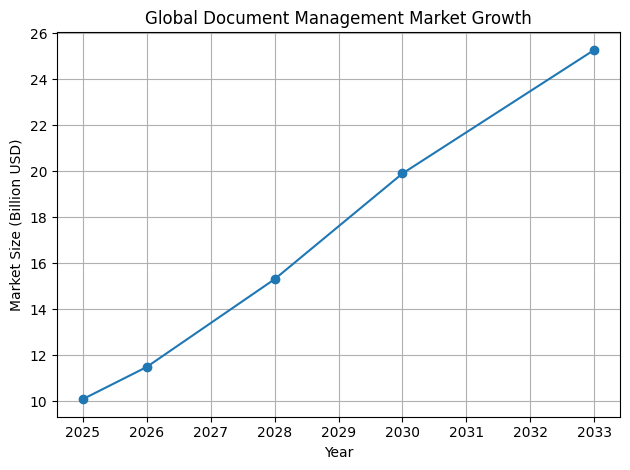
In 2026, document management software has become one of the most critical components of modern business infrastructure. Organizations across industries are generating unprecedented volumes of digital documents, ranging from contracts and financial records to compliance reports, employee files, customer communications, and operational data. Managing this rapidly expanding information ecosystem requires far more than traditional file storage solutions. As a result, document management systems have evolved into sophisticated platforms designed to organize, secure, automate, and analyze enterprise content at scale.


The rise of digital transformation initiatives over the past decade has dramatically accelerated the adoption of advanced document management technologies. Companies are no longer simply scanning paper files and storing them in digital folders. Instead, they are implementing intelligent document management platforms capable of automating workflows, extracting insights from unstructured data, and supporting regulatory compliance requirements. In this environment, selecting the right document management software has become a strategic decision that directly affects operational efficiency, data security, and organizational productivity.

The Evolution from Digital Storage to Intelligent Content Platforms
The concept of document management has undergone a profound transformation in recent years. Early document management systems focused primarily on digitizing physical paperwork and creating centralized repositories where files could be stored and retrieved. While this approach reduced paper usage and improved document accessibility, it still relied heavily on manual organization and human oversight.
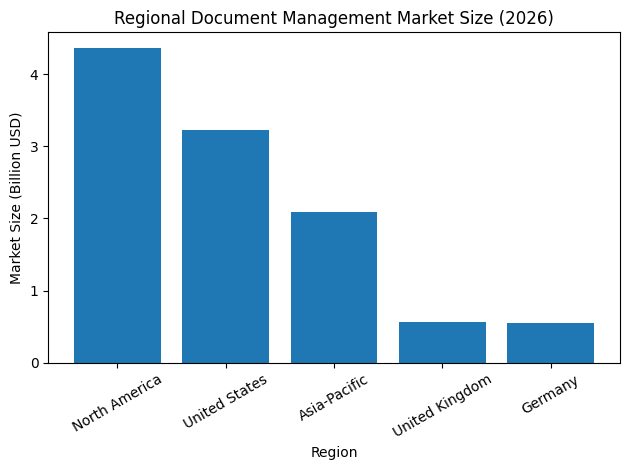
By 2026, document management platforms have evolved into intelligent content ecosystems powered by artificial intelligence, machine learning, and natural language processing technologies. These advanced capabilities allow systems to automatically classify documents, extract critical data, identify patterns, and route files through complex business workflows without manual intervention.

This technological evolution has enabled organizations to move beyond simple file storage toward fully automated document lifecycle management. Modern systems can monitor compliance requirements, enforce retention policies, and even detect operational inefficiencies within document workflows. As a result, document management software now functions as an active participant in business operations rather than a passive archive of digital files.

The Growing Importance of Enterprise Information Governance
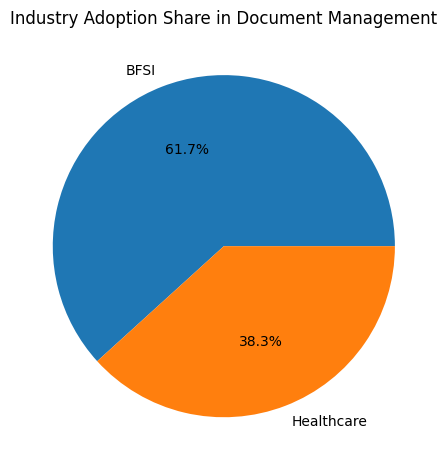
One of the key drivers behind the growing importance of document management software is the increasing complexity of regulatory compliance and data governance requirements. Organizations operating in sectors such as banking, healthcare, government, and legal services must adhere to strict regulations regarding how information is stored, accessed, and retained.
Failure to manage documents properly can lead to serious legal and financial consequences. Regulatory audits, data privacy laws, and industry-specific compliance frameworks require businesses to maintain accurate records, track document interactions, and protect sensitive information from unauthorized access.
Modern document management platforms address these challenges by incorporating robust governance features such as role-based access controls, automated retention policies, encrypted storage systems, and comprehensive audit trails. These capabilities allow organizations to maintain transparency and accountability while ensuring that critical documents remain secure and accessible when needed.
Cloud Technology and the Rise of Remote Collaboration
Another major factor influencing the growth of document management software in 2026 is the widespread adoption of cloud computing and remote work environments. The global shift toward hybrid and distributed workforces has created a strong demand for systems that allow employees to access documents securely from any location.
Cloud-based document management platforms provide the flexibility and scalability required to support modern workplace dynamics. Employees can collaborate on documents in real time, track changes through version control systems, and access files through secure cloud environments using desktops, tablets, or mobile devices.
These capabilities not only improve productivity but also enable organizations to maintain consistent document governance policies across geographically distributed teams. As businesses continue to operate in increasingly digital and decentralized environments, cloud-native document management solutions have become essential tools for maintaining operational continuity.
Artificial Intelligence and Automation in Document Workflows
Artificial intelligence is rapidly reshaping the capabilities of document management platforms. AI-powered tools can analyze document content, identify relevant data fields, and automate repetitive administrative tasks such as document indexing, classification, and routing.
Technologies such as optical character recognition and intelligent document processing allow systems to convert scanned documents into searchable digital data and automatically extract information such as invoice numbers, contract clauses, or financial details. This automation dramatically reduces the time required to process documents and minimizes the risk of human error.
In addition to automating document processing tasks, AI-driven systems can also provide predictive insights by analyzing patterns in document workflows. For example, modern document management platforms can detect approval bottlenecks, identify compliance risks, and suggest improvements to operational processes.
Why Businesses Need the Right Document Management System
Selecting the right document management software has become a strategic priority for organizations seeking to improve operational efficiency and remain competitive in a rapidly evolving digital economy. The best document management systems enable businesses to centralize information, automate workflows, enhance collaboration, and maintain regulatory compliance while protecting sensitive data.
However, the document management software market is highly competitive, with numerous vendors offering platforms designed for different industries, company sizes, and operational needs. Some systems prioritize collaboration and cloud accessibility, while others focus on enterprise governance, advanced automation, or open-source customization capabilities.
Understanding the strengths and unique features of each platform is essential for organizations that want to implement a solution aligned with their business objectives.
Overview of the Top Document Management Software in 2026
The document management software landscape in 2026 is shaped by a diverse range of platforms that address the needs of organizations at different stages of digital maturity. Some systems have emerged as industry leaders due to their advanced artificial intelligence capabilities and deep integration with enterprise software ecosystems. Others stand out for their user-friendly interfaces, affordability, or specialized workflow automation features.
This guide explores the top 10 document management software platforms in the world in 2026, highlighting their key capabilities, technological innovations, pricing structures, and real-world applications. Each platform has been selected based on its market influence, technological advancements, user adoption rates, and ability to support modern enterprise workflows.
By examining these leading solutions, businesses can gain valuable insights into how modern document management technologies are transforming the way organizations manage information, collaborate across teams, and drive operational efficiency.
Preparing for the Future of Intelligent Document Management
As organizations continue to generate larger volumes of digital information, the importance of advanced document management platforms will only continue to grow. The future of enterprise information management will increasingly rely on intelligent systems capable of organizing, analyzing, and securing data at scale.
Businesses that invest in modern document management software today are positioning themselves to handle the challenges of tomorrow’s digital economy. By adopting platforms that combine automation, artificial intelligence, cloud infrastructure, and strong governance capabilities, organizations can build resilient information systems that support long-term growth and innovation.
In the sections that follow, this comprehensive guide will explore the most influential document management software platforms shaping the global enterprise landscape in 2026. These solutions represent the cutting edge of digital document management and provide a clear glimpse into the future of intelligent enterprise content systems.
Before we venture further into this article, we would like to share who we are and what we do.
About 9cv9
9cv9 is a business tech startup based in Singapore and Asia, with a strong presence all over the world.
With over nine years of startup and business experience, and being highly involved in connecting with thousands of companies and startups, the 9cv9 team has listed some important learning points in this overview of the Top 10 Document Management Software To Try in 2026.
If you like to get your company listed in our top B2B software reviews, check out our world-class 9cv9 Media and PR service and pricing plans here.
Top 10 Document Management Software To Try in 2026
- MetaDoc
- Microsoft SharePoint
- DocuWare
- M-Files
- Google Workspace
- Laserfiche
- Box
- Zoho WorkDrive
- Alfresco
- Revver
1. MetaDoc
In the rapidly evolving enterprise software landscape of 2026, automation has become the defining principle behind next-generation document management systems. Organizations across industries increasingly require platforms that not only store documents but also actively participate in operational workflows, financial processes, and regulatory compliance management. Within this context, MetaDoc has emerged as a prominent example of the automation-first paradigm that is shaping the modern document management software market.
Developed by MetaOption, MetaDoc has established itself as a benchmark solution for enterprises seeking to eliminate manual document handling and transform document repositories into intelligent operational infrastructure. Rather than functioning as a static storage platform, the system is engineered to automate document capture, classification, indexing, and workflow routing through advanced artificial intelligence technologies.
The growing adoption of MetaDoc reflects a broader industry movement toward frictionless data management environments in which documents seamlessly interact with enterprise systems, reducing administrative overhead while accelerating business processes.
Automation-First Architecture in Enterprise Document Management
Traditional document management implementations often relied heavily on manual processes. Employees were typically responsible for uploading files, assigning metadata, organizing folders, and initiating workflow approvals. These tasks created inefficiencies, slowed business operations, and introduced the potential for human error.
MetaDoc addresses these challenges through a fully automated document lifecycle framework. The system continuously monitors incoming data streams, detects new documents as they enter the platform, and applies intelligent classification algorithms that automatically identify document types and extract relevant information.
This automation-first architecture removes the need for repetitive manual tasks and ensures that documents are immediately categorized, indexed, and routed into appropriate business workflows.
Core Automation Capabilities of MetaDoc
| Automation Capability | System Functionality | Operational Impact |
|---|---|---|
| AI Document Detection | Automatically recognizes incoming files | Eliminates manual document intake procedures |
| Intelligent Auto-Indexing | Extracts metadata and classifies documents | Improves document organization and retrieval |
| Automated Workflow Routing | Routes documents based on transaction triggers | Accelerates approval and operational processes |
| Data Extraction Engine | Captures structured information from documents | Reduces manual data entry |
| Continuous Document Monitoring | Tracks document lifecycle events | Enhances operational transparency |
Through these capabilities, MetaDoc enables organizations to create highly efficient document ecosystems in which information flows automatically between departments, systems, and workflows.
Deep Integration with Microsoft Enterprise Ecosystems
A key factor contributing to MetaDoc’s competitive advantage is its deep integration with Microsoft-centric enterprise platforms. Many organizations rely heavily on Microsoft Dynamics 365 and Microsoft Business Central as the backbone of their financial operations, supply chain management, and enterprise resource planning infrastructure.
MetaDoc is designed to integrate directly with these systems, enabling documents to interact dynamically with enterprise transactions. Instead of treating documents as external attachments, the platform embeds document processing directly into ERP workflows.
This integration allows documents to trigger operational actions automatically. For example, when an invoice is uploaded to MetaDoc, the system can automatically extract relevant financial data, validate it against ERP records, and initiate approval workflows within the organization.
ERP Integration Workflow Example
| Document Event | Automated System Action | Business Outcome |
|---|---|---|
| Invoice Upload | AI extracts invoice data fields | Document classified and stored |
| Transaction Matching | Data synchronized with Business Central ledger | Financial data verified |
| Workflow Initiation | Multi-step approval process automatically triggered | Finance team notified for review |
| Approval Completion | Approved invoice updates ERP financial records | Accounting entries completed automatically |
| Document Archiving | File stored with audit trail and version history | Compliance and reporting requirements satisfied |
By enabling documents to actively interact with business transactions, MetaDoc reduces operational delays and enhances process automation across finance and procurement departments.
MetaDoc Technical Specifications and System Features
| Feature Category | MetaDoc Specifications |
|---|---|
| Primary AI Feature | AI-driven document detection and auto-indexing |
| Integration Ecosystem | Microsoft Dynamics 365, Business Central, cloud applications |
| Deployment Options | Cloud deployment and hybrid infrastructure support |
| Security Framework | Role-based access control, encryption, audit trails |
| Workflow Automation | Transaction-triggered document routing and approvals |
| Target Market | Enterprises requiring deep ERP integration |
These technical capabilities position MetaDoc as a scalable solution for organizations undergoing digital transformation initiatives that require unified document and transaction management.
Natural Language Processing and Intelligent Document Retrieval
Another defining feature of modern document management systems in 2026 is the transition from keyword-based search toward intelligent semantic search capabilities. MetaDoc incorporates Natural Language Processing technology that allows users to retrieve documents through conversational queries rather than rigid keyword parameters.
Traditional document search systems required users to know specific file names, metadata fields, or folder locations. This often created inefficiencies when employees attempted to locate critical documents across large repositories.
MetaDoc addresses this challenge by enabling semantic search queries that interpret the meaning and context of user requests.
For example, a user might search for a document by requesting the most recent supplier contract that includes an amendment from a particular year. The system analyzes document content, version history, and metadata relationships to identify the correct file without requiring exact keyword matches.
Comparison of Search Technologies in Document Management Systems
| Search Method | Query Style Example | Retrieval Efficiency | User Experience |
|---|---|---|---|
| Keyword-Based Search | Supplier Contract 2025 Amendment | Medium | Requires specific file naming |
| Metadata Search | Contract Type: Supplier, Amendment Year: 2025 | Medium | Dependent on manual tagging |
| Natural Language Search | Find the latest supplier contract with the 2025 amendment | High | Intuitive conversational access |
This evolution toward natural language interaction reflects a broader trend in enterprise software design where systems prioritize usability, accessibility, and intelligent data discovery.
The Strategic Role of MetaDoc in the 2026 Document Management Market
The adoption of automation-first document management platforms like MetaDoc illustrates how enterprise organizations are redefining the role of document infrastructure. Rather than functioning solely as digital filing cabinets, modern systems operate as intelligent workflow engines that connect documents with operational processes, financial transactions, and compliance frameworks.
Organizations that deploy automation-driven document management solutions gain several strategic advantages, including improved operational efficiency, reduced administrative costs, faster decision-making processes, and stronger regulatory compliance capabilities.
As enterprises continue to pursue large-scale digital transformation initiatives, platforms like MetaDoc exemplify the direction of the document management industry. Intelligent automation, ERP integration, and natural language interaction are rapidly becoming standard capabilities for leading document management software systems worldwide in 2026.
2. Microsoft SharePoint
Within the global document management software ecosystem of 2026, Microsoft SharePoint continues to occupy a dominant position as one of the most widely adopted enterprise content management platforms. Its longevity and global adoption are largely driven by its deep integration with the broader Microsoft 365 productivity ecosystem. For organizations already operating within Microsoft environments, SharePoint naturally becomes the central platform for document storage, collaboration, and workflow orchestration.
Originally introduced as a collaboration and intranet platform, SharePoint has evolved over the years into a full-scale document management and enterprise content infrastructure system. In modern enterprise deployments, SharePoint acts as the foundational layer that connects document storage with communication platforms such as Microsoft Teams, email systems such as Outlook, and workflow automation tools such as Power Automate.
The result is an integrated digital workplace environment in which documents can be created, shared, reviewed, approved, and archived across multiple departments without leaving the Microsoft ecosystem.
Role of SharePoint in the Microsoft 365 Ecosystem
Microsoft SharePoint functions as the core document repository within the Microsoft productivity infrastructure. When employees collaborate on files through Microsoft Teams or share documents through Outlook, the underlying storage architecture is often powered by SharePoint libraries. This tight integration enables organizations to manage documents consistently while maintaining unified governance policies.
Because millions of enterprises worldwide rely on Microsoft 365, SharePoint frequently becomes the default document management platform for organizations seeking centralized content storage with built-in collaboration features.
SharePoint Ecosystem Integration Overview
| Microsoft Platform | Integration Role within SharePoint Ecosystem | Operational Benefit |
|---|---|---|
| Microsoft Teams | Real-time collaboration with document libraries | Enables team-based file sharing and editing |
| Microsoft Outlook | Email attachments linked to SharePoint storage | Improves version control and document tracking |
| Power Automate | Workflow automation and document approvals | Streamlines administrative processes |
| OneDrive for Business | Personal document storage synchronized with SharePoint | Provides seamless file access across devices |
| Microsoft Copilot | AI-powered productivity and document analysis | Enhances knowledge discovery and automation |
This integrated ecosystem approach is one of the primary reasons why SharePoint continues to maintain widespread enterprise adoption in 2026.
Enterprise Pricing and Service Tiers in 2026
In July 2026, Microsoft implemented a notable pricing update across its commercial productivity suites. These adjustments reflected the increasing value of built-in artificial intelligence capabilities, particularly the introduction of Copilot AI agents, as well as expanded enterprise security features.
For organizations evaluating document management solutions, the pricing of Microsoft 365 subscriptions directly influences SharePoint adoption because SharePoint functionality is embedded within these service tiers.
Microsoft Enterprise Subscription Pricing (2026)
| Microsoft Subscription Plan | Monthly Price per User (Annual Billing) | Percentage Change from Previous Pricing |
|---|---|---|
| Office 365 E1 | $10.00 | 0% |
| Office 365 E3 | $26.00 | 13% |
| Office 365 E5 | $41.00 | 8% |
| Microsoft 365 E3 | $39.00 | 8% |
| Microsoft 365 E5 | $60.00 | 5% |
| Business Basic | $7.00 | 16% |
| Business Standard | $14.00 | 12% |
Organizations that choose enterprise subscriptions without Microsoft Teams receive adjusted pricing structures. For example, Microsoft 365 E5 without Teams is priced at approximately $51.45 per user per month under the annual billing model.
These pricing updates also correspond with expanded enterprise capabilities, including enhanced AI-powered productivity tools and increased service limits for enterprise storage and collaboration environments.
SharePoint Embedded API and Storage Expansion
Another notable development in the SharePoint platform is the expansion of the SharePoint Embedded API infrastructure. This capability allows third-party applications and enterprise software vendors to use SharePoint’s storage and content management architecture as a backend infrastructure layer.
In 2026, the SharePoint Embedded API supports significantly larger storage capacities, enabling organizations to build enterprise-scale applications on top of SharePoint’s document infrastructure.
SharePoint Embedded API Technical Capabilities
| Feature Capability | Supported Limit (2026) | Enterprise Application Impact |
|---|---|---|
| Container Storage Capacity | Up to 25 TB per container | Supports large-scale document repositories |
| Maximum File Size | Up to 250 GB per file | Enables storage of large engineering or media files |
| File and Folder Count | Up to 30 million items per container | Supports complex enterprise document libraries |
| API Integration Access | Accessible through developer APIs | Enables integration with enterprise software |
These capabilities allow SharePoint to function as both a document management system and a scalable storage backbone for enterprise applications.
Technical Limits and Performance Architecture
To ensure stability across its multi-tenant cloud infrastructure, Microsoft enforces carefully designed performance limits and resource management frameworks within SharePoint environments. These limits are designed to maintain performance consistency across millions of users operating within the same cloud platform.
Enterprise tenants are typically allocated a base storage capacity of approximately 1 terabyte per licensed user. Depending on enterprise contracts and negotiated service agreements, storage allocations can expand to 5 terabytes or significantly more.
SharePoint Resource Allocation Limits (2026)
| Resource Category | Standard Limit |
|---|---|
| Storage per Container | 25 TB |
| Files and Folders per Container | 30 Million |
| Maximum Individual File Size | 250 GB |
| Requests per User | 600 resource units per minute |
| Requests per Application per Tenant | 12,000 resource units per minute |
These architectural limits help Microsoft maintain a balance between high performance and system stability across its global cloud infrastructure.
The Emergence of AI-Powered SharePoint Agents
One of the most transformative developments in SharePoint’s evolution is the introduction of SharePoint Agents. These AI-powered assistants leverage Microsoft Copilot technology and can be trained on specific document libraries to perform contextual tasks.
Instead of manually searching for documents or reviewing lengthy files, users can ask SharePoint Agents to analyze content and provide insights. These AI agents can answer questions about project documentation, summarize contracts, track project progress, and even assist with compliance monitoring.
SharePoint AI Agent Use Cases
| AI Agent Capability | Operational Function | Business Value |
|---|---|---|
| Document Q&A | Answers contextual questions from document libraries | Improves knowledge discovery |
| Contract Analysis | Reviews and summarizes legal documents | Accelerates legal review processes |
| Project Status Tracking | Extracts updates from project files | Improves project management visibility |
| Compliance Monitoring | Identifies regulatory clauses in documents | Supports governance and compliance programs |
By integrating artificial intelligence into document management workflows, Microsoft aims to transform SharePoint from a traditional storage platform into an intelligent enterprise knowledge system.
Administrative Complexity and Implementation Considerations
Despite its extensive capabilities and global adoption, SharePoint is not without challenges. Many enterprise users note that the platform can present a steep learning curve, particularly when organizations attempt to configure complex document libraries, metadata structures, and workflow automation processes.
Effective SharePoint deployment often requires dedicated IT expertise and governance planning. Organizations typically need specialized administrators to manage permissions, maintain information architecture, and optimize system performance.
SharePoint Implementation Challenges
| Implementation Challenge | Description | Organizational Requirement |
|---|---|---|
| Complex Information Architecture | Requires structured document libraries | Strategic planning and governance |
| Advanced Permission Management | Granular user access control | Skilled SharePoint administrators |
| Workflow Configuration | Automation processes require technical setup | IT and process automation specialists |
| Large-Scale Data Migration | Legacy document migration can be complex | Data migration planning and tools |
Despite these challenges, SharePoint continues to be regarded as the infrastructure standard for enterprise document management in 2026. Its combination of scalability, integration, security, and AI-driven innovation ensures that it remains a foundational platform within the global document management software market.
3. DocuWare
Within the global landscape of document management software in 2026, DocuWare has established itself as one of the most influential platforms for small-to-mid-sized businesses seeking to digitize operational workflows. While many enterprise-level document management systems are designed for large corporations with complex infrastructure, DocuWare has built its reputation by focusing specifically on organizations that require powerful automation capabilities without the complexity often associated with enterprise-scale platforms.
The system is widely recognized for enabling businesses to transition from paper-heavy operations to fully digital document ecosystems. Companies that previously relied on manual filing systems, physical approvals, and paper-based accounting processes increasingly adopt DocuWare to streamline document processing, automate workflows, and ensure regulatory compliance.
DocuWare’s market positioning in 2026 reflects a clear strategic focus on operational efficiency, ease of deployment, and intelligent automation tailored for mid-market organizations.
Market Positioning of DocuWare in the Global DMS Ecosystem
| Market Segment | Typical Organizational Profile | DocuWare Strategic Advantage |
|---|---|---|
| Small Businesses | Companies with limited IT infrastructure | Easy deployment and simplified administration |
| Mid-Market Enterprises | Organizations digitizing accounting and HR workflows | Strong automation and document indexing |
| Regulated Industries | Healthcare, finance, and legal sectors | Built-in compliance and audit capabilities |
| Distributed Workforces | Remote or hybrid organizations | Cloud-based document access and collaboration |
By addressing these operational needs, DocuWare has emerged as one of the most practical document management platforms for organizations seeking structured automation without large-scale enterprise IT complexity.
Intelligent Indexing and AI-Powered Document Processing
One of DocuWare’s defining technological features is its Intelligent Indexing system. This technology uses machine learning algorithms to analyze incoming documents and automatically extract relevant information such as invoice numbers, customer names, dates, or financial amounts.
Rather than requiring employees to manually tag documents or assign metadata, the system identifies key data fields directly from the document content. Once extracted, this data is used to categorize files, assign metadata attributes, and route documents into the appropriate business workflows.
This automated data extraction significantly reduces administrative workloads and accelerates document processing across departments such as accounting, procurement, and human resources.
Intelligent Indexing Workflow Process
| Document Processing Stage | Automated System Function | Operational Outcome |
|---|---|---|
| Document Capture | Files uploaded through scanner, email, or portal | Document enters centralized repository |
| Data Recognition | Machine learning extracts key fields | Metadata generated automatically |
| Document Classification | System categorizes file type | Organized storage and indexing |
| Workflow Assignment | Document routed to appropriate department | Approval or review process initiated |
| Archiving and Retrieval | File stored with searchable metadata | Fast retrieval and audit readiness |
This workflow automation capability allows businesses to handle large volumes of documents efficiently while minimizing manual intervention.
Subscription Models and Cloud-Based Deployment
DocuWare has adopted a subscription-based cloud delivery model that reflects the broader software-as-a-service trend across enterprise technology platforms. Cloud deployment eliminates the need for on-premise infrastructure, allowing organizations to access the platform through secure web environments.
Although the company does not publicly publish its complete pricing structure, industry market intelligence in 2026 suggests that DocuWare cloud subscriptions typically range between $25 and $100 per user per month depending on storage requirements, user volume, and enterprise features.
The platform offers multiple cloud tiers designed to accommodate different organizational sizes and operational needs.
DocuWare Cloud Service Tiers
| Cloud Tier | User Capacity | Storage Allocation | Primary Organizational Use Case |
|---|---|---|---|
| Cloud 40 | Up to 40 users | 500 GB | Small to mid-sized businesses |
| Cloud 100 | Up to 100 users | 1000 GB | Growing organizations with expanding workflows |
| Custom Enterprise | Unlimited users | Multi-terabyte storage | Large or global deployments |
This tiered subscription model allows organizations to scale their document management infrastructure as operational needs grow.
User Adoption and Market Feedback
DocuWare’s popularity among mid-market organizations is reflected in its strong adoption metrics and customer satisfaction scores. In 2026, approximately 38 percent of the platform’s users fall within the mid-market business segment, highlighting its focus on companies transitioning toward digital workflow automation.
Independent software review platforms consistently report strong satisfaction ratings for the platform’s usability and automation capabilities.
DocuWare Customer Satisfaction Metrics (2026)
| Evaluation Category | User Rating Score | Industry Average Comparison |
|---|---|---|
| Overall Customer Rating | 4.5 / 5 | Above industry average |
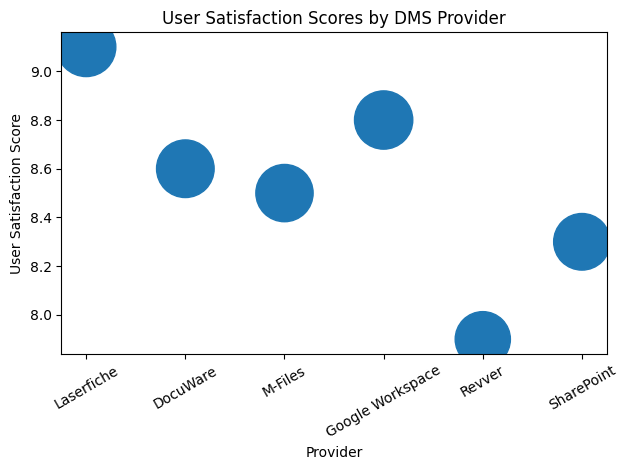
| Ease of Use | 8.6 / 10 | Strong usability rating |
| Ease of Administration | 6.7 / 10 | Slightly below industry average of 8.2 |
| Quality of Support | 7.9 / 10 | Below industry average of 8.4 |
While the platform receives high marks for usability and automation, some organizations report that system administration and technical support responsiveness could be further improved.
Advanced Workflow Automation Capabilities
Another area where DocuWare excels is workflow automation. The platform includes a visual workflow engine that allows organizations to design approval processes through drag-and-drop interfaces. This capability simplifies the configuration of complex operational workflows without requiring advanced programming expertise.
Companies can use the workflow engine to automate processes such as invoice approvals, contract reviews, procurement requests, and employee onboarding procedures.
Examples of Automated Business Workflows
| Business Process | Workflow Automation Example | Operational Benefit |
|---|---|---|
| Invoice Processing | Multi-stage approval for finance teams | Faster accounts payable cycles |
| Employee Onboarding | Document verification and HR approvals | Streamlined HR operations |
| Contract Management | Legal review and signature workflow | Improved contract lifecycle management |
| Procurement Requests | Department approval chain for purchasing | Controlled spending and compliance |
By enabling organizations to automate routine administrative processes, DocuWare helps reduce delays, eliminate paper-based approvals, and improve organizational transparency.
Compliance, Security, and Regulatory Protection
Organizations operating in regulated industries must maintain strict controls over document access, modification, and retention. DocuWare addresses these requirements through a comprehensive security and compliance framework.
The platform includes encryption protocols, granular user permission controls, and electronic signature integrations that support legally binding document approvals. Additionally, every document interaction is recorded within a tamper-proof audit trail to ensure transparency and accountability.
Compliance and Security Features
| Security Capability | System Function | Compliance Benefit |
|---|---|---|
| Advanced Encryption | Protects documents during storage and transfer | Safeguards sensitive information |
| Role-Based Access Control | Defines user permissions at multiple levels | Prevents unauthorized document access |
| Electronic Signatures | Integrates with digital signing platforms | Enables legally compliant approvals |
| Audit Trail Logging | Records all document interactions | Supports regulatory audits and governance |
These features make the platform particularly suitable for sectors such as healthcare, finance, and legal services, where strict document governance standards are required.
DocuWare’s Strategic Role in the Document Management Ecosystem
In the broader ecosystem of document management software solutions available in 2026, DocuWare occupies a distinct niche as a platform optimized for operational efficiency within small-to-mid-sized organizations. Its combination of intelligent document indexing, automated workflow management, cloud scalability, and regulatory compliance capabilities allows businesses to modernize document processes without the complexity associated with enterprise-scale systems.
For organizations transitioning from manual document handling to digital workflows, DocuWare provides a practical and scalable solution that bridges the gap between traditional paper processes and fully automated document ecosystems. As the demand for digital transformation continues to grow across industries, platforms like DocuWare remain critical enablers of efficient, compliant, and automated business operations.
4. M-Files
Within the evolving global document management software ecosystem of 2026, M-Files has established itself as one of the most distinctive and innovative platforms by fundamentally redefining how documents are organized and accessed. While many traditional document management systems rely on hierarchical folder structures to store files, M-Files introduced a metadata-driven architecture that prioritizes contextual information over file location.
This approach represents a significant conceptual shift in document management. Instead of requiring users to remember where documents are stored, the system organizes files according to their business context, such as the project they belong to, the client they relate to, or the contract category they represent. By focusing on what a document is rather than where it is located, M-Files addresses long-standing challenges associated with folder duplication, inconsistent naming conventions, and fragmented document storage.
As organizations increasingly adopt knowledge-driven operational models, the metadata-centric approach used by M-Files is gaining significant traction across industries such as professional services, legal firms, financial institutions, and engineering organizations.
The Context-First Architecture of M-Files
Traditional document repositories often rely on nested folder structures that can become increasingly complex as organizations grow. Over time, these folder hierarchies often lead to duplicated files, inconsistent storage locations, and difficulty retrieving documents when users are unsure where they were originally stored.
M-Files replaces this folder-centric model with a context-first architecture powered by metadata tagging. When a document enters the system, it is assigned metadata attributes that describe its characteristics, relationships, and purpose within the organization.
These attributes may include information such as document type, project name, customer identifier, contract status, or case number. Because documents are associated with structured metadata fields rather than physical folders, they can appear in multiple contextual views without creating duplicate files.
Comparison of Folder-Based vs Metadata-Driven Document Management
| Document Organization Model | Core Principle | Operational Outcome |
|---|---|---|
| Traditional Folder System | Files stored within hierarchical folders | Prone to duplication and inconsistent storage |
| Metadata-Driven Architecture | Documents classified through contextual attributes | Enables dynamic organization and faster retrieval |
This architecture allows employees to retrieve documents through multiple contextual pathways, significantly improving information accessibility across departments.
The Introduction of M-Files Aino AI Assistant
One of the most important technological advancements within the M-Files ecosystem in 2026 is the introduction of the M-Files Aino AI assistant. This artificial intelligence capability enhances the platform’s metadata architecture by enabling advanced knowledge discovery and automated data extraction across organizational document repositories.
M-Files Aino functions as an intelligent assistant that can analyze documents, identify relevant metadata, and generate contextual insights from across the organization’s entire information environment. Rather than limiting analysis to individual document libraries, Aino synthesizes data across multiple sources and systems.
Through this AI capability, organizations can automate document classification while also enabling employees to ask complex questions about stored content.
Core Capabilities of the M-Files Aino AI Assistant
| AI Capability | System Function | Business Benefit |
|---|---|---|
| Automated Metadata Extraction | AI identifies key attributes from document content | Reduces manual tagging and improves accuracy |
| Intelligent Tag Suggestions | Recommends contextual metadata fields | Improves classification consistency |
| Cross-Repository Knowledge Search | Aggregates insights from multiple document sources | Accelerates research and decision-making |
| Contextual Question Answering | Responds to user queries about document content | Enhances knowledge discovery across departments |
This integration of artificial intelligence with metadata management reflects a broader shift across the document management industry toward knowledge-centric enterprise systems.
M-Files Licensing Structure and Platform Capabilities
To accommodate different organizational requirements, M-Files provides a tiered licensing structure that expands functionality as companies scale their document management needs. Each license tier introduces additional features that support automation, analytics, and artificial intelligence.
M-Files License Tier Overview
| M-Files License Tier | Key Platform Capabilities |
|---|---|
| M-Files Base | Metadata architecture, automated workflows, version control |
| M-Files Team | Advanced search functionality, reporting tools, importing utilities |
| M-Files Business | Full M-Files Aino AI capabilities, advanced document comparison tools |
This structured licensing model enables organizations to begin with foundational document management capabilities and progressively adopt more advanced AI-driven knowledge management features.
Transition from AI Experiments to Measurable ROI
Across the enterprise technology landscape in 2026, organizations are increasingly moving beyond experimental artificial intelligence deployments toward solutions that deliver measurable operational value. Companies are now prioritizing AI technologies that produce clear return on investment through productivity improvements, workflow automation, and improved knowledge accessibility.
M-Files has positioned itself strongly within this shift by integrating artificial intelligence directly into the document management architecture rather than treating AI as an external add-on. Because documents are connected to structured business objects such as customers, projects, contracts, or case files, the platform can quickly retrieve relevant information even when users do not know the exact document name or storage location.
Contextual Object-Based Document Relationships
| Business Object Type | Example Contextual Link in M-Files | Information Retrieval Advantage |
|---|---|---|
| Customer Records | Documents linked to specific client profiles | Customer documentation retrieved instantly |
| Project Files | Documents associated with project identifiers | Centralized project knowledge base |
| Legal Contracts | Files linked to contract lifecycle stages | Simplified contract tracking and auditing |
| Case Management | Documents tied to case or ticket numbers | Faster investigation and case resolution |
This context-aware architecture allows organizations to significantly reduce the time required to locate critical documents and improves collaboration across departments.
User Experience and Market Satisfaction in 2026
M-Files consistently receives strong reviews from enterprise users, particularly for its powerful search capabilities and its ability to integrate seamlessly with Microsoft-based enterprise environments. Organizations that rely on Microsoft tools such as Outlook, SharePoint, and Teams often find M-Files complementary due to its ability to connect metadata structures with Microsoft collaboration workflows.
In software review platforms and industry benchmarks in 2026, M-Files demonstrates strong customer satisfaction metrics across multiple categories.
M-Files Customer Experience Metrics (2026)
| User Sentiment Metric | M-Files Score |
|---|---|
| Overall Star Rating (G2) | 4.4 / 5 |
| User Satisfaction Score (G2) | 8.5 / 10 |
| Ease of Use Rating | 4.4 / 5 |
| Customer Service Rating | 4.2 / 5 |
These ratings reflect positive user sentiment toward the platform’s usability and functionality.
Adoption Challenges and Organizational Change
Despite its strong capabilities, the metadata-driven approach of M-Files can require significant adjustments for organizations that have historically relied on folder-based file systems. Employees accustomed to navigating hierarchical folders may initially find the metadata approach unfamiliar.
As a result, some organizations report a learning curve during early adoption phases while employees transition toward context-based document discovery.
Common Adoption Considerations
| Adoption Challenge | Description | Organizational Response Strategy |
|---|---|---|
| Shift from Folder Navigation | Users must rely on metadata instead of folder paths | Provide user training and workflow demonstrations |
| Metadata Governance | Consistent tagging standards must be maintained | Establish enterprise metadata policies |
| System Configuration | Initial setup requires careful planning | Deploy with structured information architecture |
When properly implemented, however, organizations often find that the metadata-driven architecture dramatically improves long-term document accessibility and operational efficiency.
M-Files in the Future of Intelligent Document Management
Within the broader context of the top document management platforms in 2026, M-Files represents a forward-looking model that aligns with the future direction of enterprise knowledge systems. By combining metadata architecture, artificial intelligence, and contextual search capabilities, the platform enables organizations to move beyond static document storage toward dynamic knowledge management.
As businesses increasingly prioritize information accessibility, automation, and AI-powered insights, metadata-driven platforms like M-Files are likely to play a significant role in shaping the next generation of enterprise document management solutions.
5. Google Workspace
In the global document management and productivity software landscape of 2026, Google Workspace continues to hold a prominent position as one of the most widely adopted cloud-based collaboration platforms. Built around the infrastructure of Google Drive, the platform has become the preferred environment for organizations that prioritize real-time collaboration, cloud-native workflows, and intuitive user experiences.
Unlike traditional document management systems that emphasize structured file governance and enterprise document control, Google Workspace focuses on collaborative productivity and seamless information sharing. Its architecture allows teams to create, edit, store, and distribute documents simultaneously, enabling multiple users to work on the same file in real time from different locations.
This collaborative model has proven particularly attractive for startups, remote teams, digital agencies, and mid-sized organizations that require flexible document access without complex IT administration.
By 2026, Google Workspace has evolved into a powerful ecosystem that combines cloud storage, collaborative editing tools, and artificial intelligence capabilities integrated throughout its productivity applications.
Google Workspace Collaboration Ecosystem
| Google Application | Primary Function within Workspace Ecosystem | Operational Advantage |
|---|---|---|
| Google Drive | Centralized cloud storage for documents and files | Enables secure file access from any location |
| Google Docs | Real-time collaborative document editing | Supports simultaneous team collaboration |
| Google Sheets | Cloud-based spreadsheet management | Facilitates collaborative data analysis |
| Google Slides | Online presentation creation | Allows collaborative slide editing |
| Gmail | Enterprise email communication | Integrates messaging with document sharing |
| Google Meet | Video conferencing platform | Supports remote team collaboration |
This interconnected environment allows users to move seamlessly between document creation, communication, and collaboration without leaving the Google Workspace platform.
Integration of Gemini AI Across the Workspace Suite
A major development in the Google Workspace ecosystem in 2026 is the integration of Gemini AI across the entire productivity suite. Artificial intelligence capabilities are embedded directly within applications such as Google Docs, Sheets, Slides, and Gmail, allowing users to automate content creation, summarize documents, and generate insights from data.
Gemini AI assists users by suggesting text, summarizing long documents, drafting emails, and generating analytical insights within spreadsheets. These capabilities significantly reduce the time required to complete common knowledge-work tasks.
AI Capabilities within Google Workspace Applications
| Application | Gemini AI Capability | Productivity Impact |
|---|---|---|
| Google Docs | Automated writing assistance and document summaries | Accelerates content creation |
| Google Sheets | AI-powered data analysis and formula suggestions | Improves data interpretation |
| Google Slides | Automated presentation generation | Speeds up presentation design |
| Gmail | Smart email drafting and message summarization | Reduces communication workload |
| Google Drive | Intelligent document discovery and search | Enhances file retrieval across large repositories |
The integration of Gemini AI into everyday productivity workflows reflects a broader industry trend toward embedding artificial intelligence directly within collaboration platforms.
Google Workspace Pricing Structure in 2026
Google Workspace offers a multi-tiered pricing structure designed to accommodate organizations of different sizes, ranging from individual professionals and startups to large multinational enterprises. Each subscription tier provides different storage capacities, collaboration limits, and administrative capabilities.
The pricing model is structured around monthly subscriptions billed annually, allowing organizations to scale services based on operational requirements.
Google Workspace Business Plans (2026)
| Google Workspace Plan | Monthly Price (Annual Billing) | Storage per User | Maximum Meeting Participants |
|---|---|---|---|
| Business Starter | $7.00 | 30 GB | 100 |
| Business Standard | $14.00 | 2 TB | 150 |
| Business Plus | $22.00 | 5 TB | 500 |
| Enterprise | Custom Pricing | Unlimited* | 1000 |
Enterprise-level storage is expandable at Google’s discretion upon request, allowing organizations to scale their storage infrastructure as document volumes grow.
The Pooled Storage Model
One of the most distinctive aspects of Google Workspace’s storage architecture is its pooled storage model. Rather than allocating fixed storage limits to individual users, pooled storage allows organizations to aggregate the total storage capacity across all accounts.
This approach provides greater flexibility for companies where certain departments or teams require significantly more storage capacity than others.
Example of Pooled Storage Allocation
| Organization Size | Number of Users | Storage per User Plan | Total Available Storage | Practical Allocation Flexibility |
|---|---|---|---|---|
| Startup | 20 Users | 2 TB (Business Standard) | 40 TB Total | Heavy users can consume larger share |
| Mid-sized Company | 150 Users | 2 TB (Business Standard) | 300 TB Total | Storage distributed dynamically |
| Enterprise Team | 500 Users | Enterprise Plan | Unlimited Expansion | Storage scaled based on demand |
This pooled storage model helps organizations manage storage resources more efficiently and avoids underutilized storage allocations across user accounts.
Operational Advantages of Google Workspace
Google Workspace continues to receive widespread praise for its simplicity, performance, and seamless collaboration features. The platform’s clean interface and browser-based design allow users to begin working immediately without requiring extensive training or configuration.
Teams can collaborate in real time on documents, leave comments, track revisions, and maintain version histories automatically. These features are particularly valuable for organizations with distributed teams operating across different geographic regions.
Common Operational Advantages
| Operational Feature | Platform Function | Organizational Benefit |
|---|---|---|
| Real-Time Document Editing | Multiple users edit documents simultaneously | Improves team collaboration |
| Automatic Version Control | Tracks all document changes | Prevents accidental data loss |
| Cloud-Native Access | Files accessible through browser or mobile apps | Enables remote work environments |
| Seamless Application Integration | Docs, Sheets, Slides, Gmail interconnected | Reduces need for third-party tools |
These capabilities have made Google Workspace particularly attractive for startups, digital-first organizations, and fast-growing technology companies.
Operational Constraints and Limitations
Despite its widespread popularity, Google Workspace does have certain limitations when compared with specialized document management systems. Because the platform prioritizes collaboration over structured document governance, it lacks some of the advanced metadata classification and document lifecycle management features found in dedicated DMS platforms such as M-Files or enterprise records management systems.
Additionally, certain system constraints affect high-volume document operations.
Platform Limitations Reported by Enterprise Users
| Operational Limitation | System Constraint | Impact on Advanced Users |
|---|---|---|
| Daily Upload Limit | 750 GB upload cap per user per day | Restricts large-scale data migrations |
| Metadata Tagging | Limited tagging and classification capabilities | Less suitable for complex document governance |
| Advanced Compliance Controls | Fewer built-in records management features | Requires third-party compliance tools |
| Large Enterprise Workflows | Limited workflow automation compared to dedicated DMS | May require external automation systems |
These limitations do not significantly affect most small or mid-sized teams, but organizations with highly regulated document environments may require more specialized document management solutions.
Global Adoption and Market Reception
Despite these operational constraints, Google Workspace continues to maintain massive global adoption across industries. Its intuitive interface, strong collaboration capabilities, and integrated artificial intelligence features have positioned it as one of the most widely used productivity platforms in the world.
Software review platforms reflect strong user engagement and satisfaction, with tens of thousands of organizations actively using the platform for daily collaboration.
Google Workspace Market Adoption Indicators (2026)
| Market Indicator | Reported Metric |
|---|---|
| Global Review Volume (Capterra) | 17,425+ user reviews |
| Typical User Segments | Startups, mid-sized teams, remote organizations |
| Platform Strengths | Collaboration, usability, AI integration |
| Common Use Cases | Team document collaboration, remote work, cloud productivity |
As the demand for remote work infrastructure and cloud-based collaboration continues to grow, Google Workspace remains one of the most influential platforms shaping how organizations manage and collaborate on documents in the modern digital workplace.
Within the broader ecosystem of document management software in 2026, Google Workspace stands out as the platform that prioritizes collaborative efficiency and cloud-native productivity. While it may not replace specialized document governance platforms for complex enterprise environments, it continues to serve as a foundational collaboration hub for millions of organizations worldwide.
6. Laserfiche
Within the global document management and enterprise content management ecosystem of 2026, Laserfiche has established itself as one of the most powerful platforms for organizations that require strict governance, regulatory compliance, and enterprise-scale document automation. While many document management systems focus primarily on collaboration or workflow efficiency, Laserfiche emphasizes records management, compliance enforcement, and enterprise-grade process automation.
The platform is widely adopted in sectors where document governance is critical, including government agencies, higher education institutions, healthcare organizations, and financial services companies. These industries operate under strict regulatory frameworks that require precise document tracking, audit trails, lifecycle management, and compliance reporting.
Laserfiche’s ability to combine structured document governance with low-code automation tools has allowed it to become a leading Enterprise Content Management (ECM) solution for organizations managing large volumes of highly regulated information.
Industry Adoption of Laserfiche in 2026
| Industry Sector | Typical Use Case for Laserfiche | Operational Benefit |
|---|---|---|
| Public Sector | Government document archiving and compliance | Ensures regulatory transparency and accountability |
| Higher Education | Student records and administrative documentation | Simplifies academic record management |
| Financial Services | Loan processing and regulatory documentation | Strengthens financial compliance and audit trails |
| Healthcare | Medical documentation and patient record workflows | Improves governance of sensitive information |
| Corporate Enterprises | Contract management and records retention policies | Supports enterprise document lifecycle management |
By focusing on governance-heavy industries, Laserfiche has positioned itself as a leading platform for organizations that must maintain strict control over document access, retention, and auditing.
Low-Code Process Automation and Digital Workflow Design
One of Laserfiche’s most recognized strengths is its low-code automation environment, which allows organizations to build complex document workflows without requiring advanced programming expertise. Through visual design interfaces, administrators can configure document routing, approval processes, compliance checks, and automated notifications.
This low-code architecture allows business users, rather than only IT professionals, to design operational workflows that automate routine administrative tasks.
Examples of Automated Business Processes
| Business Process | Automation Workflow Example | Organizational Impact |
|---|---|---|
| Procurement Requests | Multi-department approval chain for purchasing | Reduces procurement cycle times |
| Contract Lifecycle Management | Automated contract review and approval workflows | Improves contract governance |
| Government Permit Processing | Digital submission and approval workflows | Enhances citizen service efficiency |
| Student Record Management | Automated document verification for admissions | Simplifies administrative processes |
These workflow capabilities allow organizations to eliminate paper-based processes while maintaining structured control over document access and approval procedures.
Laserfiche Pricing Structure and AI Capabilities in 2026
Laserfiche’s pricing strategy in 2026 reflects a tiered approach that allows organizations to scale their automation and artificial intelligence capabilities as their operational needs grow. Each plan expands document processing capacity, AI extraction capabilities, and governance features.
Laserfiche Cloud Subscription Plans (2026)
| Laserfiche Plan | Price per User per Month | Minimum User Requirement | AI Data Extraction Capacity |
|---|---|---|---|
| Cloud Starter | $53.00 | 1 User | Basic search capabilities |
| Cloud Professional | $73.00 | 5 Users | 50,000 AI extractions per year |
| Cloud Business | $93.00 | 25 Users | 2.5 million AI extractions per year |
The Cloud Business tier represents the most advanced offering within the platform and is typically deployed by large enterprises and government institutions that require large-scale document processing and governance infrastructure.
Enterprise Governance and Compliance Capabilities
Laserfiche distinguishes itself through its comprehensive governance features designed for highly regulated industries. The platform includes built-in records management policies, automated retention rules, legal hold capabilities, and extensive audit logging.
These capabilities allow organizations to enforce strict document lifecycle controls, ensuring that records are retained, archived, or deleted in accordance with regulatory requirements.
Enterprise Governance Features
| Governance Capability | Platform Function | Compliance Advantage |
|---|---|---|
| Legal Holds | Prevents deletion of critical documents during investigations | Supports legal compliance procedures |
| Lifecycle Management | Automates document retention and disposal rules | Ensures regulatory adherence |
| Detailed Audit Trails | Tracks all document interactions | Enables full transparency and accountability |
| Role-Based Access Control | Defines granular document permissions | Protects sensitive information |
| Records Management Policies | Classifies and manages official records | Meets regulatory recordkeeping standards |
These governance features make Laserfiche particularly valuable for organizations that must maintain strict compliance with data retention laws and regulatory oversight.
Artificial Intelligence Features and Knowledge Discovery
In addition to workflow automation and governance capabilities, Laserfiche has integrated several artificial intelligence features that assist users in navigating large document repositories. These AI capabilities help employees locate information quickly and summarize large volumes of content.
Two of the most notable AI tools introduced within the platform are Smart Chat and Document Summarization.
Laserfiche Artificial Intelligence Capabilities
| AI Feature | System Function | Business Value |
|---|---|---|
| Smart Chat | Conversational interface for document retrieval | Accelerates knowledge discovery |
| Document Summarization | Generates summaries of large documents | Saves time during document reviews |
| AI Data Extraction | Automatically captures structured data fields | Improves document indexing accuracy |
| Automated Metadata Tagging | Classifies documents based on content analysis | Enhances document organization |
Depending on the service tier selected, organizations may receive between 5,000 and 15,000 AI-powered responses per year through Smart Chat functionality.
User Satisfaction and Industry Recognition
Laserfiche has consistently received strong recognition from enterprise technology analysts and software review platforms. In particular, the platform has been acknowledged for its scalability and governance capabilities.
In 2025, Laserfiche received the designation of Gartner Customers’ Choice, reflecting high levels of satisfaction among enterprise users.
Laserfiche Customer Experience Metrics (2026)
| User Sentiment Metric | Reported Score |
|---|---|
| Overall Star Rating | 4.7 / 5 |
| Total Customer Ratings | 1,260 reviews |
| Industry Recognition | Gartner Customers’ Choice 2025 |
| Key Strengths Reported | Scalability, compliance controls, automation tools |
These ratings highlight the platform’s strong reputation among organizations that require robust governance and enterprise-scale document management capabilities.
Implementation Complexity and Administrative Requirements
Despite its powerful capabilities, Laserfiche deployments can require significant planning and technical expertise. Many organizations report that the system’s extensive configuration options and governance controls can make implementation more complex than lightweight document management platforms.
As a result, enterprises typically require dedicated administrators or implementation consultants to configure document schemas, workflow automation, and compliance policies.
Common Implementation Considerations
| Implementation Challenge | Description | Organizational Response Strategy |
|---|---|---|
| Complex System Configuration | Extensive governance and workflow settings | Deploy with experienced implementation teams |
| Specialized Administration | Requires trained administrators | Invest in technical training programs |
| Enterprise Data Migration | Migration from legacy systems can be resource intensive | Conduct phased migration strategies |
Although implementation may require significant preparation, organizations that successfully deploy the platform benefit from powerful automation and compliance management capabilities.
Agentic Automation and the Future of Laserfiche
To address the complexity of traditional enterprise automation systems, Laserfiche has introduced its Agentic Automation bundle. This initiative aims to simplify automation design by enabling non-technical users to create AI-powered agents capable of executing complex document workflows.
These AI agents can automate tasks that span multiple departments, such as compliance reviews, financial approvals, or contract lifecycle tracking.
Agentic Automation Capabilities
| Automation Feature | Operational Function | Organizational Benefit |
|---|---|---|
| AI Workflow Agents | Automate multi-step document processes | Reduces manual coordination between departments |
| Cross-Department Automation | Connects workflows across organizational units | Improves operational efficiency |
| Intelligent Task Routing | Directs documents to appropriate personnel | Speeds up decision-making processes |
By integrating artificial intelligence with low-code automation frameworks, Laserfiche is evolving into a platform capable of orchestrating large-scale enterprise document operations.
Laserfiche’s Strategic Role in the Enterprise Content Management Market
In the broader ecosystem of document management and enterprise content platforms in 2026, Laserfiche represents the governance-focused segment of the industry. While collaboration-driven platforms emphasize usability and automation-driven systems focus on operational efficiency, Laserfiche concentrates on structured records management, regulatory compliance, and enterprise document governance.
For organizations that must operate under strict regulatory frameworks and manage massive repositories of critical documentation, Laserfiche remains one of the most reliable and scalable enterprise content management solutions available. Its combination of low-code automation, artificial intelligence, and compliance infrastructure ensures that it continues to play a significant role in shaping the future of enterprise document governance.
7. Box
Within the global document management and enterprise content management landscape of 2026, Box has successfully transformed itself from a simple cloud file-sharing platform into a comprehensive enterprise content infrastructure known as the Content Cloud. This evolution reflects the broader shift in how organizations manage information, moving from basic file storage toward integrated content ecosystems that combine collaboration, governance, security, and automation.
Box is particularly favored by large enterprises that require both high-speed collaboration and strict control over data security, compliance, and governance. Unlike collaboration-focused platforms that emphasize user convenience alone, Box aims to balance accessibility with enterprise-grade administrative oversight. The platform enables organizations to share documents across global teams while maintaining strict compliance with industry regulations and security policies.
By positioning itself as a neutral content layer that integrates with hundreds of enterprise software applications, Box has become an important component of many organizations’ digital infrastructure.
The Content Cloud Architecture
The concept of the Content Cloud introduced by Box reflects a new architectural model for enterprise document management. Instead of limiting itself to document storage, the platform acts as a centralized layer where business content can be securely stored, shared, analyzed, and integrated with other enterprise applications.
This architecture allows organizations to connect multiple software tools to a single content repository while maintaining unified governance and security policies.
Box Content Cloud Ecosystem
| Platform Component | Core Function within Content Cloud | Organizational Value |
|---|---|---|
| Secure File Storage | Central repository for enterprise documents | Enables global document access |
| Collaboration Tools | File sharing, comments, and version control | Improves team productivity |
| Workflow Automation | Automated document routing and approvals | Streamlines business processes |
| AI Content Intelligence | AI-driven document analysis and summarization | Accelerates knowledge discovery |
| Integration Framework | Connects with third-party enterprise applications | Unifies enterprise software ecosystems |
Through this content-centric architecture, Box provides organizations with a unified platform capable of managing document lifecycles from creation to archiving.
Unlimited Storage Strategy and Pricing Structure
One of the most distinctive elements of Box’s strategy in 2026 is its unlimited storage model. Many document management platforms charge based on storage consumption, which can create financial friction for enterprises that manage massive volumes of digital content. Box addresses this challenge by offering unlimited storage across most of its business plans.
This approach allows organizations to expand their document repositories without worrying about escalating storage costs as their operations grow.
Box Business Plan Pricing (2026)
| Box Business Plan | Monthly Price per User | Storage Allocation | Maximum File Upload Limit |
|---|---|---|---|
| Business Starter | $5.00 | 100 GB | 2 GB |
| Business | $15.00 | Unlimited | 5 GB |
| Business Plus | $25.00 | Unlimited | 15 GB |
| Enterprise | $35.00 | Unlimited | 50 GB |
| Enterprise Plus | Custom Pricing | Unlimited | 500 GB |
The Enterprise Plus plan is designed for large organizations that require advanced governance, security controls, and large-scale document uploads. The significantly higher upload limits in this tier allow enterprises to manage large files such as engineering documents, video content, and data archives.
The Role of Box AI in Intelligent Content Management
Artificial intelligence has become a central component of the Box platform. The introduction of Box AI allows organizations to analyze document content more efficiently and extract insights from large repositories of files.
Rather than manually reading lengthy documents, users can rely on AI-powered features to summarize content, identify key terms, and generate new content based on existing documents. These capabilities are integrated directly within the Box interface, allowing users to interact with documents through conversational AI prompts.
Box AI Functional Capabilities
| AI Capability | System Function | Operational Benefit |
|---|---|---|
| Document Summarization | Generates summaries of long documents | Reduces time spent reviewing content |
| Key Term Extraction | Identifies important concepts within documents | Improves information discovery |
| AI Content Drafting | Generates new content using existing files | Accelerates document creation |
| Multi-Document Analysis | Synthesizes insights from multiple files | Enhances research and decision-making |
One of the most advanced capabilities available in the Enterprise Plus tier is Multi-Doc AI. This feature allows users to analyze entire document libraries simultaneously, identifying patterns and relationships across multiple files.
Governance and Compliance Infrastructure
Security and compliance are central pillars of the Box platform. Many organizations operate under strict regulatory requirements that mandate strong controls over document access, storage, and auditing. Box addresses these needs by incorporating advanced governance frameworks designed to meet international compliance standards.
The platform supports multiple regulatory frameworks including HIPAA for healthcare data protection, FedRAMP for U.S. government cloud security standards, and GDPR for European data privacy regulations.
Box Compliance and Security Framework
| Governance Feature | Platform Function | Compliance Benefit |
|---|---|---|
| Role-Based Access Control | Defines document permissions by user role | Prevents unauthorized data access |
| Encryption Protocols | Secures files during storage and transmission | Protects sensitive enterprise data |
| Audit Logging | Tracks all document interactions | Supports regulatory audits and investigations |
| Data Residency Controls | Allows regional storage configurations | Meets international privacy regulations |
| Legal Hold Management | Prevents deletion of documents during litigation | Ensures legal compliance |
These capabilities make Box particularly attractive for enterprises operating in regulated industries such as healthcare, finance, and government sectors.
Workflow Automation with Box Relay
In addition to storage and security capabilities, Box includes automation tools designed to streamline document workflows. One of the most important automation components is Box Relay, which allows organizations to automate approval processes and document routing without requiring complex programming.
Using visual workflow design tools, organizations can configure automated document processes such as contract approvals, financial authorizations, or HR onboarding procedures.
Box Workflow Automation Capabilities
| Workflow Function | Operational Process | Organizational Impact |
|---|---|---|
| Document Approval Routing | Multi-stage document review workflows | Accelerates decision-making |
| Automated Notifications | Alerts users when actions are required | Improves task management |
| Process Monitoring | Tracks workflow progress | Enhances operational visibility |
| Document Lifecycle Control | Automates archiving and retention policies | Supports governance and compliance |
These workflow automation capabilities enable organizations to reduce manual coordination and maintain structured control over document processing activities.
Electronic Signature Integration with Box Sign
Another critical component of the Box ecosystem is Box Sign, a built-in electronic signature tool that allows organizations to execute legally binding digital agreements without relying on external software platforms.
By integrating electronic signature capabilities directly within the document management environment, Box allows organizations to complete document lifecycles entirely within a single platform.
Digital Signature Use Cases
| Business Scenario | Signature Workflow Example | Operational Benefit |
|---|---|---|
| Contract Agreements | Legal contracts signed digitally | Accelerates contract execution |
| HR Documentation | Employee onboarding forms | Streamlines hiring processes |
| Vendor Agreements | Procurement contract approvals | Improves supplier onboarding |
| Compliance Documentation | Regulatory acknowledgement forms | Ensures audit readiness |
This integration eliminates the need to export documents to external signing platforms and simplifies the document approval process.
Global Integration Ecosystem
One of the most significant strengths of Box is its extensive integration ecosystem. With more than 1,500 native integrations, the platform can connect with a wide variety of enterprise applications across productivity, communication, customer relationship management, and workflow automation systems.
These integrations allow Box to function as a central content layer that connects multiple enterprise software platforms.
Box Enterprise Integration Ecosystem
| Integrated Platform Type | Example Integration Platforms | Operational Purpose |
|---|---|---|
| Communication Tools | Slack | Enables document sharing in team communications |
| CRM Systems | Salesforce | Connects documents with customer records |
| Productivity Suites | Microsoft 365 | Supports collaborative document editing |
| Project Management Tools | Asana and similar platforms | Links documents with project workflows |
By functioning as a neutral content hub, Box enables organizations to maintain consistent document governance while allowing employees to work within the applications they already use.
Box’s Strategic Role in the Document Management Ecosystem
In the broader document management landscape of 2026, Box represents a hybrid approach that combines collaboration, enterprise governance, and artificial intelligence within a single platform. Its Content Cloud architecture, unlimited storage strategy, and AI-powered document intelligence capabilities position it as one of the most versatile enterprise content platforms available.
For organizations seeking a secure, scalable, and highly integrated content infrastructure that connects multiple enterprise systems, Box continues to serve as one of the leading document management solutions shaping the future of enterprise information management.
8. Zoho WorkDrive
Within the expanding document management and collaboration software landscape of 2026, Zoho WorkDrive has emerged as a prominent platform designed specifically for growing teams and small-to-medium-sized enterprises seeking affordable yet capable content management solutions. As a central component of the Zoho Workplace ecosystem, WorkDrive combines cloud storage, collaborative document editing, and team-oriented file governance within a unified platform.
Unlike many enterprise-grade document management systems that emphasize complex compliance frameworks and large-scale infrastructure, Zoho WorkDrive focuses on simplicity, collaboration, and cost efficiency. This positioning has made it particularly attractive to startups, digital agencies, and expanding organizations that require structured document management without the high costs associated with enterprise platforms.
The platform integrates seamlessly with other applications within the Zoho ecosystem, including Zoho Mail, Zoho Writer, Zoho Sheet, and Zoho Projects, creating a cohesive digital workspace where teams can collaborate on documents, manage files, and coordinate tasks.
Zoho Workplace Ecosystem Integration
| Zoho Application | Role within the WorkDrive Ecosystem | Operational Advantage |
|---|---|---|
| Zoho WorkDrive | Centralized team file storage and management | Enables structured collaboration across teams |
| Zoho Writer | Cloud-based document editing | Supports real-time content collaboration |
| Zoho Sheet | Spreadsheet creation and analysis | Facilitates collaborative data management |
| Zoho Mail | Business email communication | Integrates document sharing within email flows |
| Zoho Projects | Project management and task coordination | Connects files with project activities |
This integrated environment allows teams to maintain document consistency while collaborating across multiple operational tools within the Zoho ecosystem.
Pricing Strategy and Storage Scalability
One of the defining characteristics of Zoho WorkDrive is its value-driven pricing structure. The platform is designed to provide accessible cloud storage and document collaboration features for businesses operating with limited IT budgets. Compared with many enterprise document management platforms, WorkDrive offers significantly lower subscription costs while maintaining a robust set of collaborative capabilities.
The pricing model scales according to storage capacity, user access, and upload limits, allowing organizations to expand their infrastructure as operational demands grow.
Zoho WorkDrive Subscription Tiers (2026)
| Zoho WorkDrive Tier | Annual Price per User per Month | Team Storage Capacity | Maximum File Upload Limit |
|---|---|---|---|
| Starter | $2.50 | 1 TB | 10 GB |
| Team | $4.50 | 3 TB | 50 GB |
| Business | $9.00 | 5 TB | 250 GB |
These pricing tiers make Zoho WorkDrive one of the most cost-effective document management platforms available for organizations seeking collaborative storage infrastructure.
Team Storage Expansion Model
The platform’s storage model is designed to scale alongside organizational growth. While the base plans are optimized for teams of up to ten users, Zoho allows organizations to expand storage capacity dynamically as new users are added to the system.
Each additional user contributes extra shared storage to the team’s overall repository, allowing organizations to gradually increase storage capacity without needing to upgrade entire plans.
Zoho WorkDrive Storage Expansion Structure
| Team Size Scenario | Base Storage Plan | Additional Storage per User | Potential Total Storage Capacity |
|---|---|---|---|
| Small Startup | 1 TB Starter Plan | 100 GB per additional user | Up to 2 TB with team expansion |
| Growing Team | 3 TB Team Plan | 200 GB per additional user | Up to 10 TB or more |
| Large Organization | 5 TB Business Plan | 500 GB per additional user | Up to 100 TB with full scaling |
This scalable storage model allows organizations to grow their document infrastructure gradually while maintaining predictable costs.
Team-Centric Document Management Architecture
A major differentiating feature of Zoho WorkDrive is its team-centered document ownership model. Unlike many traditional cloud storage systems where files are tied to individual user accounts, WorkDrive organizes documents around Team Folders that belong to the organization rather than specific employees.
This structure significantly reduces the risk of document loss when employees change roles, leave the company, or move between projects.
Team Folder Collaboration Model
| Workspace Component | System Function | Organizational Benefit |
|---|---|---|
| Team Folders | Shared document repositories owned by teams | Ensures continuity of document ownership |
| Department Libraries | Organized document spaces for specific departments | Improves document structure and accessibility |
| Permission Controls | Role-based access management for team members | Protects sensitive information |
| Activity Tracking | Monitors document edits and access history | Improves transparency and accountability |
This collaborative architecture ensures that files remain accessible to teams even when personnel changes occur.
Artificial Intelligence Search with Zia
Zoho WorkDrive incorporates artificial intelligence through its Zia Search capability. Zia functions as an AI-powered search assistant that enables users to locate information across the entire Zoho ecosystem.
Rather than searching individual applications separately, users can retrieve documents, messages, and data across multiple Zoho services through a single search interface.
AI Search Capabilities with Zia
| AI Feature | System Function | Productivity Benefit |
|---|---|---|
| Cross-Application Search | Retrieves data from all Zoho applications | Reduces time spent locating documents |
| Contextual Search | Interprets user queries semantically | Improves search accuracy |
| Document Content Indexing | Analyzes file content for searchable data | Enables deeper knowledge discovery |
| Smart File Suggestions | Recommends relevant documents during search | Enhances productivity during research tasks |
This AI-powered search functionality improves information accessibility and allows users to retrieve files quickly across large document repositories.
Document Version Control and Editing Protection
Another important feature of Zoho WorkDrive is its Check-in and Check-out functionality, which helps organizations manage collaborative editing without introducing document conflicts. In traditional cloud storage environments, multiple users editing the same file simultaneously can lead to version inconsistencies or accidental overwrites.
The Check-in and Check-out mechanism prevents these issues by allowing only one user to modify a document at a time while locking the file during editing.
Document Editing Control Mechanisms
| Feature Capability | System Function | Operational Advantage |
|---|---|---|
| Check-in / Check-out | Locks document during editing | Prevents version conflicts |
| Version History | Maintains record of document revisions | Enables rollback to earlier versions |
| File Activity Tracking | Records document edits and access events | Improves transparency and accountability |
| Comment Collaboration | Allows feedback without modifying original content | Supports structured review processes |
These features help maintain document integrity while allowing teams to collaborate effectively.
User Experience and Operational Efficiency
Zoho WorkDrive is widely praised for its intuitive user interface and minimal learning curve. Because the platform is designed primarily for team collaboration rather than enterprise compliance infrastructure, users can typically begin using the system without extensive training or technical configuration.
Organizations benefit from fast onboarding processes and simplified administrative controls.
Operational Advantages Reported by Teams
| Operational Feature | Platform Function | Business Value |
|---|---|---|
| Clean User Interface | Simple navigation and file management | Reduces onboarding time for new users |
| Integrated Collaboration | Documents linked with Zoho communication tools | Improves team productivity |
| Flexible Storage Scaling | Storage expands with team growth | Supports business scalability |
| Affordable Pricing | Lower subscription costs compared to enterprise DMS | Accessible for startups and SMEs |
These advantages make Zoho WorkDrive particularly attractive to companies that require reliable document collaboration without complex enterprise infrastructure.
Zoho WorkDrive’s Strategic Role in the Document Management Market
Within the broader ecosystem of document management software in 2026, Zoho WorkDrive occupies the value-focused segment of the market. While enterprise platforms emphasize regulatory governance and advanced automation capabilities, WorkDrive prioritizes collaborative productivity, affordability, and simplicity.
For small and mid-sized organizations seeking a reliable team-based document management solution integrated within a broader productivity ecosystem, Zoho WorkDrive represents one of the most accessible and scalable options available.
As digital collaboration continues to expand across distributed teams and global organizations, platforms like Zoho WorkDrive are expected to remain essential tools for companies that require efficient document sharing and team-based knowledge management without the financial and operational complexity of large enterprise systems.
9. Alfresco
Within the global document management and enterprise content management ecosystem of 2026, Alfresco occupies a distinctive position as one of the leading open-source document management platforms designed for large-scale enterprise environments. Operating under the Hyland software umbrella, Alfresco combines the flexibility of open-source architecture with enterprise-grade scalability, making it particularly attractive for organizations that require deep customization and full control over their information infrastructure.
Unlike many proprietary document management systems that operate within rigid software frameworks, Alfresco provides organizations with the ability to modify and extend the platform according to their unique operational requirements. This architectural flexibility has made the platform especially popular among sectors that demand highly tailored solutions, such as banking institutions, government agencies, and large multinational enterprises.
By offering both open-source and enterprise-supported deployment models, Alfresco enables organizations to build sophisticated document management infrastructures while maintaining control over system architecture, integrations, and deployment environments.
The Role of Open Source in Enterprise Content Management
Open-source software continues to play a significant role in enterprise technology environments where customization, transparency, and vendor independence are critical priorities. Alfresco exemplifies this model by providing a platform that allows organizations to adapt the system to complex operational workflows and regulatory environments.
Through its modular architecture and developer-friendly design, Alfresco supports extensive integration capabilities with other enterprise platforms such as customer relationship management systems, financial systems, and collaboration tools.
Advantages of Open Source Document Management Platforms
| Platform Advantage | Operational Description | Enterprise Benefit |
|---|---|---|
| Full Source Code Access | Organizations can modify and extend platform code | Enables deep customization |
| Integration Flexibility | Supports connections with multiple enterprise systems | Simplifies complex technology environments |
| Vendor Independence | Reduces reliance on proprietary software vendors | Provides long-term architectural control |
| Scalable Infrastructure | Supports large enterprise deployments | Enables high-volume document processing |
These advantages make Alfresco a strategic choice for organizations that require highly customizable document management environments.
Market Dynamics and Enterprise Adoption
Despite intense competition within the enterprise content management market, Alfresco continues to maintain a stable presence within the industry. In 2026, the platform accounts for approximately 1.3 percent of the global ECM market. While this share may appear modest compared with large proprietary platforms, Alfresco’s adoption is concentrated primarily within large enterprise organizations.
The majority of Alfresco deployments occur within companies that require extensive document governance, complex integrations, and long-term infrastructure flexibility.
Alfresco User Base by Organizational Size
| Organization Size Category | Percentage of Total Users |
|---|---|
| Large Enterprises (More than 1,000 employees) | 42% |
| Medium Organizations (50–1,000 employees) | 37% |
| Small Organizations (Fewer than 50 employees) | 21% |
This distribution highlights Alfresco’s strong presence within large-scale enterprises and institutions that require highly configurable document management systems.
Enterprise Deployment Characteristics
| Deployment Characteristic | Typical Implementation Environment | Operational Impact |
|---|---|---|
| Large Enterprise Deployments | Government agencies and financial institutions | Supports large-scale regulatory compliance |
| Hybrid Infrastructure | Combination of on-premise and cloud environments | Enables flexible data governance policies |
| Custom Application Integration | Integration with legacy systems and internal tools | Preserves existing IT infrastructure |
These deployment characteristics demonstrate why Alfresco is frequently selected by organizations managing complex technology ecosystems.
Strategic Platform Evolution in 2026
As enterprises increasingly focus on modernizing legacy infrastructure without disrupting critical operational systems, Alfresco has introduced new architectural capabilities designed to bridge traditional systems with modern digital platforms.
One of the most important developments in Alfresco’s 2026 roadmap is Hyland Content Federation. This capability allows organizations to connect multiple document repositories across different platforms without physically migrating the data.
Many large organizations operate multiple document management systems simultaneously, often due to legacy software deployments or acquisitions. Content Federation enables these organizations to create a unified access layer that allows employees to retrieve documents across different systems through a single interface.
Hyland Content Federation Capabilities
| Federation Capability | System Function | Enterprise Benefit |
|---|---|---|
| Cross-System Document Access | Retrieves documents across multiple platforms | Eliminates fragmented information silos |
| Unified Content Search | Enables centralized search across repositories | Improves knowledge discovery |
| Non-Disruptive Integration | Connects systems without migrating data | Reduces infrastructure migration risks |
| Legacy System Compatibility | Integrates with platforms such as SharePoint and OnBase | Extends lifespan of existing systems |
This approach is often described as modernization without rebuilding, allowing enterprises to evolve their information architecture while preserving existing investments.
Agentic Document Processing and Intelligent Automation
Another major development within the Alfresco ecosystem is the introduction of Agentic Document Processing. This innovation combines Intelligent Document Processing technology with an AI-driven Agent Builder framework that enables organizations to automate complex document-centric workflows.
Traditional document processing often requires extensive manual intervention to classify documents, extract data fields, and route files through approval processes. Alfresco’s Agentic Document Processing capabilities aim to automate these tasks through intelligent AI agents that can execute document workflows autonomously.
Agentic Document Processing Architecture
| Automation Capability | System Function | Operational Advantage |
|---|---|---|
| Intelligent Document Processing | Extracts structured data from unstructured documents | Reduces manual document processing workloads |
| Agent Builder Framework | Allows organizations to create AI workflow agents | Simplifies automation development |
| Document Classification AI | Automatically categorizes incoming files | Improves document organization |
| Workflow Orchestration | Routes documents across departments automatically | Accelerates operational processes |
These capabilities allow organizations to automate document-intensive operations such as loan processing, regulatory compliance documentation, and government permit approvals.
Integration with Legacy and Modern Enterprise Systems
One of Alfresco’s greatest strengths is its ability to integrate with both legacy infrastructure and modern enterprise software platforms. Many large organizations operate complex IT environments that include decades-old legacy systems alongside newer cloud applications.
Alfresco’s architecture allows it to serve as an intermediary content layer capable of bridging these systems without requiring a complete infrastructure overhaul.
Enterprise Integration Capabilities
| Integration Category | Example Connected Systems | Operational Benefit |
|---|---|---|
| Enterprise Content Systems | SharePoint, OnBase | Centralized document retrieval |
| Financial Platforms | ERP and banking systems | Connects financial records with documents |
| Government Systems | Public sector administrative platforms | Supports regulatory document management |
| Custom Enterprise Applications | Internal enterprise tools | Enables tailored business workflows |
This integration capability ensures that organizations can unify their information environments while maintaining compatibility with existing technology infrastructure.
Implementation Considerations and Technical Requirements
While Alfresco offers extensive flexibility and customization potential, its implementation typically requires strong technical expertise. Organizations often deploy dedicated development teams or system integrators to configure workflows, build custom integrations, and maintain the platform’s infrastructure.
As a result, Alfresco deployments are more common among organizations with advanced IT capabilities or specialized system integration partners.
Common Implementation Considerations
| Implementation Factor | Description | Organizational Requirement |
|---|---|---|
| Technical Customization | Platform designed for extensive configuration | Requires skilled developers or system integrators |
| Infrastructure Management | Often deployed in hybrid or on-premise environments | Requires internal IT infrastructure management |
| Workflow Development | Custom workflows created through development tools | Needs technical automation expertise |
While this complexity may present challenges for smaller organizations, enterprises with large IT departments often view Alfresco’s flexibility as a strategic advantage.
Alfresco’s Role in the Future of Enterprise Content Management
Within the broader document management software ecosystem in 2026, Alfresco represents the open-source and customization-focused segment of the market. Its architecture is designed for organizations that require full control over their document infrastructure, advanced integrations, and large-scale information governance.
Through innovations such as Hyland Content Federation and Agentic Document Processing, Alfresco is positioning itself as a modernization platform capable of bridging legacy enterprise systems with modern digital workflows.
For governments, financial institutions, and large enterprises operating complex information environments, Alfresco remains one of the most powerful and flexible enterprise content management platforms available in the global document management market.
10. Revver
Within the evolving document management software landscape of 2026, Revver has emerged as a specialized platform designed to automate document-heavy operational workflows. Formerly known as eFileCabinet, the platform has repositioned itself as a workflow-centric document management solution tailored specifically for industries that rely heavily on structured documentation processes.
Revver’s core philosophy centers on transforming document-dependent workflows into streamlined, automated processes that enhance operational efficiency and reduce administrative overhead. Instead of focusing solely on document storage, the platform emphasizes workflow automation, compliance management, and integrated electronic signature capabilities.
This focus has made Revver particularly attractive to professional services industries such as accounting firms, financial institutions, legal practices, and healthcare organizations. These sectors frequently handle sensitive documentation that must be securely managed, processed, and approved through structured workflows.
Revver Industry Adoption in 2026
| Industry Sector | Typical Document Workflows Managed by Revver | Operational Benefit |
|---|---|---|
| Accounting Firms | Tax documents, client records, audit files | Simplifies document-heavy financial workflows |
| Financial Services | Client onboarding, compliance forms, approvals | Improves regulatory document management |
| Healthcare | Patient documentation and administrative records | Strengthens privacy and compliance control |
| Legal Services | Case documentation and contract management | Enhances document tracking and approvals |
Through these targeted industry applications, Revver has positioned itself as a specialized workflow automation platform rather than a general-purpose document repository.
Workflow Automation and Smart Document Processing
One of Revver’s primary differentiators is its strong emphasis on document-driven automation. The platform enables organizations to convert repetitive document processes into automated workflows that guide documents through predefined operational stages.
For example, accounting firms can configure workflows that automatically route tax documents from client submission to internal review, approval, and final filing. Similarly, healthcare organizations can automate administrative documentation processes related to patient records and compliance reporting.
Revver Workflow Automation Capabilities
| Automation Capability | System Function | Operational Impact |
|---|---|---|
| Automated Document Routing | Routes documents through predefined workflow stages | Reduces manual coordination between teams |
| Task Management | Assigns document-related tasks to specific users | Improves operational accountability |
| Workflow Notifications | Alerts users when actions are required | Prevents process delays |
| Document Lifecycle Tracking | Monitors document progress across workflow stages | Enhances operational transparency |
These capabilities allow organizations to significantly reduce the time required to process document-intensive business operations.
Flexible Licensing with Mixed User Tiers
A distinctive feature of Revver’s 2026 pricing strategy is its flexible licensing structure that allows organizations to mix and match license tiers within a single account. This model enables companies to allocate different feature sets to users depending on their responsibilities and operational requirements.
For example, external clients may only require limited access to upload documents, while internal administrators may need full automation and compliance management capabilities. By supporting mixed license configurations, Revver allows organizations to optimize software costs while maintaining operational flexibility.
Revver Licensing Structure (2026)
| Revver License Type | Monthly Price per User | Core Features Included |
|---|---|---|
| Guest User | $0.00 | Document viewing and uploading for external clients |
| Basics | $25.00 | Document storage, file sharing, and organization |
| Essentials | $67.00 | Task management and AI-driven document extraction |
| Full | $87.00 | Administrative controls and full workflow automation |
This tiered licensing model allows companies to assign higher-level capabilities only to employees who require advanced workflow management tools.
Artificial Intelligence with Smart Extract
Artificial intelligence plays an important role in Revver’s document automation capabilities. The platform incorporates a feature known as Smart Extract, which uses AI-driven recognition technology to automatically capture key information from documents.
When documents are uploaded into the system, Smart Extract analyzes the file content and identifies relevant metadata fields such as dates, client names, invoice numbers, and other structured information. This data is then used to categorize documents and trigger automated workflows.
Smart Extract Automation Workflow
| Document Processing Stage | System Action | Business Benefit |
|---|---|---|
| Document Upload | File submitted through portal or internal system | Document enters automated processing pipeline |
| AI Data Extraction | Smart Extract identifies key data fields | Eliminates manual metadata entry |
| Document Classification | System assigns document category | Improves organization and searchability |
| Workflow Initiation | Document routed to relevant team or reviewer | Accelerates document processing |
| Secure Archiving | File stored with metadata and audit history | Ensures compliance and traceability |
Because Smart Extract is included in every Revver subscription tier, even basic users benefit from automated document classification and indexing.
Integrated Electronic Signatures
Revver also includes integrated electronic signature capabilities that allow organizations to finalize document approvals directly within the platform. This eliminates the need to export documents to external signing platforms, simplifying contract approvals and client onboarding processes.
Electronic signature integration supports legally binding digital approvals, making the platform particularly useful for industries that require secure authorization of documents.
Electronic Signature Use Cases
| Business Process | Signature Workflow Example | Operational Advantage |
|---|---|---|
| Client Agreements | Digital signing of contracts and service agreements | Accelerates contract finalization |
| Tax Document Approval | Client authorization of financial filings | Simplifies accounting workflows |
| Healthcare Consent Forms | Patient approval of administrative documentation | Enhances compliance and documentation control |
| Vendor Contracts | Supplier agreement approvals | Streamlines procurement processes |
These capabilities enable organizations to manage entire document lifecycles within a single platform.
User Satisfaction and Security Perception
Revver has received strong positive feedback from users in areas related to document security and privacy protection. Organizations operating in regulated industries frequently highlight the platform’s secure document handling capabilities and its ability to maintain strict confidentiality controls.
User reviews in 2026 indicate that approximately 91 percent of feedback reflects positive sentiment regarding the platform’s security features.
Revver Customer Experience Indicators (2026)
| User Sentiment Category | Reported Performance Indicator |
|---|---|
| Positive Security Reviews | 91% favorable feedback |
| Key Strengths Reported | Secure document storage, automation capabilities |
| Common Industry Users | Accounting firms, financial institutions, healthcare organizations |
These ratings reflect strong user confidence in Revver’s ability to manage sensitive business documentation.
Performance Challenges and Technical Limitations
Despite its strong automation capabilities, some user feedback in 2026 highlights operational challenges related to system performance and administrative complexity. Certain users report that the platform may experience technical disruptions or slower response times when processing extremely large document repositories.
In addition, the system’s administrative controls can sometimes be difficult to manage, particularly for organizations with large user bases and complex permission structures.
Reported Platform Limitations
| Operational Limitation | Description | Impact on Users |
|---|---|---|
| Technical Disruptions | Occasional system interruptions reported | Affects workflow continuity in some environments |
| Sluggish Performance | Slow processing with very large document files | Impacts heavy document processing tasks |
| User Management Complexity | Administrative configuration can be cumbersome | Requires careful system governance |
Approximately 72 percent of negative user feedback categories relate to technical disruptions or performance concerns, suggesting that the platform’s extensive automation capabilities can sometimes affect system responsiveness.
Revver’s Role in the Document Management Ecosystem
Within the broader ecosystem of document management platforms in 2026, Revver occupies the workflow automation niche focused on document-intensive professional services industries. While many document management systems emphasize collaboration or large-scale enterprise governance, Revver prioritizes operational automation and secure document processing.
For accounting firms, financial institutions, healthcare providers, and legal organizations that rely heavily on structured document workflows, Revver provides a targeted solution designed to simplify administrative processes and reduce manual document handling.
As organizations continue to seek software platforms capable of automating document-dependent workflows, Revver represents a specialized document management system designed to transform traditional document processing into streamlined, automated business operations.
Overview of the Global Document Management System Market in 2026
The global document management system market in 2026 represents a major inflection point in the evolution of enterprise information infrastructure. Organizations across industries are increasingly transitioning from traditional document storage solutions toward intelligent content ecosystems capable of automating document workflows, extracting business intelligence, and supporting predictive governance frameworks.
During the first quarter of 2026, the global market value for document management systems has reached approximately $11.48 billion. This reflects strong expansion from the 2025 valuation of $10.08 billion and represents a compound annual growth rate of approximately 13.9 percent. The growth trajectory is driven by the widespread digital transformation initiatives taking place across both private enterprises and public institutions.
However, the expansion of the document management industry is not solely the result of increased software adoption. The broader shift occurring in 2026 reflects a structural change in how organizations perceive and manage information. Companies are increasingly treating documents not merely as stored files but as strategic information assets that can generate insights, automate operations, and support decision-making processes.
The Evolution from Paperless Offices to Intelligent Content Ecosystems
During the early 2020s, enterprise technology discussions frequently focused on the concept of the paperless office. Organizations sought to digitize paper documents in order to reduce administrative overhead, improve accessibility, and minimize physical storage requirements.
By 2026, the industry has moved significantly beyond this initial phase of digitization. Modern document management systems now function as intelligent content ecosystems that combine artificial intelligence, automation, and advanced analytics to manage complex information environments.
These ecosystems allow organizations to process large volumes of unstructured data, extract actionable insights from documents, and automate business processes that were previously dependent on manual document handling.
Key Drivers of the Intelligent Content Ecosystem
| Market Driver | Operational Description | Strategic Impact |
|---|---|---|
| Growth of Unstructured Data | Increasing volumes of emails, reports, contracts, and forms | Necessitates advanced document indexing systems |
| Automation of Document Workflows | AI-driven routing and approval processes | Reduces administrative workloads |
| Remote and Hybrid Work Models | Distributed workforce access requirements | Requires cloud-based document accessibility |
| Compliance and Data Governance | Regulatory requirements for document retention and auditing | Drives adoption of structured records management |
| Artificial Intelligence Integration | AI-powered search and content analysis | Enhances enterprise knowledge discovery |
These forces collectively shape the modern document management ecosystem and explain why demand for intelligent document infrastructure continues to grow rapidly.
Long-Term Market Forecast and Growth Trajectory
Industry forecasts suggest that the strong growth of the document management system market will continue throughout the remainder of the decade. Current projections estimate that the market could reach approximately $25.28 billion by 2033.
Some industry analysts anticipate an even faster expansion, with the most aggressive projections estimating a compound annual growth rate approaching 16.59 percent during the forecast period.
Projected Global Document Management Market Growth
| Year | Estimated Market Value | Growth Trend |
|---|---|---|
| 2025 | $10.08 Billion | Baseline valuation |
| 2026 | $11.48 Billion | Strong growth driven by digital transformation |
| 2028 | $15.30 Billion (Projected) | Expansion of AI-driven document automation |
| 2030 | $19.90 Billion (Projected) | Enterprise-wide content intelligence adoption |
| 2033 | $25.28 Billion (Projected) | Mature intelligent content ecosystem market |
This trajectory reflects the increasing importance of structured information governance in a data-driven global economy.
Cloud-Native Architecture as the Dominant Deployment Model
One of the defining technological characteristics of the document management industry in 2026 is the dominance of cloud-native deployment architectures. Cloud infrastructure provides organizations with flexible storage capacity, scalable computing resources, and secure remote access to enterprise documents.
Cloud-based document management platforms have become the preferred deployment model for organizations seeking to support distributed workforces and reduce infrastructure costs associated with on-premise systems.
By 2026, cloud-based deployments are projected to account for approximately 65 percent of the total document management system market.
Comparison of Deployment Models in 2026
| Deployment Model | Market Share (Estimated) | Key Advantages |
|---|---|---|
| Cloud-Based DMS | 65% | Scalability, remote access, reduced infrastructure costs |
| Hybrid Systems | 22% | Balance between cloud flexibility and on-premise control |
| On-Premise DMS | 13% | Full data control for highly regulated industries |
The widespread adoption of cloud infrastructure reflects the increasing demand for flexible digital environments capable of supporting hybrid work arrangements and global collaboration.
Market Segmentation: Software Versus Services
The document management market in 2026 is primarily dominated by software platforms, which represent the core technological infrastructure enabling document storage, automation, and information retrieval. Software solutions account for approximately 76.12 percent of the total market share.
However, the services segment associated with document management systems is growing even faster than the software itself. Services such as system implementation, consulting, customization, and enterprise integration are expected to experience the highest growth rates within the industry.
Market Segment Distribution in 2026
| Market Segment | Share of Total Market | Growth Characteristics |
|---|---|---|
| Document Management Software | 76.12% | Core platform infrastructure |
| Implementation Services | 13.40% | System configuration and deployment |
| Consulting and Integration | 10.48% | Workflow design and system integration |
The services segment is projected to experience a compound annual growth rate of approximately 18.90 percent, reflecting the increasing complexity of enterprise document infrastructures and the need for expert implementation support.
Regional Market Dynamics
Geographic adoption patterns play an important role in shaping the global document management system market. Different regions are progressing at varying speeds depending on their digital transformation strategies, regulatory environments, and economic conditions.
North America continues to represent the largest revenue-generating region for document management solutions. In 2025, the region accounted for approximately 43.70 percent of the global market share. This dominance is largely due to the early adoption of enterprise software platforms and the presence of many major technology providers headquartered within the region.
Regional Market Share Distribution
| Geographic Region | Market Share | Key Growth Factors |
|---|---|---|
| North America | 43.70% | Early adoption and strong technology ecosystem |
| Europe | 27.50% | Strict regulatory frameworks and compliance requirements |
| Asia-Pacific | Rapidly growing | Government digitalization initiatives |
| Latin America | Emerging market | Expanding SME technology adoption |
| Middle East and Africa | Developing | Public sector digital transformation programs |
While North America remains the largest market, the Asia-Pacific region has emerged as the fastest-growing geographic segment.
Asia-Pacific Market Expansion
The Asia-Pacific region is currently experiencing the most rapid expansion in document management system adoption. Industry forecasts estimate that the region will achieve a compound annual growth rate of approximately 18.20 percent over the coming years.
Several factors are contributing to this rapid expansion, including large-scale government digitalization initiatives, increasing internet infrastructure, and the growing adoption of enterprise software among small and medium-sized businesses.
Asia-Pacific Growth Drivers
| Growth Factor | Description | Market Impact |
|---|---|---|
| Government Digitalization Programs | Public sector initiatives to digitize administrative processes | Increases demand for secure document systems |
| SME Technology Adoption | Growing number of small businesses implementing cloud software | Expands addressable market |
| Expanding Digital Infrastructure | Improvements in connectivity and cloud services | Enables broader technology adoption |
| Cross-Border Business Growth | International trade and outsourcing operations | Requires standardized document management systems |
These developments position the Asia-Pacific region as one of the most strategically important growth areas for document management software providers in the coming decade.
The Strategic Importance of Document Management Systems
As enterprises generate increasingly large volumes of digital information, document management systems are becoming essential components of modern business infrastructure. Organizations are no longer implementing document management platforms solely to store files but to create structured, intelligent information environments that support automation, compliance, and operational efficiency.
The transition from basic document storage toward predictive information governance represents one of the most important technological shifts shaping enterprise software in 2026. Businesses that successfully implement advanced document management systems gain improved data accessibility, enhanced regulatory compliance capabilities, and greater operational agility.
Within this rapidly evolving technological landscape, the leading document management platforms of 2026 are those that combine automation, artificial intelligence, and enterprise integration to create intelligent content ecosystems capable of supporting the future of digital business operations.
The Technological Paradigm of 2026: From Document Storage to Intelligent Content Systems
The document management systems of 2026 are characterized by a significant technological transformation that extends far beyond traditional file storage capabilities. Modern platforms now incorporate advanced technologies such as Artificial Intelligence, Machine Learning, and Natural Language Processing to create intelligent content infrastructures capable of automating document processing and extracting actionable insights from large volumes of information.
Earlier generations of document management software primarily served as digital filing cabinets that stored scanned documents or uploaded files. In contrast, the systems deployed in 2026 function as intelligent data environments that actively analyze content, identify patterns, automate workflows, and support predictive decision-making processes.
This shift from storage-centric architecture toward intelligence-driven platforms reflects a broader evolution in enterprise information management. Organizations now rely on document management systems not only to archive files but also to transform documents into structured data assets that can drive operational efficiency and strategic insights.
Artificial Intelligence as the Core Engine of Modern Document Systems
Artificial Intelligence has become the central technological engine powering modern document management solutions. Through the integration of machine learning algorithms and natural language processing models, document management platforms can now interpret document content, identify key information fields, and automate complex business workflows.
Machine learning models continuously analyze document interactions and user behavior, allowing systems to improve classification accuracy and recommend relevant documents during searches. Natural language processing enables systems to interpret user queries in conversational language, making document retrieval more intuitive and efficient.
These capabilities allow document repositories to evolve into intelligent knowledge platforms that actively support enterprise operations.
Key AI Technologies Integrated into Document Management Systems
| Technology Component | Operational Function | Organizational Impact |
|---|---|---|
| Artificial Intelligence | Automates document classification and data extraction | Reduces manual document processing |
| Machine Learning | Learns from document patterns and user interactions | Improves indexing accuracy and workflow automation |
| Natural Language Processing | Enables conversational document search and analysis | Enhances knowledge discovery and accessibility |
| Predictive Analytics | Identifies patterns and potential operational risks | Supports proactive decision-making |
Through these technologies, modern document management platforms function as intelligent systems capable of supporting real-time information analysis and automated document governance.
Predictive Analytics and Decision-Making Acceleration
One of the most transformative capabilities introduced into document management platforms in 2026 is predictive analytics. Instead of merely organizing documents for later retrieval, modern systems analyze content patterns and workflow activity to generate predictive insights that help organizations optimize operations.
Predictive analytics engines can detect negotiation delays in contract workflows, identify potential compliance risks within regulatory documents, and highlight operational inefficiencies within document approval processes. By analyzing historical workflow patterns, these systems can recommend process improvements and flag anomalies before they escalate into larger operational problems.
Industry research indicates that predictive decision support integrated within document management systems has increased organizational decision-making speeds by approximately 45 percent.
Predictive Intelligence Capabilities in Document Management Systems
| Predictive Function | System Capability | Operational Benefit |
|---|---|---|
| Workflow Bottleneck Detection | Identifies delays in document approval chains | Accelerates business process completion |
| Compliance Risk Monitoring | Flags regulatory inconsistencies in documents | Prevents potential legal or regulatory violations |
| Contract Analysis | Evaluates negotiation patterns and contract clauses | Supports faster legal review processes |
| Process Optimization | Suggests improvements to document workflows | Enhances operational efficiency |
These predictive features enable document repositories to function as insight engines rather than passive storage environments.
Accuracy Improvements in Document Processing Technologies
Another major technological advancement within document management systems is the dramatic improvement in document recognition and processing accuracy. Technologies such as Optical Character Recognition and Intelligent Document Processing have reached levels of precision that allow organizations to automate large volumes of document handling with minimal human intervention.
Optical Character Recognition converts scanned documents into machine-readable text, while Intelligent Document Processing systems analyze this text to extract structured information such as names, dates, invoice numbers, and financial values.
By 2026, leading document management platforms achieve extremely high levels of accuracy when processing printed documents.
Industry Accuracy Benchmarks for Document Processing (2026)
| Technical Metric | Industry Standard (2026) | Performance Impact |
|---|---|---|
| Character Error Rate (CER) | Less than 1 percent | Minimal need for manual corrections |
| Word Error Rate (WER) | Less than 2 percent | Enables reliable semantic document search |
| Standard OCR Accuracy | 98 to 99 percent | Suitable for high-volume document automation |
| Advanced AI Effectiveness | Approximately 99.9 percent | Appropriate for legal and financial documentation |
| Decision-Making Efficiency | 45 percent improvement | Faster operational decision cycles |
These technical benchmarks represent a significant improvement compared with earlier document recognition technologies, which often required extensive manual review.
Reduction of Manual Document Review Workloads
The high accuracy of modern document processing technologies has dramatically reduced the need for manual document validation. In earlier document processing environments, organizations often needed human reviewers to verify a large percentage of processed documents due to recognition errors.
By 2026, exception review rates have declined substantially due to improvements in OCR and AI-driven document analysis.
Comparison of Document Review Requirements
| Processing Environment | Average Error Frequency | Manual Review Requirement |
|---|---|---|
| Early OCR Systems | Approximately 1 error per 20 documents | Frequent manual verification |
| Modern AI-Driven Systems | Approximately 1 error per 100 documents | Minimal exception review |
This improvement allows organizations to automate document-intensive workflows such as invoice processing, contract analysis, and compliance reporting with much greater efficiency.
Industry Adoption Across Key Economic Sectors
The rapid advancement of intelligent document management technologies has resulted in widespread adoption across multiple industries. Certain sectors have become particularly dependent on advanced document management platforms due to the large volume of documentation they process and the regulatory requirements governing their operations.
The banking, financial services, and insurance sector currently represents the largest share of the document management system market. These institutions must manage vast quantities of financial records, compliance reports, and client documentation while adhering to strict regulatory frameworks.
Industry Market Share by Sector
| Industry Sector | Estimated Market Share | Key Drivers of Adoption |
|---|---|---|
| Banking, Financial Services, and Insurance | 26% to 28.5% | Regulatory compliance and transaction documentation |
| Government and Public Sector | Growing adoption | Digital governance and record digitization |
| Healthcare | Fastest-growing sector | Electronic medical record digitization |
| Legal and Professional Services | High adoption | Contract and case documentation management |
The healthcare sector, in particular, is experiencing rapid expansion in document management system adoption.
Healthcare Sector Growth Forecast
Healthcare organizations are undergoing a large-scale transition toward digital record management. Hospitals and medical institutions are digitizing decades of paper-based records while simultaneously implementing automated systems for patient onboarding and regulatory documentation.
Industry projections estimate that the healthcare segment of the document management market will grow at a compound annual growth rate between approximately 16.78 percent and 17 percent between 2026 and 2033.
Healthcare Document Management Growth Drivers
| Growth Driver | Description | Operational Impact |
|---|---|---|
| Historical Record Digitization | Conversion of legacy patient records into digital systems | Improves accessibility and compliance |
| Patient Onboarding Automation | Digital processing of medical forms and consent documents | Accelerates hospital administrative workflows |
| Regulatory Compliance Requirements | Strict healthcare data management regulations | Drives adoption of secure document platforms |
| Telehealth Expansion | Remote patient services requiring digital documentation | Increases demand for cloud-based document systems |
These developments highlight how document management technology has become an essential infrastructure component across multiple industries.
The Emergence of Intelligent Information Governance
As document volumes continue to expand and organizations generate increasingly complex data environments, document management platforms are evolving into intelligent information governance systems. Rather than merely storing documents, modern platforms provide advanced automation, predictive insights, and compliance monitoring that allow organizations to manage information strategically.
The transformation from simple document repositories to intelligent content ecosystems represents one of the most significant technological shifts within enterprise software in 2026. Organizations that adopt these advanced systems gain improved operational efficiency, stronger compliance frameworks, and faster access to critical business knowledge.
In this new paradigm, document management systems function as strategic knowledge infrastructure that enables organizations to convert unstructured information into actionable intelligence.
Comparative Market Analysis and 2026 Performance Metrics
The document management system market in 2026 is increasingly defined by what analysts describe as a “flight to intelligence.” Organizations are no longer evaluating platforms solely on their ability to store documents or provide basic file sharing. Instead, businesses now demand systems capable of actively participating in operational processes through automation, artificial intelligence, and predictive analytics.
This shift reflects a broader transformation in enterprise software expectations. Modern document management platforms must now support automated workflows, advanced document recognition, real-time collaboration, and compliance monitoring. As a result, organizations are prioritizing platforms that integrate seamlessly with enterprise applications and provide measurable operational improvements.
These evolving requirements have significantly influenced market segmentation patterns. The software segment remains the dominant category within the document management industry, accounting for more than 76 percent of total market share. However, the services segment is expanding at a faster rate as organizations increasingly require consulting, integration support, and customization services to deploy advanced AI-enabled document management systems.
Document Management Market Segmentation in 2026
| Market Segment | Share of Total Market | Growth Trend | Strategic Importance |
|---|---|---|---|
| Document Management Software | 76%+ | Stable and dominant segment | Core technology infrastructure |
| Implementation Services | Rapid growth | Increasing demand for enterprise deployments | Supports large-scale system integration |
| Consulting and AI Integration | Fastest-growing niche | Driven by complexity of AI-enabled systems | Enables automation and advanced analytics |
As document management systems evolve into intelligent enterprise platforms, organizations increasingly rely on specialized services to configure workflows, integrate AI capabilities, and manage large-scale deployments.
Global Market Size and Regional Adoption Patterns
By 2026, the global document management system market has reached an estimated valuation of $11.48 billion. While North America continues to dominate overall revenue generation, several emerging markets are experiencing faster growth rates as digital transformation initiatives accelerate across industries.
North America remains the largest regional market due to early adoption cycles, mature enterprise software ecosystems, and the presence of many major technology providers. Within this region, the United States represents the single largest national market, driven by strong demand from both private sector enterprises and government institutions.
However, the Asia-Pacific region is currently experiencing the fastest growth. Many organizations in this region are bypassing legacy infrastructure and adopting modern cloud-native document management systems directly. This leapfrogging phenomenon allows companies to implement advanced systems without needing to migrate from outdated platforms.
Regional Market Performance in 2026
| Region or Country | Estimated Market Size (2026) | Dominant Industry Vertical |
|---|---|---|
| North America (Total) | $4.36 Billion | Banking, Financial Services, Healthcare |
| United States | $3.23 Billion | Technology and Government |
| Asia-Pacific | $2.09 Billion | Manufacturing and Retail |
| United Kingdom | $0.56 Billion | Financial Services |
| Germany | $0.55 Billion | Manufacturing |
These regional differences highlight how industry structure, regulatory requirements, and technological infrastructure influence document management adoption patterns.
Regional Drivers of Document Management Adoption
| Region | Key Growth Driver | Impact on Market Expansion |
|---|---|---|
| North America | Mature enterprise technology adoption | Sustains dominant global revenue share |
| Asia-Pacific | Rapid digital transformation in SMEs | Drives fastest regional growth rates |
| Europe | Strict regulatory compliance requirements | Encourages adoption of secure document systems |
| Emerging Markets | Increasing internet and cloud infrastructure | Expands accessibility of cloud-based solutions |
These trends demonstrate how document management systems are becoming critical components of digital infrastructure across multiple geographic markets.
User Satisfaction and Platform Evaluation Metrics
Another important factor influencing the competitive landscape of the document management industry is user satisfaction. Software review platforms and enterprise benchmarking tools indicate that user experience plays a crucial role in determining platform adoption and long-term success.
In 2026, two key factors consistently correlate with higher satisfaction scores: ease of use and mobile accessibility. Platforms that offer intuitive interfaces, simplified navigation, and responsive mobile applications tend to receive higher ratings during early adoption phases.
Solutions such as Zoho WorkDrive and Google Workspace frequently receive strong user feedback due to their clean interface design and minimal onboarding complexity. These platforms allow teams to begin collaborating quickly without requiring extensive technical training.
However, enterprise platforms such as Microsoft SharePoint and Laserfiche tend to receive higher ratings in categories related to system capability, scalability, and stability once organizations have fully implemented and configured the platforms.
User Satisfaction Metrics Across Leading DMS Providers
| DMS Provider | G2 Rating (2026) | User Satisfaction Score (1–10) |
|---|---|---|
| Laserfiche | 4.7 | 9.1 |
| DocuWare | 4.5 | 8.6 |
| M-Files | 4.4 | 8.5 |
| Google Workspace | 4.6 | 8.8 |
| Revver | 4.3 | 7.9 |
| Microsoft SharePoint | 4.0 | 8.3 |
These satisfaction scores reflect how different platforms prioritize different aspects of the user experience.
User Experience versus Enterprise Capability
| Platform Category | Strengths Reported by Users | Typical Organizational Preference |
|---|---|---|
| Collaboration-Focused Platforms | Ease of use and fast onboarding | Startups and mid-sized teams |
| Enterprise Governance Platforms | Advanced features and regulatory compliance | Large enterprises and government organizations |
| Workflow Automation Platforms | Operational efficiency and automation tools | Document-heavy professional services sectors |
This differentiation highlights the strategic decisions organizations must make when selecting document management platforms.
Organizations seeking rapid deployment and intuitive collaboration tools may prioritize usability, while enterprises with strict regulatory requirements often prioritize scalability, governance capabilities, and advanced automation features.
The Competitive Landscape of Intelligent Document Management
As the document management market continues to evolve, the most successful platforms are those capable of combining usability with intelligent automation and enterprise integration capabilities. Organizations increasingly expect their document management systems to function as operational platforms that actively support business processes rather than simply storing files.
This shift toward intelligent document ecosystems is reshaping competitive dynamics across the industry. Vendors that integrate artificial intelligence, predictive analytics, and workflow automation into their platforms are increasingly viewed as strategic technology partners rather than simple software providers.
In 2026, the document management industry is defined not only by technological capabilities but also by how effectively platforms balance usability, automation, and enterprise governance. Systems that successfully deliver this combination are positioned to lead the next generation of intelligent enterprise content management.
The Future of Document Management in the Era of Intelligent Enterprise Systems
The document management landscape in 2026 clearly demonstrates that document management systems have evolved far beyond their original role as back-office administrative utilities. What were once simple repositories designed primarily for file storage and retrieval have now become critical components of enterprise technology infrastructure.
Modern document management platforms now function as strategic information systems capable of supporting operational workflows, regulatory governance, and predictive decision-making. The leading platforms discussed throughout this analysis are no longer competing primarily on storage capacity or file-sharing functionality. Instead, competition now centers on the sophistication of artificial intelligence capabilities, the depth of system integrations, and the ability to automate complex enterprise processes.
As organizations continue to expand their digital transformation initiatives, document management systems are increasingly positioned as foundational platforms within broader enterprise information ecosystems.
The Emergence of Agentic Artificial Intelligence
One of the most transformative developments shaping the document management industry in 2026 is the rise of agentic artificial intelligence. Unlike traditional automation systems that require predefined rules and manual configuration, agentic AI systems are designed to operate more autonomously by interpreting context and navigating complex workflows.
These intelligent agents can analyze document content, identify relevant actions, and execute operational tasks without requiring constant human intervention. In advanced implementations, AI agents can coordinate multi-step business processes, retrieve relevant information across enterprise systems, and provide contextual recommendations to decision-makers.
Platforms such as MetaDoc and Laserfiche exemplify this shift toward agentic automation by introducing AI assistants capable of orchestrating document-centric workflows across multiple departments and systems.
Capabilities of Agentic AI in Document Management
| Agentic AI Capability | Operational Function | Strategic Benefit |
|---|---|---|
| Autonomous Workflow Navigation | AI agents move documents through multi-step processes | Reduces administrative coordination |
| Contextual Document Analysis | Interprets document meaning and relationships | Improves knowledge discovery |
| Cross-System Data Retrieval | Accesses information across multiple enterprise platforms | Enables unified enterprise intelligence |
| Predictive Process Assistance | Suggests actions based on workflow patterns | Enhances operational decision-making |
These capabilities represent a major step toward intelligent enterprise systems capable of managing information autonomously while still allowing human oversight.
Increasing Complexity in Licensing and Pricing Models
Another notable trend within the document management industry is the growing complexity of software licensing structures. As platforms incorporate advanced artificial intelligence capabilities, pricing models are evolving to reflect the value provided by these new features.
Rather than offering simple subscription tiers based solely on storage capacity or user counts, many vendors now structure their pricing around functionality, automation capabilities, and AI-powered features. This trend is evident in the 2026 pricing adjustments introduced by Microsoft across its productivity and enterprise software suites.
In these updated pricing structures, access to advanced AI capabilities such as intelligent document analysis, automated workflows, and conversational assistants is increasingly bundled into higher-tier subscription plans.
Evolution of Document Management Pricing Models
| Pricing Model Type | Traditional Approach | Emerging 2026 Approach |
|---|---|---|
| Storage-Based Pricing | Costs determined by file storage capacity | Gradually declining importance |
| User-Based Licensing | Fixed pricing per software user | Still widely used but supplemented by AI tiers |
| AI Capability Pricing | Limited availability in early systems | Premium tiers now include advanced AI features |
| Consumption-Based Pricing | Rare in earlier systems | Growing adoption for AI processing workloads |
This shift reflects a broader industry recognition that artificial intelligence capabilities now represent a major differentiating factor between document management platforms.
Compliance and Governance as Core Platform Requirements
Regulatory compliance has also emerged as a central consideration in the design of modern document management systems. Organizations operating across multiple jurisdictions face increasingly complex legal requirements related to data retention, privacy protection, and audit transparency.
As a result, document management platforms now incorporate comprehensive governance frameworks designed to automate compliance processes and ensure regulatory adherence.
Capabilities such as automated retention policies, legal hold management, audit trails, and role-based access controls are now considered baseline requirements for enterprise document management systems.
Compliance Features Driving Enterprise Adoption
| Governance Capability | Operational Function | Organizational Impact |
|---|---|---|
| Automated Retention Policies | Enforces document lifecycle rules automatically | Ensures regulatory compliance |
| Legal Hold Management | Prevents deletion of documents during investigations | Protects legal and regulatory records |
| Comprehensive Audit Trails | Records every document interaction | Supports compliance reporting and auditing |
| Granular Access Control | Restricts document access based on user roles | Enhances information security |
Organizations that implement document management systems with strong governance capabilities are better positioned to meet evolving regulatory requirements and protect sensitive information assets.
The Role of Data Quality in Future Document Strategies
As automation and artificial intelligence become more deeply embedded in document management systems, data quality is emerging as one of the most critical factors influencing system performance. Artificial intelligence models rely heavily on structured and accurate information in order to generate reliable insights and automate workflows effectively.
Poorly organized document repositories, inconsistent metadata tagging, or incomplete document records can significantly reduce the effectiveness of intelligent automation systems. Consequently, organizations are increasingly investing in data governance strategies that ensure document accuracy, consistency, and accessibility.
Data Governance Priorities for Modern Document Systems
| Data Governance Focus | Implementation Approach | Strategic Outcome |
|---|---|---|
| Metadata Standardization | Establish consistent tagging structures | Improves document search accuracy |
| Data Quality Monitoring | Validate document completeness and accuracy | Enhances reliability of AI-driven processes |
| Information Lifecycle Management | Enforce retention and archival policies | Supports regulatory compliance |
| Document Classification | Apply structured taxonomies to content repositories | Enables efficient knowledge retrieval |
These governance practices help ensure that automated systems operate on reliable information, reducing the risk of errors in document-driven processes.
Human-in-the-Loop AI and Organizational Trust
Despite the growing capabilities of artificial intelligence within document management systems, human oversight remains a critical component of enterprise information management strategies. The concept of human-in-the-loop AI emphasizes the importance of maintaining human control over automated processes, particularly in environments involving sensitive data or high-stakes decision-making.
In document management environments, human-in-the-loop models allow employees to review automated document classifications, validate extracted data fields, and approve workflow decisions before final execution.
Human Oversight in Intelligent Document Systems
| Human-in-the-Loop Function | System Interaction | Benefit to Organizations |
|---|---|---|
| AI Output Validation | Humans verify automated data extraction | Ensures information accuracy |
| Workflow Approval Oversight | Users approve AI-recommended document actions | Maintains governance and accountability |
| Compliance Monitoring | Humans review automated compliance alerts | Prevents regulatory violations |
| Training AI Models | Users correct system predictions | Improves long-term AI performance |
This collaborative model ensures that automation increases efficiency while preserving the reliability and trustworthiness of enterprise information systems.
The Strategic Outlook Beyond 2026
Looking ahead toward 2027 and the following decade, document management systems are expected to continue evolving into intelligent enterprise knowledge platforms. The most successful implementations will be those that integrate artificial intelligence, automation, and governance frameworks while maintaining strong data quality standards and human oversight mechanisms.
Organizations that treat document management as a strategic component of their digital infrastructure will gain significant advantages in operational efficiency, regulatory compliance, and knowledge accessibility.
In the emerging era of intelligent enterprise systems, document management platforms are no longer simply tools for organizing files. They have become central engines of organizational knowledge, enabling businesses to transform unstructured information into actionable intelligence that supports faster, more informed decision-making across every level of the enterprise.
Conclusion
The global document management software landscape in 2026 illustrates how profoundly enterprise information management has evolved over the past decade. What began as a simple effort to digitize paper documents has now matured into a sophisticated ecosystem of intelligent content platforms capable of automating workflows, supporting regulatory compliance, and enabling organizations to transform unstructured data into actionable business intelligence.
As explored throughout this analysis of the top 10 document management software platforms in the world in 2026, the industry is no longer defined by storage capacity or basic file sharing. Instead, the defining characteristics of leading document management systems now revolve around artificial intelligence capabilities, intelligent automation, enterprise integration, security governance, and cloud-native scalability.
Organizations evaluating document management solutions in 2026 must therefore consider not only how documents are stored, but how those documents interact with broader business processes. Modern document management platforms are increasingly expected to function as operational engines that actively support decision-making, compliance monitoring, and knowledge discovery.
The Transformation of Document Management Software
The most important takeaway from the current generation of document management systems is that the industry has transitioned from document storage toward intelligent document ecosystems. Advanced technologies such as machine learning, natural language processing, and intelligent document processing now allow organizations to automate tasks that once required extensive manual effort.
Modern systems can automatically classify documents, extract key data fields, route files through approval workflows, and even analyze document content to identify risks, opportunities, and operational inefficiencies. These capabilities enable organizations to convert static document repositories into dynamic information systems that support strategic decision-making.
In practical terms, this transformation means that documents are no longer passive records of business activity. Instead, they have become active participants in enterprise operations, capable of triggering workflows, generating insights, and enabling collaboration across departments and geographic locations.
Key Technological Trends Driving Document Management in 2026
Several technological trends are shaping the future of document management software and influencing how organizations select and deploy these systems. These developments are expected to define the next generation of enterprise content management platforms.
Artificial Intelligence and Intelligent Automation
Artificial intelligence has become a central component of modern document management systems. AI-powered capabilities allow platforms to automatically recognize document types, extract relevant information, and automate repetitive administrative tasks.
These capabilities are particularly valuable in document-intensive industries such as finance, healthcare, legal services, and government administration, where organizations must process large volumes of structured and unstructured documentation.
Cloud-Native Infrastructure
Cloud-based deployment models have become the dominant architecture for document management platforms in 2026. Cloud infrastructure provides organizations with scalable storage, remote accessibility, and lower infrastructure costs compared to traditional on-premise systems.
The growth of remote and hybrid work environments has further accelerated the adoption of cloud-native document management systems, as employees require secure access to enterprise documents from multiple locations and devices.
Compliance and Governance Integration
Regulatory compliance has become a critical requirement for document management systems. Organizations operating in regulated industries must ensure that documents are stored securely, retained according to legal requirements, and accessible for auditing purposes.
As a result, leading document management platforms now incorporate advanced governance capabilities such as automated retention policies, legal holds, comprehensive audit trails, and granular access controls.
Enterprise System Integration
Another defining characteristic of modern document management platforms is their ability to integrate seamlessly with other enterprise systems. Document management software must now interact with enterprise resource planning platforms, customer relationship management systems, financial software, and communication tools.
These integrations enable documents to become part of larger business workflows, allowing organizations to automate complex processes and improve operational efficiency.
Understanding the Strategic Role of Document Management Systems
For modern organizations, document management software has become far more than an administrative tool. It now represents a core component of enterprise information architecture.
Companies generate enormous volumes of documents every day, including contracts, invoices, employee records, compliance documentation, and customer communications. Without structured document management systems, these information assets quickly become difficult to manage, retrieve, and analyze.
Implementing an advanced document management platform allows organizations to centralize information, automate document workflows, and ensure that employees can access the information they need quickly and securely.
These capabilities provide several strategic advantages, including improved operational efficiency, enhanced regulatory compliance, faster decision-making processes, and stronger collaboration across departments.
Comparing the Top Document Management Software Platforms in 2026
Each of the top document management software solutions analyzed in this report serves a different segment of the enterprise technology market. Understanding these distinctions is essential for organizations seeking the most appropriate solution for their specific needs.
MetaDoc represents the automation-first approach to document management, providing deep integration with enterprise resource planning platforms and advanced AI-driven document classification.
Microsoft SharePoint remains the infrastructure standard for organizations operating within the Microsoft ecosystem, offering strong integration with productivity tools such as Teams, Outlook, and Power Automate.
DocuWare continues to dominate the small-to-mid-sized business segment with its intuitive interface and intelligent indexing capabilities designed to simplify paper-heavy workflows.
M-Files stands out with its metadata-driven architecture, allowing organizations to organize documents according to business context rather than folder location.
Google Workspace excels in collaborative document environments, offering real-time editing capabilities and seamless cloud-native productivity tools powered by integrated artificial intelligence.
Laserfiche provides enterprise-scale governance capabilities, making it particularly suitable for organizations operating under strict regulatory requirements.
Box positions itself as a secure enterprise content cloud platform that balances collaboration with advanced security and compliance controls.
Zoho WorkDrive offers an affordable and flexible document management solution tailored for growing teams and small-to-medium-sized organizations.
Alfresco delivers open-source enterprise scalability for organizations requiring high levels of customization and architectural control.
Revver specializes in workflow automation and compliance-focused document management for professional services industries.
Selecting the Right Document Management Software
Choosing the best document management software in 2026 requires organizations to evaluate several important factors, including business size, regulatory requirements, existing technology infrastructure, and operational workflows.
Organizations seeking highly automated enterprise workflows may prioritize platforms with strong artificial intelligence capabilities and ERP integrations. Companies operating in regulated industries may require systems with advanced compliance frameworks and detailed audit trails.
Smaller organizations and startups may prioritize affordability, ease of use, and collaborative functionality when selecting document management platforms.
Ultimately, the most effective document management solution is one that aligns with an organization’s operational needs, technology ecosystem, and long-term digital transformation strategy.
The Future of Document Management Beyond 2026
Looking ahead, the role of document management systems will continue to expand as organizations generate increasing volumes of digital information. Future platforms are expected to incorporate even more advanced artificial intelligence capabilities, including autonomous document processing agents, predictive workflow optimization, and deeper enterprise analytics integration.
The concept of intelligent content ecosystems will become increasingly central to enterprise technology infrastructure. Document management platforms will not only store and organize information but will also analyze it, interpret it, and deliver insights that support real-time business decision-making.
Organizations that invest in modern document management systems today will be better positioned to manage the growing complexity of enterprise information environments in the years ahead.
Final Thoughts on the Top Document Management Software in 2026
The top document management software platforms in the world in 2026 demonstrate how rapidly enterprise information management technology has evolved. These platforms are no longer simply tools for organizing digital files; they have become intelligent systems capable of transforming raw data into structured knowledge.
As organizations continue their digital transformation journeys, the importance of advanced document management systems will only increase. Businesses that adopt intelligent document management platforms gain the ability to automate operations, strengthen regulatory compliance, and unlock the full strategic value of their information assets.
In an increasingly data-driven global economy, the ability to manage, analyze, and secure organizational information effectively will remain one of the most important competitive advantages any organization can achieve.
If you find this article useful, why not share it with your hiring manager and C-level suite friends and also leave a nice comment below?
We, at the 9cv9 Research Team, strive to bring the latest and most meaningful data, guides, and statistics to your doorstep.
To get access to top-quality guides, click over to 9cv9 Blog.
To hire top talents using our modern AI-powered recruitment agency, find out more at 9cv9 Modern AI-Powered Recruitment Agency.
People Also Ask
What is document management software in 2026?
Document management software in 2026 is a digital platform that stores, organizes, and automates documents using AI, cloud storage, and workflow tools to improve collaboration, compliance, and business productivity.
Why is document management software important for businesses?
It helps organizations securely store files, automate approvals, improve document retrieval, ensure compliance, and reduce manual paperwork, making operations faster and more efficient.
What are the top document management software platforms in 2026?
Popular solutions include MetaDoc, Microsoft SharePoint, DocuWare, M-Files, Google Workspace, Laserfiche, Box, Zoho WorkDrive, Alfresco, and Revver.
How does AI improve document management systems?
AI automates document classification, extracts data from files, enables smart search, and predicts workflow actions, allowing businesses to process documents faster and reduce manual errors.
What industries benefit most from document management software?
Industries like banking, healthcare, legal services, government, manufacturing, and accounting benefit greatly because they handle large volumes of documents and require strict compliance.
Is cloud document management better than on-premise systems?
Cloud systems offer remote access, scalability, automatic updates, and lower infrastructure costs, making them ideal for modern businesses and hybrid work environments.
How secure is modern document management software?
Most platforms include encryption, role-based access control, audit trails, and regulatory compliance features to ensure documents remain secure and protected from unauthorized access.
What features should businesses look for in a DMS in 2026?
Important features include AI search, workflow automation, cloud storage, document version control, compliance tools, integrations with business software, and secure access management.
What is intelligent document processing in modern DMS platforms?
Intelligent document processing uses AI and OCR technology to automatically extract key data from documents such as invoices, contracts, or forms.
How does document management software improve workflow efficiency?
It automates approvals, organizes documents automatically, and connects with other business tools, reducing manual tasks and accelerating internal processes.
What is OCR in document management systems?
Optical Character Recognition converts scanned documents and images into searchable digital text, enabling faster document indexing and retrieval.
Can document management systems integrate with other software?
Yes, most platforms integrate with tools like ERP systems, CRM platforms, accounting software, and collaboration tools to streamline enterprise workflows.
What is metadata-based document management?
Metadata-based systems organize documents using tags such as client name, project, or date rather than folders, making files easier to locate and manage.
How does document version control work?
Version control tracks document changes and stores previous versions so users can view history, restore earlier versions, and maintain accountability.
What are the benefits of automated document workflows?
Automated workflows reduce manual approvals, speed up business processes, improve accuracy, and ensure documents follow consistent review and compliance procedures.
Is document management software suitable for small businesses?
Yes, many platforms like Zoho WorkDrive and DocuWare offer affordable plans designed for small teams and growing companies.
How does document management software support compliance?
It provides retention policies, legal holds, audit trails, and secure access controls to help organizations comply with regulations like GDPR, HIPAA, and financial standards.
What is enterprise content management software?
Enterprise content management systems manage large volumes of digital content across an organization, including documents, records, and multimedia files.
How does natural language search work in DMS platforms?
Natural language search allows users to type questions or phrases instead of keywords, enabling the system to understand intent and retrieve relevant documents.
What role does AI play in document search?
AI analyzes document context and metadata to provide accurate search results, recommend relevant files, and identify patterns in enterprise data.
Can document management systems handle large file volumes?
Yes, enterprise platforms can manage millions of files and support large file uploads, making them suitable for organizations with extensive digital archives.
What is the average cost of document management software in 2026?
Pricing varies widely but typically ranges from around $5 to $90 per user per month depending on features, storage capacity, and AI capabilities.
How do document management systems support remote work?
Cloud-based systems allow employees to access, edit, and share documents securely from any device or location.
What is an intelligent content ecosystem?
An intelligent content ecosystem is a digital environment where documents are automatically analyzed, connected to workflows, and used to generate insights for business decisions.
Which document management systems offer the best AI features?
Platforms like MetaDoc, M-Files, Laserfiche, and Box offer advanced AI capabilities including automated indexing, predictive workflows, and document analysis.
How does document management software improve collaboration?
Teams can edit documents simultaneously, track changes, comment on files, and share information securely across departments.
What is document lifecycle management?
Document lifecycle management tracks files from creation to archiving or deletion while enforcing retention policies and compliance rules.
How do businesses migrate to a document management system?
Migration typically involves scanning physical files, importing digital records, organizing metadata, and integrating the system with existing business software.
What challenges do companies face when implementing a DMS?
Common challenges include data migration complexity, employee training, system integration, and establishing consistent document governance policies.
What is the future of document management software?
Future systems will focus on AI automation, agentic workflows, predictive analytics, and deeper integrations, transforming document repositories into intelligent business platforms.
Sources
The Business Research Company
- SNS Insider
- OpenPR
- Fortune Business Insights
- 360iResearch
- M-Files
- Document Logistix
- VAO World
- Goods Order Inventory System
- Gartner
- AscenWork Technologies
- Microsoft
- Microsoft Learn
- Zapier
- ZDNet
- SaaSworthy
- Revver
- The Digital Project Manager
- G2
- DocuWare
- Dokmee
- Business.com
- Capterra
- Shoviv Software
- Email Vendor Selection
- Lark
- Google Support
- FlowForma
- Hyland Connect
- Box
- Zoho
- GetApp
- Enlyft