


Key Takeaways
- The top disk imaging software in 2026 combines high-speed system backup, rapid disaster recovery, and advanced cybersecurity features to protect modern NVMe and cloud-based infrastructures.
- Leading tools such as enterprise imaging platforms and SMB-focused solutions enable fast bare-metal recovery, automated backups, and reliable protection against ransomware and hardware failures.
- Choosing the best disk imaging software depends on your Recovery Time Objective (RTO), storage environment, and scalability needs across enterprise, SMB, and advanced personal systems.
The global digital ecosystem in 2026 is more data-driven, interconnected, and vulnerable than at any other point in technological history. Organizations, professionals, and individual users now rely on digital systems to manage everything from financial transactions and industrial automation to remote collaboration and cloud infrastructure. In this environment, the ability to protect operating systems, applications, and critical data is no longer simply a matter of convenience—it has become a core requirement for operational continuity. This is where disk imaging software plays a pivotal role.


Disk imaging technology has evolved dramatically over the past decade. What began as a niche tool primarily used by IT technicians for system cloning and backup has transformed into one of the most important layers of modern cyber-resilience strategies. By creating an exact replica of a computer’s entire storage drive—including the operating system, installed programs, configuration settings, and user files—disk imaging software allows systems to be restored rapidly after hardware failure, malware attacks, or catastrophic data corruption.

In 2026, the importance of this capability cannot be overstated. As cyber threats continue to grow in sophistication, organizations are increasingly exposed to ransomware attacks, supply chain vulnerabilities, and data breaches that can cripple digital infrastructure within minutes. The financial impact of such disruptions is staggering. Industry research consistently shows that the cost of system downtime for large enterprises can reach hundreds of thousands of dollars per hour, while smaller businesses risk operational paralysis if critical systems become unavailable. For both enterprises and individuals, disk imaging provides one of the fastest and most reliable methods of restoring systems to a known working state.

Another major factor driving the adoption of disk imaging software is the rapid evolution of storage technologies. Modern computers are now powered by high-speed NVMe solid-state drives capable of transferring massive volumes of data within seconds. While this performance improvement enhances system responsiveness and data processing capabilities, it also requires advanced backup tools capable of operating at similar speeds. Traditional backup utilities often struggle to keep pace with these new storage architectures, which has pushed disk imaging software developers to build highly optimized engines capable of handling multi-gigabyte-per-second workloads.
At the same time, the rise of hybrid cloud infrastructure has reshaped how organizations approach data protection. Businesses no longer rely solely on local storage for backups. Instead, they combine on-premise systems with remote cloud repositories to ensure redundancy and disaster recovery. Modern disk imaging software therefore needs to support seamless integration with cloud storage platforms, enabling system images to be replicated securely across multiple environments. This approach aligns with the widely recommended “3-2-1 backup strategy,” which emphasizes keeping multiple copies of data on different storage media and locations.
The increasing complexity of IT environments has also broadened the range of features expected from disk imaging platforms. In addition to creating system images, many modern solutions incorporate advanced capabilities such as incremental backups, ransomware detection, encryption, cloud synchronization, and virtualization support. Some platforms even allow organizations to instantly launch system images as virtual machines, dramatically reducing downtime during disaster recovery scenarios.
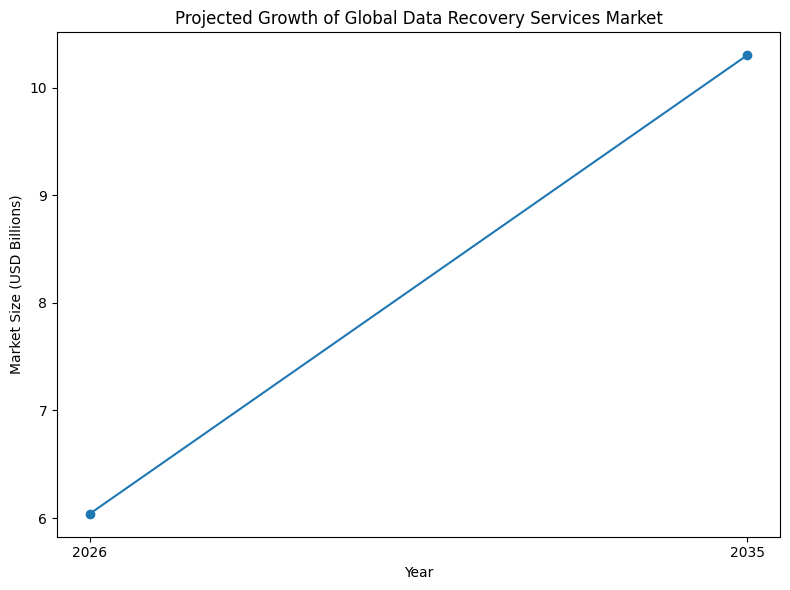
Within this rapidly evolving landscape, the disk imaging software market has expanded into a diverse ecosystem of specialized solutions. Some platforms focus on enterprise infrastructure protection, offering advanced management tools for large-scale virtualized environments. Others target small and medium-sized businesses that require simple yet powerful backup systems without complex configuration. Meanwhile, open-source imaging tools remain popular among system administrators who need flexible deployment solutions for large networks.
This diversity means that selecting the right disk imaging software in 2026 depends heavily on the specific needs of the user. Enterprises managing hundreds or thousands of endpoints require scalable platforms capable of centralized monitoring and automation. Managed service providers need multi-tenant backup solutions that integrate with remote monitoring tools. Small businesses and home offices often prioritize ease of use and affordability, while advanced users and IT professionals may prefer lightweight tools that offer precise control over imaging operations.
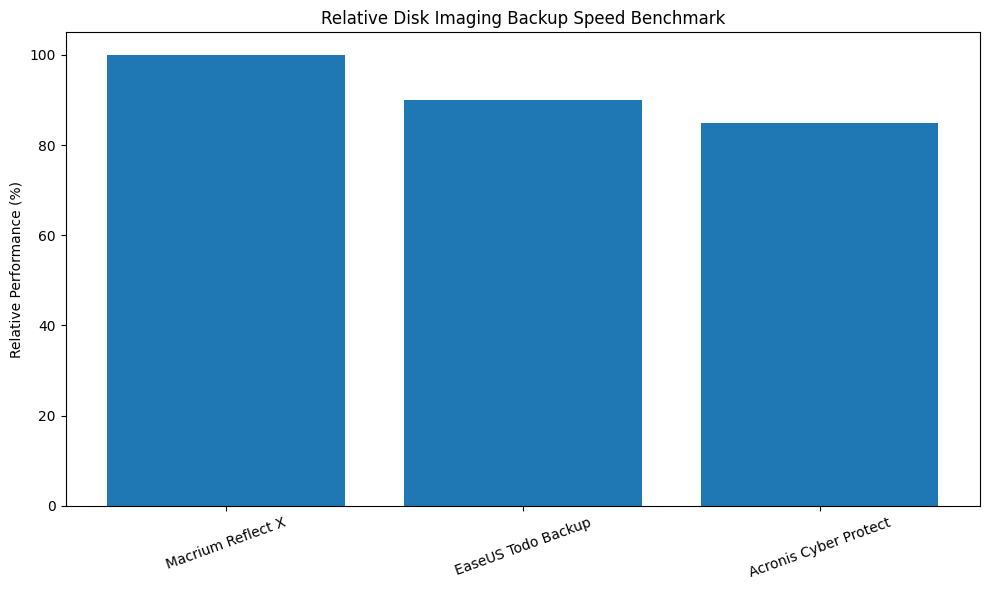
Because of these varying requirements, evaluating disk imaging tools requires careful consideration of several critical factors. Backup speed is one of the most important performance indicators, particularly in environments where large data volumes must be processed quickly. Compression efficiency also plays a major role, as it determines how much storage space backup images will consume. Recovery reliability is equally crucial, since the ultimate purpose of disk imaging software is to ensure that systems can be restored quickly and accurately when failures occur.
Security has also become a defining feature of modern disk imaging platforms. With ransomware attacks targeting backup repositories as a means of preventing recovery, many vendors now implement immutable storage technologies that prevent backup images from being modified or deleted. Additionally, encryption standards such as AES-256 ensure that stored disk images remain protected against unauthorized access.
As the industry moves toward the next generation of data protection technologies, automation and artificial intelligence are beginning to influence how disk imaging systems operate. Emerging solutions are incorporating predictive analytics that monitor hardware health and system performance. These systems can anticipate potential failures and automatically initiate protective backups or system migrations before a crash occurs. This shift represents a fundamental transformation in how backup technology functions—from a reactive recovery tool to a proactive infrastructure safeguard.
Given the growing importance of reliable system imaging, choosing the best disk imaging software has become a critical decision for businesses, IT professionals, and advanced users alike. The market now offers a wide array of tools, each designed with different strengths, features, and deployment models. Some solutions excel in enterprise virtualization environments, while others specialize in high-speed disk cloning, automated backups, or simplified system migration.
This guide explores the top 10 disk imaging software in the world in 2026, examining the tools that have emerged as leaders in performance, reliability, and innovation. By analyzing their features, capabilities, and real-world applications, this article provides a comprehensive overview of the solutions that are shaping the future of system backup and recovery. Whether the goal is protecting enterprise infrastructure, safeguarding personal devices, or managing large-scale IT environments, understanding these leading disk imaging platforms is essential for building a resilient digital strategy in the modern computing landscape.
Before we venture further into this article, we would like to share who we are and what we do.
About 9cv9
9cv9 is a business tech startup based in Singapore and Asia, with a strong presence all over the world.
With over nine years of startup and business experience, and being highly involved in connecting with thousands of companies and startups, the 9cv9 team has listed some important learning points in this overview of the Top 10 Disk Imaging Software in 2026.
If you like to get your company listed in our top B2B software reviews, check out our world-class 9cv9 Media and PR service and pricing plans here.
Top 10 Disk Imaging Software in 2026
- Acronis Cyber Protect Home Office
- Macrium Reflect X
- EaseUS Todo Backup
- Clonezilla
- AOMEI Backupper
- Veeam Agent for Windows
- Paragon Hard Disk Manager
- R-Drive Image
- Active@ Disk Image
- Arcserve ShadowProtect SPX
1. Acronis Cyber Protect Home Office
Within the global landscape of disk imaging software in 2026, Acronis Cyber Protect Home Office has emerged as one of the most influential platforms due to its transition from a traditional backup tool into a comprehensive cyber protection ecosystem. Rather than operating as a standalone imaging utility, the platform now functions as a unified protection environment that integrates disk imaging, disaster recovery, cybersecurity monitoring, and system management into a single consolidated interface.
This strategic shift addresses a growing challenge within modern IT infrastructures often referred to as tool sprawl. Organizations commonly rely on multiple independent tools to manage backups, cybersecurity, vulnerability monitoring, endpoint detection, and recovery orchestration. Managing these fragmented systems can significantly increase operational complexity and reduce efficiency across IT departments.
Acronis has approached this challenge through the development of a unified agent architecture. This architecture allows a single software agent installed on an endpoint device to manage multiple protection layers simultaneously. As a result, system administrators can manage backup operations, security monitoring, malware detection, and recovery procedures through one centralized platform.
The company’s market expansion reflects the increasing demand for this integrated protection model. Acronis has secured substantial financial backing to support its research and product development initiatives. The company has raised approximately $658 million in funding and achieved a valuation exceeding $3.5 billion following its most recent Series C investment round.
Table: Acronis Corporate and Market Overview (2026)
| Category | Details |
|---|---|
| Global Customer Base | Over 750,000 businesses |
| Service Provider Ecosystem | 20,000+ partners worldwide |
| Total Funding Raised | $658 million |
| Company Valuation | Over $3.5 billion |
| Global Workforce | 1,916 employees |
| Core Technology Focus | Unified cyber protection platform |
Technical Architecture and AI Security Framework
A defining feature of the 2026 version of Acronis Cyber Protect Home Office is its artificial intelligence–powered threat detection engine. This system uses machine learning models to analyze behavioral patterns and detect suspicious activities that may indicate malware infections, ransomware attacks, or unauthorized system access.
The platform has also incorporated hardware-level optimizations through strategic partnerships with hardware manufacturers. One of the most notable collaborations involves Intel, whose latest processor technologies support AI-driven workloads.
The software is optimized to run on Intel Core Ultra processors equipped with dedicated Neural Processing Units (NPUs). These specialized components are designed specifically for artificial intelligence workloads and allow the platform to execute complex malware analysis tasks without relying heavily on the system’s main CPU.
This architectural approach provides several advantages. By offloading security analysis tasks to the NPU, the platform reduces the computational strain placed on the central processing unit. As a result, intensive disk imaging operations can run simultaneously with real-time threat monitoring without causing significant performance degradation.
Independent cybersecurity testing laboratories have verified the effectiveness of this design. Organizations such as AV-TEST and SE Labs have awarded Acronis top-tier certifications based on its endpoint detection and response capabilities.
Table: Security Architecture Performance Indicators
| Security Metric | Performance Outcome |
|---|---|
| Malware Detection Accuracy | 100 percent detection rate |
| False Positive Incidents | Zero false positives reported |
| EDR Certification Rating | AAA rating from independent laboratories |
| Protection Against Active Malware | 100 percent detection of real-world threats |
| Threat Detection Technology | AI-based behavioral analysis |
| Hardware Acceleration Support | Neural Processing Unit integration |
Performance Efficiency and Recovery Capabilities
In addition to cybersecurity functionality, Acronis Cyber Protect Home Office continues to deliver strong performance benchmarks in disk imaging and system recovery operations. Full-system backups remain efficient, even when the software’s security monitoring features operate concurrently.
The platform’s recovery engine has been optimized to dramatically reduce the time required to restore an entire system following failure or compromise. The recovery time objective (RTO) achieved by the platform can be up to twenty times faster than legacy backup systems that rely on slower file-level restoration processes.
However, the integration of multiple protection layers introduces minor performance trade-offs. Because the platform initializes security modules during system startup, boot times may increase slightly compared with systems running standalone imaging tools. This trade-off is widely considered acceptable given the additional security protections provided by the unified architecture.
Table: Platform Performance Metrics
| Feature | Specification or Metric |
|---|---|
| Malware Detection Rate | 100 percent with zero false positives |
| Recovery Time Objective (RTO) | Up to 20 times faster than legacy solutions |
| User Satisfaction Rating | 99 percent of users rate 4 or 5 stars |
| Global Employee Count (2026) | 1,916 employees |
| Full Disk Backup Efficiency | High performance sector-level imaging |
| Startup Performance Impact | Slight increase due to integrated security |
Active Disk Learning Technology
One of the platform’s most distinctive innovations is its Active Disk Learning capability. Traditional disk imaging tools typically require systems to reboot into a specialized pre-boot environment before a consistent disk image can be captured. This requirement interrupts user workflows and can introduce operational downtime, particularly in enterprise environments where continuous system availability is essential.
Active Disk Learning eliminates this limitation by enabling the platform to analyze disk activity in real time while the operating system continues running. The system intelligently tracks data changes and builds a consistent disk image without requiring a system restart.
This capability allows organizations to perform complete system backups without interrupting active applications or user sessions. It is particularly valuable during system migration processes, operating system upgrades, or infrastructure modernization projects.
Table: Disk Imaging Technology Comparison
| Feature | Conventional Imaging Tools | Acronis Active Disk Learning |
|---|---|---|
| System Reboot Requirement | Often required | Not required |
| Backup During Active Operation | Limited capability | Fully supported |
| Downtime During Imaging | Possible | Minimal or none |
| Data Capture Method | Snapshot-based imaging | AI-assisted disk analysis |
Subscription Pricing Structure for 2026
Acronis employs a flexible subscription pricing model designed to support a wide range of users, from individual home system owners to large enterprise environments. Each tier provides progressively expanded capabilities, including additional cloud storage capacity and enhanced cybersecurity features.
Table: Acronis Cyber Protect Home Office Pricing Model
| Subscription Tier | Starting Annual Cost | Key Features Included |
|---|---|---|
| Standard | $49.99 | Local disk imaging, anti-ransomware protection, vulnerability scanning |
| Advanced | $69.99 | 500 GB cloud backup storage, automated backup replication |
| Premium | $129.99 | 5 TB cloud storage, blockchain notarization, digital e-signature tools |
| Workstation (Business) | $85.00 per device | Centralized management, extended detection and response integration |
Competitive Position Within the Disk Imaging Software Industry
Within the broader global market for disk imaging software in 2026, Acronis Cyber Protect Home Office stands out due to its integration of cybersecurity, backup management, and disaster recovery within a single platform. Many competing tools still focus primarily on cloning and backup functionality without incorporating advanced threat detection or endpoint monitoring.
The unified protection model offered by Acronis represents a broader trend across the industry. As cyber threats become increasingly sophisticated, backup software is evolving into full cyber resilience platforms capable of defending against attacks while simultaneously ensuring rapid data recovery.
Matrix: Disk Imaging Platform Capability Comparison
| Evaluation Factor | Traditional Imaging Tools | Acronis Cyber Protect Platform |
|---|---|---|
| Disk Imaging Capability | Strong | Strong |
| Integrated Cybersecurity | Limited | Extensive |
| Cloud Backup Integration | Moderate | Advanced |
| AI-Based Threat Detection | Rarely implemented | Fully integrated |
| Hardware AI Acceleration | Minimal | Supported |
| Unified System Management | Partial | Fully centralized |
Conclusion
The disk imaging software sector in 2026 reflects a broader transformation in how organizations approach data protection and cyber resilience. Backup and recovery technologies are no longer isolated IT tools but have become foundational elements of comprehensive cybersecurity strategies.
Acronis Cyber Protect Home Office exemplifies this shift by combining advanced disk imaging technology with artificial intelligence–driven threat detection, hardware-accelerated malware analysis, and flexible cloud backup capabilities. Its unified architecture enables organizations to reduce operational complexity while strengthening both data protection and system security.
As digital infrastructures continue to expand and cyber threats evolve in sophistication, unified cyber protection platforms like Acronis are likely to remain central to the future of disk imaging software worldwide.
2. Macrium Reflect X
Within the global disk imaging software market in 2026, Macrium Reflect X has distinguished itself as one of the most performance-focused solutions available. While many modern platforms emphasize broad integration with cybersecurity tools and cloud ecosystems, Macrium’s design philosophy prioritizes one core objective: minimizing system recovery time. The company operates under the principle that the true value of a backup solution is measured not by the number of stored backups but by how quickly a system can be restored following an outage, cyberattack, or hardware failure.
This philosophy has become increasingly relevant across industries where downtime carries significant operational costs. In sectors such as manufacturing, logistics, and financial services, even brief system interruptions can disrupt production workflows or service delivery. A 2026 industry study titled State of Backup and Recovery in Manufacturing highlighted the seriousness of this issue. The report found that while the majority of organizations maintain backup systems, only 18 percent successfully achieve their targeted recovery time objectives.
Macrium Reflect X addresses this challenge by focusing heavily on restoration performance, storage efficiency, and system reliability.
Macrium Reflect X Engine: Architectural Improvements
Macrium Reflect X represents a major technological advancement compared with earlier versions of the platform. Released as the successor to Macrium Reflect 8.1 in late 2024, the software introduced a redesigned imaging engine engineered to maximize performance during both backup and restoration processes.
The Reflect X engine incorporates advanced compression algorithms combined with optimized multithreading capabilities. These enhancements allow the software to fully utilize modern multi-core processors and high-speed storage devices such as NVMe solid-state drives. By distributing workload processing across multiple CPU cores, the platform significantly reduces the time required to process large disk images.
In standardized benchmark tests conducted in 2026 using a 13th Generation Intel Core i5 environment with NVMe-to-NVMe data transfers, Macrium Reflect X demonstrated a substantial improvement in restoration speed compared with previous versions.
Table: System Restoration Benchmark Comparison
| Software Version | Test Environment | System Image Restore Time |
|---|---|---|
| Macrium Reflect 8 | Intel Core i5 with NVMe storage | 8 minutes 10 seconds |
| Macrium Reflect X | Intel Core i5 with NVMe storage | 1 minute 29 seconds |
| Performance Improvement | Same hardware configuration | Over 5x faster restoration |
This dramatic improvement in restoration speed highlights Macrium’s strategic focus on reducing downtime during system recovery events.
Core Technical Capabilities
Macrium Reflect X introduces several advanced technical capabilities designed to support fast, reliable system restoration in demanding IT environments.
Rapid Delta Restore Technology
One of the most important innovations within the platform is Rapid Delta Restore (RDR). Instead of restoring an entire disk image during recovery, RDR identifies and restores only the specific data blocks that have changed since the last backup operation.
By restoring only the modified portions of a disk image, the system can significantly reduce restoration time and minimize operational disruption. This capability is particularly beneficial in enterprise environments where systems must return to operation as quickly as possible following an outage.
Resumable Imaging
Another important feature introduced in the 2026 version of Macrium Reflect X is Resumable Imaging. Traditional backup operations can fail due to unexpected events such as network interruptions, system restarts, or storage device disconnections. When such failures occur, many legacy backup tools require the entire backup process to restart from the beginning.
Resumable Imaging eliminates this inefficiency. If a backup operation is interrupted, the software records the progress state of the backup and resumes the process from the exact point where the interruption occurred. This capability reduces wasted time and network bandwidth, especially when large system images are involved.
Long-Term Servicing Channel (LTSC)
Macrium also provides a Long-Term Servicing Channel (LTSC) edition of its software. This version is designed for environments where long-term stability is more important than frequent feature updates. Industrial control systems, air-gapped networks, and secure operational infrastructures often require software that remains unchanged for extended periods to ensure compatibility with specialized hardware or regulatory requirements.
The LTSC edition offers a perpetual licensing model combined with extended support plans lasting between three and five years. During this support period, the platform receives security updates and stability patches without introducing major feature changes that could affect system reliability.
Table: Core Technical Features of Macrium Reflect X
| Feature | Description |
|---|---|
| Rapid Delta Restore (RDR) | Restores only changed data blocks to reduce system recovery time |
| Resumable Imaging | Allows interrupted backups to resume from the exact point of interruption |
| Multithreaded Imaging Engine | Optimizes CPU utilization for faster backup and restore operations |
| Advanced Compression | Reduces storage footprint of disk image files |
| LTSC Edition | Long-term stability with 3–5 year support lifecycle |
Licensing and Pricing Structure for 2026
Macrium Reflect X follows a standalone licensing model designed to support both professional and enterprise users. The pricing structure varies depending on the intended deployment environment and system type.
The software provides dedicated editions for individual workstations, business servers, and specialized environments that require long-term support stability.
Table: Macrium Reflect X Pricing Structure (2026)
| Edition | Starting Price | Primary Use Case |
|---|---|---|
| Reflect X Workstation | $69.95 | Individual professional workstations |
| Reflect X Server | $499.00 | Critical business servers and enterprise systems |
| Reflect LTSC | $57.00 | Industrial systems and air-gapped environments |
Strategic Move Toward Open Data Formats
Another notable strategic decision by Macrium in 2026 involves the transition toward open-source data formats for backup archives. Historically, many disk imaging vendors used proprietary file formats that could only be accessed through the vendor’s own software tools. While these formats allowed vendors to optimize compression and storage efficiency, they also created long-term accessibility concerns for customers.
Macrium’s adoption of an open data format model is intended to address these concerns. By enabling greater transparency and interoperability, customers gain more control over their backup archives and are less dependent on proprietary software to access stored data.
This approach aligns with broader industry trends emphasizing data portability, long-term digital preservation, and vendor neutrality.
Competitive Position in the Disk Imaging Software Market
In comparison with other leading disk imaging platforms, Macrium Reflect X focuses less on cybersecurity integration and more on delivering best-in-class restoration speed and reliability. This positioning makes the software particularly attractive for organizations that already deploy separate cybersecurity platforms but require a highly optimized backup and recovery solution.
Matrix: Positioning of Macrium Reflect X Within the Disk Imaging Market
| Evaluation Factor | Typical Imaging Platforms | Macrium Reflect X |
|---|---|---|
| Disk Imaging Performance | Moderate | Exceptional |
| Recovery Time Optimization | Limited | Advanced RDR |
| Integrated Cybersecurity | Moderate in some tools | Minimal focus |
| Backup Reliability | Standard | High reliability |
| Industrial System Compatibility | Limited | Strong with LTSC |
| Open Data Format Support | Rare | Implemented |
Conclusion
Macrium Reflect X has established itself as a leading performance benchmark within the disk imaging software industry in 2026. By prioritizing restoration speed, backup reliability, and system stability, the platform offers a specialized solution for environments where rapid system recovery is critical.
The introduction of advanced features such as Rapid Delta Restore, Resumable Imaging, and long-term servicing support demonstrates Macrium’s focus on operational continuity. Combined with its move toward open backup data formats, the platform reflects a growing industry emphasis on performance transparency and long-term data accessibility.
For organizations seeking a disk imaging solution optimized for fast system restoration and stable long-term operation, Macrium Reflect X remains one of the most technically refined options available in the current market.
3. EaseUS Todo Backup
Within the global disk imaging software ecosystem in 2026, EaseUS Todo Backup has emerged as one of the most widely adopted solutions among home users, freelancers, and small businesses. While enterprise-focused platforms often emphasize advanced security integration and centralized management systems, EaseUS positions itself as a high-performance yet highly accessible backup platform designed for non-technical users.
The platform’s success in the consumer market stems from its simplified user interface, reliable disk imaging engine, and fast backup performance. EaseUS Todo Backup is particularly known for its wizard-style workflow design, which guides users through complex operations such as full system imaging, disk cloning, and operating system migration.
This design philosophy reduces the risk of configuration errors while making powerful disk management operations accessible to users who may not possess advanced IT expertise.
EaseUS Todo Backup has therefore become a preferred option for individuals upgrading storage devices, migrating operating systems from traditional hard drives to solid-state drives, and maintaining reliable system backups for personal computing environments.
User Experience and Interface Design
A defining characteristic of EaseUS Todo Backup is its guided user interface architecture. Rather than presenting users with complex configuration menus, the software organizes backup and imaging tasks into step-by-step workflows.
These guided workflows are particularly valuable for high-risk operations such as HDD-to-SSD migration. During such operations, incorrect disk selection or configuration mistakes could potentially result in data loss or system instability.
The wizard-style interface ensures that users complete each step in the correct order, verifying disk selections and backup parameters before executing the imaging process.
Table: User Experience Design Principles
| Interface Component | Functionality Provided |
|---|---|
| Wizard-Based Workflows | Guides users through backup and migration processes step-by-step |
| One-Click Backup Options | Simplifies disk and partition backup tasks |
| Automated Disk Detection | Automatically identifies source and destination drives |
| System Migration Tools | Supports operating system transfer to new storage devices |
| Bootable Recovery Media | Allows system restoration in case of system failure |
These design features have allowed EaseUS Todo Backup to maintain strong adoption among users who require reliable backup solutions without complex enterprise-level configuration processes.
Quantitative Performance Benchmarks
Independent testing conducted in 2026 indicates that EaseUS Todo Backup delivers some of the fastest disk imaging speeds in the consumer backup category. Performance benchmarks demonstrate that the platform is capable of creating large disk image backups in significantly shorter timeframes compared with many competing consumer tools.
One widely referenced benchmark test involved creating a backup image of a 700 gigabyte system. Using the platform’s rapid compression technology and optimized disk reading algorithms, the system successfully completed the backup in approximately 13 minutes.
This level of performance is achieved through several technical optimizations. The platform intelligently reads only active data blocks on the disk, reducing unnecessary scanning of unused sectors. Additionally, the software integrates with operating system shadow copy services, enabling it to capture consistent disk snapshots while the operating system remains active.
These optimizations allow the software to fully utilize modern storage hardware such as SSDs and NVMe drives.
Table: Backup Performance Metrics
| Performance Metric | EaseUS Todo Backup 2026 Result |
|---|---|
| Backup Size Tested | 700 GB |
| Backup Completion Time | 13 minutes |
| Compression Technology | Rapid compression engine |
| Snapshot Method | Shadow Copy Service integration |
| Disk Reading Strategy | Intelligent data block scanning |
Technical Specifications and Platform Capabilities
EaseUS Todo Backup supports a wide range of disk and partition formats, allowing the software to operate across multiple storage environments and operating systems. This broad compatibility makes the platform suitable for personal computing environments as well as small office IT systems.
In addition to disk imaging, the software provides file-level backup, system cloning, and cross-device data migration tools.
Table: Storage and File System Compatibility
| Supported File System | Platform Compatibility |
|---|---|
| NTFS | Windows system drives and partitions |
| FAT32 | Legacy storage devices and USB drives |
| exFAT | Large external drives and portable media |
| Ext2 / Ext3 / Ext4 | Linux-based partitions |
This cross-platform compatibility allows EaseUS Todo Backup to function effectively in hybrid computing environments where multiple operating systems are used.
Recovery Performance and Technical Limitations
While EaseUS performs exceptionally well in backup speed, some technical limitations have been noted by industry reviewers regarding the complexity of full system restoration procedures. Restoring a disk image to identical hardware is generally straightforward, but restoring systems to dissimilar hardware environments can require multiple configuration steps.
Experts have reported that full system restoration procedures may involve more than 25 individual steps when migrating systems to different hardware platforms.
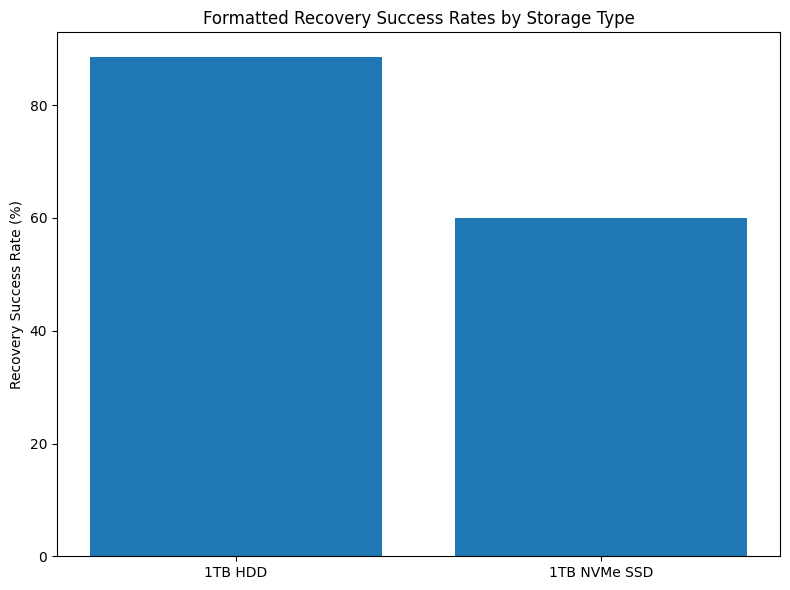
Additionally, recovery success rates can vary depending on the type of storage device being used. Traditional hard disk drives generally achieve higher recovery success rates because they do not utilize the TRIM command used by modern solid-state drives.
The TRIM command permanently removes deleted data blocks from SSD storage, which can complicate certain recovery scenarios.
Table: Data Recovery Success Metrics
| Recovery Scenario | Success Rate |
|---|---|
| HDD Formatted Drive Recovery | 92 percent |
| SSD Recovery with TRIM Enabled | 60 percent |
| File-Level Recovery | High reliability |
| Cross-System Hardware Migration | Requires advanced configuration |
Pricing and Licensing Structure in 2026
EaseUS Todo Backup follows a flexible pricing structure designed to accommodate a wide range of users, from individuals requiring basic backup protection to businesses managing multiple workstations.
The platform offers both free and paid editions, allowing users to start with basic functionality before upgrading to more advanced features.
Table: EaseUS Todo Backup Pricing Plans (2026)
| Plan Type | Cost | Key Features Included |
|---|---|---|
| Free Edition | $0.00 | Basic disk and partition backup, no automated scheduling |
| Home Monthly Plan | $9.90 | Unlimited backup storage, bootable recovery disk creation |
| Home Yearly Plan | $39.95 | Full-featured personal backup solution |
| Workstation Plan | $99.00 | Business licensing with command-line support |
Enterprise Editions and Business Scalability
Beyond its consumer-oriented offerings, EaseUS also provides specialized editions designed for enterprise deployment. These include Server, Advanced Server, and Technician versions that support larger IT infrastructures and centralized management capabilities.
These enterprise editions enable organizations to deploy disk imaging solutions across multiple servers and workstations while maintaining centralized control over backup policies and recovery operations.
Table: Enterprise Editions Overview
| Edition Type | Target Environment | Key Capabilities |
|---|---|---|
| Server Edition | Small business servers | Server-level disk imaging and recovery |
| Advanced Server | Large enterprise infrastructures | Network-wide backup management |
| Technician Edition | IT service providers and consultants | Multi-client support and deployment tools |
Position in the Consumer Disk Imaging Market
EaseUS Todo Backup occupies a unique position within the disk imaging industry by balancing speed, accessibility, and affordability. While enterprise platforms may offer more complex management features and integrated cybersecurity capabilities, EaseUS focuses on delivering high-speed imaging performance combined with user-friendly workflows.
Matrix: Market Position of EaseUS Todo Backup
| Evaluation Factor | Consumer Backup Tools | EaseUS Todo Backup |
|---|---|---|
| Backup Speed | Moderate | High performance |
| User Interface Simplicity | Variable | Very user-friendly |
| Enterprise Security Features | Limited | Moderate |
| Hardware Migration Support | Basic | One-click migration |
| Pricing Accessibility | Moderate | Highly affordable |
| Consumer Adoption Rate | Moderate | Very high |
Conclusion
EaseUS Todo Backup has secured a strong reputation in the disk imaging software market in 2026 by delivering high-speed backup performance within a user-friendly environment. Its guided interface design simplifies complex disk management tasks, making advanced backup operations accessible to non-technical users.
Although certain restoration scenarios can involve more complex processes, the platform’s fast imaging engine, broad file system compatibility, and flexible pricing structure make it an attractive solution for home users and small businesses.
By combining high performance with simplicity, EaseUS Todo Backup continues to serve as one of the most practical and widely adopted disk imaging solutions in the consumer and small business market segments.
4. Clonezilla
In the disk imaging software landscape of 2026, Clonezilla continues to stand as the most prominent open-source solution for large-scale system cloning and mass deployment operations. While many commercial disk imaging tools prioritize user-friendly interfaces and integrated security features, Clonezilla focuses on performance, scalability, and technical flexibility. As a result, it has become a widely trusted tool among system administrators, enterprise IT departments, data center engineers, and educational institutions that require efficient imaging of large numbers of machines.
Clonezilla is distributed under the GNU General Public License Version 2 (GPLv2), which ensures that the software remains free to use, modify, and redistribute. This open-source licensing model has enabled the platform to maintain widespread adoption across both public and private sector environments. Its reliability and adaptability have made it particularly valuable in environments where large-scale system provisioning must be performed quickly and cost-effectively.
Clonezilla is available in three primary editions, each designed to serve different deployment scenarios ranging from individual system maintenance to enterprise-level network imaging.
Table: Clonezilla Editions and Deployment Models
| Edition Name | Primary Use Case | Deployment Scope |
|---|---|---|
| Clonezilla Live | Disk cloning for individual systems | Single-machine operations |
| Clonezilla Lite Server | Small-scale network deployments | Limited multi-device cloning |
| Clonezilla SE (Server Edition) | Enterprise mass deployment environments | Large-scale simultaneous system imaging |
These different deployment modes allow Clonezilla to serve a broad range of operational needs, from simple workstation backups to large institutional system rollouts.
Massive Deployment Capabilities and Network Efficiency
One of Clonezilla’s most distinctive strengths is its ability to perform large-scale system imaging across entire networks. The Clonezilla Server Edition (SE) is specifically engineered to deploy disk images to multiple machines simultaneously. This capability makes it particularly useful for environments such as university computer labs, corporate workstation rollouts, and enterprise hardware provisioning projects.
The platform supports several network transmission methods to distribute system images efficiently. These include multicast, broadcast, and unicast data transfer models. Multicast transmission is especially valuable in large environments because it allows a single image stream to be transmitted simultaneously to multiple machines, dramatically reducing network bandwidth consumption.
In its 2026 release, Clonezilla introduced improved support for BitTorrent-based image distribution using a mechanism known as Ezio. This approach enables system images to be distributed across wide-area networks where traditional multicast traffic may be restricted or unsupported by network infrastructure.
The BitTorrent-based system allows participating machines to share image data with one another during deployment, further improving distribution efficiency and reducing strain on central servers.
Table: Network Deployment Capabilities
| Deployment Feature | Clonezilla 2026 Capability |
|---|---|
| Simultaneous System Cloning | Over 40 computers at once |
| Network Transmission Modes | Multicast, broadcast, and unicast |
| Wide-Area Network Deployment | BitTorrent-based Ezio distribution |
| Bandwidth Optimization | Peer-assisted image sharing |
| Deployment Environment | Data centers, labs, enterprise IT infrastructures |
These capabilities allow system administrators to rapidly deploy identical system configurations across large numbers of devices with minimal manual intervention.
Technical Interoperability and Cross-Platform Support
Another major advantage of Clonezilla is its extensive compatibility with a wide range of operating systems and file systems. Many commercial disk imaging platforms are optimized primarily for Windows-based environments. In contrast, Clonezilla is designed to support heterogeneous computing environments where multiple operating systems may coexist.
This flexibility makes the platform particularly useful in environments such as research institutions, development labs, and cloud infrastructure providers where cross-platform compatibility is essential.
Clonezilla supports disk imaging for systems running Windows, Linux, macOS, BSD variants, and virtualization platforms such as VMware. The platform achieves this interoperability by supporting a wide range of file system structures.
Table: File System Compatibility by Operating System
| Operating System Platform | Supported File Systems (2026) |
|---|---|
| GNU/Linux | ext2, ext3, ext4, reiserfs, reiser4, xfs, jfs, btrfs, f2fs, nilfs2 |
| Windows | FAT12, FAT16, FAT32, exFAT, NTFS |
| macOS | HFS+, APFS |
| UNIX / BSD Systems | UFS (FreeBSD, NetBSD, OpenBSD), Minix |
| Virtualization Platforms | VMFS3, VMFS5 (VMware environments) |
This extensive compatibility ensures that Clonezilla can create and restore disk images across nearly any modern computing platform.
System Provisioning and Point-in-Time Imaging
Clonezilla’s architecture is particularly well suited for point-in-time system imaging. This process captures a complete snapshot of a system at a specific moment and allows administrators to replicate that configuration across multiple machines.
For example, an organization may configure a single master workstation containing all required operating system settings, security patches, drivers, and enterprise software. Clonezilla can then replicate that system image across dozens or even hundreds of machines simultaneously.
This approach greatly reduces the time required to deploy new systems and ensures consistency across large device fleets.
Table: System Provisioning Workflow
| Deployment Stage | Process Description |
|---|---|
| Master System Configuration | Install OS, drivers, and required applications |
| Image Creation | Clonezilla captures a full disk image of the master system |
| Image Distribution | Network deployment using multicast or BitTorrent methods |
| System Replication | Target machines receive and apply identical system image |
| Deployment Completion | Systems boot with standardized configuration |
This imaging model is widely used in educational institutions, corporate device rollouts, and managed IT service environments.
User Interface and Usability Considerations
Despite its powerful capabilities, Clonezilla is widely recognized for having a steep learning curve compared with commercial disk imaging tools. The platform relies primarily on a text-based interface rather than a graphical user interface. This design reflects its origins as a system administration tool rather than a consumer-oriented backup application.
The text-driven interface provides detailed control over imaging operations but can be challenging for users without prior experience in command-line environments or system administration tasks.
Additionally, Clonezilla does not currently support incremental or differential backups. Each imaging operation typically creates a full disk image rather than capturing only the changed data blocks since the previous backup.
While this limitation reduces storage efficiency compared with modern incremental backup systems, it simplifies the imaging architecture and ensures consistent system snapshots.
Table: Usability and Functional Characteristics
| Feature Category | Clonezilla Implementation |
|---|---|
| Interface Type | Text-based terminal interface |
| Incremental Backup Support | Not supported |
| Differential Backup Support | Not supported |
| Point-in-Time Imaging | Fully supported |
| Learning Curve | High for non-technical users |
These characteristics make Clonezilla particularly suitable for IT professionals who require precise control over system imaging operations.
Market Position in the Disk Imaging Ecosystem
In the broader disk imaging software market of 2026, Clonezilla occupies a unique position as the leading open-source platform for large-scale system cloning and deployment. Unlike commercial solutions that prioritize ease of use or integrated cybersecurity features, Clonezilla focuses on scalability, technical flexibility, and network efficiency.
Matrix: Market Position of Clonezilla in Disk Imaging Software
| Evaluation Factor | Commercial Imaging Tools | Clonezilla |
|---|---|---|
| Licensing Cost | Paid subscription | Free open-source |
| Mass Deployment Capability | Moderate | Very strong |
| Enterprise Network Imaging | Supported in premium tools | Native support |
| Cross-Platform Compatibility | Limited in some tools | Extensive |
| User Interface Simplicity | User-friendly GUI | Command-line driven |
| Incremental Backup Capability | Common feature | Not supported |
Conclusion
Clonezilla continues to play a vital role in the disk imaging software ecosystem in 2026, particularly for environments that require high-performance system deployment at scale. Its open-source licensing model, extensive file system compatibility, and powerful network imaging capabilities make it an indispensable tool for system administrators and IT professionals managing large infrastructure environments.
Although its command-line interface and lack of incremental backup features may limit its appeal for casual users, Clonezilla remains one of the most powerful and cost-effective disk imaging platforms available for enterprise deployment, research institutions, and technical environments requiring precise control over system provisioning.
5. AOMEI Backupper
Within the evolving disk imaging software market of 2026, AOMEI Backupper has emerged as a well-balanced solution that effectively bridges the gap between entry-level consumer backup tools and complex enterprise-grade imaging platforms. The software has gained significant adoption among individual users, small businesses, and IT professionals seeking reliable disk cloning functionality combined with a simplified user experience.
Unlike enterprise-focused backup platforms that prioritize large-scale infrastructure management, AOMEI Backupper concentrates on delivering powerful cloning and backup capabilities within a streamlined and accessible interface. This positioning has allowed the platform to capture a growing share of the disk imaging market, particularly among users who require advanced migration features without the complexity associated with enterprise backup suites.
One of the platform’s most notable innovations is its Intelligent Clone technology. This feature allows the software to copy only the active data sectors within a storage partition rather than duplicating every sector on the disk. As a result, users can migrate operating systems and data from larger hard drives to smaller solid-state drives without encountering storage capacity limitations.
This capability has become particularly important as SSD upgrades have become common in both consumer and professional computing environments.
Market Position and Adoption Trends
AOMEI Backupper’s growth has been driven largely by its ability to offer advanced disk imaging capabilities while maintaining a highly intuitive interface. Many users find enterprise solutions such as infrastructure-level backup systems to be overly complex for routine disk migration tasks.
By focusing on usability and clarity, AOMEI has positioned its software as a practical alternative for users who need reliable system cloning without navigating complicated configuration environments.
The platform is widely used in scenarios such as:
Operating system migration from HDD to SSD
Workstation backup and disaster recovery
Disk cloning for hardware upgrades
System deployment for small office environments
Table: Market Positioning of AOMEI Backupper
| Market Segment | Adoption Characteristics |
|---|---|
| Home Users | SSD upgrades and system backup |
| Freelancers and Creators | Workstation imaging and data protection |
| Small Businesses | Backup automation and hardware migration |
| IT Technicians | Disk cloning and system maintenance operations |
These use cases highlight the platform’s role as a flexible mid-tier imaging solution capable of serving both personal and professional environments.
Intelligent Clone Technology and Storage Optimization
At the core of AOMEI Backupper’s cloning capabilities is its Intelligent Clone system. Traditional disk cloning tools often duplicate every sector on a storage device, including unused space. While this approach guarantees an exact copy, it can create problems when migrating data to smaller storage devices.
The Intelligent Clone engine addresses this limitation by copying only sectors that contain active data. This allows users to move entire system environments to smaller SSDs as long as the destination disk has enough capacity to store the used data.
This approach not only enables flexible migration scenarios but also reduces cloning time because fewer data sectors need to be transferred.
Table: Intelligent Clone Process
| Cloning Stage | Operational Process |
|---|---|
| Source Disk Analysis | Scans disk to identify used sectors |
| Data Block Selection | Selects only active data sectors for migration |
| Destination Disk Validation | Ensures target drive has sufficient available space |
| Sector-Level Transfer | Copies selected data sectors to the new drive |
| System Boot Configuration | Adjusts boot records for the new storage environment |
This process enables seamless system migration even when the destination disk has a smaller total capacity than the source drive.
SSD Optimization and 4K Partition Alignment
Another key technical feature of AOMEI Backupper is its support for 4K partition alignment. Modern solid-state drives use 4-kilobyte physical sectors to optimize read and write performance. If disk partitions are not properly aligned with these sector boundaries, storage devices may experience reduced performance and increased wear over time.
AOMEI Backupper automatically aligns cloned partitions to 4K boundaries during disk migration operations. This optimization ensures that SSDs operate at peak efficiency and helps extend the lifespan of the storage device.
Table: SSD Optimization Features
| Feature | Technical Benefit |
|---|---|
| 4K Partition Alignment | Optimizes SSD read/write performance |
| Intelligent Sector Cloning | Reduces cloning time and storage requirements |
| Automatic Boot Configuration | Ensures successful system startup after migration |
| SSD Optimization Mode | Enhances storage performance during cloning |
These features make AOMEI Backupper particularly attractive for users upgrading legacy systems to SSD storage.
User Interface and Workflow Simplicity
Ease of use has become one of AOMEI Backupper’s most widely praised characteristics. The platform’s graphical interface is designed with a clean layout that simplifies backup configuration and disk cloning tasks.
Users are guided through clearly structured workflows that allow them to select source disks, destination drives, and cloning parameters without navigating complex technical menus.
Compared with older imaging tools that rely heavily on manual configuration, AOMEI Backupper’s interface is designed to reduce the cognitive load placed on users during critical system operations.
Table: Interface Design Advantages
| Interface Component | User Benefit |
|---|---|
| Simplified Navigation Menu | Easy access to backup, restore, and cloning tools |
| Guided Operation Panels | Step-by-step process for disk migration |
| Visual Disk Mapping | Clear representation of source and target drives |
| Task Automation Options | Scheduled backups and automatic execution |
These usability improvements have helped attract users who may find enterprise-oriented solutions too complicated for everyday disk management tasks.
Artificial Intelligence and Automation Support
The 2026 version of AOMEI Backupper introduces early-stage AI-assisted automation features designed to simplify backup management. These capabilities allow the platform to analyze user behavior patterns and recommend optimal backup schedules and system protection strategies.
Additionally, the software can perform autonomous task execution for routine operations such as scheduled backups, cleanup of outdated backup files, and automated disk health monitoring.
Table: AI-Assisted Automation Features
| Feature | Functional Capability |
|---|---|
| Proactive Backup Suggestions | Recommends optimal backup schedules |
| Autonomous Task Execution | Automatically performs routine backup operations |
| System Monitoring | Detects potential storage health issues |
| Intelligent Task Scheduling | Adjusts backup intervals based on system activity |
Although these AI features remain relatively lightweight compared with enterprise automation platforms, they represent an emerging trend toward intelligent backup management.
Cloud Integration and Storage Support
AOMEI Backupper also supports cloud-based backup storage, allowing users to maintain off-site copies of their disk images and files. The software integrates with AOMEI Cloud storage services as well as third-party object storage providers that support the S3 protocol.
This hybrid storage capability allows organizations to combine local backup repositories with remote cloud storage to improve disaster recovery resilience.
Table: Cloud Storage Compatibility
| Storage Platform | Integration Type |
|---|---|
| AOMEI Cloud | Native integration within the platform |
| Amazon S3-Compatible APIs | Third-party cloud object storage support |
| Hybrid Local Backup | Local disk and cloud backup combination |
These features enable flexible storage architectures that can accommodate both personal backup needs and small business data protection strategies.
Pricing and Licensing Structure
AOMEI Backupper follows a freemium licensing model designed to attract new users through a feature-rich free edition while reserving advanced capabilities for paid tiers.
The Standard edition provides core disk imaging and backup functionality at no cost. However, certain advanced features, including full system cloning capabilities, are restricted to the Professional edition.
Table: AOMEI Backupper Pricing Structure (2026)
| Plan Tier | Cost | Included Capabilities |
|---|---|---|
| Standard Edition | Free | Basic disk and partition backup functionality |
| Professional | $49.95 | System cloning, advanced migration features, automation |
Reviewers frequently note that while the free edition provides substantial functionality, system-level cloning—one of the most commonly requested features for SSD upgrades—is available only in the Professional tier.
Competitive Position in the Disk Imaging Software Market
Within the disk imaging software industry, AOMEI Backupper occupies a middle-ground position between basic consumer tools and enterprise infrastructure backup platforms. Its strength lies in delivering advanced cloning capabilities with minimal complexity.
Matrix: Competitive Position of AOMEI Backupper
| Evaluation Factor | Basic Consumer Tools | Enterprise Imaging Platforms | AOMEI Backupper |
|---|---|---|---|
| Ease of Use | High | Low to moderate | High |
| Advanced Disk Cloning | Limited | Extensive | Strong |
| Enterprise Infrastructure | Limited | Full enterprise capabilities | Moderate |
| SSD Migration Optimization | Basic | Advanced | Advanced |
| Pricing Accessibility | Very affordable | High cost | Affordable |
Conclusion
AOMEI Backupper has established itself as a versatile disk imaging platform that successfully balances advanced functionality with user-friendly design. By combining features such as Intelligent Clone technology, SSD optimization through 4K partition alignment, and simplified workflow management, the platform addresses the needs of users seeking powerful disk cloning capabilities without enterprise-level complexity.
Its freemium pricing model, expanding automation capabilities, and cloud integration options position AOMEI Backupper as one of the most accessible yet technically capable disk imaging solutions available in the 2026 market.
6. Veeam Agent for Windows
In the enterprise backup and disaster recovery ecosystem of 2026, Veeam continues to hold a dominant position as one of the most trusted vendors for protecting virtualized infrastructures. While the company is widely recognized for its flagship Backup & Replication platform, the Veeam Agent for Windows has become an essential component within modern hybrid IT environments.
This agent-based solution is specifically designed to protect physical endpoints such as workstations, laptops, and physical servers that operate within organizations where virtualization technologies are heavily deployed. In many enterprise infrastructures, physical machines often serve as gateways, developer workstations, or data ingestion systems that ultimately feed into virtualized environments.
Veeam Agent for Windows provides a bridge between these physical systems and enterprise virtualization platforms, ensuring that physical workloads can be backed up, replicated, and restored within the same unified data protection framework.
Role Within the Enterprise Backup Architecture
Veeam Agent for Windows plays a strategic role in hybrid infrastructure environments where both physical and virtual machines coexist. Instead of managing separate backup systems for physical and virtual devices, organizations can integrate physical system backups directly into the broader Veeam Backup & Replication ecosystem.
This unified architecture allows administrators to manage backup policies, encryption standards, storage repositories, and recovery workflows from a centralized console. Physical machines protected by the Veeam Agent can also be incorporated into enterprise disaster recovery strategies that include virtual machine failover.
Table: Role of Veeam Agent Within Enterprise Infrastructure
| Infrastructure Component | Protection Method Provided by Veeam |
|---|---|
| Physical Workstations | Disk-level image backup and recovery |
| Physical Servers | Full system backup with incremental updates |
| Virtual Machines | Integrated with Backup & Replication platform |
| Hybrid Infrastructure | Unified management across physical and virtual environments |
| Disaster Recovery Systems | Cross-platform recovery workflows |
This integration capability is one of the key reasons why the Veeam ecosystem remains widely deployed across enterprise IT environments.
Instant VM Recovery: Veeam’s Core Innovation
One of the most significant technological innovations offered by Veeam is its Instant VM Recovery capability. Traditional disaster recovery workflows typically involve restoring a complete system image from backup storage before the system can be brought back online. Depending on the size of the system and storage infrastructure performance, this process can take hours or even longer.
Instant VM Recovery eliminates this delay by allowing a backed-up system image to be launched immediately as a virtual machine within supported virtualization platforms. Instead of waiting for the entire restoration process to complete, the system image is mounted directly from the backup repository and executed as a functioning virtual machine.
This capability allows organizations to restore operations almost immediately following a system failure or cyberattack.
The technology supports deployment within major virtualization platforms such as VMware vSphere and Microsoft Hyper-V. Once the virtual machine is operational, the system can continue running while the full restoration process is completed in the background.
Table: Instant VM Recovery Workflow
| Recovery Stage | Operational Process |
|---|---|
| Backup Image Selection | Administrator selects system image from backup repository |
| Virtual Machine Launch | Image mounted directly as a VM in virtualization environment |
| Immediate System Availability | Applications and services resume operation |
| Background Data Migration | Full restoration occurs without interrupting system uptime |
| Permanent Virtual Machine Deployment | System can remain virtualized if desired |
This recovery approach dramatically reduces downtime during disaster recovery events and represents one of Veeam’s most distinctive enterprise features.
Security Architecture and Data Protection Model
Security has become a major focus for enterprise backup systems as ransomware attacks increasingly target backup repositories themselves. In response to these threats, Veeam has integrated multiple security layers into its backup architecture.
The platform follows a Zero Trust security framework, which assumes that no system or network component should be automatically trusted. Access to backup repositories, administrative controls, and recovery processes requires strict authentication and authorization policies.
Additionally, Veeam employs strong encryption technologies to protect backup data both during transmission and while stored within backup repositories. AES encryption standards are used to secure data, ensuring that backup archives remain protected even if storage infrastructure is compromised.
One of the most important security capabilities offered by the platform is immutable backup storage. Immutable backups prevent stored backup files from being modified or deleted for a defined period of time, protecting them from ransomware attacks that attempt to destroy backup data before encrypting production systems.
Table: Security and Protection Features
| Security Feature | Implementation in Veeam 2026 |
|---|---|
| Security Framework | Zero Trust architecture |
| Encryption Standard | AES encryption for backup data |
| Immutable Backup Storage | Prevents modification or deletion of backup files |
| Access Control | Role-based administrative permissions |
| Secure Data Transmission | Encrypted backup data transfer |
These security capabilities are essential for organizations operating in highly regulated industries or environments with elevated cybersecurity risks.
Backup Efficiency and Storage Optimization
Enterprise organizations often manage enormous data volumes across thousands of machines. Efficient backup storage management therefore becomes a critical requirement for large-scale infrastructure environments.
Veeam addresses this challenge through block-level tracking technology. Instead of backing up entire disks during every backup operation, the system identifies and captures only the data blocks that have changed since the previous backup.
This incremental backup strategy significantly reduces storage requirements and improves backup speed.
In addition to block-level tracking, Veeam incorporates advanced deduplication technologies that identify duplicate data blocks across multiple backup images. By storing identical data only once, the platform dramatically reduces storage consumption across large datasets.
Table: Backup Efficiency Mechanisms
| Efficiency Feature | Operational Benefit |
|---|---|
| Block-Level Tracking | Backs up only modified data blocks |
| Incremental Backup Processing | Reduces backup time and storage usage |
| Data Deduplication | Eliminates duplicate data across backup sets |
| Storage Compression | Reduces backup archive size |
| Multi-Repository Support | Distributes backups across multiple storage systems |
These features allow organizations to maintain long-term backup histories without requiring excessive storage infrastructure.
Pricing and Licensing Model
Veeam Agent for Windows operates within a subscription-based licensing model designed for enterprise deployment environments. Instead of purchasing perpetual licenses for individual machines, organizations typically license workloads under a flexible consumption-based model.
This approach allows businesses to scale backup protection according to the number of active systems within their infrastructure.
Table: Veeam Agent for Windows Pricing Overview (2026)
| Licensing Metric | Pricing and Details |
|---|---|
| Starting Cost | $3.50 per workload per month |
| Licensing Model | Subscription-based workload licensing |
| Target Deployment | Enterprise and mid-size organizations |
| Backup Integration | Compatible with Veeam Backup platform |
The flexible pricing structure allows organizations to protect both physical and virtual workloads under a unified licensing framework.
Usability and Deployment Complexity
Despite its powerful capabilities, Veeam is frequently described as one of the more complex platforms within the backup and disaster recovery industry. Deploying reliable multi-tenant backup architectures often requires careful planning and technical expertise.
Industry reviewers frequently note that new administrators may require formal training before managing large Veeam environments effectively.
However, this complexity is largely a result of the platform’s extensive capabilities. Organizations managing large infrastructures often benefit from the granular control and advanced configuration options that the platform provides.
Table: Usability Characteristics
| Deployment Factor | Observed Characteristics |
|---|---|
| Learning Curve | Moderate to high |
| Configuration Complexity | Requires planning for enterprise environments |
| Administrative Control | Highly granular management options |
| Multi-Tenant Backup Support | Supported for managed service providers |
Competitive Position in the Disk Imaging and Backup Market
Within the broader data protection ecosystem, Veeam occupies a specialized position focused on virtualization protection and enterprise-scale disaster recovery.
While many disk imaging tools concentrate on individual workstation backups, Veeam’s architecture is designed for organizations operating large virtualized infrastructures.
Matrix: Competitive Position of Veeam in the Backup Market
| Evaluation Factor | Standard Imaging Tools | Veeam Enterprise Platform |
|---|---|---|
| Virtual Machine Integration | Limited | Extensive |
| Disaster Recovery Automation | Basic restore tools | Instant VM Recovery |
| Enterprise Infrastructure | Minimal support | Designed for large environments |
| Storage Optimization | Moderate | Advanced deduplication |
| Security Architecture | Basic encryption | Zero Trust + immutable backups |
Conclusion
Veeam Agent for Windows continues to play a crucial role within enterprise backup strategies in 2026. By enabling physical systems to be integrated into virtualized disaster recovery environments, the platform provides organizations with a powerful mechanism for maintaining operational continuity.
Its Instant VM Recovery technology, combined with advanced deduplication and block-level backup capabilities, allows businesses to recover from system failures with minimal downtime. Although the platform requires technical expertise to deploy effectively, its scalability, reliability, and integration with virtualization infrastructures make it one of the most powerful data protection solutions available in the enterprise backup market.
7. Paragon Hard Disk Manager
In the disk imaging and storage management software market of 2026, Paragon Hard Disk Manager (HDM) stands out as one of the most comprehensive solutions available for managing the full lifecycle of storage devices. Unlike many disk imaging tools that focus primarily on backup and recovery tasks, Paragon HDM combines disk imaging, partition management, storage optimization, and secure data erasure within a single unified platform.
This multifunctional approach allows the software to serve a broader role in system administration workflows. Rather than acting solely as a backup utility, Paragon Hard Disk Manager functions as an all-in-one storage maintenance toolkit capable of supporting data migration, partition restructuring, disk cloning, and secure data destruction.
The platform is widely used by IT professionals, system administrators, and advanced users who require granular control over disk infrastructure while maintaining reliable backup and recovery capabilities.
Lifecycle Management for Storage Devices
A key differentiator of Paragon Hard Disk Manager is its focus on storage lifecycle management. Many organizations manage large fleets of storage devices that must be provisioned, upgraded, migrated, and eventually decommissioned over time.
HDM supports each stage of this lifecycle by providing tools that allow administrators to configure new disks, migrate operating systems to upgraded storage devices, reorganize disk partitions, and securely erase data before hardware retirement.
Table: Storage Lifecycle Operations Supported by Paragon HDM
| Lifecycle Stage | Functionality Provided by HDM |
|---|---|
| Storage Provisioning | Disk partitioning and system deployment |
| System Migration | Operating system transfer to new storage devices |
| Storage Optimization | Partition resizing and disk layout adjustments |
| Backup and Recovery | Full disk imaging and system restoration |
| Secure Decommissioning | Certified data sanitization and disk wiping |
This lifecycle-oriented design makes the software particularly useful in enterprise environments where storage management extends beyond simple backup operations.
Advanced Partition Management Capabilities
Partition management is one of the core strengths of Paragon Hard Disk Manager. The platform allows administrators to modify disk structures with a high degree of flexibility while minimizing system downtime.
One of the most powerful capabilities offered by the software is the ability to resize disk partitions while copying them. This allows users to migrate partitions to new storage devices while simultaneously adjusting their size to match the available storage capacity.
Another important capability involves migrating Windows operating systems to storage devices with different physical sector sizes. As storage technologies evolve, sector sizes may vary between older hard drives and modern SSDs. HDM automatically adapts the migration process to ensure that system structures remain compatible with the destination drive.
Table: Partition Management Features
| Partition Operation | Functional Description |
|---|---|
| Partition Resizing | Expand or shrink partitions without data loss |
| Partition Copying | Duplicate partitions to new storage devices |
| Partition Merging | Combine multiple partitions into a single volume |
| Partition Splitting | Divide large partitions into smaller logical volumes |
| Sector Size Adaptation | Supports migration to drives with different sectors |
These capabilities allow administrators to reorganize storage infrastructures without requiring complete system reinstalls.
Secure Data Sanitization and Compliance
As organizations retire old storage hardware, securely erasing sensitive data becomes a critical requirement. Simply deleting files or formatting disks does not permanently remove data, leaving organizations vulnerable to data recovery attempts.
Paragon Hard Disk Manager includes certified data sanitization algorithms designed to permanently remove data from storage devices. One of the most widely recognized standards implemented in the platform is the DoD 5220.22-M data wiping algorithm, originally developed by the United States Department of Defense.
This algorithm overwrites data multiple times using specific patterns to ensure that previously stored information cannot be recovered using forensic techniques.
Table: Data Sanitization Methods
| Sanitization Standard | Purpose and Security Level |
|---|---|
| DoD 5220.22-M | Multi-pass overwrite for secure data destruction |
| Single-Pass Overwrite | Rapid disk clearing for non-sensitive data |
| Custom Wipe Patterns | User-defined overwrite algorithms |
| SSD Secure Erase | Firmware-level data removal for solid-state drives |
These features are especially valuable for organizations operating under strict data privacy and regulatory compliance requirements.
Interoperability and Cross-Platform File System Access
Another distinctive feature of Paragon Hard Disk Manager is its emphasis on interoperability across different operating systems and file system formats. Modern computing environments frequently involve systems running multiple operating systems, particularly within development environments and hybrid infrastructures.
To address this challenge, Paragon provides a specialized component known as Linux File Systems for Windows. This module enables Windows-based systems to access Linux-formatted storage devices directly.
Windows users can read and write data on Ext2, Ext3, and Ext4 partitions, which are commonly used by Linux operating systems. Additionally, the software provides read-only access to more advanced Linux file systems such as Btrfs and XFS.
Table: Cross-Platform File System Support
| File System Type | Supported Access Level on Windows Systems |
|---|---|
| Ext2 | Full read and write access |
| Ext3 | Full read and write access |
| Ext4 | Full read and write access |
| Btrfs | Read-only access |
| XFS | Read-only access |
This cross-platform compatibility allows IT administrators to manage storage devices across mixed operating system environments without requiring separate tools.
Pricing and Licensing Structure for 2026
Paragon Hard Disk Manager uses a traditional one-time purchase licensing model rather than the subscription-based pricing structures used by many competing platforms. This approach is particularly appealing to professionals and organizations that prefer predictable long-term costs rather than recurring subscription fees.
The software is offered in several licensing tiers designed to support individual users, IT technicians, and large enterprise environments.
Table: Paragon Hard Disk Manager Pricing Structure (2026)
| Licensing Tier | Starting Price | Operating System Support |
|---|---|---|
| Advanced (3-PC) | $79.95 | Windows 7 through Windows 11 |
| Server Edition | $499.00 | Windows Server 2012 through 2025 |
| Technician Edition | $599.00 | Multiple devices (one active at a time) |
| Enterprise Edition | $899.00 | Corporate endpoint management platforms |
This licensing approach makes the software particularly attractive for organizations that wish to avoid long-term subscription commitments.
Market Position in the Disk Imaging Software Ecosystem
Within the broader disk imaging and backup market, Paragon Hard Disk Manager occupies a specialized niche centered on storage management versatility. While many competing tools focus exclusively on backup operations, HDM integrates backup functionality with advanced disk administration capabilities.
Matrix: Competitive Position of Paragon Hard Disk Manager
| Evaluation Factor | Basic Backup Tools | Enterprise Backup Platforms | Paragon HDM |
|---|---|---|---|
| Disk Imaging Capability | Moderate | Strong | Strong |
| Advanced Partition Management | Limited | Limited | Extensive |
| Cross-Platform File System Access | Rare | Rare | Supported |
| Secure Data Sanitization | Basic | Moderate | Advanced |
| Licensing Model | Subscription | Subscription | One-time purchase |
This positioning allows Paragon Hard Disk Manager to serve users who require both system imaging and deep storage administration tools within a single software environment.
Conclusion
Paragon Hard Disk Manager continues to distinguish itself in the disk imaging software market of 2026 by offering a comprehensive suite of storage management tools. Its ability to combine disk imaging, partition management, secure data destruction, and cross-platform file system access makes it one of the most versatile storage administration platforms available.
The software’s one-time purchase licensing model further enhances its appeal for professionals who prefer long-term cost stability. For organizations and advanced users seeking a unified platform capable of managing the entire lifecycle of storage devices, Paragon Hard Disk Manager remains one of the most capable and flexible solutions in the modern disk imaging software ecosystem.
8. R-Drive Image
Within the disk imaging software landscape of 2026, R-Drive Image continues to maintain a strong reputation among IT technicians, data recovery specialists, and system administrators who prioritize efficiency, portability, and hardware compatibility. Unlike many modern backup platforms that focus on extensive feature ecosystems or enterprise-level infrastructure management, R-Drive Image is designed as a specialized technical utility optimized for fast imaging, reliable recovery, and flexible deployment across diverse hardware environments.
Its streamlined architecture allows the software to operate with minimal system overhead while still delivering robust disk imaging capabilities. Because of this efficiency, R-Drive Image has become a common tool in IT repair workflows, forensic investigations, and system recovery operations where speed and portability are essential.
One of the most widely praised characteristics of the platform is its startup version, which enables the software to run independently from a bootable environment. This feature allows technicians to perform disk imaging and recovery tasks on systems that are unable to boot normally.
Portable Boot Environment for System Recovery
The startup version of R-Drive Image is a bootable environment designed specifically for recovery scenarios where an operating system cannot load. The tool can be installed onto a compact USB drive and launched directly during system startup, bypassing the installed operating system entirely.
This capability is particularly useful in scenarios such as system crashes, corrupted boot partitions, ransomware incidents, or hardware migration projects. By booting from external media, technicians can access storage devices directly and create full disk images before attempting system repair.
The startup environment contains a minimal operating system along with all necessary drivers required to interact with storage controllers, network interfaces, and other hardware components.
Table: Bootable Startup Environment Capabilities
| Feature | Operational Benefit |
|---|---|
| Bootable USB Environment | Allows disk imaging without relying on installed OS |
| Direct Hardware Access | Enables imaging of damaged or non-booting systems |
| Portable Recovery Toolkit | Can be carried on small USB drives |
| Offline Disk Imaging | Prevents interference from active system processes |
| System Rescue Functionality | Supports recovery from critical system failures |
These features make R-Drive Image particularly valuable in IT support environments where rapid recovery or forensic disk imaging is required.
Extensive Hardware Compatibility
Another defining strength of R-Drive Image is its exceptionally broad hardware compatibility. The startup version includes one of the most extensive driver libraries available in disk imaging software, enabling the tool to operate across a wide range of storage controllers, RAID systems, and networking hardware.
This compatibility ensures that the software can interact with both legacy storage devices and modern high-performance infrastructure components.
The tool supports a wide variety of storage technologies including SATA, PATA, SCSI, and SAS storage controllers, as well as enterprise RAID systems used in high-performance computing environments.
Table: Supported Storage Hardware
| Hardware Category | Supported Drivers and Controllers |
|---|---|
| SATA / PATA | Intel ESB/ICH, Promise, VIA, Marvell, Silicon Image |
| SCSI / SAS | Adaptec AACRAID, LSI MegaRAID, QLogic ISP4XXX |
| RAID Controllers | Hardware RAID arrays and enterprise storage devices |
| NVMe Storage | Modern solid-state storage devices |
This extensive hardware support allows the tool to operate effectively across desktops, enterprise servers, and specialized storage infrastructures.
Advanced RAID and Storage Architecture Support
R-Drive Image also provides comprehensive support for advanced RAID and storage architectures. This functionality is particularly useful in professional IT environments where complex storage configurations are commonly used to improve redundancy and performance.
The platform supports several RAID technologies used across both consumer and enterprise systems, including Apple software RAID configurations and Linux-based logical volume management systems.
Table: RAID and Storage Technology Compatibility
| Storage Technology | Supported Configuration Types |
|---|---|
| Apple Software RAID | Native support within macOS environments |
| CoreStorage | Apple logical volume management system |
| Fusion Drives | Hybrid Apple storage configuration |
| Linux LVM / LVM2 | Logical Volume Manager support |
| Linux mdadm RAID | Software RAID configuration management |
This level of compatibility allows technicians to capture complete system images from complex storage infrastructures without requiring additional specialized tools.
Networking Support for Remote Imaging
In addition to storage compatibility, R-Drive Image also supports a wide range of network interface drivers. This capability enables disk images to be transferred across local networks or saved directly to remote storage repositories.
Network-based imaging is particularly useful for system administrators who need to back up or restore systems without physically attaching external storage devices.
Table: Networking Hardware Support
| Networking Hardware | Supported Driver Examples |
|---|---|
| Intel 10GbE | High-speed enterprise network adapters |
| Broadcom Tigon3 | Server-class Ethernet controllers |
| RealTek 8169 | Widely used consumer and workstation NICs |
These capabilities allow disk images to be transmitted efficiently within enterprise networks or IT service environments.
Encryption and Data Protection
Security is also an important component of R-Drive Image’s architecture. The platform incorporates AES-256 encryption to protect disk image files during storage and transmission.
This encryption standard is widely used across government, enterprise, and cybersecurity environments because of its strong resistance to brute-force attacks. By encrypting disk image archives, organizations can ensure that sensitive system data remains protected even if backup files are stored on external media or transferred across networks.
Table: Security and Data Protection Features
| Security Feature | Implementation Details |
|---|---|
| Encryption Standard | AES-256 encryption for disk image files |
| Secure Image Storage | Protects backup archives from unauthorized access |
| Encrypted Transfer | Secures image files during network transfer |
| Password Authentication | Restricts access to protected backup files |
These protections make the platform suitable for use in environments where sensitive data must be handled securely.
Pricing and Licensing Model
One of the reasons R-Drive Image remains popular among technical professionals is its affordability compared with many enterprise backup solutions. The platform follows a straightforward licensing model with a relatively low entry cost.
This pricing structure makes the software accessible to individual technicians, small IT service providers, and independent consultants who require professional-grade disk imaging capabilities without the financial commitment of large enterprise backup platforms.
Table: R-Drive Image Pricing Overview (2026)
| Licensing Tier | Starting Price | Target User Group |
|---|---|---|
| R-Drive Image License | $44.95 | Individual technicians and IT professionals |
| Commercial Use | Higher-tier licensing available for organizations | |
| Enterprise Deployment | Scalable licensing options for corporate environments |
This competitive pricing has helped establish the software as one of the most cost-effective professional imaging tools available in the market.
Market Position in the Disk Imaging Ecosystem
Within the broader disk imaging software market, R-Drive Image occupies a unique niche as a lightweight technical utility designed specifically for professionals who require fast and reliable imaging tools without unnecessary complexity.
Unlike enterprise backup platforms that emphasize large-scale infrastructure management, R-Drive Image focuses on portability, hardware compatibility, and direct system recovery capabilities.
Matrix: Market Position of R-Drive Image
| Evaluation Factor | Enterprise Backup Platforms | R-Drive Image |
|---|---|---|
| System Imaging Capability | Extensive | Strong |
| Portability | Limited | Highly portable |
| Hardware Compatibility | Moderate | Extensive |
| Enterprise Infrastructure | Designed for large networks | Limited focus |
| Recovery Environment | Integrated platform tools | Bootable startup version |
This positioning makes the software especially attractive for technical professionals who require flexible tools capable of handling diverse hardware environments.
Conclusion
R-Drive Image continues to serve as one of the most reliable and efficient disk imaging utilities for IT professionals in 2026. Its lightweight design, extensive hardware compatibility, and powerful bootable recovery environment make it an essential tool for system maintenance, troubleshooting, and disaster recovery operations.
By combining advanced RAID support, strong encryption standards, and affordable licensing, R-Drive Image delivers professional-grade imaging capabilities without the complexity associated with larger enterprise backup systems. For technicians and system administrators seeking a portable and highly dependable imaging solution, R-Drive Image remains one of the most practical utilities available in the modern disk imaging software ecosystem.
9. Active@ Disk Image
Within the disk imaging software ecosystem of 2026, Active@ Disk Image has established a reputation as a highly specialized solution designed for precision disk duplication and low-level system imaging. Unlike many consumer-oriented backup tools that prioritize convenience and automation, Active@ Disk Image focuses on exact sector-level replication of storage media. This approach ensures that every data sector, partition structure, and file system element from the original disk is preserved exactly in the resulting disk image.
Version 26.0.4, released in early 2026, further refines this precision-oriented approach by introducing improvements to image exploration, file recovery flexibility, and cloud storage integration. The software is widely used by digital forensics professionals, hardware technicians, and system builders who require complete fidelity between source disks and their backups.
Because of its sector-level accuracy, Active@ Disk Image is particularly valuable in scenarios where the precise layout of the storage medium must be preserved. These include forensic investigations, system replication for hardware deployment, and archival preservation of system environments.
Sector-Level Imaging Technology
The core strength of Active@ Disk Image lies in its ability to create exact sector-by-sector images of storage devices. Traditional backup tools often focus on file-level or partition-level backups, copying only the logical data stored within a file system. Sector-level imaging goes deeper by capturing every sector on the disk, including unused sectors, hidden system structures, and file system metadata.
This method ensures that the resulting disk image is a true binary replica of the original storage medium.
Table: Disk Imaging Method Comparison
| Imaging Method | Data Captured | Typical Use Case |
|---|---|---|
| File-Level Backup | Individual files and folders | Personal data backup |
| Partition-Level Imaging | Logical partition structures | Operating system backup |
| Sector-Level Imaging | Exact disk sectors including unused space | Forensics, system cloning, hardware duplication |
Sector-level imaging is particularly useful for forensic investigations where investigators must preserve the original disk layout exactly as it existed at the time of capture.
Forensic and System Builder Applications
Because Active@ Disk Image preserves the raw structure of disks, it has become a widely adopted tool among digital forensics investigators and hardware system builders. In forensic environments, capturing an exact copy of a storage device is critical for maintaining evidence integrity.
Similarly, system builders often use sector-level imaging to replicate preconfigured system environments across multiple devices during hardware deployment.
Table: Professional Use Cases
| Industry Segment | Operational Application |
|---|---|
| Digital Forensics | Evidence preservation and forensic disk imaging |
| System Integration | Mass duplication of configured operating systems |
| IT Service Providers | Disk recovery and forensic troubleshooting |
| Data Preservation | Archival imaging of legacy storage systems |
These use cases highlight the platform’s focus on accuracy and technical control rather than consumer-oriented automation.
Disk Image Explorer Enhancements in the 2026 Release
A major improvement introduced in version 26.0.4 is the enhanced Disk Image Explorer feature. Historically, sector-level disk images often required users to restore the entire disk or partition in order to access specific files. This process could be time-consuming when dealing with large disk images.
The updated Disk Image Explorer addresses this limitation by allowing users to browse and extract individual files or folders directly from within a disk image.
The software now includes selective volume indexing capabilities, which enable faster navigation through large disk images by identifying file system structures within the image file. In addition, the platform introduces folder-level search functionality that allows users to quickly locate specific data within stored disk images.
Table: Disk Image Explorer Capabilities
| Feature | Functional Benefit |
|---|---|
| Selective Volume Indexing | Faster navigation within large disk images |
| Folder-Level Search | Enables targeted file recovery without full restore |
| Direct File Extraction | Restores individual files from disk image archives |
| Partition-Level Access | Browse partitions contained within the disk image |
These improvements significantly enhance the usability of sector-level images while preserving the platform’s precision-focused design.
Cloud Storage Integration
In response to growing demand for remote backup storage, Active@ Disk Image now supports cloud-based image storage using Amazon S3 compatible protocols. This capability allows users to store disk images directly in cloud object storage systems rather than relying solely on local storage devices.
Cloud storage integration provides several advantages, including improved disaster recovery resilience and the ability to maintain off-site backups.
Table: Cloud Storage Compatibility
| Storage Platform | Integration Type |
|---|---|
| Amazon S3 | Native support via S3 API |
| S3-Compatible Providers | Compatible with third-party object storage |
| Hybrid Backup Environments | Supports local and cloud backup combinations |
These features enable organizations to build hybrid backup architectures that combine local imaging with remote disaster recovery protection.
Operating System Compatibility
Active@ Disk Image supports a wide range of Windows operating system environments, including legacy server platforms that remain in operation within many enterprise environments.
This backward compatibility is particularly useful for organizations maintaining older systems that must still be protected or migrated to modern infrastructure.
Table: Supported Windows Platforms
| Operating System Category | Supported Versions |
|---|---|
| Windows Desktop Systems | Multiple versions of Windows platforms |
| Windows Server Systems | Windows Server 2003 through 2022 |
| Legacy Enterprise Systems | Compatible with older server infrastructures |
This compatibility allows the software to operate across diverse environments without requiring specialized imaging tools for legacy systems.
Pricing and Licensing Structure for 2026
Active@ Disk Image follows a traditional software licensing model with different tiers designed for personal, professional, and enterprise deployment environments. The licensing structure allows individuals and organizations to select the level of functionality appropriate for their operational needs.
Table: Active@ Disk Image Pricing Structure (2026)
| License Type | Personal Price (3 PCs) | Business Price (Per Seat) |
|---|---|---|
| Standard | $49.00 | $59.00 |
| Professional | $79.00 | $109.00 |
| Enterprise | Not available | $2,795.00 (Unlimited use) |
The enterprise license allows organizations to deploy the software across unlimited devices within corporate environments, making it suitable for large-scale system management operations.
Competitive Position in the Disk Imaging Market
Within the broader disk imaging software industry, Active@ Disk Image occupies a specialized niche centered on precise sector-level imaging and forensic-grade duplication capabilities. While many commercial imaging platforms focus on automated backup scheduling or integrated cybersecurity features, Active@ Disk Image prioritizes accuracy and low-level disk replication.
Matrix: Market Position of Active@ Disk Image
| Evaluation Factor | Consumer Backup Tools | Active@ Disk Image |
|---|---|---|
| Sector-Level Imaging | Limited | Core capability |
| Forensic Data Preservation | Rare | Fully supported |
| Automated Backup Scheduling | Common | Moderate |
| File-Level Recovery | Supported | Enhanced with Image Explorer |
| Cloud Storage Integration | Increasingly common | Supported via S3 APIs |
This positioning makes the platform particularly valuable for professionals working in forensic analysis, IT diagnostics, and storage infrastructure management.
Conclusion
Active@ Disk Image continues to serve as a highly specialized disk imaging solution within the 2026 data protection market. By focusing on precise sector-level replication, the platform delivers capabilities that are essential for forensic investigations, system duplication, and archival storage preservation.
The introduction of enhanced Disk Image Explorer functionality, combined with support for cloud-based storage and broad operating system compatibility, has expanded the platform’s usability while preserving its core strength in low-level disk imaging. For professionals requiring exact disk replication and advanced image exploration tools, Active@ Disk Image remains one of the most technically reliable imaging utilities available in the modern disk imaging software landscape.
10. Arcserve ShadowProtect SPX
In the disk imaging and backup software ecosystem of 2026, Arcserve ShadowProtect SPX continues to maintain a strong reputation as one of the most dependable and mature imaging platforms available. While many modern backup tools attempt to combine multiple security, cloud, and system management functions into a single application, ShadowProtect SPX takes a more focused approach. Its design philosophy centers on delivering reliable disk image creation and restoration with minimal complexity.
For more than fifteen years, the ShadowProtect platform has remained a consistent presence in the Windows and Linux backup markets. This longevity has allowed the software to develop a reputation for stability, reliability, and predictable recovery performance. Many IT professionals consider it one of the most dependable solutions for local system imaging and disaster recovery.
The software is particularly favored by experienced users and administrators who prioritize dependable backup workflows over feature-heavy ecosystems.
Long-Term Market Presence and Product Maturity
ShadowProtect SPX’s maturity is one of its most valuable characteristics. Over its long development history, the platform has undergone continuous refinement focused on improving backup reliability and restoration accuracy. Rather than introducing frequent experimental features, the software has focused on strengthening its core disk imaging architecture.
This approach has resulted in a highly stable system that many professionals trust for long-term backup strategies.
Table: Platform Maturity Indicators
| Product Attribute | ShadowProtect SPX Characteristics |
|---|---|
| Years in Active Development | Over 15 years |
| Primary Design Focus | Reliable disk image creation and restore |
| Platform Stability | Highly mature and refined architecture |
| Target Users | IT professionals and advanced users |
| Backup Philosophy | Focus on reliability over feature breadth |
The platform’s long-standing presence in the backup market has helped establish its reputation as a dependable recovery solution for mission-critical systems.
Focused Backup and Imaging Architecture
Unlike many modern backup platforms that attempt to function as comprehensive security ecosystems, ShadowProtect SPX concentrates exclusively on disk imaging and system recovery. This specialized design allows the software to excel at its core task: creating complete disk images and restoring them reliably in disaster recovery scenarios.
The platform captures a full system snapshot of a disk partition, including the operating system, installed applications, system settings, and stored data. In the event of system failure, this image can be restored to return the system to its previous operational state.
This focused architecture reduces system complexity and minimizes the number of components that could potentially introduce instability into the backup workflow.
Table: Core Imaging Capabilities
| Capability | Description |
|---|---|
| Full Disk Imaging | Captures complete system state including OS |
| Partition-Level Backup | Allows imaging of individual disk partitions |
| Incremental Backup Support | Captures only changed data after initial backup |
| Rapid System Recovery | Restores systems quickly following failure |
| Hardware-Independent Restore | Allows restoration to dissimilar hardware |
These features enable organizations and individual users to maintain reliable disaster recovery strategies without relying on complex infrastructure.
Restoration to Dissimilar Hardware
One of the most important technical capabilities provided by ShadowProtect SPX is its ability to restore system images to dissimilar hardware environments. In traditional backup scenarios, restoring a system image to different hardware may cause boot failures due to incompatible drivers or system configuration differences.
ShadowProtect SPX addresses this issue through its hardware-independent restore functionality. During the restoration process, the software automatically adapts the system configuration to match the hardware environment of the destination system.
This capability is especially useful in disaster recovery situations where replacement hardware may not match the specifications of the original system.
Table: Hardware-Independent Restore Workflow
| Restoration Stage | Process Description |
|---|---|
| Disk Image Selection | Administrator chooses system image to restore |
| Hardware Environment Analysis | Software analyzes destination hardware |
| Driver Injection | Required drivers inserted during restoration |
| System Configuration Update | Adjusts boot configuration and hardware settings |
| System Startup | Restored system boots on new hardware |
This capability significantly improves recovery flexibility and reduces downtime following hardware failures.
Preferred Backup Strategy for Advanced Users
ShadowProtect SPX is particularly popular among technically experienced users who prefer straightforward backup workflows that operate reliably without constant monitoring. Many administrators deploy the software as part of a “set it and forget it” backup strategy.
In this approach, regular disk images are scheduled and stored locally on network-attached storage devices or external drives. These backups remain available for rapid restoration in the event of system malfunction or malware infection.
Table: Typical Deployment Environments
| Deployment Environment | Storage Method Used |
|---|---|
| Personal Workstations | External USB backup drives |
| Small Business Servers | Local network-attached storage systems |
| IT Service Providers | Centralized NAS backup repositories |
| Disaster Recovery Systems | Local backup archives for rapid restoration |
This local backup strategy reduces reliance on internet connectivity while maintaining quick access to system recovery images.
System Recovery and Malware Protection
ShadowProtect SPX is particularly effective in scenarios involving severe system corruption, malware attacks, or ransomware incidents. In many such situations, attempting to repair the operating system or remove malware manually can be unreliable or time-consuming.
Restoring a clean disk image created prior to the attack often represents the fastest and most reliable recovery method.
Table: Disaster Recovery Scenarios
| Incident Type | Recovery Method with ShadowProtect SPX |
|---|---|
| Operating System Corruption | Restore previous system image |
| Malware Infection | Revert to clean backup state |
| Ransomware Attack | Restore encrypted system from backup |
| Hardware Failure | Restore system to replacement hardware |
These capabilities make the platform particularly valuable in maintaining system continuity and minimizing operational disruptions.
Pricing and Licensing Structure
ShadowProtect SPX follows a traditional one-time licensing model rather than a recurring subscription-based pricing structure. This approach is attractive to professionals and small businesses that prefer predictable costs without ongoing subscription fees.
Table: ShadowProtect SPX Licensing Overview (2026)
| Attribute | ShadowProtect SPX Details |
|---|---|
| Expert Rating | 4.5 out of 5 (Outstanding) |
| Supported Operating Systems | Windows and Linux |
| Primary Limitation | No direct disk-cloning feature |
| Typical Price | Approximately $90 for a one-time license |
The absence of subscription pricing allows users to purchase the software once and continue using it indefinitely without additional fees.
Limitations and Trade-Offs
Despite its strengths, ShadowProtect SPX does have certain limitations compared with some competing disk imaging tools. One of the most frequently mentioned limitations is the absence of a direct disk-cloning feature.
Instead of cloning disks directly, users must first create a disk image and then restore that image to the target drive. Although this process is still effective, it introduces an additional step compared with tools that offer direct cloning functionality.
Table: Functional Limitations
| Limitation | Operational Impact |
|---|---|
| No Direct Disk Cloning | Requires imaging followed by restoration |
| Limited Cloud Integration | Primarily designed for local backup storage |
| Minimal Security Integration | Focuses strictly on backup and recovery |
These limitations reflect the software’s design philosophy of prioritizing reliability and simplicity over broad feature expansion.
Market Position in the Disk Imaging Industry
Within the broader disk imaging software market, ShadowProtect SPX occupies a niche focused on reliability and dependable system recovery rather than feature-rich platform ecosystems.
Matrix: Market Position of ShadowProtect SPX
| Evaluation Factor | Enterprise Backup Platforms | ShadowProtect SPX |
|---|---|---|
| Disk Imaging Reliability | Strong | Exceptional |
| Integrated Security Features | Extensive in some platforms | Minimal focus |
| Cloud Backup Integration | Common | Limited |
| Recovery Performance | Strong | Very strong |
| Licensing Model | Subscription | One-time license |
This positioning makes the software particularly attractive for users who prioritize stable, predictable backup operations over complex management systems.
Conclusion
Arcserve ShadowProtect SPX remains one of the most reliable disk imaging solutions available in the 2026 backup software market. Its long-standing presence, mature architecture, and focus on dependable system recovery have earned it strong trust among IT professionals and technically advanced users.
By concentrating on reliable disk imaging and hardware-independent restoration rather than expanding into broader security ecosystems, ShadowProtect SPX continues to deliver a highly stable backup solution. For users seeking a dependable “set it and forget it” imaging platform that prioritizes restoration accuracy and long-term reliability, ShadowProtect SPX remains one of the most trusted options available.
The Evolution of Disk Imaging Performance in the NVMe Era
By 2026, the rapid transition from traditional spinning hard disk drives (HDDs) to solid-state storage technologies has dramatically reshaped the performance expectations for disk imaging software. Storage devices based on NVMe architecture, particularly those using PCIe Gen5 and emerging Gen6 interfaces, are capable of delivering multi-gigabyte-per-second read and write speeds that far exceed the capabilities of older SATA-based drives.
This technological shift has fundamentally altered how disk imaging software is evaluated. In earlier generations of storage hardware, the primary performance limitation was the storage device itself. Backup and imaging tools often waited for relatively slow disk reads and writes during imaging operations.
In the modern NVMe environment, however, the storage medium is rarely the limiting factor. Instead, the primary bottleneck has shifted toward the software layer responsible for processing data during backup operations.
Changing Bottlenecks in Disk Imaging Performance
In high-speed NVMe environments, disk imaging software must process massive volumes of data in real time. During imaging operations, software must perform multiple computational tasks simultaneously, including:
Data compression to reduce storage requirements
Encryption to protect backup archives
Integrity verification to prevent data corruption
File indexing to enable fast recovery operations
These tasks must be performed at speeds capable of keeping up with NVMe drives that can exceed several gigabytes per second in throughput.
If the software cannot compress or encrypt data quickly enough, the imaging process becomes CPU-bound rather than storage-bound. As a result, many legacy disk imaging tools struggle to fully utilize the available bandwidth of modern NVMe storage devices.
Table: Evolution of Disk Imaging Bottlenecks
| Storage Era | Primary Performance Limitation |
|---|---|
| HDD-Based Systems | Slow mechanical disk read/write speeds |
| SATA SSD Generation | Moderate storage bandwidth limitations |
| NVMe Gen4 Storage | Balanced storage and processing workloads |
| NVMe Gen5 and Gen6 | CPU and software processing limitations |
This shift has placed increasing emphasis on software optimization, multithreaded processing, and hardware acceleration technologies.
Real-Time Compression and Encryption Challenges
Modern disk imaging software must now perform complex processing tasks at extremely high speeds. Compression algorithms reduce the size of disk images, but they require significant CPU resources. Similarly, encryption algorithms protect sensitive backup data but introduce additional computational overhead.
To maintain performance parity with high-speed NVMe drives, imaging software vendors have increasingly adopted technologies such as:
Multithreaded processing engines
Hardware acceleration through modern CPUs
AI-assisted workload optimization
Memory-based caching mechanisms
These improvements allow disk imaging platforms to perform real-time compression and encryption without significantly slowing down backup operations.
Table: Key Performance Optimization Technologies
| Optimization Technique | Operational Benefit |
|---|---|
| Multithreaded Processing | Distributes imaging tasks across multiple cores |
| Hardware Encryption | Offloads encryption to specialized CPU hardware |
| Compression Acceleration | Improves speed of data reduction algorithms |
| RAM Caching | Reduces latency during large backup operations |
These optimizations are essential for achieving full-speed backup performance on modern storage hardware.
The TRIM Command and Its Impact on Data Recovery
One of the most significant technical factors influencing disk imaging and recovery in 2026 is the TRIM command used by solid-state drives. Unlike mechanical hard drives, SSDs actively manage unused storage blocks to maintain performance and extend device lifespan.
When files are deleted on an SSD, the operating system can issue a TRIM command that instructs the drive to permanently erase the corresponding data blocks. This process helps maintain write performance by ensuring that future write operations can occur without requiring additional erase cycles.
However, this behavior has important implications for data recovery.
On traditional HDDs, deleted files often remain physically present on the disk until new data overwrites those sectors. This allows forensic tools and recovery utilities to reconstruct deleted files with relatively high success rates.
In contrast, once an SSD processes a TRIM command, the deleted data blocks are permanently erased, significantly reducing the likelihood of successful recovery.
Table: Recovery Success Rates by Storage Type
| Storage Device Type | Formatted Recovery Success Rate |
|---|---|
| 1TB HDD | 85% to 92% recovery success |
| 1TB NVMe SSD | Approximately 60% recovery success |
These statistics demonstrate how SSD technology has fundamentally changed the data recovery landscape. As a result, proactive backup strategies have become far more important than post-deletion recovery attempts.
Importance of Continuous and Active Backup Protection
Because SSDs can permanently erase deleted data through TRIM operations, modern disk imaging strategies increasingly emphasize continuous or near-continuous backup mechanisms. Rather than relying on periodic manual backups, organizations now deploy automated imaging systems that create regular system snapshots.
These active protection strategies ensure that recoverable backup images exist before accidental deletion, hardware failure, or ransomware attacks occur.
Table: Recommended Backup Strategies for NVMe Systems
| Backup Strategy Type | Protection Level Provided |
|---|---|
| Scheduled Disk Imaging | Periodic system state backups |
| Incremental Backup Chains | Captures only changed data blocks |
| Continuous Data Protection | Near real-time backup of system changes |
| Snapshot-Based Imaging | Captures system state without downtime |
These approaches help mitigate the reduced recovery possibilities associated with TRIM-enabled SSD storage.
Comparative Benchmark Testing in 2026
Independent expert testing conducted in 2026 provides valuable insights into how leading disk imaging platforms perform under modern NVMe storage conditions. Several widely used tools were evaluated based on key metrics such as backup speed, compression efficiency, handling of large file collections, and compatibility with virtualized environments.
Table: Disk Imaging Performance Comparison
| Performance Metric | Macrium Reflect X | EaseUS Todo Backup | Acronis Cyber Protect |
|---|---|---|---|
| Backup Speed (Relative) | 100% (Baseline) | 90% | 85% |
| Image Compression Size | 100% (Baseline) | 95% | 90% (smaller is better) |
| Small File Handling | Average | Good | Excellent |
| Virtual Machine Backup | Average | Not available | Excellent |
These results highlight the strengths and trade-offs among the platforms.
Macrium Reflect X consistently leads in raw full-disk imaging speed due to its highly optimized compression engine and multithreaded architecture. EaseUS Todo Backup performs competitively in consumer environments, offering strong performance while maintaining a user-friendly interface.
Acronis Cyber Protect, while slightly slower in raw imaging speed, demonstrates advantages in compression efficiency and small file processing. This capability is particularly beneficial when backing up file collections containing thousands of small objects, such as image libraries or development repositories.
Performance Considerations for Different Workloads
Different backup scenarios place varying demands on disk imaging software. The ideal imaging platform for a particular environment often depends on the type of data being protected and the operational priorities of the organization.
Table: Imaging Performance by Workload Type
| Workload Type | Recommended Strength in Imaging Software |
|---|---|
| Full System Backups | High raw imaging speed |
| Large Media Libraries | Efficient handling of small files |
| Virtualized Environments | Strong VM backup and restoration support |
| Enterprise Infrastructure | Advanced compression and deduplication |
Understanding these differences allows organizations to select imaging platforms that best align with their operational requirements.
Conclusion
The rapid adoption of NVMe storage technology has fundamentally reshaped the disk imaging software landscape in 2026. As storage hardware continues to accelerate, the performance limitations of disk imaging systems increasingly lie within the software layer responsible for compression, encryption, and data processing.
At the same time, SSD technologies such as TRIM have reduced the effectiveness of traditional data recovery techniques. This shift reinforces the importance of proactive imaging strategies and automated backup scheduling.
Modern disk imaging tools must therefore balance speed, storage efficiency, and intelligent data management in order to keep pace with evolving hardware capabilities. The platforms that successfully achieve this balance will continue to define the next generation of data protection technologies.
The Shift Toward Resolution-Based Support in Disk Imaging Software
By 2026, the evaluation criteria for disk imaging software have expanded beyond technical capabilities such as backup speed, compression efficiency, and recovery performance. Increasingly, organizations and enterprise buyers are assessing the effectiveness of a vendor’s support ecosystem as a core component of the overall product offering.
In previous generations of enterprise software, customer support was typically structured around traditional ticket management systems. These systems relied heavily on manual triage processes where customer issues were logged, categorized, and assigned to human support agents. While effective in many scenarios, ticket-based support models often resulted in long response times, inconsistent troubleshooting quality, and higher operational costs.
In response to these challenges, the industry has gradually transitioned toward a model known as resolution-based support. This approach prioritizes rapid problem resolution rather than ticket volume management. At the center of this transformation is the emergence of AI-native support platforms capable of diagnosing and resolving routine technical issues automatically.
The Rise of AI-Native Support Platforms
AI-native support systems leverage machine learning models and automated diagnostic engines to analyze incoming support requests. These platforms are designed to interpret natural language queries, identify known problem patterns, and deliver immediate troubleshooting guidance or automated resolutions.
Instead of waiting for a support agent to review a ticket, users can receive immediate responses from AI-driven systems that are trained on extensive knowledge bases containing product documentation, known issue logs, and historical troubleshooting data.
This automation allows vendors to resolve a large percentage of common customer issues without requiring human intervention.
Table: Evolution of Customer Support Models
| Support Model | Operational Characteristics |
|---|---|
| Traditional Help Desk | Manual ticket review and human agent responses |
| Knowledge Base Self-Service | Static documentation and user search |
| AI-Assisted Support | Automated suggestions with agent oversight |
| AI-Native Resolution Systems | Autonomous issue resolution using machine learning |
The transition toward AI-native resolution systems has significantly improved both support speed and operational efficiency.
Quantitative Improvements in Support Performance
The adoption of AI-native support platforms has produced measurable improvements in key customer service metrics. One of the most important metrics used in technical support operations is First Contact Resolution (FCR), which measures the percentage of issues resolved during the first interaction with the support system.
Traditional help desks often struggle to achieve high FCR rates because complex ticket routing and manual review processes introduce delays.
AI-native platforms, however, can identify known issues instantly and provide preconfigured solutions based on historical case data.
Table: Support Performance Metrics Comparison (2026)
| Support Metric | AI-Native Support Systems | Traditional Help Desk |
|---|---|---|
| First Contact Resolution | 55% – 70% | 10% – 25% |
| Average Handle Time | Less than 3 minutes | 7 – 8 minutes |
| Cost Per Resolution | $1.00 – $3.00 | $6.00 – $12.00 |
These improvements have significant implications for software vendors operating large customer support infrastructures.
Cost Efficiency and Operational Impact
Reducing the cost of resolving support cases has become an important priority for software companies, particularly those serving large enterprise customer bases. Traditional support operations often require significant staffing resources, training programs, and infrastructure to maintain acceptable response times.
AI-native support platforms dramatically reduce these operational costs by automating the resolution of common issues.
Routine problems such as installation failures, license activation errors, or backup configuration questions can be handled automatically without involving human support agents. This allows technical teams to focus their efforts on complex or critical issues that require deeper technical expertise.
Table: Support Cost Reduction Through Automation
| Support Model | Average Cost Per Resolution | Operational Efficiency |
|---|---|---|
| Traditional Help Desk | $6.00 – $12.00 | High staffing overhead |
| AI-Assisted Support | $4.00 – $6.00 | Partial automation |
| AI-Native Resolution | $1.00 – $3.00 | Fully automated workflows |
These cost efficiencies have encouraged many software vendors to integrate AI-native support platforms directly into their product ecosystems.
Real-Time SLA Monitoring and Enterprise Requirements
Another major development in customer support infrastructure is the integration of real-time Service Level Agreement (SLA) monitoring systems. Enterprise customers often operate under strict uptime requirements, and delays in resolving technical issues can result in significant financial losses.
Modern AI-driven support platforms allow vendors to monitor and enforce SLA commitments automatically. These systems track response times, escalation procedures, and resolution timelines to ensure that enterprise customers receive support within predefined contractual windows.
For example, businesses operating on large e-commerce platforms often require responses to critical issues within strict time limits.
Table: Typical Enterprise SLA Requirements
| Industry Sector | Typical SLA Response Requirement |
|---|---|
| E-commerce marketplace sellers | Within 24 hours |
| Cloud infrastructure services | Within 2 – 4 hours |
| Industrial automation systems | Within 30 – 60 minutes |
| Financial services platforms | Immediate escalation protocols |
By monitoring SLA compliance automatically, AI-driven support systems can prioritize cases based on urgency and ensure that critical incidents receive immediate attention.
Specialized Support Platforms in the Software Industry
To implement AI-native support models, many software vendors now rely on specialized support automation platforms. These platforms combine automated ticket routing, knowledge base integration, and machine learning-based diagnostics.
Solutions such as eDesk and Lorikeet are increasingly used by technology companies to manage support interactions and ensure consistent service delivery.
These systems allow vendors to maintain real-time visibility into support operations, including customer satisfaction metrics, resolution times, and SLA compliance performance.
Table: Capabilities of Modern Support Platforms
| Platform Capability | Operational Function |
|---|---|
| Automated Ticket Triage | Categorizes and prioritizes incoming issues |
| AI Diagnostic Assistance | Suggests solutions based on historical data |
| SLA Monitoring | Tracks response and resolution deadlines |
| Customer Sentiment Analysis | Evaluates user satisfaction and frustration levels |
| Knowledge Base Integration | Provides automated access to documentation |
These features allow software vendors to provide faster and more consistent technical support experiences.
Impact on Disk Imaging Software Vendors
For vendors in the disk imaging software market, strong support infrastructure is especially important because backup and recovery tools are often deployed in mission-critical environments. When system failures occur, customers require immediate assistance to restore operational systems.
As a result, disk imaging software companies increasingly integrate AI-native support technologies into their product ecosystems. Automated troubleshooting systems can assist users with tasks such as:
Backup configuration errors
Recovery environment setup
Disk migration troubleshooting
Cloud storage integration issues
By resolving routine technical questions automatically, vendors can reduce support queues and provide faster responses for complex recovery scenarios.
Conclusion
The shift toward resolution-based support represents one of the most significant operational transformations in the software industry in 2026. By replacing traditional ticket management systems with AI-native resolution platforms, software vendors are able to dramatically improve response speed, increase first-contact resolution rates, and reduce operational support costs.
For disk imaging software providers, this transition is particularly important because their products are often used in environments where rapid system recovery is essential. The integration of AI-driven support systems, real-time SLA monitoring, and automated diagnostics ensures that customers receive faster assistance during critical system incidents.
As enterprise infrastructure continues to grow in complexity, resolution-based support models are likely to become a defining feature of the next generation of data protection and disaster recovery platforms.
Industry Recognition and User Satisfaction in the Disk Imaging Software Market
By 2026, the competitive landscape of disk imaging and backup software is shaped not only by technical capabilities but also by user satisfaction and industry recognition. Independent review platforms, industry awards, and professional surveys have become critical indicators of software quality from the perspective of real-world users.
Among the most influential evaluation sources are the G2 Best Software Awards and PCMag Reader’s Choice surveys. These rankings aggregate feedback from thousands of verified users across various industries and technical backgrounds. Rather than focusing solely on feature checklists, these evaluations prioritize metrics that reflect everyday usability and long-term value.
Two criteria in particular play a major role in determining market leaders:
Ease of Use, which measures how easily users can configure and manage backup systems
Value for Money, which evaluates whether the software provides sufficient capability relative to its cost
These factors have become especially important as organizations increasingly adopt hybrid IT environments where both technical professionals and non-specialist users interact with backup systems.
The Role of Independent Review Platforms
Platforms such as G2 and TrustRadius collect detailed user feedback across multiple dimensions including reliability, support quality, performance, and usability. These reviews offer valuable insights into how disk imaging software performs in real-world environments rather than controlled laboratory testing.
Unlike vendor-sponsored benchmarks, these platforms rely on verified user submissions and comparative scoring systems to determine rankings.
Table: Key Evaluation Criteria Used by Review Platforms
| Evaluation Metric | Description of Measurement |
|---|---|
| Ease of Use | Simplicity of installation, configuration, and operation |
| Reliability | Consistency of backup and recovery processes |
| Value for Money | Cost-effectiveness relative to available features |
| Support Quality | Vendor response speed and resolution effectiveness |
| Performance | Backup speed, compression efficiency, and recovery time |
These metrics collectively provide a more comprehensive understanding of how disk imaging platforms perform in operational environments.
G2 Best Software Awards 2026: Backup and Imaging Leaders
The 2026 G2 Best Software Awards highlight several vendors that have demonstrated strong performance across enterprise, cloud, and consumer backup markets.
These rankings are based on aggregated user satisfaction scores, market presence, and feature capabilities.
Table: G2 Best Software Awards 2026 (Backup and Imaging Category)
| Software Platform | Ranking Category | Key Strengths Identified by Users |
|---|---|---|
| Veeam Backup & Replication | #1 Overall Backup Platform | Virtualization management and enterprise reliability |
| Acronis Cyber Protect Cloud | #1 SaaS Backup Platform | Microsoft 365 and Google Workspace protection |
| IDrive | Best Value Backup Solution | Large cloud storage capacity at low cost |
| 4DDiG Partition Manager | Emerging Consumer Tool | Simplified SSD upgrade workflow |
These results demonstrate the diversity of solutions that dominate different segments of the backup software market.
Enterprise Leadership: Veeam Backup & Replication
Veeam Backup & Replication secured the top position in the overall backup category due to its strong reputation in enterprise virtualization environments. The platform is widely used by organizations that operate complex infrastructures built on virtualization technologies.
Its ability to manage large-scale virtual machine environments with reliable backup automation has made it a preferred solution for enterprise data centers.
Key capabilities that contributed to Veeam’s ranking include:
High-performance virtual machine backup and replication
Instant VM Recovery for rapid disaster recovery
Advanced storage deduplication and compression
Integration with enterprise cloud platforms
These features allow organizations to maintain consistent backup strategies across large virtualized infrastructures.
Cloud Backup Leadership: Acronis Cyber Protect Cloud
Acronis Cyber Protect Cloud secured the top ranking in the SaaS backup category for the third consecutive year. This recognition reflects the growing importance of protecting cloud-based productivity platforms such as Microsoft 365 and Google Workspace.
Many organizations rely heavily on these platforms for communication, document storage, and collaboration. However, native platform protections often do not provide comprehensive long-term backup coverage.
Acronis addresses this gap by offering dedicated backup solutions designed specifically for SaaS environments.
Table: Acronis Cyber Protect Cloud Strengths
| Feature Category | User-Recognized Strength |
|---|---|
| SaaS Platform Protection | Backup for Microsoft 365 and Google Workspace |
| Unified Cybersecurity | Combines backup with malware protection |
| Cloud Infrastructure | Hybrid cloud backup architecture |
| Managed Service Provider Tools | Multi-client backup management |
These capabilities have helped Acronis maintain strong market adoption among managed service providers and cloud-focused organizations.
Best Value Backup Solution: IDrive
IDrive received recognition as the best value disk imaging and backup solution in the 2026 G2 rankings. This award highlights the platform’s ability to provide substantial storage capacity at a significantly lower cost than many enterprise backup solutions.
One of the platform’s most notable offerings is its 5 terabyte cloud storage plan, which is priced substantially lower than many competing services.
Table: IDrive Value Proposition
| Value Factor | IDrive Offering |
|---|---|
| Cloud Storage Capacity | 5 TB included in standard plans |
| Pricing Structure | Significantly lower than enterprise platforms |
| Backup Scope | Supports system images and file backups |
| Target Users | Small businesses and cost-conscious users |
This combination of affordability and functionality has made IDrive particularly attractive for individuals and small organizations seeking cloud-based backup solutions.
Emerging Consumer Tools: 4DDiG Partition Manager
Another notable recognition in the 2026 rankings is the emergence of 4DDiG Partition Manager as a strong performer in the consumer software category. The platform has gained attention due to its highly simplified SSD upgrade process.
Many users upgrading older systems to SSD storage encounter challenges during disk migration and partition restructuring. The software addresses these challenges with a wizard-driven workflow that guides users through the entire migration process.
Table: Consumer-Friendly Features of 4DDiG Partition Manager
| Feature | User Benefit |
|---|---|
| Wizard-Based Migration | Simplifies SSD upgrade process |
| Automated Disk Detection | Reduces risk of incorrect drive selection |
| Guided Partition Adjustment | Assists with resizing and alignment tasks |
| Simplified Interface | Accessible to non-technical users |
These usability-focused features contributed to the platform’s rapid growth in the consumer market.
User Satisfaction Scores Across Major Platforms
In addition to industry awards, user satisfaction ratings provide further insight into the strengths of leading disk imaging platforms. Platforms such as TrustRadius compile detailed feedback from IT professionals and business users who deploy these tools in real-world environments.
Table: User Satisfaction Scores (TrustRadius 2026)
| Software Platform | User Satisfaction Score |
|---|---|
| Macrium Reflect | 9.2 / 10 |
| EaseUS Todo Backup | 8.9 / 10 |
| AOMEI Backupper | 8.6 / 10 |
Macrium Reflect consistently ranks highly among IT professionals due to its exceptional backup speed, reliability, and efficient restoration capabilities. EaseUS Todo Backup and AOMEI Backupper receive strong ratings from small business users and home office environments where ease of use and affordability are particularly important.
Market Segmentation of User Preferences
Different categories of users often prioritize different features when evaluating disk imaging software. Enterprise administrators typically focus on scalability, reliability, and integration with existing infrastructure, while individual users and small businesses often prioritize usability and cost efficiency.
Table: User Preferences by Market Segment
| User Segment | Primary Evaluation Criteria |
|---|---|
| Enterprise IT Teams | Scalability, automation, virtualization support |
| Managed Service Providers | Multi-client management and security features |
| Small Businesses | Cost efficiency and simplified backup workflows |
| Home Users | Ease of use and automated backup scheduling |
Understanding these preferences helps explain why different software platforms dominate different segments of the backup software market.
Conclusion
Industry recognition and user satisfaction ratings provide valuable insight into the real-world performance of disk imaging software platforms in 2026. Awards from independent review platforms such as G2 and user feedback collected through TrustRadius demonstrate that market leadership is influenced not only by technical performance but also by usability, pricing, and support quality.
Enterprise-focused platforms like Veeam continue to dominate large-scale infrastructure environments, while Acronis leads in SaaS backup protection. Meanwhile, solutions such as Macrium Reflect, EaseUS Todo Backup, and AOMEI Backupper maintain strong adoption among professionals and small businesses seeking reliable and accessible disk imaging tools.
As backup and recovery technologies continue to evolve alongside modern storage architectures, user satisfaction and industry recognition will remain key indicators of long-term success in the disk imaging software market.
Conclusion
The global technology environment of 2026 demonstrates that disk imaging software has evolved far beyond its original role as a simple backup utility. What was once considered a niche administrative tool used primarily by system technicians has now become a foundational pillar of modern data protection, disaster recovery, and cyber-resilience strategies. In an era where organizations operate across hybrid infrastructures, high-speed NVMe storage systems, and cloud-based platforms, the ability to create reliable system images and restore them within minutes is no longer optional—it is essential.
The analysis of the Top 10 Disk Imaging Software in the world in 2026 highlights how the industry has diversified to meet the needs of vastly different users, ranging from global enterprises and managed service providers to small businesses and advanced individual users. Each platform discussed throughout this guide reflects a distinct philosophy regarding data protection, system recovery, and infrastructure resilience.
Some solutions prioritize unified cybersecurity ecosystems, others focus on raw imaging speed and technical precision, while several tools specialize in large-scale deployments or simplified workflows for non-technical users. This diversity demonstrates that the disk imaging software market is no longer defined by a single dominant approach. Instead, it has become a multifaceted ecosystem designed to support a wide spectrum of operational environments.
The Strategic Importance of Disk Imaging in Modern IT Infrastructure
One of the most significant developments shaping the disk imaging landscape in 2026 is the increasing cost of system downtime. Organizations across industries now depend on digital infrastructure to manage operations, logistics, communications, and data processing. When systems fail, the resulting disruption can have immediate financial consequences.
Industry research indicates that large enterprises may experience operational losses exceeding hundreds of thousands of dollars per hour during critical system outages. Even smaller organizations can face significant productivity losses when essential infrastructure becomes unavailable.
Disk imaging software addresses this challenge by enabling rapid system restoration through full system snapshots. Unlike traditional file-based backups, disk images capture the complete operating environment, including the operating system, installed applications, system configurations, and stored data.
Table: Backup Method Comparison
| Backup Method | Scope of Protection | Recovery Complexity | Recovery Speed |
|---|---|---|---|
| File-Level Backup | Individual files and folders | Moderate | Moderate |
| Application Backup | Specific application datasets | Moderate | Moderate |
| Disk Imaging | Entire system environment | Low | Very Fast |
| Continuous Data Protection | Near real-time system state | Very Low | Immediate |
This comprehensive recovery capability allows organizations to restore entire systems in a matter of minutes rather than hours or days.
Key Technological Trends Shaping Disk Imaging Software in 2026
Several technological trends have significantly influenced the development of disk imaging solutions in recent years. These trends are closely tied to broader shifts in storage architecture, cybersecurity threats, and cloud computing infrastructure.
First, the widespread adoption of NVMe SSD storage has dramatically increased storage throughput capabilities. Modern drives operating on PCIe Gen5 interfaces can achieve extremely high data transfer speeds, requiring imaging software to adopt advanced multithreading, compression optimization, and hardware acceleration techniques to maintain performance.
Second, the growing prevalence of ransomware attacks has pushed disk imaging software vendors to integrate cybersecurity features directly into their platforms. Many modern imaging tools now include ransomware detection, immutable backup storage, and automated recovery mechanisms that allow organizations to revert compromised systems to verified safe states.
Third, hybrid cloud architectures have become the dominant deployment model for many organizations. Disk imaging software must now support seamless replication between local storage environments and cloud platforms such as Amazon S3, Microsoft Azure, or other object storage services.
Table: Key Technology Drivers in Disk Imaging Software Development
| Technology Trend | Impact on Imaging Software |
|---|---|
| NVMe High-Speed Storage | Requires optimized imaging engines |
| Ransomware Threats | Integration of cybersecurity features |
| Hybrid Cloud Infrastructure | Support for offsite backup replication |
| Large-Scale Virtualization | Advanced VM backup capabilities |
| AI-Driven Automation | Predictive backup and recovery workflows |
These developments have transformed disk imaging from a reactive recovery tool into a proactive infrastructure safeguard.
How the Top Disk Imaging Platforms Address Different Use Cases
The top disk imaging solutions available in 2026 each address specific operational needs and user environments. Some platforms excel in enterprise virtualization environments, while others focus on consumer usability or large-scale deployment automation.
Table: Strategic Positioning of Leading Disk Imaging Solutions
| Software Category | Typical Users | Primary Advantage |
|---|---|---|
| Enterprise Backup Platforms | Large organizations | Virtualization and infrastructure scalability |
| Unified Cyber-Protection Suites | SMBs and managed services | Combined security and backup |
| Performance-Focused Imaging Tools | Industrial environments | Rapid system restoration |
| Open-Source Deployment Tools | System administrators | Large-scale system cloning |
| Consumer Backup Solutions | Home users and small offices | Simplicity and affordability |
This segmentation allows organizations to select tools that align closely with their operational requirements.
For example, enterprise-grade platforms often emphasize virtualization support, compliance reporting, and multi-tenant infrastructure management. In contrast, consumer-oriented tools prioritize ease of use and automated workflows that require minimal technical expertise.
The Role of Recovery Objectives in Software Selection
One of the most important considerations when selecting disk imaging software is aligning the solution with the organization’s Recovery Time Objective (RTO) and Recovery Point Objective (RPO).
RTO determines how quickly systems must be restored following a failure, while RPO defines how much data loss can be tolerated.
Table: Recovery Objectives and Imaging Strategy
| Recovery Requirement | Recommended Imaging Strategy |
|---|---|
| Extremely low downtime tolerance | Continuous imaging and rapid restore |
| Moderate downtime tolerance | Scheduled full system imaging |
| Low data loss tolerance | Incremental backup chains |
| High-availability infrastructure | Snapshot-based replication |
Organizations operating critical infrastructure environments such as financial services, industrial automation, and cloud hosting platforms typically require extremely low RTO thresholds, making rapid disk imaging capabilities essential.
The Growing Convergence of Backup and Cybersecurity
Another defining trend in the disk imaging industry is the growing convergence between data protection systems and cybersecurity platforms. As cyber threats continue to evolve, modern imaging tools increasingly incorporate threat detection and incident response capabilities.
These integrated systems can automatically detect suspicious activity, isolate compromised systems, and restore affected machines from clean system images.
Table: Cybersecurity Integration in Disk Imaging Platforms
| Security Feature | Operational Benefit |
|---|---|
| Ransomware Detection | Identifies abnormal encryption activity |
| Immutable Backup Storage | Prevents backup tampering |
| Automated System Rollback | Rapid recovery after security incidents |
| Behavioral Monitoring | Detects unusual system processes |
This integration strengthens organizational resilience by ensuring that backup systems remain accessible even during cyberattacks.
The Future of Disk Imaging and Autonomous Infrastructure
Looking beyond 2026, the future of disk imaging technology will likely be shaped by the integration of predictive analytics and autonomous system management. Emerging technologies such as Agentic Artificial Intelligence are beginning to transform backup systems into intelligent infrastructure components capable of predicting failures before they occur.
Future imaging platforms may continuously monitor hardware health metrics, system telemetry, and operational patterns to determine when protective actions should be initiated.
Table: Emerging Capabilities in Next-Generation Disk Imaging
| Future Capability | Operational Impact |
|---|---|
| Predictive Failure Detection | Prevents hardware-related downtime |
| Autonomous Backup Scheduling | Adjusts backup frequency dynamically |
| Self-Healing Infrastructure | Automatically restores compromised systems |
| AI-Driven Resource Optimization | Improves backup efficiency and performance |
These capabilities suggest that disk imaging technology will increasingly function as an intelligent foundation for resilient computing environments.
Final Thoughts on the Best Disk Imaging Software of 2026
The Top 10 Disk Imaging Software in the world in 2026 represent the most advanced tools currently available for safeguarding digital infrastructure. Each platform discussed in this guide contributes to a broader ecosystem of technologies designed to protect data, minimize downtime, and ensure operational continuity.
For organizations managing large enterprise environments, scalability and virtualization integration remain critical considerations. Small businesses benefit from unified solutions that combine backup automation with cybersecurity monitoring. Advanced users and IT professionals often prefer lightweight imaging tools that provide maximum technical control.
Regardless of the specific environment, one conclusion is clear: reliable disk imaging software is no longer a secondary tool in the IT toolkit. It has become a central component of modern data protection strategy.
As digital systems continue to grow in complexity and cyber threats become more sophisticated, the importance of dependable imaging solutions will only increase. Organizations that invest in robust backup and recovery infrastructure today will be far better prepared to navigate the challenges of tomorrow’s digital landscape.
If you find this article useful, why not share it with your hiring manager and C-level suite friends and also leave a nice comment below?
We, at the 9cv9 Research Team, strive to bring the latest and most meaningful data, guides, and statistics to your doorstep.
To get access to top-quality guides, click over to 9cv9 Blog.
To hire top talents using our modern AI-powered recruitment agency, find out more at 9cv9 Modern AI-Powered Recruitment Agency.
People Also Ask
What is disk imaging software and how does it work?
Disk imaging software creates a complete copy of a hard drive, including the operating system, applications, and files. This image can be restored later to recover a system after crashes, malware attacks, or hardware failure.
Why is disk imaging software important in 2026?
In 2026, disk imaging software is essential for cyber-resilience and disaster recovery. It allows organizations and individuals to restore entire systems quickly after ransomware attacks, hardware failure, or data corruption.
What is the difference between disk imaging and file backup?
Disk imaging captures the entire system including OS and settings, while file backup only saves selected files or folders. Disk imaging enables full system restoration, whereas file backups require reinstalling the operating system and applications.
Which features should the best disk imaging software include?
The best disk imaging tools should offer fast backup speed, incremental imaging, encryption, cloud backup support, ransomware protection, and rapid system restoration capabilities for minimal downtime.
What are the top disk imaging software tools in 2026?
Leading disk imaging solutions in 2026 include tools like Acronis Cyber Protect, Macrium Reflect X, EaseUS Todo Backup, Clonezilla, AOMEI Backupper, Veeam, and other professional imaging utilities used by enterprises and IT professionals.
Can disk imaging software protect against ransomware attacks?
Yes, many modern imaging tools include ransomware detection and immutable backups. If a system becomes infected, users can restore a clean system image created before the attack.
Is disk imaging software useful for SSD upgrades?
Disk imaging software is commonly used for SSD upgrades because it allows users to clone their existing system to a new drive without reinstalling the operating system or applications.
What is bare-metal recovery in disk imaging software?
Bare-metal recovery allows a complete system to be restored to a new or empty drive without reinstalling the operating system manually. The entire system environment is rebuilt from a saved disk image.
Does disk imaging software work with NVMe SSD drives?
Modern disk imaging software supports high-speed NVMe drives and can create system images from these storage devices while maintaining high data transfer speeds and performance.
Can disk imaging software back up to the cloud?
Many modern imaging tools support cloud storage integration. Users can store backup images on platforms like cloud object storage or private cloud servers to ensure offsite data protection.
How often should system images be created?
The frequency depends on how often system data changes. Many users schedule daily or weekly full backups with incremental imaging between them to maintain up-to-date recovery points.
What is incremental disk imaging?
Incremental imaging saves only the changes made since the last backup image. This reduces storage usage and speeds up backup operations while maintaining a complete recovery chain.
What is differential disk imaging?
Differential imaging captures all changes made since the last full backup image. It allows faster recovery than incremental backups because fewer image files must be processed during restoration.
Is disk imaging software suitable for small businesses?
Yes, disk imaging software is widely used by small businesses to protect servers and workstations. It provides quick recovery from system failures without needing complex IT infrastructure.
Can disk imaging software restore systems to different hardware?
Some advanced tools support hardware-independent restoration. This allows a system image to be restored to a computer with different hardware components.
Is open-source disk imaging software available?
Yes, open-source tools like Clonezilla provide powerful disk imaging capabilities. These tools are commonly used by IT professionals for system deployment and large-scale cloning operations.
What storage devices can disk imaging software support?
Disk imaging software typically supports HDDs, SSDs, NVMe drives, RAID arrays, and network storage devices, allowing flexible backup strategies.
How large are disk image files typically?
The size of a disk image depends on the amount of used data and compression settings. Many imaging tools reduce file size through compression to save storage space.
Is disk imaging software difficult to use for beginners?
Many modern imaging tools offer user-friendly interfaces and step-by-step backup wizards. This makes them accessible even for non-technical users.
Can disk imaging software be used for system migration?
Yes, disk imaging tools are commonly used to migrate systems from one computer to another or to transfer operating systems to faster storage devices.
What is the 3-2-1 backup strategy in disk imaging?
The 3-2-1 backup strategy recommends keeping three copies of data, storing them on two different storage types, and keeping one copy offsite or in the cloud.
How long does it take to create a disk image?
The time required depends on the size of the drive and system performance. Modern imaging tools can create full system images in minutes on high-speed NVMe storage.
Can disk imaging software back up virtual machines?
Some advanced backup platforms support virtual machine imaging, allowing organizations to protect virtualized infrastructure environments.
Is disk imaging software secure for sensitive data?
Most professional imaging tools include AES encryption and secure storage features to protect backup images from unauthorized access.
Can disk images be mounted to access files?
Yes, many disk imaging tools allow users to mount backup images as virtual drives, making it possible to access or restore individual files without restoring the entire system.
Does disk imaging software support automated backups?
Yes, modern imaging tools allow users to schedule automatic backups based on daily, weekly, or event-based triggers.
Can disk imaging software recover deleted files?
While disk imaging is primarily used for system recovery, mounted disk images can sometimes be used to retrieve files that were deleted after the backup was created.
What industries benefit most from disk imaging software?
Industries such as IT services, healthcare, manufacturing, finance, and cloud infrastructure rely heavily on disk imaging for data protection and system recovery.
How much does disk imaging software cost in 2026?
Pricing varies depending on features and licensing. Consumer tools may start under fifty dollars, while enterprise solutions can cost significantly more due to advanced capabilities.
What should users consider before choosing disk imaging software?
Users should consider backup speed, recovery reliability, cloud support, security features, and compatibility with their storage infrastructure before selecting a disk imaging solution.
Sources
Acronis
The Business Research Company
Mordor Intelligence
SourceForge
DevOps School
Business Research Insights
Arizton
Global Growth Insights
Slashdot
TechRadar
iFeeltech
Tracxn
Wikipedia
SCM Galaxy
TrustRadius
Macrium
Gitnux
Paragon Software
HDDLife
The Hans India
ZDNet
EasyUEFI
iMobie
EaseUS
Clonezilla
Mike Slinn
AOMEI
YouTube
G2
Drive Image
Active Disk Image
PCMag
Lorikeet
eDesk


